Nokia SU-8W - Wireless Keyboard Manuel utilisateur

User Guide for the Wireless Keyboard
(SU-8W)
9233612
Issue 1
DECLARATION OF CONFORMITY
We, NOKIA CORPORATION declare under our sole responsibility that the product SU-8W is in
conformity with the provisions of the following Council Directive: 1999/5/EC. A copy of the
Declaration of Conformity can be found at http://www.nokia.com/phones/
declaration_of_conformity/.
Copyright © 2004 Nokia. All rights reserved.
Reproduction, transfer, distribution or storage of part or all of the contents in this document in any form
without the prior written permission of Nokia is prohibited.
Nokia and Nokia Connecting People are registered trademarks of Nokia Corporation. Other product and
company names mentioned herein may be trademarks or tradenames of their respective owners.
Bluetooth is a registered trademark of Bluetooth SIG, Inc.
Nokia operates a policy of continuous development. Nokia reserves the right to make changes and
improvements to any of the products described in this document without prior notice.
UNDER NO CIRCUMSTANCES SHALL NOKIA BE RESPONSIBLE FOR ANY LOSS OF DATA OR INCOME OR
ANY SPECIAL, INCIDENTAL, CONSEQUENTIAL OR INDIRECT DAMAGES HOWSOEVER CAUSED.
THE CONTENTS OF THIS DOCUMENT ARE PROVIDED "AS IS". EXCEPT AS REQUIRED BY APPLICABLE LAW,
NO WARRANTIES OF ANY KIND, EITHER EXPRESS OR IMPLIED, INCLUDING, BUT NOT LIMITED TO, THE
IMPLIED WARRANTIES OF MERCHANTABILITY AND FITNESS FOR A PARTICULAR PURPOSE, ARE MADE IN
RELATION TO THE ACCURACY, RELIABILITY OR CONTENTS OF THIS DOCUMENT. NOKIA RESERVES THE
RIGHT TO REVISE THIS DOCUMENT OR WITHDRAW IT AT ANY TIME WITHOUT PRIOR NOTICE.

The availability of particular products may vary by region. Please check with the Nokia dealer nearest to
you.
In some countries there may be restrictions in using Bluetooth devices. Check with your local authorities.
Unauthorized changes or modifications to this device may void the user's authority to operate the
equipment.
This device may contain commodities, technology or software subject to export laws and regulations from
the US and other countries. Diversion contrary to law is prohibited.

Copyright © 2004 Nokia. All rights reserved. 4
Contents
1. Introduction.......................................................................................................5
Bluetooth wireless technology ................................................................................................................ 5
2. Getting started ..................................................................................................7
Overview......................................................................................................................................................... 7
Installing and using the batteries........................................................................................................... 9
Installing the memory card in a compatible phone ........................................................................10
Opening the keyboard ..............................................................................................................................11
Switching the keyboard on or off.........................................................................................................11
Pairing the keyboard with a compatible phone................................................................................11
Troubleshooting .........................................................................................................................................14
3. Using the keyboard..........................................................................................15
Placing your phone on the cradle.........................................................................................................15
Typing text...................................................................................................................................................16
Using the keyboard with several paired compatible phones ........................................................18
Resetting the keyboard............................................................................................................................18
4. Battery information.........................................................................................19
Using the batteries....................................................................................................................................19
Care and maintenance ........................................................................................21
FCC Notice—Nokia Wireless Keyboard SU-8W .................................................22

Introduction
5
Copyright © 2004 Nokia. All rights reserved.
1. Introduction
The foldable Nokia Wireless Keyboard enables you to enter text in comfort. Use
the full QWERTY keyboard with a Bluetooth connection to get the best out of the
messaging applications in your compatible mobile phone. Write text messages
and emails, or edit your calendar entries; combine productivity with style.
The keyboard comes with two AAA batteries and a MultiMediaCard (MMC)
memory card that includes the Wireless Keyboard software application. This
application is needed to use the keyboard with your compatible phone.
Read this user guide carefully before using the keyboard. Also read the user guide
for your phone, which provides important safety and maintenance information.
Your device may contain small parts. Keep them out of reach of small children.
■Bluetooth wireless technology
The Wireless Keyboard SU-8W is specially designed for compatible Nokia phones
with the Series 60 user interface that support Bluetooth wireless technology. The
keyboard supports the Human Interface Device profile 1.0. (A profile is a set of
Bluetooth commands that the phone uses to control the keyboard.)
A Bluetooth connection does not require that the compatible phone and the
keyboard be in line of sight, but both devices should be within 10 metres of each
other. Connections can be subject to interference from obstructions, such as walls
or other electronic devices.

Copyright © 2004 Nokia. All rights reserved. 6
The Wireless Keyboard SU-8W is compliant with and adopts the Bluetooth
Specification 1.1. However, interoperability between the keyboard and other
Bluetooth-enabled products is not guaranteed because it depends on
compatibility. For compatibility between the keyboard and other Bluetooth-
enabled products, contact your dealer.
Getting started
7
Copyright © 2004 Nokia. All rights reserved.
2. Getting started
There may be restrictions on using Bluetooth technology in some locations. Check
with your local authorities or service provider.
■Overview
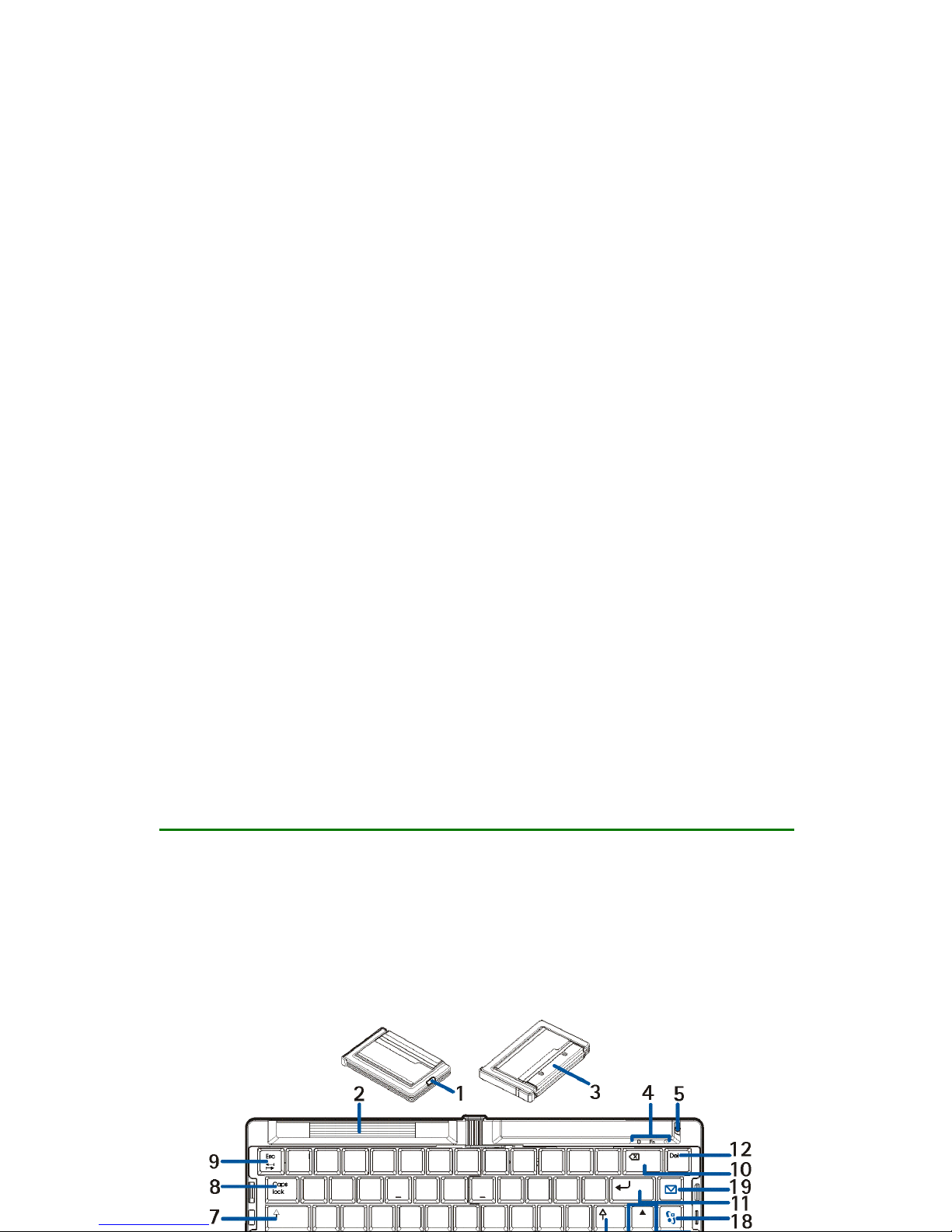
The keyboard contains the following parts, as shown in Figure 1:
Release button (1) opens the keyboard.
Retractable cradle (2)
Cover of the battery compartment (3)

Copyright © 2004 Nokia. All rights reserved. 8
Indicator lights (4). The green indicator is on when you can type characters
that are printed on the keys in green. The blue indicator shows the status of
the Bluetooth connection. The indicator is blinking red when the power level
of the battery is low and green when the keyboard is switched on.
Power key (5) switches the keyboard on or off.
Fn key (6). See Typing text on page 17.
Shift keys (7). See Typing text on page 17.
Caps lock key (8) toggles between the lower and upper character case.
Tab/Esc key (9). See the instructions for your text editing application.
Backspace key (10) deletes a character on the left of the cursor.
Enter key (11) adds a new line (when writing text) or selects a function in some
menus.
Del key (12) deletes a character on the right of the cursor.
Ctrl and Alt key (13). See the instructions for your text editing application. To
open the profile menu of your compatible phone, press the Del key while you press
and hold the Ctrl and Alt key.
Alt Gr key (14) opens a list of special characters.
Space bar (15) inserts a space.
Selection keys (16) have the same functions as the selection keys on your
compatible phone.
Arrow keys (17) have the same functions as the scroll keys on your compatible
phone.

Getting started
9
Copyright © 2004 Nokia. All rights reserved.
Menu key (18) opens the main menu of your compatible phone.
Messaging key (19) opens the messaging application on your compatible
phone.
Before you can start using the keyboard, you need to:
• Install the batteries. See page 9.
• Insert the memory card. See page 10.
• Install the Wireless Keyboard application from the memory card, and pair the
keyboard with your compatible phone. See page 11.
• Place your phone in the cradle, if you wish. See page 15.
■Installing and using the batteries
The Wireless Keyboard SU-8W is intended for use with standard AAA batteries.
Open the battery compartment of the keyboard by sliding the compartment cover
from the keyboard. Place the two batteries in the compartment. The correct
position of the batteries is indicated in the compartment. Close the compartment
by sliding the cover towards the keyboard.
Battery operation times
The operation time of the supplied batteries is up to 50 hours. The operation time
of other batteries varies depending on the battery type. The keyboard is
Copyright © 2004 Nokia. All rights reserved. 10
automatically switched off when it is folded (or when it is left unused for 10
minutes while open).
Battery indicator
When the power in the batteries is low, the red indicator blinks every 3
seconds. When the batteries are discharged, the red indicator blinks every
second. In this case, change the batteries.
■Installing the memory card in a compatible phone
The memory card supplied with the keyboard can be inserted in a memory card
slot that supports the full-size or reduced-size MultiMediaCard format. Check the
type of the memory card slot from the user guide of your compatible phone.
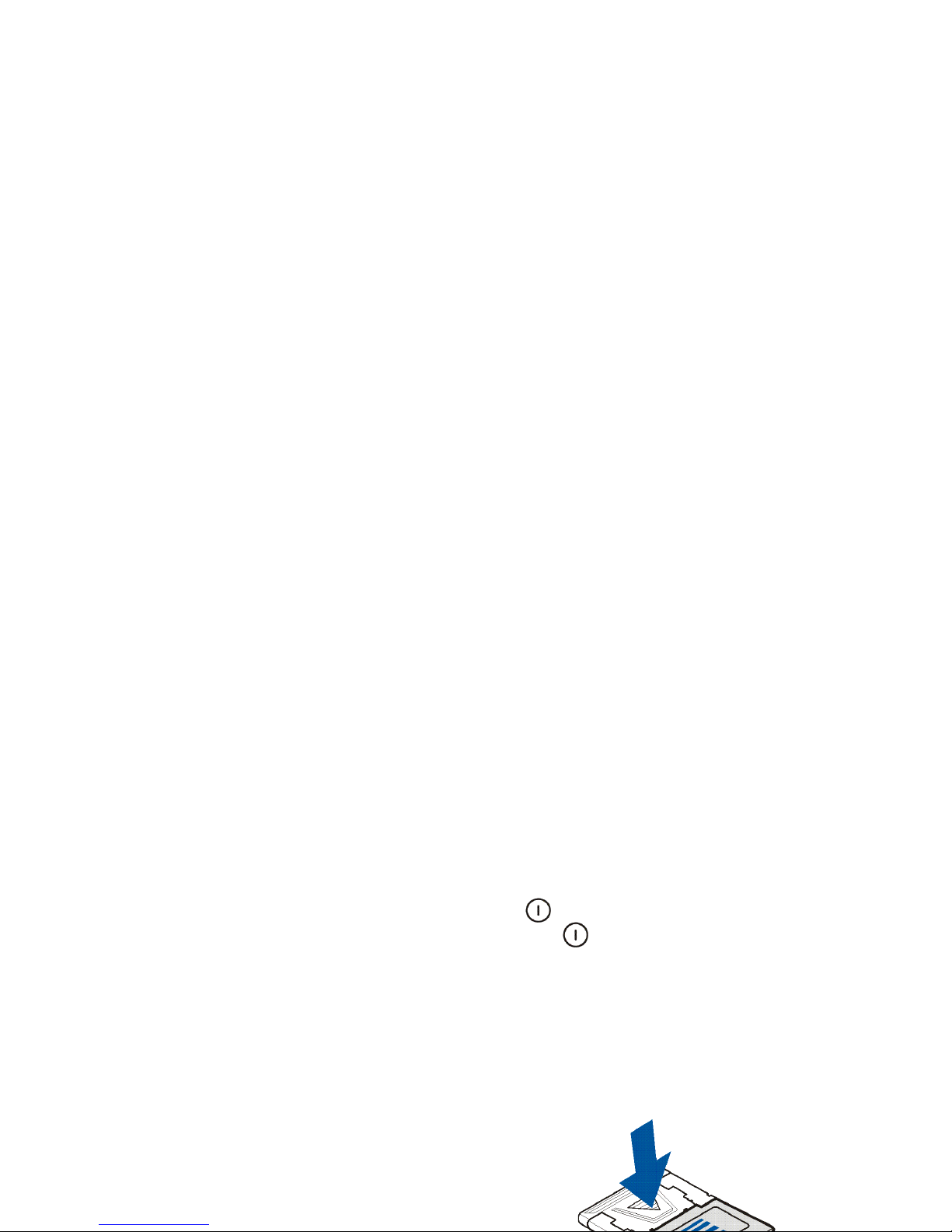
If your phone has a memory card slot that supports
the reduced-size MultiMediaCard format, remove
the adapter from the memory card by pushing the
arrow marked on the adapter and pulling the
adapter away from the card as shown in Figure 2.
To insert the memory card, see the instructions in
the user guide of your compatible phone.
Autres manuels pour SU-8W - Wireless Keyboard
2
Table des matières
Autres manuels Nokia Clavier