
Noam NMC3 Manuel utilisateur


2 11
Owner’s Manual
NMC3 / NMB3
This manual will explain how to install your unit as a whole. Detailed
instructions for each; NA2 amplifier, NR controller and N3C/N3B
speakers can be found separately inside your NMC3 / NMB3 package.
*We strongly recommend to take the time and read each of the manuals*
Thank you for purchasing a NOAM Marine audio system. Your stereo system has been
designed and manufactured to exacting standards in order to ensure years of musical
enjoyment. At NOAM we plan and design our products so you can install it by yourself
and save the extra dollars for a professional installation. But, for maximum performance,
we highly recommend that you have your new NMC3 / NMB3 installed by a professional
audio shop. Professional audio dealer has the training, expertise and installation equipment
to ensure optimum performance from this product. Should you decide to install the system
yourself, please take the time to read all manuals thoroughly to familiarize yourself with its
installation requirements and setup procedures. If you have any questions regarding the
instructions written in any of the manuals or any aspect of your system’s operation,
please contact your authorized NOAM dealer for assistance or directly to us at
sales@noamaudio.com
What’s Included
Introduction
NA2 Amplifier:
NR Controller:
NMC3 NMB3
N3C - Pair of Chrome 3.5” waterproof
speakers
NR – Waterproof Bluetooth Controller
NA2 – 2 channels Marine Amplifier
All wires and mounting accessories
NR – Waterproof Bluetooth Controller
NA2 – 2 channels Marine Amplifier
All wires and mounting accessories
N3B - Pair of Black Aluminum 3.5”
waterproof speakers
* Detailed accessory list for each speakers, controller and amplifier can be found inside each
component’s manual.
Both NMC3 & NMB3 were built as a system. All included components of the unit; Speakers,
amplifier & controller were designed and tuned to match one another and function as a full
audio system.
The NA2 is an IPX6 waterproof, state of the art, Class D, 2-channel full range amplifier,
well-tuned to power the N3 speaker right to its best performance.
The NR Bluetooth controller is your head unit. The NR features Bluetooth® streaming and
AUX input. Rated at IPX7 waterproof level, your NR will endure wild weather conditions for
years.
®

10 3
N3 Speakers:
The pair of N3 speakers features 3.5” Water-Proof Full Range Speaker, cased in a
high-quality Aluminum housing.
Your N3 speakers will fit any Motorcycle / ATV handlebar at 7/8”, 1” & 1.25” diameter.
* THIS MANUAL AND OTHERS CAN ALSO BE
FOUND ON OUR WEBSITE UNDER ‘SUPPORT’
SECTION *
WWW.NOAMAUDIO.COM
Waterproof:
Your NA2 amplifier is an IPX6 waterproof level.
Though this is a Marine IPX6 rated amplifier,
whenever possible, mount the amplifier in a
dry, well-ventilated location that does not interfere with
other factory installed electronic devices. If a dry
environment is not available, a location that is not exposed
to heavy splashing may be used.
While this amplifier is designed to be water-resistant, it
should never be submerged under water or subjected to
high-pressure water spray. Do not install where it will be
directly exposed to the elements.
Heaving an amplifier sealed to the
elements at IPX6 level means that
heat generated inside the amp has
nowhere to escape. Playing hard
with your NA2 will get it Hot. That’s
fine and normal. But, avoid touching the amplifier’s surface
during or right after use.
Specifications:
MAX POWER AT 4 Ω
WATERPROOF LEVEL
TOTAL HARMONIC DISTORTION
S/N RATIO REF 1W AT 4 Ω
FREQUENCY RANGE
FUSE RATING
150W
IPX66
0.07%
>90dB
20Hz-20KHz
20A

4 9
A. Installation Applications:
The NMC3 / NMB3 is designed for operation with 12 volts, negative-ground electrical
systems. Using this product in systems with positive ground and/or voltages other than
12V may result in damage to the product and will void the warranty.
B. Safety Considerations:
• Though this is a Marine IPX6 rated amplifier, whenever possible, mount the amplifier in a
dry, well-ventilated location that does not interfere with other factory installed electronic
devices. If a dry environment is not available, a location that is not exposed to heavy
splashing may be used.
• While this amplifier is designed to be water-resistant, it should never be submerged
under water or subjected to high-pressure water spray. Do not install where it will be
directly exposed to the elements.
• Securely mount the amplifier so that it does not come loose in the event of a
collision/sudden jolt or as a result of repeated vibrations during normal operation.
• Check before drilling to make sure that you will not be drilling into an exterior panel/hull,
fuel tank, gas/brake line, wiring harness, or other vital system.
Heaving an amplifier sealed to the elements at IPX6 level means
that heat generated inside the amp has nowhere to escape. Playing
hard with your NA2 will get it Hot. That’s fine and normal. But, avoid
touching the amplifier’s surface during or right after use.
Do not mount the amplifier in the engine compartment or in any areas of extreme
heat. Mounting the unit in the engine compartment will void your warranty.
• Protect all system wires from sharp edges (metal, fiberglass, etc.) by carefully routing
them, tying them down and using grommets and loom where appropriate.
• Secure all wiring as needed, using cable ties or wire clamps to protect them from
moving parts and sharp edges.
Do not run system wiring outside or underneath the vehicle/vessel. This is an
extremely dangerous practice, which can result in severe damage/injury.
More about the NA2 Amplifier
Get to know your NA2
The NA2 amplifier is state of the art Class D amplifier designed to
provide great amplification in a small space for your motorcycle / ATV
audio system. The NA2 is a 2-channel full range amplifier.
The NA2 amplifier is meant to work with the NOAM NR Bluetooth
controller. The NR controller is your audio source head-unit, able to
trigger your amplifier ON/OFF.
®
What’s Included
• NA2 - 2 channels Marine amplifier
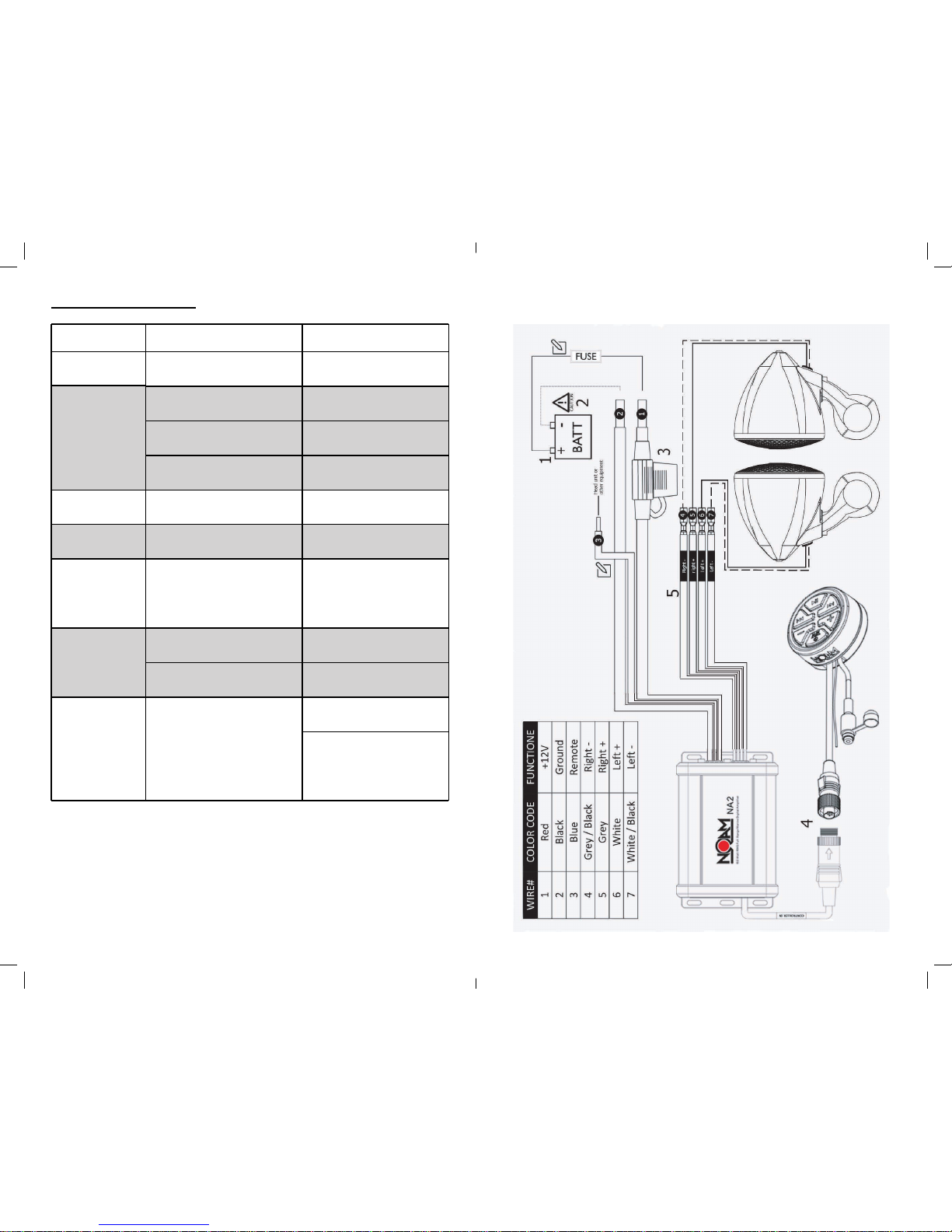
1. Input – waterproof DIN plug allows you to connect your NA2
amplifier to the NOAM NR Bluetooth controller/receiver.
2. Red / positive power wire – includes a 20A fuse and fuse holder.
3. Black / ground power wire.
4. Blue / remote Turn On - *optional – you don’t need to use it in order
to power your NA2 amplifier
5. Output channels
• 6’ power wire
• 20A fuse and fuse holder
• 4 pcs of mounting screws
®
8 5
Refer to section C
TROUBLESHOOTING
Problem Cause Solution
It just doesn’t
sound right
It just doesn’t
sound right
Speaker are connected to
the wrong output
Refer to section C.5 of
this owner manual
Amplifier
doesn’t turn on
Balance
Reversed
Output
Distorted
Output shuts
o after a while
Blowing Fuses
Controller wasn’t
turned ON
Did you remember to press
and hold the controller’s power
button for 3-5 seconds?
Faulty fuse
Remove fuse and check
with continuity meter.
Replace if necessary.
Poor connection integrity
Check “+12V” and “Ground”
leads for pinched wires; ensure
tight connections.
Poor connection integrity Correct Speaker
Wire Orientation
NR/Audio player
Volume Set Too High
Lower NR/Audio
player Volume
Overheating condition
(Thermal Protection)
Excessive Output Levels Lower the Volume
Contact us at
Amp is defective
The amplifier is picking
up alternator or
radiated noise
Move the audio cables away
from the power wires
Check the alternator and/or
voltage regulator. Test for
weak battery or add water
to the battery
Make sure amplifier mounting
area has adequate space for
ventilation and heat
dissipation.
Whining or
ticking noise
while the
engine is ON

6 7
C. Installation Procedure/Connections Power/Protect Indicator:
If you feel unsure about installing this system yourself, have it installed by a
qualified technician.
Before installation Disconnect the NEGATIVE battery post connection and secure
the disconnected cable to prevent accidental reconnection during installation. This
is an essential safety precaution during installation!
Avoid running power wires near the low-level input cables, antenna, power leads,
sensitive equipment or harnesses. The power wires carry substantial current and
could induce noise into the audio system.
1. Connect the RED power lead to the positive (+12V) battery post.
There are two status indicator lights on the end panel of the amplifier.
1. “POWER” (Blue): Lights to indicate that the amplifier is turned on
and operating normally. 2. “PROTECT” (Red): Lights to indicate the
amplifier’s protection circuitry has been activated to prevent product
failure due to thermal overload, over current or short-circuit to the
amplifier’s outputs. When this protection mode is activated, the
amplifier will shut down to protect its circuitry. When the problem is
corrected, the amplifier will return to normal operation and the
“Protect” LED will shut o.
3. Fuse. Your NA2 already includes a 20A fuse. The NA2 power wires are 8’ long, while the
Fuse housing located on the Red/Positive power wire at 3.3’ of wire from the amplifier.
4. Connect the NR male controller DIN plug to the NA2’s female DIN plug.
* Powering the NA2 amplifier. Long pressing your NR controller’s power button for few
seconds will trigger both the NR controller and the NA2 amplifier ON/OFF.
5. Run the speakers wires to the amplifier’s output.
Make sure about correct polarity when connecting your speakers to the amplifier.
speaker’s Red wire (+) should connect to color (+) output channels.
speakers’s Black wire (-) should be connected to color / Black (-) output channels.
Speaker connection color codes:
6. If you haven t already done so, mount the amp now.
7. Now you should be good to go and play tunes for the first time.
2. We strongly recommend to run the Black/Ground power cable to the negative (-12V)
battery post.
Blue / Remote Turn-On wire is not required for installing or running your NA2
amplifier. The NR controller is able to power trigger your amplifier
You have plenty of power wire length before the fuse holder (3.3’). Strive to leave
no more than 18” (45.7 cm) of wire between the fuse holder and the battery
positive (+12V) terminal. You can cut the remaining wire.


107.6mm(4.24”)
158.8mm(6.25”)
98.8mm(3.89”)
Thank you for choosing NOAM N3 speakers.
We invested a lot of thought, time and eort into
the creation of these speakers. all while great sound
and ease of use are on our mind to lead the way.
Your N3 speakers went through Three rounds
Of QC before being packed.
If and at any given time, you have any questions
Or concerns, please feel free to contact us at:
Enjoy Your Ride!
. 1 pair - N3 speakers
. 1 pair - 16mm - M8 Allen head screw
. 2 pair - 14mm - M5 Allen head screw
. 2 pair - of each 7/8 & 1” rubber inserts
Mounting Dimensions(enclosure):
Power Rating: 100 W MAX / 50 W RMS
Sensitivity: 90 dB @ 1W/1M
MidBass: 3.5” Water-Proof Full-
Range Speaker
Nominal Impedance: 4 ohm
Length: 107.6mm(4.24”)
Width: 98.8mm(3.89”)
Height: 158.8mm(6.25”)
N3B 3.5” Motorcycle Speaker 100W/50W Power Handling
N3C 3.5” Motorcycle Speaker 100W/50W Power Handling

Step 1: Choose the correct rubber insert’s
size for your handlebar and place it around
the handlebar.
note: 1.25” handlebar doesn’t require
any rubber inserts for installation.
Step 2: place the speaker’s bracket
over the rubber insert/handlebar.
Using a M4 Allen wrench, screw the
two M5 screws.
Best practice: Make sure you
screw each side’s M5 screw
evenly.
Speaker Rotation: Using
a M6 Allen wrench, loosen the
M8 screw and adjust the right angle of
your speaker.
Best practice: direct the speaker
towards your helmet.
rubber insert
M6 Allen
wrench
M4 Allen
wrench

Black SPKR (–)
Red SPKR (+)
Speaker
Wiring
Speaker Wiring:
The N3 has long wiring, well protected in a wiring sleeve.
- You can cut the wiring to a desired length for a clean installation.
But, make sure to do so only after you finished installing your entire
audio system, including its amplifier.
- Connect the speaker wires to your amplifier ensuring correct polarity;
Red to positive and Black to negative.
Running your N3 wiring:
Run the N3’s wires along and attached the Bike’s cage/body
all the way to the amplifier’s location.
Use cable ties to ensure it will be kept away from sharp edges to avoid
the possibility of getting pinched by moving mechanisms.
...to ensure it is away...
Importnt featurs of the N3
Please read before first use
Handlebar Fitment:
Your N3 speakers can be mounted
on 7/8”, 1” & 1.25” handlebars.
Inside the N3 package are two
rubber inserts:
For 7/8” handlebar, use the
thicker rubber insert.
For 1” handlebar, use the
thinner rubber insert.
For 1.25” handlebar, no rubber
insert is required. simply mount the
bracket directly on your handlebar.
Choosing the right angle:
The N3 speakers can be mounted
in various angles.
The M8 screw found on the bottom of
the speaker can be loosened to allow
full rotation of the speaker. (see page 5)
The bracket itself can also be
rotated around the handlebar, allowing
you to mount the speaker above or
underneath the handlebar.
Replacing the speaker:
If, for any reason, you need to replace
your speaker, you can easily do it.
on the back of your N3 speaker you
will find a M6 Allen screw. using a M4
Allen wrench, unscrew this screw.
You can now take o your speaker and
replace it with new one.
For spare parts, contact us at:
Ce manuel convient aux modèles suivants
1
Table des matières
Manuels Accessoires pour motos populaires d'autres marques

SRC
SRC B-TRK502-01-01-SL Manuel utilisateur

3M
3M Speedglas 9100 MP Manuel utilisateur

hepco & becker
hepco & becker 6307520 00 01 Manuel utilisateur

HOMCOM
HOMCOM AA0-077 Manuel utilisateur

hepco & becker
hepco & becker 6307558 00 01 Manuel utilisateur

Wunderkind Custom
Wunderkind Custom 106503-F15 Guide de l'utilisateur


