
NIXER PD Dante Manuel utilisateur

PD Dante
User Manual
v2.02
(rev a 31/10/18)

PD Dante version 2.02 rev a - 31/10/18
2
Nixer Ltd
45 Evelyn Road
Dunstable
Bedfordshire
LU5 4NG
Telephone
+44 1582 343111
email
website
www.nixerproaudio.com

PD Dante version 2.02 rev a - 31/10/18
3
Contents
Manufacturer's CE Declaration of Conformity ......................................................................... 5
Important Safety Information .................................................................................................. 6
General Precautions ................................................................................................................. 7
Introduction .............................................................................................................................. 8
Welcome and Unpacking .......................................................................................................... 9
Quick Start Guide ...................................................................................................................... 9
PD Dante Front View .............................................................................................................. 11
Left View ................................................................................................................................. 11
Right View ............................................................................................................................... 12
Power ..................................................................................................................................... 12
PD Dante Software ................................................................................................................. 13
Main Input Screen .................................................................................................................. 13
Channel Assignment Window ................................................................................................. 16
Channel Setup Menu .............................................................................................................. 17
Focus ....................................................................................................................................... 18
Dante Menu ............................................................................................................................ 19
View RX Channels ................................................................................................................... 20
View TX channels .................................................................................................................... 21
Set Routing ............................................................................................................................. 21
Memory Menu ........................................................................................................................ 24
Selecting a memory ................................................................................................................ 24
Editing the name of a memory ............................................................................................... 25
Selecting auto recall of a memory .......................................................................................... 25
The System Menu ................................................................................................................... 26
Mode ...................................................................................................................................... 26
Inputs ...................................................................................................................................... 27
Route Matrix ........................................................................................................................... 29
Outputs ................................................................................................................................... 30
>> ............................................................................................................................................ 31
<< ............................................................................................................................................ 31
Meter Control ......................................................................................................................... 32
System Info ............................................................................................................................. 33
Update .................................................................................................................................... 34

PD Dante version 2.02 rev a - 31/10/18
4
Configuring Dante Networks .................................................................................................. 38
Correct IP configuration ......................................................................................................... 38
Possible IP network configuration mistakes ........................................................................... 38
Dimensioned drawing ............................................................................................................. 43
15way D-type pinout .............................................................................................................. 43

PD Dante version 2.02 rev a - 31/10/18
5
Manufacturer's CE Declaration of Conformity
Manufacturer Identification
Legal Name: Nixer Ltd
45 Evelyn Road, Dunstable
Bedfordshire, LU5 4NG
Tel.: +44 (0) 1582 343111
Representative: Nick Fletcher
Function: CEO/CTO
Product: PD-Dante - Audio over Ethernet Diagnostic Tool
Brand: Nixer
Model: PD-Dante (Mk 1)
CE Affixing Date: 08.11.2017
Declaration:
Provided that it is installed, maintained and used in the application for which it is made, with
respect of the professional practices, relevant installation codes and manufacturer's
instructions:
European harmonized standards applied:
EMC Emission EN 61000-6-3:2007-10-01:
EN55022:2007-06-01, Class B wireless,
EN 550022:2007-06-01, wired
Immunity EN 61000-6-1:2007-12-01:
EN 61000-4-2 + A1+A2: 2002-02-01,
EN 61000-4-3: 2007-11-01,
EN 61000-4-4: 2005-09-01,
EN 61000-4-5:2007-08-01,
EN 61000-4- 6+A1:2002-02-01,
Product safety: 2006/95/EG
ROHS:
Signature of manufacturer's representative:
Nick Fletcher
We hereby declare, under our sole responsibility, that the above referenced product complies with the
essential requirements of Council Directives 2004/108/EC (EMC), 2006/95/EC (LVD) and 2011/65/EC
(ROHS)

PD Dante version 2.02 rev a - 31/10/18
6
Important Safety Information
CAUTION: These servicing instructions are for use by qualified personnel only. To reduce
the risk of electric shock, do not perform any servicing other than that contained in the User
Manual unless you are qualified to do so. Refer all servicing to qualified service personnel.
• Read these instructions.
• Keep these instructions.
• Heed all warnings.
• Follow all instructions.
• Do not use this apparatus near water. Do not expose this apparatus to dripping or
splashing and ensure that no objects filled with liquids, such as vases, are placed on
this apparatus.
• Clean only with a dry cloth.
• Do not block any of the ventilation openings. Install in accordance with the
manufacturer’s instructions.
• Do not install or use near any heat sources such as radiators, heat registers, stoves,
or other apparatus that produce heat.
• Only use attachments/accessories specified by the manufacturer.
• Refer all servicing to qualified service personnel. Servicing is required when the
apparatus has been damaged in any way, such as the power-supply cord or plug is
damaged, liquid has been spilled or objects have fallen into the apparatus, the
apparatus has been exposed to rain or moisture, does not operate normally, or has
been dropped.
• To completely disconnect mains power from this apparatus, the power supply cord
must be unplugged.
For US and CANADA only:
Do not defeat the safety purpose of the grounding-type plug. A grounding-type plug has two
blades and a third grounding prong. The wide blade or the third prong is provided for your
safety. When the provided plug does not fit into your outlet, consult an electrician for
replacement of the obsolete outlet.
The lightning flash with arrowhead symbol, within an equilateral triangle is intended to alert
the user to the presence of an uninsulated “dangerous voltage” within the product’s enclosure
that may be of sufficient magnitude to constitute a risk of electric shock to persons.
The exclamation point within an equilateral triangle is intended to alert the user to the
presence of important operating and maintenance (servicing) instructions in the literature
accompanying the appliance.

PD Dante version 2.02 rev a - 31/10/18
7
General Precautions
• Do not place heavy objects on the PD Dante, expose it to sharp objects or handle it
in any way that may cause damage, e.g., rough handling and/or excessive vibration.
• Do not subject the equipment to dirt, dust, heat or vibration during operation or
storage. Never expose the console to rain or moisture in any form. Should the unit
become wet, turn it off and disconnect it from the power source without further
delay. The equipment should be given sufficient time to dry out before
recommencing operation.
• When cleaning the PD Dante, never use chemicals, abrasive substances or solvents.
• The front panel should be cleaned using a soft brush and a dry lint-free cloth. For
persistent marks, use a soft cloth and isopropyl alcohol.
• Keep these instructions for future reference. Follow all warnings in this manual and
those printed on the unit.
• The PD Dante must be connected following the guidance in this manual. Never
connect power amplifier outputs directly to the PD Dante. Connectors and plugs
must never be used for any other purpose than that for which they are intended.
• The equipment must be powered from an appropriate source which can be via the
PoE input and/or the USB input. Use both inputs for redundancy purposes.
• The PD Dante must not be operated inside a case or enclosed as the housing acts as
a heatsink for the components inside.
• Refer servicing to qualified technical personnel only.

PD Dante version 2.02 rev a - 31/10/18
8
Introduction
Thank you for purchasing your new Nixer PD Dante audio network confidence monitor,
diagnostic and testing tool. This unit has been designed to make it convenient and easy to
test, setup and monitor audio signals within Dante networks. Operation is via it’s clear and
simple to use touchscreen interface and it is housed in a compact and robust case.
It’s a small portable Dante unit, which allows the monitoring of up to 64 Dante (or AES67)
channels at 48kHz (32 channels at 96kHz). The signals are presented to the user via the
inbuilt speakers or the headphone jack. The speakers are automatically muted when a
headphone jack is inserted. Simultaneous outputs are also available in the form of the stereo
balanced line outputs and AES output accessed via the 15way D-type.
The speakers and headphones have independent settings for volume, the unit recalling the last
used setting for each when changing between speakers and headphones.
The balanced line outputs and AES output can be configured to follow the volume settings of
the speakers or headphones. Alternatively, they can be set to independent levels with
individual trim controls for each.
Additional inputs are available as an unbalanced stereo line input on a 3.5mm jack, AES
input via the 15way D-type connector and a mic input on the headphone connector
(accommodating standard mobile phone headsets)
All of these inputs can be routed to any of the Dante output channels.
An internal oscillator with user adjustable frequency and level settings is available to send to
any of the 64 Dante outputs with options for Sine Wave, Square Wave or PNG.
The device is operated and controlled via the large 5.0” diagonal (127mm) 24bit colour LCD
and capacitive touch panel.
A simple and elegant menu system has been designed to be intuitive to navigate allowing the
user to access all the features of the PD Dante very quickly.
The high-resolution screen is easy to read presenting comprehensive metering, routing and
status information to the user.
Nixer Ltd was founded in 2000 by two professional audio design engineers who have
between them over 50 years’ experience of designing and manufacturing the highest quality
audio products possible. Their designs have been used on many world-famous shows on
Broadway, The West End and around the world.

PD Dante version 2.02 rev a - 31/10/18
9
Welcome and Unpacking
Thank you for purchasing a PD Dante
Please take care when unpacking your product
In the box, you will find
• the PD Dante
• USB Plug top supply with adaptors for the
o UK
o Europe
o USA
o Australia
• 0.5m USB lead
• Quick Start Guide
Check that all the parts are present and in good condition
Please contact your retailer immediately should anything be incorrect
Quick Start Guide
Once you have unpacked your PD Dante you can follow this quick guide to get you started
using it.
Firstly, you will need to down load and install a copy of Dante Controller onto your PC/Mac
You can download this from
https://www.audinate.com/products/software/dante-controller
Next plug your PD Dante into your network with an RJ45 patch lead
If you have plugged into a PoE enabled router/port you will see the splash screen on the PD
Dante appear after a couple of seconds
If you do not have a PoE port, then you will need to plug in the supplied Plug Top Supply
and connect it to the PD Dante with the supplied USB cable. Note the USB cable supplied is
relatively short at 500mm this is due to the current draw of the PD Dante, longer cables may
work but we do not guarantee they will
After the PD Dante has booted you will be presented with the main screen
If you have a valid network connection the status light in the top left side of the screen next to
the P (primary) will turn green
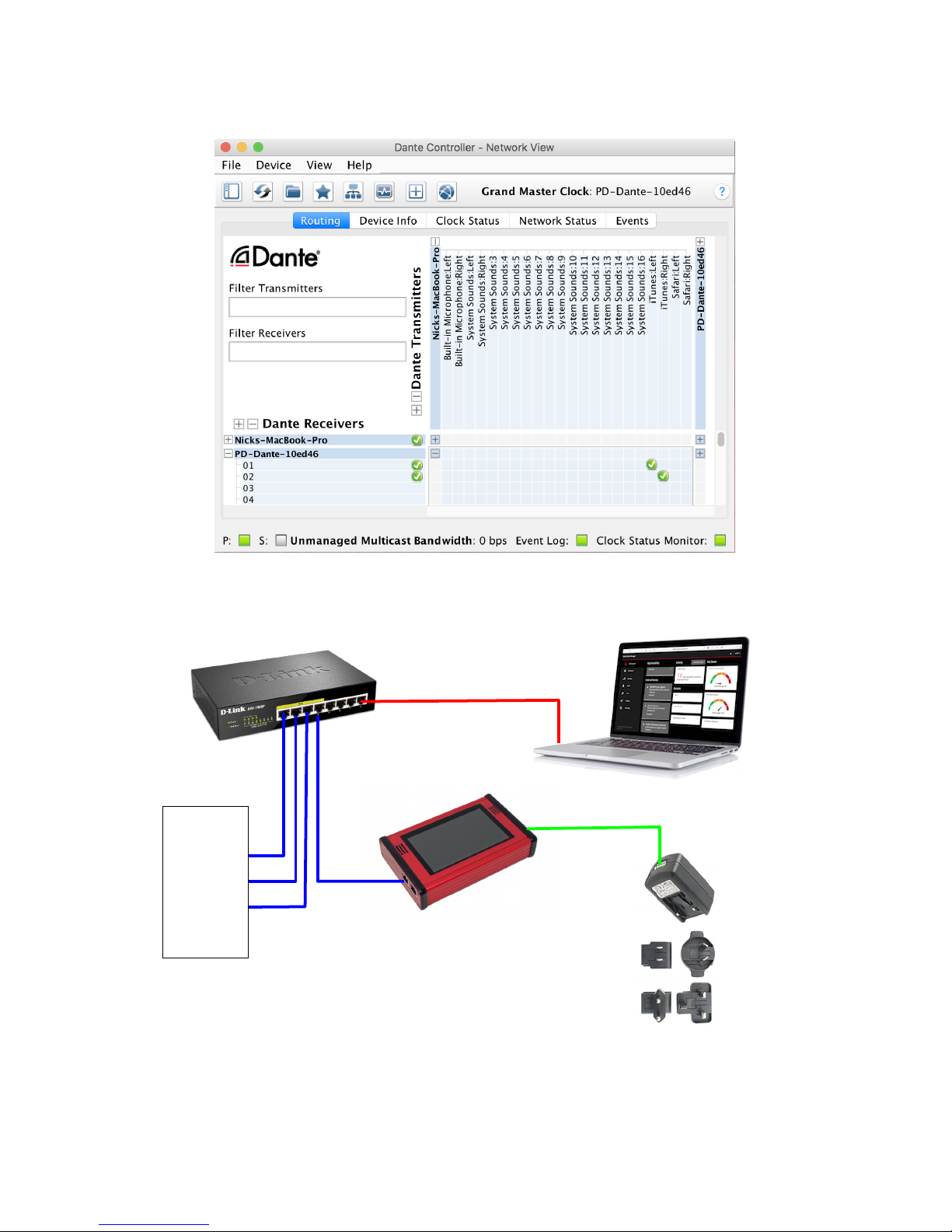
At this point start Dante Controller on your PC/Mac and you will see your PD Dante appear
in the list of devices
You will then be able to select sources and destinations for your PD Dante
For more advice on using Dante Controller please visit the Audinate Website
Once you have done this you will be able to start using your PD Dante via the touch screen
interface
Please take the time to register your PD Dante here
http://www.nixerproaudio.com/Registration/registration.php
Once you have registered you will be full access to download the User Manual and any
software updates available for your PD Dante
PD Dante version 2.02 rev a - 31/10/18
10
View of Dante Controller with PD Dante connected
Basic PD Dante connection diagram
Dante Network
containing other
Dante enabled
devices
PoE Enable Switch Computer running Dante Controller
for setting initial connections
PD Dante powered via PoE or alternatively via
supplied USB Plug Top Supply
USB Plug Top
Supply
Table des matières
Manuels Système de haut-parleurs populaires d'autres marques


Sondpex
Sondpex Active Speaker System and Digital Music... Manuel utilisateur

JVC
JVC NX-PN7 Manuel utilisateur

Marshall Amplification
Marshall Amplification AR-DM61-BT Manuel utilisateur

Yamaha
Yamaha NX-A01 - Speaker Sys Manuel utilisateur

SE Audiotechnik
SE Audiotechnik I-LINE Manuel utilisateur

Gemini
Gemini WRX-843 Series Manuel utilisateur