Address: Room1121 Linqiao Piazza, Ningbo City,315010, China Tel:+86(574) 27861829 27861849 Fax:+86(574)87264906
Ningbo DSW International Co.,Ltd.
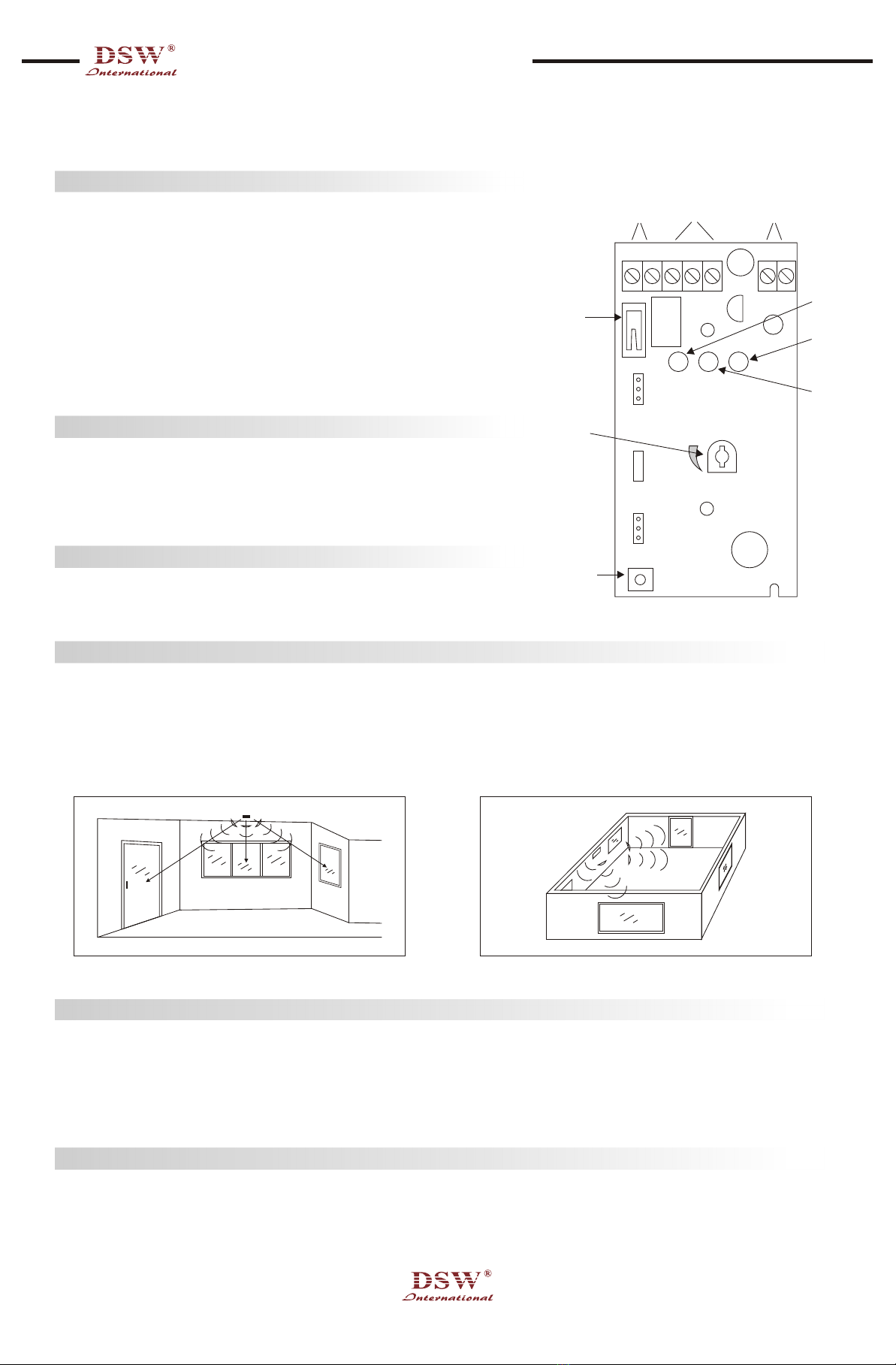
STATUS LED: ON side of lumper is shorted, tile green status LED is able. OFF side is shorted, the LED is disable. Default setting is ON.
MEMORY: ON side of jumper is shorted, the memory LED is able. The red ALARM LED will be steady ON after alarmed detection until
reset by pressing the TEST switch twice or power off. Default setting is OFF.
Use a screwdriver to turn the sensitivity adjusting VR as shown on Fig 1. Turn clockwise to increase sensitivity. Turn anti-clockx.sise to
reduce sensitivity, Do not set sensitivity any higher than necessary to protect the glass in the detector's range. Setting sensitivity higher
than needed increases the chance of false alarms without increasing protection. A correct setting is that besides enough sensitivity it
will not caused false alarm when you clap your hand near the detector.
When the correct sensitivity is found using the above procedure, determine whether the sensitivity is high enough to trigger the alarm
(red LED ON) by using PS-373 tester. If the Red LED does not come ON, the sensitivity must be increased.
When setting sensitivity make sure that the room's environment is as close as possible to what it will be when the detector is in use. For
instance, it the curtains are usually closed at night when the alam is armed, then set sensitivity with the curtain closed. If a window in
the room is left open, then set the sensitivity with v, indoor, open. The sensitivity should always be retested when the environment of the
room changes, such as when furniture is moved.
For proper testing, use the PS-373 Glass break Simulator. Press the Test Mode Switch of the detector once: the yellow Test Mode LED
will illuminate. Then move to the part of the protected surface furthest from the glass break detector to conduct the test. Press and hold
the "push" switch on the simulator until a full glass break test tone is generated. The detector's red LED should respond to this tone and
light. If the red LED does not respond to the test tone, the sensitivity should be increased(turn VR clockwise). If the detector still
responds to the simulator even the distance between them is further than the protected range, it means the sensitivity is too sensitive
and need to be reduced (turn VR anti-clockwise). Once testing is complete, press the Test Mode Switch again to exit Test Mode: the
yellow Test Mode LED will be extinguished, However, if left in Test Mode, the PS-372 will automatically exit Test Mode 5 minutes later.
Please always check whether the capacity of 9V battery inside simulator is in the enough level for testing.
Normal: Green LED lights, disable by jumper
Alarm: Red LED lights for 3 seconds. If alarm memory is set, red LED will light constantly. To clear alarm memory, press lest Button
twice or cycle power.
Test Mode: Yellow LED light
Low Voltage: Red LED flashing when supply voltage is under 11V
Regular maintenance and inspection (at least annually) by the installer and frequent testing by the user are vital to continuous
satisfactory operation of any alarm system, The installer should assume the responsibility of developing and offering a regular
maintenance program to the user, as well as acquainting the user with the proper operation and limitations of the alarm system and its
component parts. Recommendations must be included for a specific program of frequent testing (at least monthly) to insure the
system's operation at all times.
While this Glass Break Detector is a highly reliable intrusion detection device, it does not offer guaranteed protection against burglary.
Any intrusion detection device is subject to compromise or failure to warn for a variety of reasons. For example: Intruders may gain
access through unprotected openings or have the technical sophistication to bypass an alarm sensor or disconnect an alarm warning
device. This detector cannot operate properly if it is not installed in accordance with the instructions in this installation manual or the
control to which it is connected is not operative (because of lack of power, malfunction, etc.) This detector cannot sense intrusion when
the attack occurs outside of its specified protection range or if its DC electrical power source is off, missing, dead, or insufficiently
filtered. This equipment, like other electrical devices, is subject to component failure. Although this equipment is designed to last as long
as 10 years, the electronic components could fail at any time. The most common cause of an alarm system not functioning when an
intrusion occurs is inadequate maintenance. This device, and the alarm system to which it is connected, should be tested monthly to
make sure all is working properly.
JUMPER SETTING
SENSITIVITY SETTING
TESTING
LED INDICATION
MAINTENANCE
LIMITATIONS OF YOUR GLASS BREAK DETECTOR
SPECIFICATIONS
Model
Sensor
Digital Processor
Coverage Range
Type of glass protected
Sensitivity Adjust
Alarm Output
Alarm Indication
Alarm Duration
Alarm Output Rating
Tamper Output
Power Source
Circuit Protection
Mounting
Operating Temperature
Case
Dimension
Weight
PS-372
Condensed M icrophone
Microprocessor controlled
8 in
All type, rain size 900cm square
Continuously adjustable
N.O. and N.C. contact
Red LED
3 seconds
30VDC 1A
N.C. contact
11.5-16VDC, 24mA
Reverse polarity protected
Ceiling or wall mounted, near to or opposite to the glass
oo
-10 to 50 C
Fire resistance white ABS
51X99X20mm
100g