
Night Owl Smart Safe Manuel utilisateur

Smart Safe
USER’S MANUAL
www.NightOwlSP.com

2
Thank you for choosing Night Owl Security Products!
By purchasing a Night Owl product, you receive a one (1) year warranty covering manufacturing defects in
material and workmanship. In addition to warranty and technical support benefits, you will have access to
our multitude of free instructional “How to Videos”. You can also view our instructional videos by clicking the
“How to Videos” tab within your product’s page on our website.
Please see the warranty section of this manual for exclusions and additional details. Not all features and
capabilities are shared across all models so you may see features which are not applicable. In addition you
may see screen images that do not exactly match those on your display.
Quick Setup Guide
Use a QR Code scanner on your Smart Device to scan the QR Code.
Scan the QR code above to access the Quick Setup Guide for assistance
in configuring Night Owl Smart Safe.
THIS MANUAL WAS ACCURATE AT THE TIME IT WAS COMPLETED. DUE TO OUR ONGOING EFFORT TO
CONSTANTLY IMPROVE OUR PRODUCTS, FUNCTIONS MAY HAVE BEEN ADDED OR CHANGED.
Register at www.NightOwlSP.com

3
TABLE
OF CONTENTS

4
Chapter 1: FCC Warnings........................................................................................................ 6
Chapter 2: Safety Instructions................................................................................................. 8
Chapter 3: Specifications ..................................................................................................... 10
3.1 System Requirements ........................................................................................ 10
3.2 Package Contents .............................................................................................. 10
Chapter 4: Getting Started.................................................................................................... 12
4.1 About Your Smart Safe ....................................................................................... 12
4.2 Status Light Key................................................................................................ 13
4.3 Beep Key .......................................................................................................... 13
Chapter 5: Smart Safe Setup ................................................................................................ 15
Chapter 6: Programming the Access Code .............................................................................. 17
Chapter 7: Meet Night Owl Safe............................................................................................ 19
7.1 Download the Night Owl Safe App and Add the Safe ............................................. 19
Chapter 8: Bolting Down Your Safe........................................................................................ 21
Chapter 9: Obtaining a Replacement Key............................................................................... 24
9.1 Locating Model and Serial Number...................................................................... 24
9.2 Locating Key Number......................................................................................... 24
Chapter 10: Warranty ........................................................................................................... 26
Customer Support.................................................................................................... Back Cover
Table of Contents

5
CHAPTER 1
FCC WARNINGS

6
Chapter 1: FCC Warnings
FCC
This device complies with Part 15 of the FCC Rules. Operation is subject to the following two conditions: (1)
this device may not cause harmful interference and (2) this device must accept any interference received,
including interference that may cause undesired operation.
FCC Compliance Statement
These limits are designed to provide reasonable protection against frequency interference in residential
installation. This equipment generates, uses and can radiate radio frequency energy and if not installed or used
in accordance with the instructions, may cause harmful interference to radio communication. However, there
is no guarantee that interference will not occur in television reception, which can be determined by turning
the equipment off and on. The user is encouraged to try and correct the interference by one or more of the
following measures:
• Reorient or relocate the receiving antenna.
• Increase the separation between the equipment and the receiver.
• Connect the equipment into an outlet on a circuit different from that to which the receiver is connected.
• Consult the dealer or an experienced radio/TV technician for help.
CAUTION!
The Federal Communications Commission warns the user that changes or modifications
to the unit not expressly approved by the part responsible for compliance could void the
user’s authority to operate the equipment.

7
CHAPTER 2
SAFETY
INSTRUCTIONS

8
Chapter 2: Safety Instructions
CAUTION!
You may be subjected to severe electrical shock if you disassemble the Smart Safe.
THE WORKING TEMPERATURE OF THE DEVICE IS FROM 0 °F TO 122 °F.
KEEP PRODUCT SURFACES CLEAN AND DRY. TO CLEAN THE OUTSIDE CASE OF THE SAFE, USE
A LIGHTLY DAMPENED CLOTH. DO NOT USE CLEANING SOLUTIONS OR SOLVENTS.
NEVER INSERT METAL INTO THE SAFE’S CASE OR ITS OPENINGS. INSERTING METAL INTO THE
SAFE’S CASE MAY CAUSE ELECTRIC SHOCK.
PLEASE MAKE SURE YOU HAVE A STRONG WI-FI CONNECTION IN THE LOCATION WHERE YOU
PLAN TO INSTALL THE DEVICE.
DO NOT EXPOSE THE SAFE TO RAIN OR USE NEAR WATER. IF THE SAFE GETS WET, REMOVE
THE BATTERIES AND CONTACT TECHNICAL SUPPORT IMMEDIATELY.
DO NOT INSTALL THE SAFE NEAR ANY HEAT SOURCES SUCH AS STOVES, HEAT REGISTERS,
RADIATORS OR ELECTRONICS (INCLUDING AMPLIFIERS) THAT PRODUCE HEAT.
ALL ELECTRONIC OPERATION SHOULD BE IN STRICT COMPLIANCE WITH THE ELECTRICAL
SAFETY REGULATIONS, FIRE PREVENTION REGULATIONS AND OTHER RELATED REGULATIONS IN
YOUR LOCAL REGION.
WHEN MOUNTING THE SAFE, MAKE SURE IT IS FIRMLY FIXED TO THE SURFACE.
IF SMOKE, ODORS OR NOISE RISE FROM THE DEVICE, TURN OFF THE POWER AT ONCE BY
REMOVING THE BATTERY PACK.
NEVER ATTEMPT TO DISASSEMBLE THE DEVICE YOURSELF. (WE SHALL NOT ASSUME ANY
RESPONSIBILITY FOR PROBLEMS CAUSED BY UNAUTHORIZED REPAIR OR MAINTENANCE.)
DO NOT DROP THE DEVICE OR SUBJECT IT TO PHYSICAL SHOCK, AND DO NOT EXPOSE IT
TO HIGH ELECTROMAGNETISM RADIATION. AVOID INSTALLING ON A VIBRATING SURFACE OR
PLACES SUBJECT TO SHOCK (IGNORANCE CAN CAUSE EQUIPMENT DAMAGE).
DO NOT OPERATE IN WET OR DUSTY AREAS. AVOID PLACING THE SAFE IN AREAS SUCH AS A
DAMP BASEMENT OR DUSTY ATTIC.

9
CHAPTER 3
SPECIFICATIONS
10
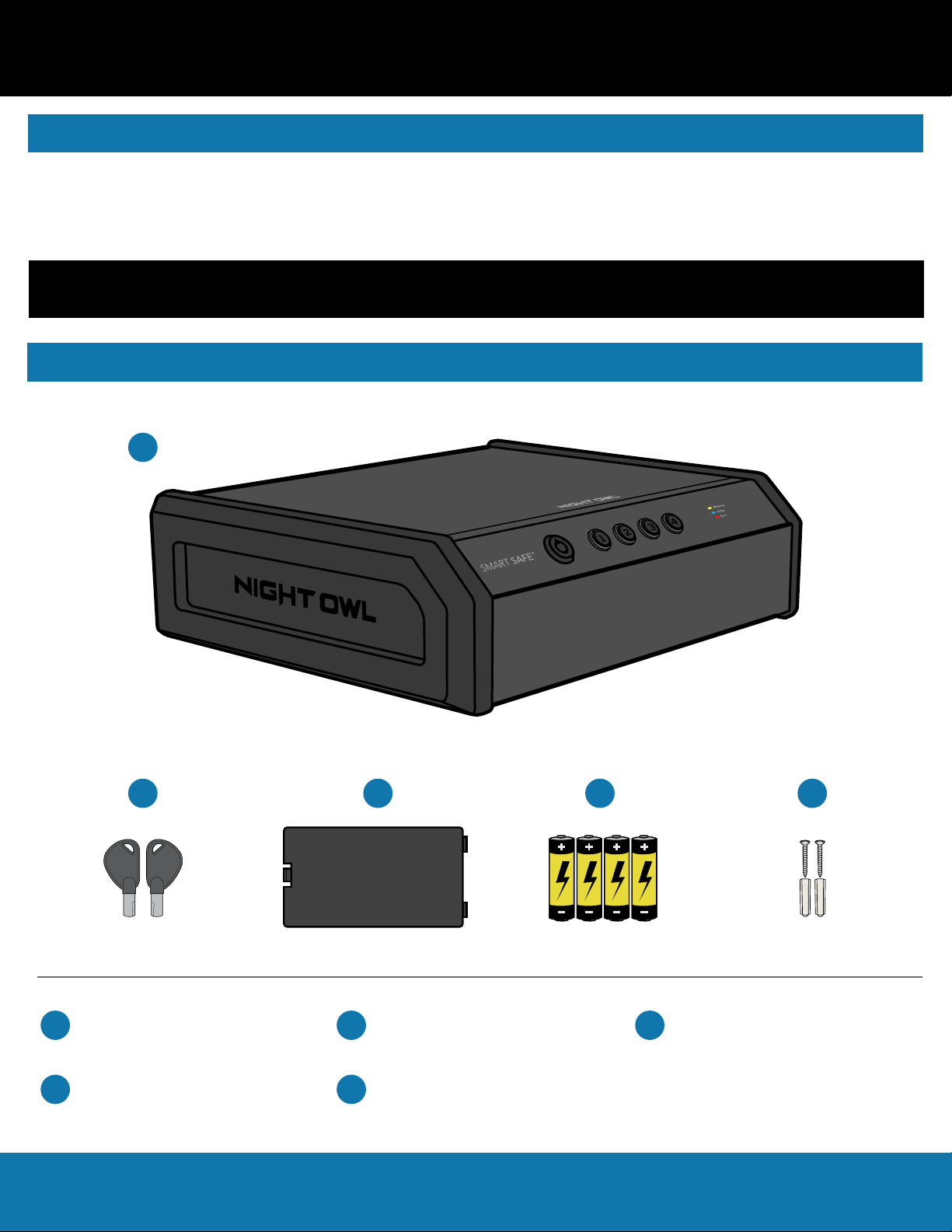
3.2 Package Contents
Please be sure that your mobile device complies with the following specifications:
• Android™: 6 and above
• iOS®: 10 and above
THIS MANUAL WAS ACCURATE AT THE TIME IT WAS COMPLETED. DUE TO OUR ONGOING EFFORT TO
CONSTANTLY IMPROVE OUR PRODUCTS, SPECIFICATIONS MAY HAVE BEEN ADDED OR CHANGED.
Chapter 3: Specications
1 x Smart Safe
(Model #: CS-04WFB)
1 x Smart Safe Keys 1 x Battery Cartridge Cover
4 x Batteries 2 x Mounting Hardware
A
BCDE
A
D
BC
E
3.1 System Requirements
Table des matières
Autres manuels Night Owl Sûr


Manuels Sûr populaires d'autres marques


Honeywell
Honeywell 2077D - 1.21 Cubic Foot Anti-Theft Safe Manuel utilisateur

Hornady
Hornady SnapSafe Trunk Safe II Manuel utilisateur

SPORTS AFIELD
SPORTS AFIELD SA-HD5-BIO Manuel utilisateur

Honeywell
Honeywell 5912 Manuel utilisateur

Phoenix
Phoenix FS1280F Manuel utilisateur

Phoenix
Phoenix SS0992K Fiche d'information produit


