
Nexxt XPY310 Manuel utilisateur


Nexxt Solutions - Outdoor Wireless IP Camera
2
Outdoor Wireless IP Camera
INTRODUCTION
Thank you for purchasing the Nexxt Solutions XPY-310
Outdoor Wireless IP Camera. Featuring an infrared
cut-off filter, our new XPY is an integrated wireless
IP Camera solution that combines high quality digital
video with network connectivity and a powerful web
server to bring a clear picture to your desktop or
mobile phone from anywhere on your local network
or over the Internet.

Nexxt Solutions - Outdoor Wireless IP Camera
3
This camera can be mounted indoors or outdoors.
Use the supplied power adaptor to connect the
camera to the AC mains (12V DC, 1.0A).
The warranty does not cover any damage caused
by applying the wrong voltage.
Never attempt to disassemble the unit. The warran-
ty does not cover damages as a result of tampering
with, or the improper alteration of the device.
Do not point the camera at the sun or at any other
strong light source.
Do not install the camera where it can be exposed
to rain or water
Wait at least 10 seconds when powering the
camera on and off. Otherwise, it can cause serious
damage to the CPU.
When updating the camera, please make sure that:
the camera is connected directly to a computer
using a network cable;
all other programs and windows on the computer
have been closed;
the camera remains connected during the entire
firmware update.
•
•
•
•
•
•
•
-
-
-
BEFORE YOU BEGIN

Nexxt Solutions - Outdoor Wireless IP Camera
4
FEATURES
The camera combines a high-sensitivity 1/4 CMOS
image sensor with a powerful wireless web server
in order to capture clear images from anywhere,
and to transmit them instantly on your local
network or over the internet.
Can be used on WiFi or wired networks.
It uses the MJPEG hardware compression tech-
nique, which can display high-quality and real-time
video transmission at 25fps on a LAN/WAN con-
nection
Input and output ports with smart motion detection
to connect sirens, smoke detectors, door sensors
or any other external alarm devices.
Selectable image resolution of 640x480 and
320x240 pixels.
The system can be expanded at any time by adding
multiple cameras.
View multiple cameras in split screen view or
choose full screen in order to monitor the activity
from a single camera.
Cameras can be viewed via standard PC or Mac
browsers, including Internet Explorer, Safari,
Chrome and Firefox.
Infrared LEDs for night vision (up to 20 meters).
Includes multi-level user management system,
which can be configured with passwords for
controlled access.
Easy- to-use web browser controls. They also allow
quick configuration changes via the Settings menu.
Compatibility with smartphones enables you to
view real-time videos over the internet using any
standard browser.
Supports image snapshots and image forwarding
•
•
•
•
•
•
•
•
•
•
•
•
•

Nexxt Solutions - Outdoor Wireless IP Camera
5
-
-
-
-
NOTES ON WINDOWS AND MAC COMPATIBILITY:
•
•
•
•
•
•
•
•
•
•
•
•
via email and FTP upload.
Bullet type, robust construction with waterproof
casing.
Powder coated finish to protect camera against
rust.
Fog resistant safety glass for extra protection.
Wide range of temperature operation: -5 to +45 °C
(+22 to +113 °F).
Versatile installation: the camera can be mounted
on the wall or ceiling.
Wireless IP Camera
Wi-Fi antenna
AC power adaptor
Quick installation guide
CD-ROM (includes the IP Super Client software and
a digital copy of the manual)
Network cable
Mounting bracket and hardware
IP camera setup should be completed on a
Windows PC only using Internet Explorer.
Live viewing, taking snapshots, recording and cam-
era configuration are fully supported on computers
with Windows operating systems.
Mac users are only able to:
view live images via compatible web browsers
including Safari, Firefox and Chrome but are limited
to viewing one camera at a time.
take and save snapshot images via the web
browser interface.
PACKAGE CONTENTS
Open the box and make sure all items listed below
are included:

Nexxt Solutions - Outdoor Wireless IP Camera
6
CAMERA INSTALLATION
Our WiFi Outdoor Surveillance Camera can be set
up in minutes for instant monitoring and live viewing
on your Windows computer and 3G Smartphone -
all via your wireless network router or switch. For
optional recording capabilities, simply install the re-
cording software in your Windows PC and configure
it according to your particular needs.
Begin by screwing the antenna and bracket to the
camera. Connect the camera using the power
adaptor that comes with the product.
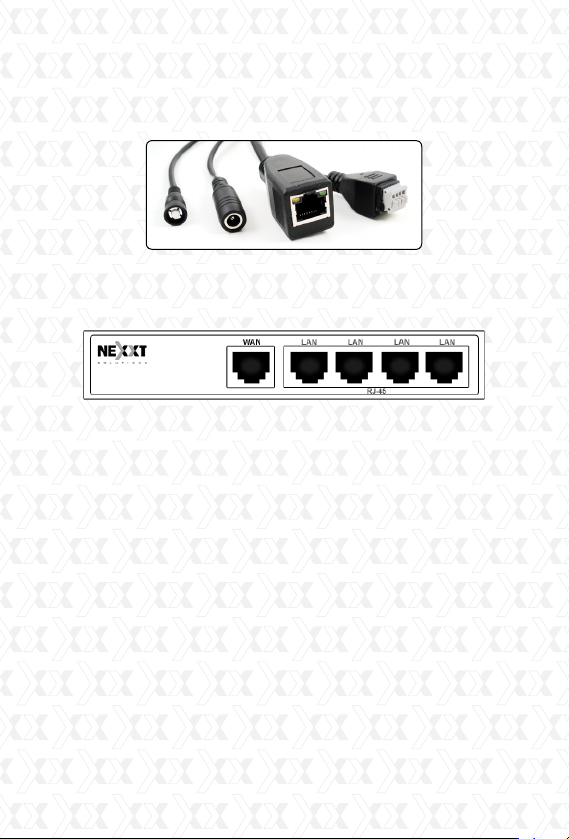
Using a standard Ethernet network cable, connect
the camera to your network.
The camera can either be connected to a router/
switch or directly to a PC with an Ethernet
network cable. We recommend setting up the
camera on your network using a wired connection
prior to using the device in a wireless configura-
tion.
Continue with the setup of the camera
(as described in the following chapter). Once the
camera has been successfully connected to your
network, it can be mounted on the wall or ceiling
using the wall plugs and screws included with the
device. (The camera set up must be performed
using Windows operating system only).
1.
2.
3.
Nexxt Solutions - Outdoor Wireless IP Camera
7
Plug the LAN cable into the RJ-45 connector
on the end of the cable attached to the rear of
the camera.
1.
2.Plug the other end into an available RJ-45 port
on your router.
3. Connect the power cable to the wall outlet.
Please note that if you are using the camera on
a wireless network, you will need to configure the
camera for wired use, prior to configuring wire-
less settings in the device (later described in this
manual).
Accessing the IP camera
Using the IP Super Client Software
Note: The IP network camera is designed to work in
a local area network (LAN) or over the internet. For
the first method, we highly recommend using the
software included in the CD. The installation steps
are described below.

Nexxt Solutions - Outdoor Wireless IP Camera
8
1. Introduction
The IP camera Super Client is an easy-to-use
software designed for surveillance applications
with multiple cameras. This software includes PT
controls, recording, alarm notifications, in addition
to a central management feature that allows the
administration, configuration and access control
settings for each individual device.
Adding devices
After installing the client software, we need to add
the devices. When running the program, the device
list on the right of the main interface is empty; there
is a guide to show you how to add the devices.
Functions:
Supports up to 81-video monitoring in one screen.
Supports multi-level structured device list.
Supports scheduled recording with alarm.
Supports panoramic recording.
Supports motion detection, sound alert and
external alarm trigger.
Supports audio, SMS, SMS modem, dialing, email,
FTP and alarm output switch.
Supports inquiries, browsing of alarm and opera-
tion log records.
Supports multi-level access management.
Supports remote login to check records and alarm
records.
•
•
•
•
•
•
•
•
•

Nexxt Solutions - Outdoor Wireless IP Camera
9
Click the right button to choose “add new device”
or “add new group”. This program supports a
multi-level structure to manage existing devices.
Now, let’s take the 310-series and 330-series as
examples to introduce the adding device option.

Nexxt Solutions - Outdoor Wireless IP Camera
10
310-Series Image:
330-Series Image:
Ce manuel convient aux modèles suivants
1
Table des matières
Autres manuels Nexxt Caméra de sécurité


