
Nexo CMS100 Manuel utilisateur

CMS100
PRODUCT MANUAL Issue 8

Copyright © Elstat Ltd
2017 All Rights Reserved
All information in this document is property of
Elstat Ltd
Commercial use and distribution of the contents
of this publication is not allowed without express
and prior written consent of Elstat Ltd

CMS100 Product Manual, Issue 8
www.nexo.com Page 3
CONTENTS
1. CONTROLLER WITH INTELLIGENCE
1.1 Functionality 5
1.2 User interface 6
1.3 Overall dimensions 7
1.4 Mounting 8
1.5 Electrical connections 9
1.6 Programming port cover 9
1.7 Wiring diagram 10
1.8 Relay ratings 11
1.9 Temperature input ranges 11
1.10 Environmental ratings 12
2. ACCESSORIES
2.1 Temperature sensors 13
2.2 Door switch 15
2.3 Motion sensor 17
2.4 Transformer 18
3. USER GUIDE
3.1 Power-up sequence 19
3.2 Function buttons 19
3.3 (GDC) Firmware menus 20
3.4 The menu arrangement 21
3.5 Menu access 22
3.6 Test routines (tSt) 22
3.7 Viewing the last three cooler faults witnessed by the controller (FLt) 30
3.8 Half reset (Hr) 31
3.9 Viewing statistics 33
4. CONTROLLER ALARM OPERATIONS
4.1 ‘Limp home’ functionality 35
4.2 Door open alarms 35
4.3 Door alarms ‘Limp home’ mode 36

CONTENTS
Product Manual, Issue 8 CMS100
www.nexo.comPage 4
4.4 Temperature sensor alarms 37
4.5 Appliance sensor alarms 37
4.6 Refrigeration system failure (rSF) alarms 38
5. COOLER AND CONTROLLER TROUBLESHOOTING TIPS
5.1 RSF Alarms 39
5.2 Door Switch Broken Alarms 39
5.3 Door Broken Alarms 39
5.4 Appliance Sensor Alarms 39
5.5 Condenser Sensor Alarms 40
5.6 Freeze-up protection (888) 40
5.7 Condenser high temperature (Ht) alarms 40
5.8 Other Problems 41
6. PARAMETERS
6.1 Parameters by function 43
6.2 Parameter validation 44
6.3 Parameters denition 44
7. APPROVALS
7.1 Product Approvals 57
7.2 Bluetooth Approvals 58
8. GLOSSARY OF TERMS
8.1 Acronyms 59
8.2 Controller and accessory terms 59

CMS100 Product Manual, Issue 8
www.nexo.com Page 5
1. CONTROLLER WITH INTELLIGENCE
The Nexo controllers are the rst truly
intelligent refrigeration solution for
the beverage industry that delivers
consumer insights from eld data to
optimize and take complete control of
cold drink marketing.
Elstat’s game-changing Nexo platform
is a powerful tool that connects drink
brands directly to consumers at the
point of sale, wherever they are in
the world, to create sustainable and
protable relationships.
The energy management system (ems) controllers from Elstat are used in a variety of drinks coolers,
optimising energy savings, without compromising on drinks serving temperature.
The CMS100 Nexo controller is designed for applications such as single door coolers, double door coolers
and vending machines.
1.1 Functionality
Feature Description
User and
diagnostic
information
3-digit, 7-segment display that displays the product temperature and other information
such as defrost or teach and alarm conditions. Also push buttons, that enable the end-
users to cancel alarms and service technicians to run test routines.
Product
temperature
An appliance sensor measures temperature of the refrigeration compartment. EMS
controllers use the refrigeration temperature to manage the product temperature.
Refrigeration
system high
temperature alarm
An optional condenser sensor measures the temperature of the refrigeration system.
EMS controllers use the temperature to alert to problems such as blocked condensers.
Motion detection A remote or integrated motion sensor enables EMS controllers to detect activity when
someone moves in front of the cooler.
Door open
detection
A door switch enables EMS controllers to detect cooler activity when someone opens the
cooler doors.
The controllers switch the following cooler components:
Feature Description
Compressor EMS controllers switch the compressor to manage the temperature of the refrigeration
compartment.
Evaporator fan EMS controllers can control the evaporator fan.
Lights EMS controllers can control the cooler lights to save energy.

Product Manual, Issue 8 CMS100
www.nexo.comPage 6
1.2 User interface
All Elstat controllers are made from food grade materials and are safe for internal installation. The
CMS100 controllers are available with either an integrated or a remote motion sensor.
Controller with integrated motion detection
(IMD)
Controller with remote motion detection
(RMD)
10
911
1 2 3 4
57
8
6
This variant should always be installed where the
sensor can ‘see’ activity. It is recommended that the
controller is installed externally on the cooler.
This variant of the controller can be installed
internally on the cooler but the remote motion
sensor must be installed where it can ‘see’ activity.
Item LED Indicator Name Function Colour
1Compressor On when the compressor is running. Green
2Evaporator fan On when the evaporator fan is running. Green
3Saving temperature
disable
On if the saving temperature is disabled.
The controller maintains the Ready mode
temperatures at all times.
Red
4Motion On when motion sensor detects motion from
passing shoppers. Red
Item Push Button Name Function
5Set Accept/forward - selects menu options and parameters.
6Defrost
Return/backward - De-selects menu options and parameters.
Activates a manual defrost
(only applicable if temp is below termination temp).
7Up Scrolls up menus.
Increases parameter values.
8Down Scrolls down menus. Decreases parameter values. Cancels the
rSF, d0 and Ht alarms.

CMS100 Product Manual, Issue 8
www.nexo.com Page 7
Item On display Name Function
9Motion Sensor Detects motion
10 LED Display Displays the current status of the controller
11 Programmable Port Enables upload of parameters using a dongle
1.3 Overall dimensions
The overall dimensions of the controller are shown in the following diagram.
142 mm
127.8 mm
47.8 mm
63 mm
120 mm
41 mm
103 mm
Product Manual, Issue 8 CMS100
www.nexo.comPage 8
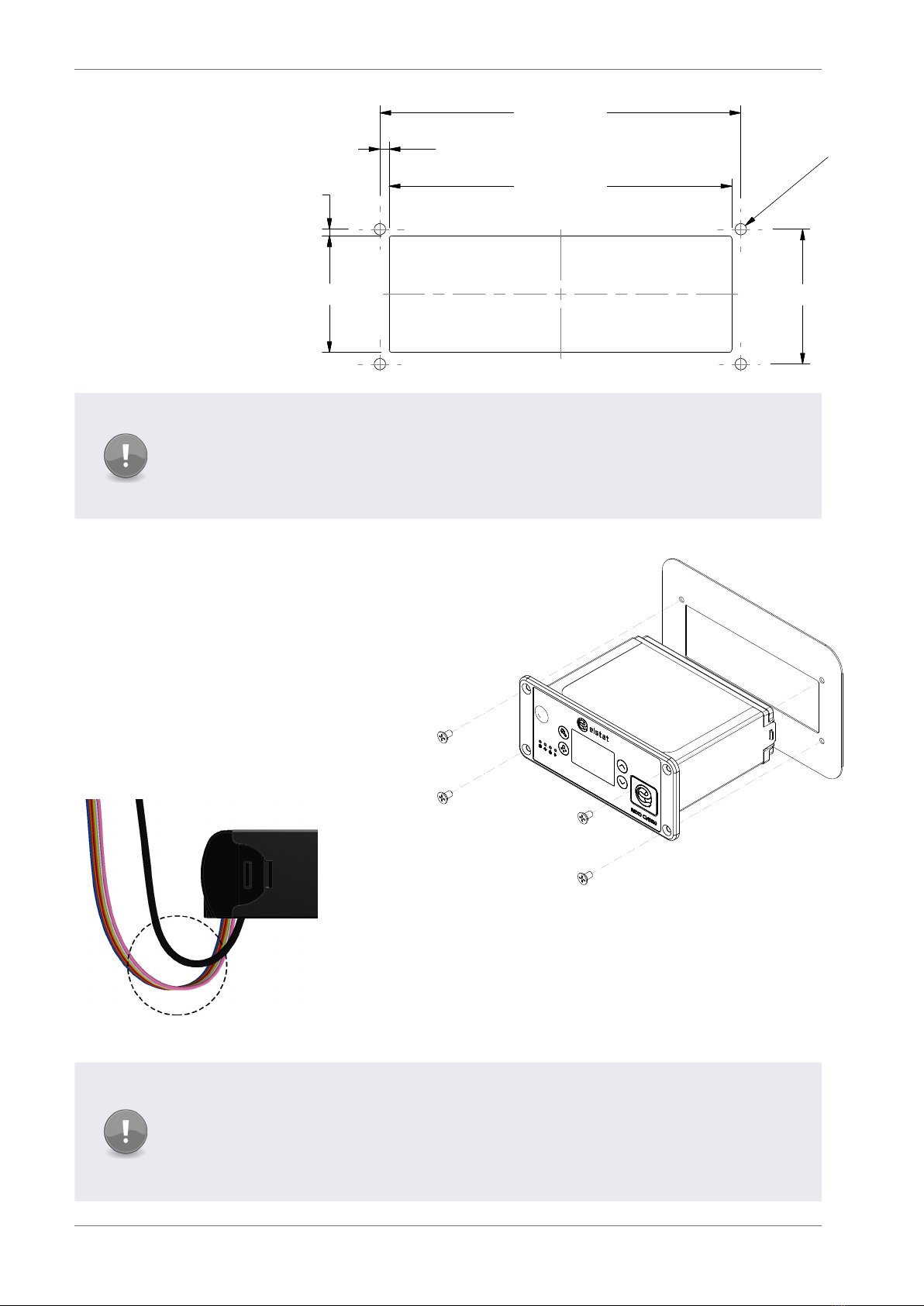
1.4 Mounting
CMS100 Nexo
controllers are
designed for panel
mounting and are
secured using four
countersunk self-
tapping screws.
The aperture
and screw pitch
dimensions are as
shown.
Note
The Water Ingress Protection ratings (IP ratings) are only valid when the product is
mounted in the recommended orientation shown below.
Failure to follow these guidelines will invalidate the designed levels of Ingress Protection
and any subsequent damage incurred will not be covered under the warranty terms.
In addition, incorrect installation may result in the following conditions:
`If mounted vertically with the integrated
motion sensor close to the oor, the motion
sensor may not be able to detect motion
eectively.
`If mounted vertically with [parameter
programming port] close to the oor, water
ingress may occur.
`If mounted too close the oor, water ingress
may occur at the mains or line voltage
terminals.
Cable routing to the CMS100 controller is critical as water can trace
or follow the cable downwards.
Therefore, immediately prior to the connection to the controller, a
drip loop must be formed in all wiring as shown.
An appropriate level of protection must be given for the eects of
water ingress due to condensation, product spillage, and so on.
Note
Cable routing looms must not be secured to hot pipes or vibrating components. Secure
cable routing looms with clips where ever possible.
Ensure that the back of the controller is protected from the possibility of unauthorized
tooled access with an appropriate strain relief on cables.
122.0 -0.2
0.2
+ mm
47.8 -0.2
0.2
+ mm
2.9 -0.2
0.2
+ mm
42.0 -0.2
0.2
+ mm
2.9 -0.2
0.2
+ mm
127.8 -0.2
0.2
+ mm
3.0
-0.2
0.2
+ mm

CMS100 Product Manual, Issue 8
www.nexo.com Page 9
1.5 Electrical connections
Item Description Connectors
1 Compressor
61 23 4 578 9 10 11
2 Line in
3 Fan(s)
4 Light(s)
5 Product Sensor
6 12VAC
7 Evaporator Sensor
8 Door
9 Condenser Sensor
10 Appliance Sensor
11 Remote Motion Detector
(If applicable)
1.6 Programming port cover
When accessing the programming port on
the controller fascia, remove the rubber
cover and let it hang on the attaching strap.
This will prevent misplacing the port cover.
Note
Do not remove programming port cover fully. Detaching the cover from the controller
fascia can damage the attaching strap.
On completion of controller
programming, ensure that the
programming port cover is replaced
inserting the left edge rst then
securing the other edges in place
moving in clockwise direction.

Product Manual, Issue 8 CMS100
www.nexo.comPage 10
1.7 Wiring diagram
Note
To remove the potential for damage occurring to, and the potential for failure of,
the crimped connection on the mating half of terminals 1 to 4 of the CMS100 Nexo
controller it is recommended that only right angle insulated 6.3mm tab connectors,
complete with strain relief, are used to terminate these cables. Use of straight
connectors may exert excessive pressure on to that connector.
A - Controller I - Modem interface R - Lights out
B - Appliance sensor J - Motion sensor S - Line in
C - RMD K - 12VAC T - Transformer
D - Evaporator sensor L - Live U - Evaporator fan
E - Door switch N - Neutral V - Lights
F - RJ45 Port M - Stock / product sensor W - Compressor
G - Condenser sensor P - Fan out
H - Display Q - Compressor out
Note
An additional input has been inserted between 12AV and Auxiliary inputs. The order
does vary to Elstat’s ems55adv models.
Table des matières
Autres manuels Nexo Contrôleurs


