
NewSound Poco Q Manuel utilisateur

Xiamen NewSound Technology Co.,Ltd
Address: 1st and 2nd Floor, No.13
of Xiangyue Road, Torch Hi-Tech Industrial
Development Zone, Xiang'An District, Xiamen, China.
User Manual
NewSound Hearing Aid
Poco Q

Preface
................................................................................................
..
1
Features.
...............................................................................................4
Preparation............................................................................................5
Operation
...........................................................................................
...
7
Complete hearing instrument assembly .............................................7
How to wear your POCO Q ................................................................8
How to remove your POCO Q ............................................................9
Programming options .........................................................................9
Maintenance
......................................................................................
...
12
Troubleshooting ..................................................................................12
Battery replacement ........................................................................
...
.14
Battery care.........................................................................................15
Whistling noise helpful tips .................................................................16
Cleaning care and precautions ...........................................................17
Appendix
............................................................................................
...
18
Working condition................................................................................18
FDA information...................................................................................19
Service and warranty ..........................................................................23
Contents
1
THANK YOU and WELCOME to NewSound’s most innovative and reliable product,
designed to enhance the quality of sounds in your everyday life!
This user manual only applies to the POCO Q.
In-the-ear (ITE) hearing instrument.
Intended use
This ITE hearing instrument is an electronic device which amplifies sounds
from the surrounding environment. It will help people with mild to moderate
hearing loss or those who just want to enhance their ability to hear
conversations in a noisy environment. Some models are programmed with
tinnitus masking function which used to suppress or mask the ringing effect for
a tinnitus sufferer.
Precautions
For users with ear infection, it is suggested not to wear hearing instrument until
ear normal condition restored or by following a doctor’s advice. Please consult
with your hearing healthcare professional first if you have any questions about
your hearing or your hearing instrument.
THE MANUFACTURER RESERVES THE RIGHT TO MODIFY THE TECHNICAL
SPECIFICATIONS OF THE PRODUCT WITHOUT ANY PRIOR NOTICE.
2
Hazard Warnings – relevant warning notices
Never wear other people’s hearing aid! It could permanently damage/affect
your hearing.
Avoid direct contact with force (e.g. smacking/slapping, wrestling or likewise
sports) while wearing a hearing instrument, such impact could be harmful to
your hearing.
Do not wear hearing instrument in heavy industrial areas (mines, explosion
sites).
If pain, skin irritation in the ear or excessive accelerated earwax, consult
physician.
Hearing aid batteries are toxic. Keep out of reach of children and pets. If
accidentally swallowed, consult physician immediately!
In the unlikely case of the dome being stuck in your ear canal, after the
removal of the sound tube from the ear, it is highly recommended, for you to
see a physician for safe removal of the dome.
– Please read before using your hearing instrument the first time.
Hazard warnings and product safety
Preface
43
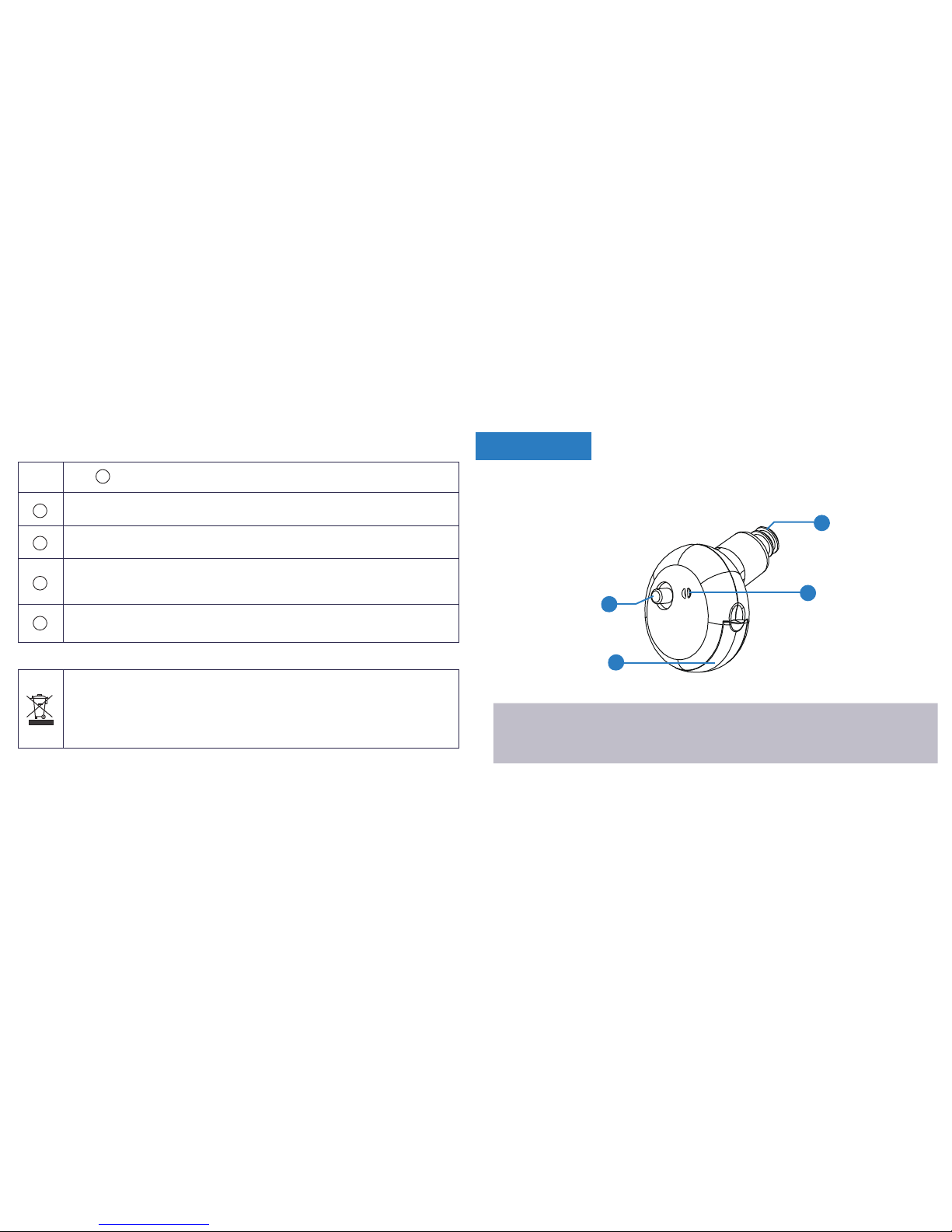
Microphone port
Memory switch
Receiver
Battery door 2
4
3
1
Notice: Some models are programmable with a programming port.
The programming port is for hearing professional use only.
Product Safety – relevant product handling and care
Do not drop hearing device onto a hard surface that can damage the
instrument.
When hearing instrument is not in use, leave battery door open so moisture
can evaporate. Store instrument in a safe, dry and clean place.
Remove battery from your hearing instrument if not use for an extended
period of time to prevent dead battery from leakage/expansion that can be
harmful to the instrument.
To obtain best performance from your hearing instrument, always use new
and high-quality batteries.
i
i
i
i
i
Proper disposal of electronic products protects the health of people and the
environment. This symbol means the hearing instrument may not be thrown
away as normal daily waste. Hearing instrument should be disposed at
intended electronic waste/recycle sites, or at your hearing care professional
office.
Features
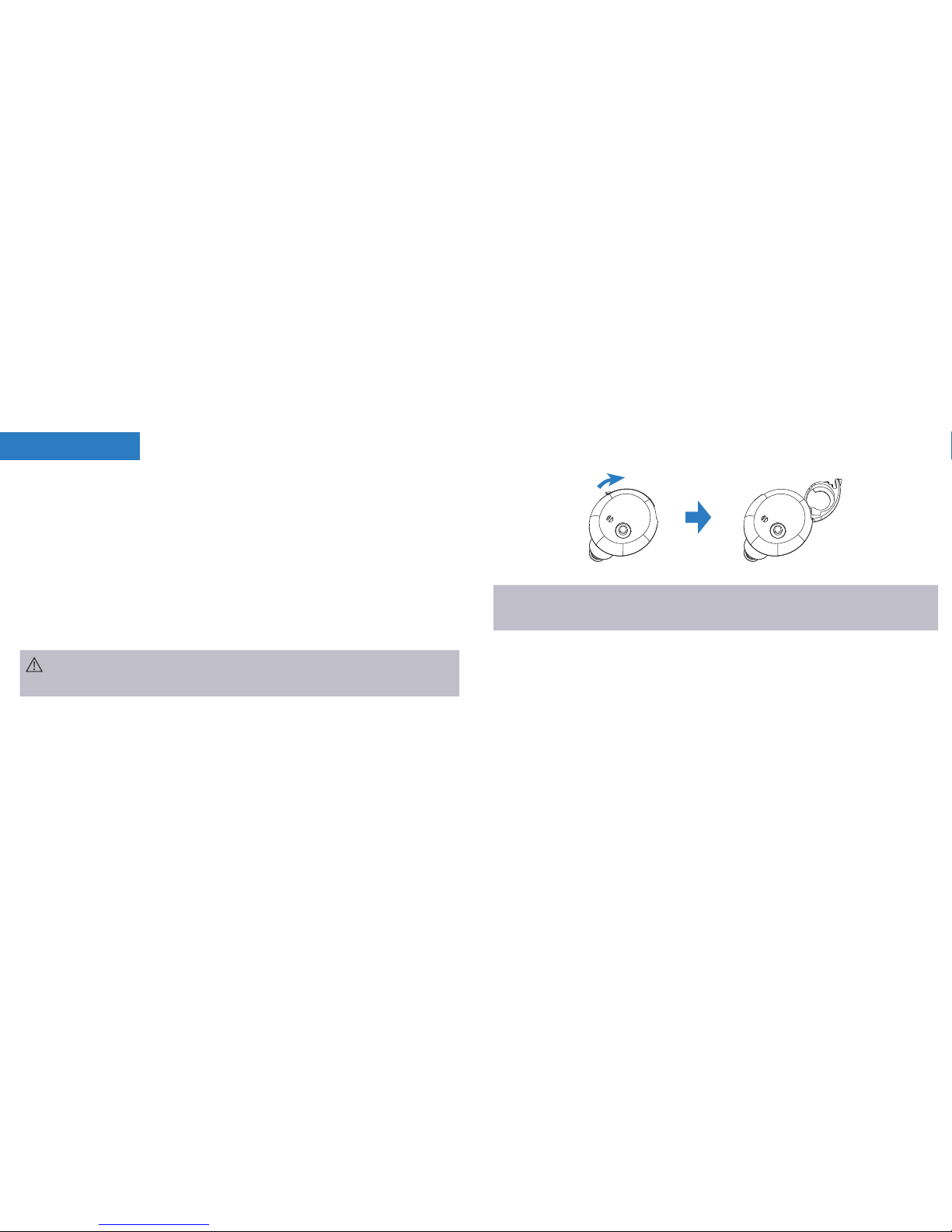
POCO Q device (1) Cleaning brush (1) User manual (1)
5 6
Kit packaging included:
Memory foam set (size: S, M, L)
Closed domes (size: 9mm, 15mm)
Magic dome (size: 12mm)
Mushroom dome set (size: S, M, L)
POCO Q uses a 10A battery.
IMPORTANT: Insert battery into the battery door compartment with the positive
(+) side (flat side) faced up. If the battery is inserted incorrectly, the
door will not close. Do not force close the battery door!
WARNING: Keep batteries away from children and pets. Seek immediate
medical attention if a battery is accidentally swallowed!
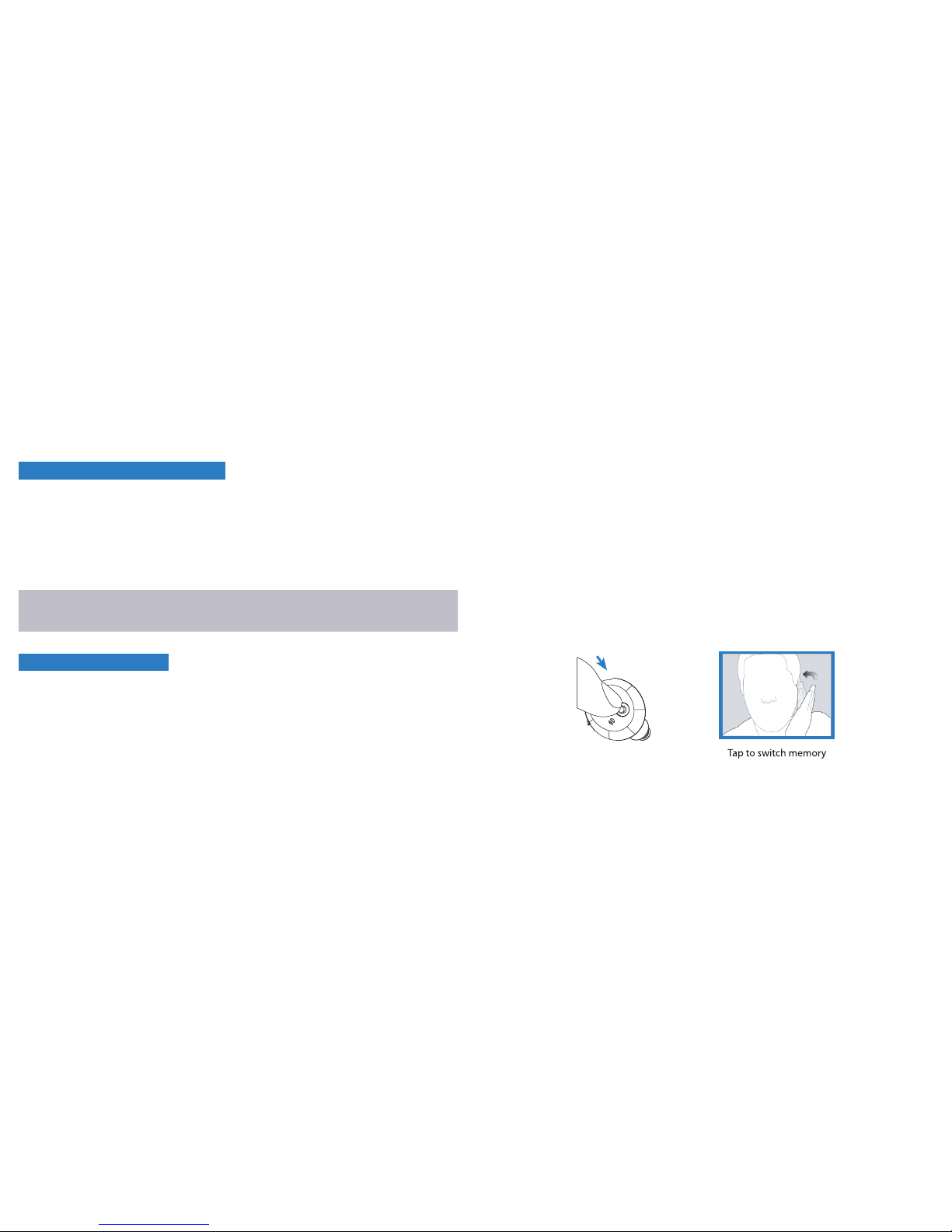
TURN ON - Gently insert battery and close the door. The hearing instrument
has a built-in power on delay, so it will take several seconds for
the device to activate its full functions.
TURN OFF - Simply keep battery door open; also helps extend battery life.
Battery helpful tips
NOTE: Turn OFF instrument if not use in an extended period of time to prevent
damage from battery expansion and leakage.
Preparation

Your hearing instrument consists of two basic parts: The hearing instrument
housing and the dome.
Select the best fit dome size will provide the most comfortable wearing
experience. Memory foam can easily be 'pinched' to make the foam thinner, more
compress, for ease of fitting. The memory foam will return to its original size
after fitting.
7 8
How to wear your POCO Q
Hold the POCO Q between your thumb and index finger, using the hand on the
same side of your hearing instrument.
Insert the instrument canal end first into the ear canal. Gently tug on your ear lobe,
with index finger, push the instrument into the best fit position.
NOTE: It is recommended, before wearing, turn ON the instrument and keep
volume control at lower or at comfortable setting. Volume control at high/loud
setting prior to inserting into the ear can cause feedback from the instrument
and can be uncomfortable to your listening experience.
Complete hearing instrument assembly
Operation
9 10
How to remove your POCO Q
1. Place thumb behind your ear lobe and gently press your ear upward to push
the instrument out of the ear canal.
2. Chewing movements of the jaw will help ease the instrument move out of
the ear canal.
3. Grasp the protruding instrument and remove from ear canal.
WARNING: to prevent instrument damage from misuse, NEVER attempt to
remove your POCO Q by pulling on the volume control or the battery door!
Programming options
Your hearing instrument ‘beeping’ signal will help you identity preset programs.
Example: program 1 will emit 1 beep, program 2 will emit 2 beeps, etc.
Standard/Preset Program: Factory preset programming - available ONLY in
Poco Q 401 with memory switch function.
Programmable: Professional socket programming setting - available in
Poco Q 400/600/800/1600.
Memory Switch: NOT available in Poco Q 400/600/800/1600.
TAP Technology: Available only in Poco Q 800/1600
Your hearing instrument can be programmed up to 4 different listening programs.
When the hearing instrument is turned on, it will automatically be in program 1.
Other preset programs are for your specific needs that can be accessed by
using the memory switch. Pressing of the memory switch will change the
program according to the preset sequence: 1, 2, 3 and 4.

1211
Troubleshooting
SYMPTOM
No sound
or low sound
Whistling,
feedback
POSSIBLE CAUSE
Battery door not closed correctly
Low or dead battery
Sound outlet blocked or damaged
SOLUTIONS
Reopen and close battery door properly
Replace battery
Clear up sound tube or contact hearing
healthcare professional
Volume too low Turn volume higher/louder
Built-in delay power ON feature Wait a few seconds for the device to
turned on
Excessive ear wax built-up Remove/clear wax built-up or contact
your hearing care professional
Hearing instrument not fitted well
in the ear.
Remove and reinsert the instrument
Excessive earwax in your ear Contact your hearing care professional
Volume too loud/high
The instrument was not fitted well
in the ear
Turn down volume
Re-adjust or re-insert the instrument
Program 1
POCO Q400 Normal
Program 2 Program 3 Program 4
POCO Q401
POCO Q600
POCO Q800
Normal Noisy Outdoor
Normal
Normal Noisy Outdoor Telecoil
Standard program setting and recommended using environment:
POCO Q1600 Normal Noisy Outdoor Telecoil
Maintenance
POCO Q201 Normal Noisy Outdoor
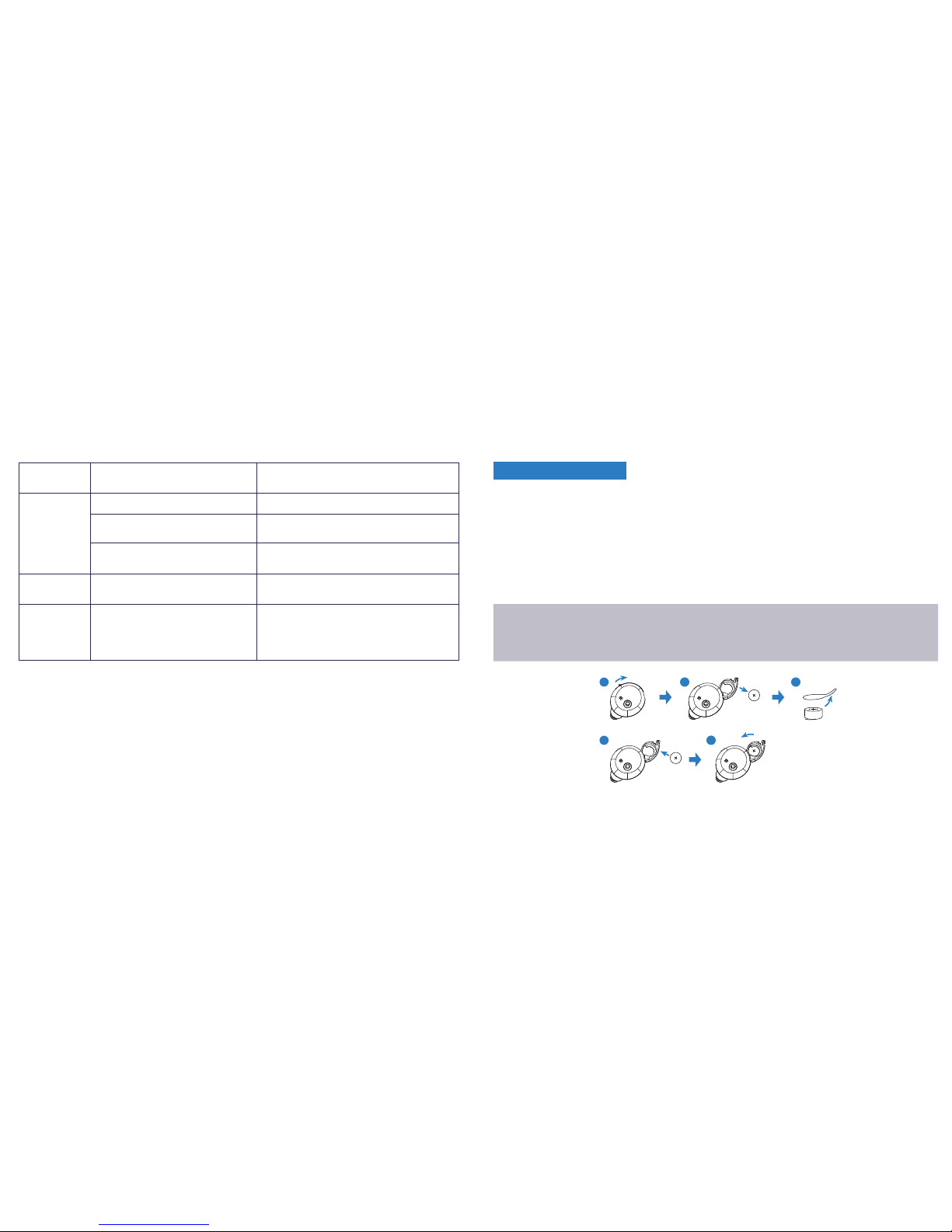
When you hear one short beep - signal alerting that battery is running low/out.
Low battery alert will continue intermittently until battery gets replace.
1. Switch off the hearing instrument.
2. Open the battery door and remove the old battery.
3. Remove the protective foil from the new battery.
4. Insert the new battery, and be sure the plus (+) faced up.
5. Close the battery door.
13 14
SYMPTOM POSSIBLE CAUSE
Low or dead battery
SOLUTIONS
Replace battery
Poor battery contact Contact hearing healthcare professional
Sound outlet blocked or
damaged Clean sound outlet or contact hearing
healthcare professional
Sound:
distorted,
unclear,
intermittent,
too much
bass, static
**Too much
Bass May need reprogramming Contact hearing healthcare professional
**Static
Noise
Too close to other
electromagnetic devices/fields
(such as other cell phones,
speakers, etc.)
Move away from other devices/fields
121 13
154
Battery replacement
NOTE: Gentle handing - battery operation needs little effort.
There should be no resistance at closing, for door cannot close if battery
is reversed.

15 16
The sound quality may change after the first warning, this is normal and can be
remedied by replacing with a fresh battery.
To prevent dead battery corrosion inside your hearing instrument ALWAYS
remove the battery if your instrument is not in use for long period of time.
Battery care
The performance of the hearing instrument greatly depends on the quality
of the battery.
1) It is important to use high quality batteries since it helps prevent instrument
from periodic malfunction.
2) Batteries shall be well kept in its original seal and package.
3) Never leave an old or dead battery in the hearing instrument. Leaving a dead
battery inside the instrument for an extended period of time can cause battery
leakage which can be damaging to the instrument.
Whistling is common in small amplifier and is known as 'feedback'.
It is caused by amplified sound leaving the ear and receiving back into
the microphone and being re-amplified. The following tips will help reduce the
effect of feedback/whistle noise:
1. Reduce the volume.
Keep volume at lower setting before inserting the instrument in your ear.
2. Secure instrument fitted position.
Feedback/whistling noise will stop when the instrument is best fitted/sealed
in the ear with the best fitted dome size.
3. Clear the ear canal of wax or debris.
Seek your hearing care provider for excessive wax built-up.
4. Replace the dome.
Select a better fitted size.
Whistling noise helpful tips
Table des matières
Autres manuels NewSound Prothèse auditive


Manuels Prothèse auditive populaires d'autres marques


Advanced Bionics
Advanced Bionics Slim HP Standard Manuel utilisateur

Widex
Widex DREAM440 THE DREAM SERIES Manuel utilisateur

Phonak
Phonak myPilot Manuel utilisateur

NIKEN
NIKEN NK-401 Manuel utilisateur

ON Semiconductor
ON Semiconductor Ezairo 7111 Pre Suite Manuel utilisateur

Sonetik
Sonetik GOHEAR Manuel utilisateur