
NewHawk UMEN-260314-V1.0 Manuel utilisateur

UMEN-260314-V1.0
7'' LCD FIELD MONITOR
USER MANUAL

User manual
2
www.newhank.com
SUMMARY
1. PRODUCT DESCRIPTION .................................................................................................................. 3
2. INSTALLATION OF SUNSHADE COVER ............................................................................................. 5
3. DV BATTERY MOUNT PLATE ............................................................................................................ 6
4. WIRING INSTRUCTIONS ................................................................................................................... 7
5. SETTING MENU................................................................................................................................ 8
6. SPECIFICATIONS............................................................................................................................. 13
7. ACCESORIES ................................................................................................................................... 13
8. TROUBLE SHOOTING ..................................................................................................................... 14
9. WARRANTY AND CONTACTS ......................................................................................................... 14

User manual
3
www.newhank.com
1. PRODUCT DESCRIPTION
1.TALLY (indicator light).
2.Earphone jack.
3.Power indicator light: ON/OFF (Light turns to red when power on).
4.VIDEO: Indicator lights up when signal switch to video state.
5.YPbPr: Indicator lights up when signal switch to YPbPr state.
6.HDMI: Indicator lights up when signal switch to HDMI state.
7.SDI: Indicator lights up when signal switch to SDI state
8.F1, F2, F3, F4:User-definable buttons.
Default functions:
F1 Camera F2 H/V Delay
F3 Check Field F4 Center Marker
F1 Peaking F2 False Color
F3 Exposure F4 Histogram
(function customized to meet your needs)
9.Knob BRI/MENU: Press the knob to access the menu function, pressing the knob in the menu to
return to the previous page or exit the menu. Rotate knob to select an option.
Default as Brightness function.
10.Knob SAT: Press the knob to select main MENU options; rotate knob to confirm the selection and
adjust parameter values.
Default as Saturation function.
11.Knob TINT: Default as Tint function.
12.Knob CONT: Default as Contrast function.

User manual
4
www.newhank.com
1. Battery power on/off switch: “‖” is battery power; “O” is power off; “|” is DC power.
2. Battery pinch slots.
3. SDI signal input / output interface.
4. YPbPr signal input interface.
5. Audio signal input.
6. Audio (L/R) input.
7. HDMI (High Definition Multimedia Interface) signal input / output.
8. 4-pin XLR DC power input.
Pin number
Signal
①
GND
②③
……...
④
+12V
Ps: Unavailable under SDI mode 26 (USB 5V/0.5A output power).

User manual
5
www.newhank.com
2. INSTALLATION OF SUNSHADE COVER
①As shown, buckle the sunshade cover on the device.
②As shown, cover buttoned into the appropriate slot, and fastened in accordance with the order of the
both sides.
③As shown, bend sunshade panel to meet and paste with sunshade cover interlocking.
④Installation completed.
User manual
6
www.newhank.com
3. DV BATTERY MOUNT PLATE
Standard mounts process
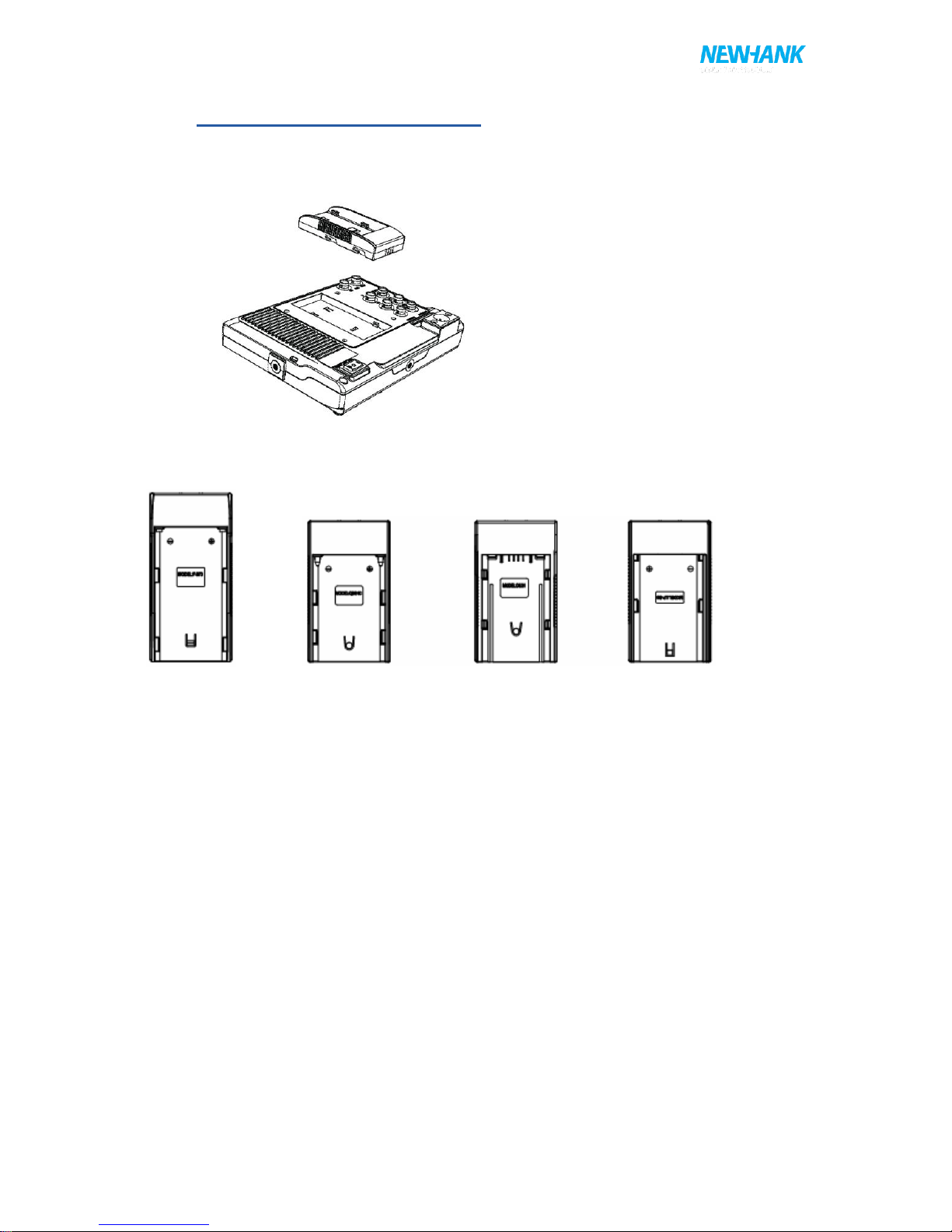
Following three types of battery plates are suitable for this device, model F970, QM91D, DU21 & LP-
E6 (choose 2 out of 4).
MODEL: F-970 MODEL: QM91D MODEL: DU21 MODEL: LP-E6
DV Battery Mount Plate:
DV Battery Mount Plate Specification:
Model DU21 for battery of Panasonic DV: NV-GS/PV-GS/DZ-MV/GS/H28/H258/H288GK series,
comply with Panasonic battery DU06/VBD140/SANYO DZhs301sw/Hitachi
DZ-HS303SW/BZ-BP14S/DZ3200/BP07W.
Model QM91D for battery of SONY DV:
DSCR1/F/S/MVCCD/E/HC15E/HC1E/AE1u/DCRTRV828/E/CCD-TRV11
6/DCR-DVD/PS105K/300K/10P/1E series.
Model F970 for battery of SONY DV:
DCR-TRV series, DCR-TRV E series, VX2100E PD P series, GV-A700,
GV-D800 FD/CCD-SC/TR3/FX1E/HVR-AIC, HDR-FX1000E,
HVR-Z1C, HVR-V1C, FX7E F330.
Model LP-E6 for battery of Canon DSLR:
5D Mark II/EOS7D/EOS60D

User manual
7
www.newhank.com
V-mount battery plate (optional): Please refer to GP-L130AB type battery specifications.
Anton Bauer mount battery plate (optional): Please refer to GP-L130B type battery specifications.
4. WIRING INSTRUCTIONS
1- XLR (M) connector: to connect the XLR connector on device.
2- DC Power adapter connector.
3- Red: for TALLY red light connector.
4- Green: for TALLY green light connector.
5- Black: for grounding.
6- XLR (F) connector: for the XLR adapter.

User manual
8
www.newhank.com
5. SETTING MENU
Before setting the functions, please make sure the device is connected correctly.
When power on, press BRI/M/SEL knob on the device, function menus will pop-up on the screen. After
confirm the option value, then press BRI/M/SEL knob to return to the previous, and press the
BRI/M/SEL knob again to exit the menu settings.
BRI / M / SEL knob to select an option.
SAT / ADJ knob to select the main menu, adjusting option values and confirm the selection.
Color Temp
Settings: User, 6500ºK, 7500 ºK, 9300 ºK
Default: User
On User mode, user can adjust RGB gain and bias. User mode is recommended for professional
users only.
Check Field
Settings: Off, Mono, Red, Green, Blueµ
Default: Off
Setting Mono, Red, Green or Blue display color.
Aspect Ratio
Settings: 4:3, 16:9, Full Screen.
Default: 4:3
Setting screen aspect ratio: 4:3, 16:9 and full screen.
Pixel-to-Pixel
Setting: On, Off
Default: Off

User manual
9
www.newhank.com
Shows the original picture with 1:1 pixel mapping, if the picture is larger than the monitor’s LCD
resolution, the center part of the picture is shown. BRI / M / SEL knob operation you can see part of
the picture is not completely display.
Camera
Settings: 480P, 1080I
Default: 480P
For 480P screen pixel DSLR camera, such as Canon 5D Ⅱcamera
For 1080I screen pixel DSLR camera, such as Canon 5D Ⅲcamera
H/V delay
Settings: Off, H&V delay, V delay, H delay.
Default: Off
H/V Delay allows you to check the outside signal of active picture area. This mode is for broadcast
professionals.
Underscan
Settings: On, Off
Default: Off
HDMI monitor can not display the best resolution pixel-to-pixel mode , the output resolution is smaller
than the display resolution , the display will appear black side of this situation is called HDMI
underscan; Conversely , the display You can not display the entire contents of the image that HDMI
overscan. Underscan / Overscan principle each pixel point average tensile or compression so that the
image can be completely displayed on the screen.
Center Marker
Settings: On, Off
Default: Off
Set to display center marker or not.
Screen Markers
Settings: Off, 95%, 93%, 90%, 88%, 85%, 80%

User manual
10
www.newhank.com
Default: Off
The box -shaped mark display on or off can be set in accordance with the desired ratio.
Language
Settings: English, Chinese
Default: English
Set English/ Chinese switch.
PIP
Settings: Small, Medium, Large, PBP, POP
Default: Small
PIP top life of the display default, Set small, medium, large screen in screen, as well as painting
outside source adjustments and interchangeable , the small screen , screen and big screen , you can
also adjust the display position , respectively, for the upper left , upper right , lower left and lower right.
Shortcut key of PIP function will be available after setting in the menu.
SDI
Settings: On, Off
Default: Off
Connect 3G-SDI signal can be set to turn on or off .
Input Format OSD
Settings: 5s, 10s, 15s
Default: 5s
The menu signal display period , display the length of time can be set according to individual needs.
Table des matières


