
New Air AF-520B Manuel utilisateur

18" Outdoor Misting Fan
OWNERS MANUAL
Read and save these instrucons.
AF-520B
2
hp://www.NewAir.com
A Name You Can Trust
Trust has to be earned and we will earn yours. Customer happiness is
the focus of our business.
From the factory to the warehouse, from the sales floor to your home,
the whole NewAir family promises to provide you with innovave
products, exceponal service, and support when you need it the most.
Count on NewAir.
As a proud NewAir owner, welcome to our family. There are no robots
here, real people shipped your product and real people are here to help
you.
Thank you for your purchase and remember NewAir, A Name You Can
Trust.
Call us today at 855-963-9247
For future reference, we recommend you aach a copy of your sales receipt
here and record the following informaon. You will need this informaon if it
becomes necessary to contact the manufacturer for service inquiries.
Date of Purchase: ___________________________________
Serial Number: ___________________________________
Model Number: ___________________________________
Connect with us online.

3
A Name You Can Trust
READ AND SAVE THESE INSTRUCTIONS.
TABLE OF CONTENTS
Specificaons……………………………………………………………………………………………………
Before First Use………………………………………………………………………………………………..
Important Instrucons………………………………………………………………………..……………
Parts List…………………………………………………………………………………………………………..
Preparaon...........................................................................................................
Assembly Instrucons………………………………………………………………………………………
Operang Instrucons………………………………………………………………………………………
GFCI Operaons....................................................................................................
Maintenance Instrucons.....................................................................................
Troubleshoong…………………………………………………………………………………………......
Cleaning……………………………………………………………………………………………................
Limited Manufacturer’s Warranty…………………………………………………………………...
3
3
4
5
5
5
7
7
7
8
8
9
BEFORE FIRST USE
• Read and follow all the instrucons below even if you feel you are
familiar with the appliance.
• Remove the packing and make sure that the appliance is intact. If in
doubt do not use the appliance and contact the place of purchase.
• Do not leave packaging materials such as bags and staples within reach
of children.
• Dispose of packaging carefully and with consideraon for the
environment.
• It is ideal to retain the appliance carton for seasonal storage.
• For your convenience, record the date you received the appliance on
the warranty page of these instrucons, and aach your proof of
purchase. Retain this informaon in the event that warranty service is
required.

4
hp://www.NewAir.com
IMPORTANT INSTRUCTIONS
• SAVE THESE INSTRUCTIONS.
1. Fan should be used under rated voltage.
2. Connect power aer the fan is fully assembled.
3. Never insert fingers, pencils, or any other object through the guard when fan
is running.
4. Unplug from outlet when: not in use, when moving fan from one locaon to
another, before pung on or taking off parts, and before cleaning.
5. Disconnect fan when removing grilles for cleaning.
6. Be sure fan is on a stable surface when operang to avoid overturning.
7. DO NOT use fan in a window. Rain water may create an electrical hazard.
RULES FOR SAFETY OPERATION
Read Rules for Safe Operaon and Instrucons Carefully.
CAUTION
• To reduce the risk of fire or electric shock, do not use this fan with any solid
state speed control device.
• This product must be grounded. If it should malfuncon or break down,
grounding provides a path of least resistance for electric current to reduce the
risk of electric shock. This product is equipped with a cord having an
equipment-grounding conductor and a grounding plug. Plug into an
appropriate outlet that is properly installed and grounded in accordance with
all local codes and ordinances.
• This fan is provided with a ground fault circuit interrupter (GFCI) built into the
plug of the power supply cord.
This device provides addional protecon from the risk of electric shock.
Should replacement of the plug or cord become necessary, use only idencal
replacement parts that include GFCI protecon.
• Do not leave the fan running unaended.
• Do not use fan in a window. Rain may create an electrical hazard.
• Do not sck any object or body parts in the grill of the fan while the blades
are moving or the fan is plugged in.
SAFETY INFORMATION
WARNING
CAUTION
A Name You Can Trust
5
ASSEMBLY INSTRUCTIONS
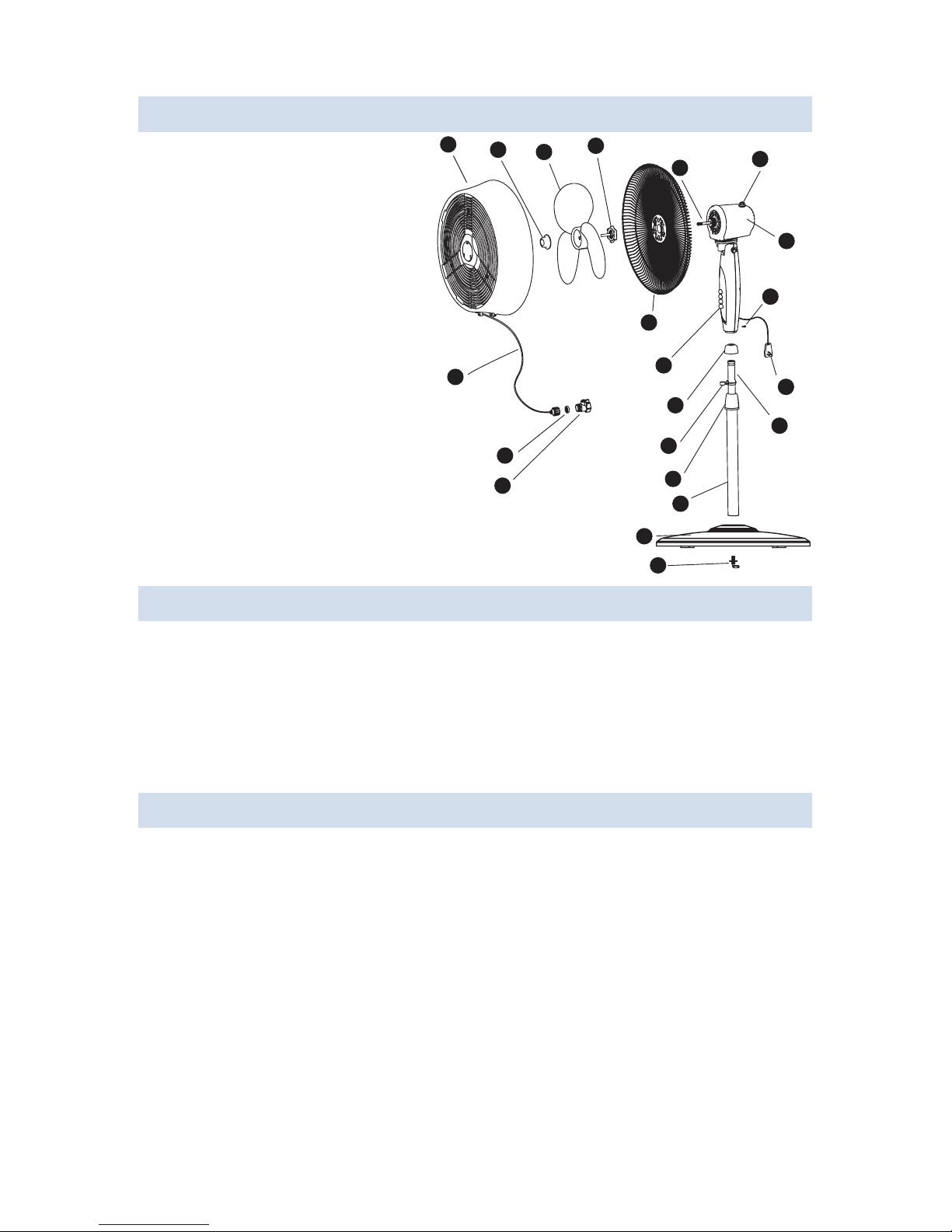
PARTS LIST
A. Front grill
B. Blade cap
C. Fan blade
D. Plasc nut
E. Rear grill
F. Motor sha
G. Clutch Knob
H. Motor housing
I. Push buon
J. Thumb screw
K. Power cord
L. Waterproof cover
M. Misng line holder
N. Internal pole
O. Height adjustment knob
P. External pole
Q. Misng line
R. Filter washer
S. Valve
T. Base
U. "7" finger screw
ABCD
FG
E
I
H
J
T
U
S
R
Q
L
M
P
O
K
N
PREPARATION
Before beginning assembly of product, make sure all parts are present. Compare
parts with package contents list and diagram above. If any part is missing or
damaged, do not aempt to assemble the product. Contactcustomer service for
replacement parts.
Esmated Assembly Time: 15 minutes
Tools Required for Assembly: Phillips Screwdriver (NOT INCLUDED)
Step 1. Fan Base Assembly (Fig. 1)
1. Unscrew the "7" finger screw (U) from the external pole (P) and aach the
external pole (P) to the base (T) by ghtening the "7" finger screw (U).
2. Remove the height adjustment knob (O) by unscrewing it counterclockwise.
3. Use your finger to pull out the internal pole(N), slide height adjustment
knob (O) over internal pole (N). Fasten it to external pole (P) by turning the
knob while holding the pole. Make sure the knob (O) is ghtly fastened before
final assembly.

6
hp://www.NewAir.com
B
D
EF
C
A
Fig. 2
Fasten
O
N
P
T
U
Fig. 1 Fig. 3 Fig. 4
J
L
N
M
O
Step 2. Fan Head Assembly (Fig. 2)
1. Remove the blade cap (B) by turning clockwise. Remove the plasc nut (D) by
turning counter clockwise.
2. Posion the rear gille (E) over the motor sha (F), make certain the handle is at
the top and the one notch in the rear of rear grill (E) cover fit over the three
prong on the motor housing(H).
3. Secure rear grille (E) by turning the plasc nut (D) clockwise and ghtening
firmly.
4. Slide the fan blade (C), with the hollow interior of the blade facing toward rear
grille (E), onto motor sha (F)
5. Secure Fan blade (C) onto motor sha (F) by turning the blade
cap (B)counterclockwise unl it firmly in place.
6. Loosen the bolt on the boom of the Front Grill (A) and mount the Front
Grill (A) with the logo right side up to the Rear Grill (E) by snapping both
together firmly.Ensure all snaps around the Front Grill (A) are secure on the
Rear Grill (E).
7. Tighten the bolt on the boom of the Front Grill (A).
Step 3. Final Assembly (Fig. 4)
1. Loosen the thumb screw (J) by turning it counter clockwise.
2. Always keep the water proof cover (L) match with the height adjustable
knob (O) when adjusng the internal pole (N).
3. Insert internal pole (N) into the neck joint and ghten by turning thumb
screw (J) clockwise. Make sure it is ght enough to support the fan head.
4. Aach the Misng Line holder (M) onto the Internal pole (N).
5. Secure the Misng Line (Q) to the clip under the Front grill (A) and the Misng
Line Holder (M).

7
OPERATING INSTRUCTIONS
A Name You Can Trust
The GFCI on the plug of this fan has 2 buons"TEST" and "RESET". If you wish to
see if the GFCI circuit is funconing properly press the "TEST" buon. The fan will
immediately shut off as if the GFCI has been acvated and the window between
the buon will change to black. This lets you know the GFCI circuit has been
cvated. Press the "RESET" buon and the fan can be turned on again and the
window between the buons will show orange. This indicates the GFCI circuit has
not been acvated and the fan should operate normaly.
GFCI OPERATIONS
1. Place the fan on a level surface. Plug the GFCI plug into a standard 120V AC
3-Prong wall outlet.
2. Aach the Valve(S) onto a standard outdoor hose. Turn your water on at the
spigot and use the lever on the valve(S) to turn water on and off.
3. To turn oscillaon mode on, push the Clutch Knob (G). Pull the Clutch Knob (G)
up to turn oscillaon off.
4. To adjust the air flow upward or downward, simply lt the fan head with hand
and move to desired angle.
5. Control speed by pushing the desired buon :
0 - OFF, 1 - low, 2 - medium, 3 - high
6. The height of the fan can be adjusted by loosening the height adjustment
knob (O) and carefully adjusng the Internal Pole(N). the fan and reghtening
Height adjustment knob(O). Always ensure the waterproof cover(L) covers the
Height adjustable Knob(O) aer adjusng the Internal Pole(N).
The fan requires lile maintenance. Do not try to fix it by yourself. Refer it to
qualified service personnel if service is needed.
1. Before cleaning and assembling, do not plug the pins into the socket.
2. To ensure adequate air circulaon to the motor. Keep vents at the rear of the
motor housing from dust, fluff and etc. A vacuum cleaner can not be used to
clean these vents before unplug. Do not disassemble the fan remove fluff.
3. Please wipe the exterior parts with a so cloth soaking a mild detergent.
Do not use any abrasive detergent or solvents to avoid scratching the sufrace.
Do not use of the following as a cleaner: gasoline, thinner, bending.
4. Do not allow water or any other liquid into the motor housing or interior parts.
MAINTENANCE INSTRUCTIONS
hp://www.NewAir.com
8
1. Be sure to unplug the power cord from the outlet before cleaning.
2. Plasc parts should be cleaned with mild soap and damp cloth or sponge.
Thoroughly remove soap film with clean water.
3. Be sure not to get water or other liquid inside of the motor.
- Water pressure must not exceed 555 153 kPa (5.62 kfg/cm2)
- The hose must be in good condion
CLEANING
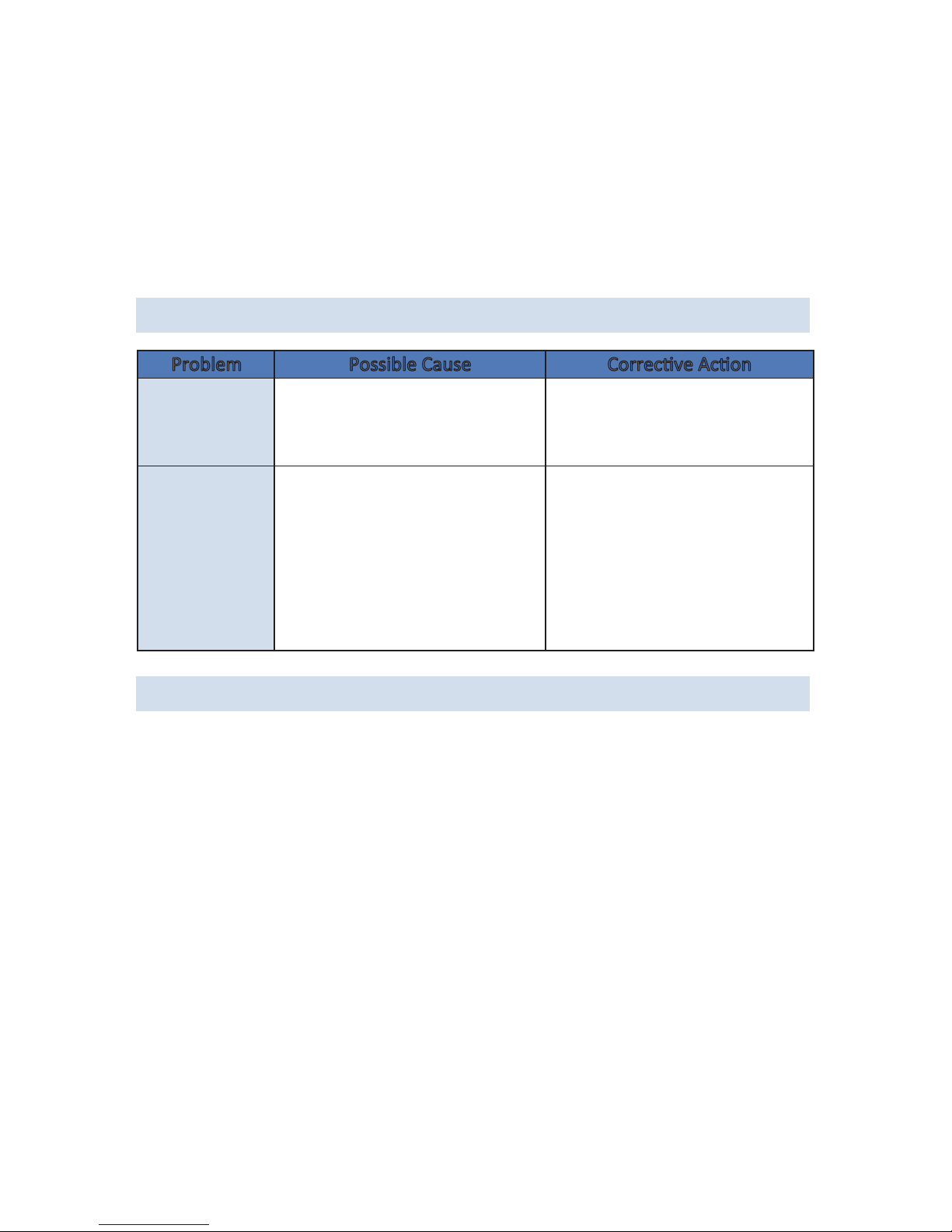
TROUBLESHOOTING
The fan will not
operate.
The fan will not
operate.
The fan isn’t plugged in and/or
the electrical outlet isn’t
working properly.
Obstrucons are keeping the
fan from working.
Make sure the fan is plugged
in and/or the electrical outlet
is working properly.
Check for obstrucons. If you
find an obstrucon, turn the
fan off.Unplug the fan and
carefully remove the
obstrucon. Plug the fan in and
turn it on again by referring to
the operang instrucons.
Problem Possible Cause Correcve Acon
Misng Nozzle Maintenance:
1. To clean the misng nozzles, use a pair of needles nose pliers to twist each
nozzle counterclockwise.
2. Once removed, soak the nozzles in white vinegar for 2 hours.
3. Rinse each nozzle with water and place back into the front fan grill.
4. Twist clockwise unl secure. DO NOT over ghten.

A Name You Can Trust
9
LIMITED MANUFACTURER’S WARRANTY
This appliance is covered by a limited manufacturer’s warranty. For one year
from the original date of purchase, the manufacturer will repair or replace any
parts of this appliance that prove to be defecve in materials and workmanship,
provided the appliance has been used under normal operang condions as
intended by the manufacturer.
Warranty Terms:
During the first year, any components of this appliance found to be defecve
due to materials or workmanship will be repaired or replaced, at the
manufacturer’s discreon, at no charge to the original purchaser. The
purchaser will be responsible for any removal or transportaon costs.
Warranty Exclusions:
The warranty will not apply if damage is caused by any of the following:
• Power failure
• Damage in transit or when moving the appliance
• Improper power supply such as low voltage, defecve household
wiring or inadequate fuses
• Accident, alteraon, misuse or abuse of the appliance such as using
non-approved accessories, inadequate air circulaon in the room or
abnormal operang condions (extreme temperatures)
• Use in commercial or industrial applicaons
• Fire, water damage, the, war, riot, hoslity or acts of God such as
hurricanes, floods, etc.
• Use of force or damage caused by external influences
• Parally or completely dismantled appliances
• Excess wear and tear by the user
Obtaining Service:
When making a warranty claim, please have the original bill of purchase with
purchase date available. Once confirmed that your appliance is eligible for
warranty service, all repairs will be performed by a NewAir™ authorized repair
facility. The purchaser will be responsible for any removal or transportaon
costs. Replacement parts and/or units will be new, re-manufactured or
refurbished and is subject to the manufacturer’s discreon. For technical
Table des matières
Autres manuels New Air Ventilateur

New Air
New Air NIF20WBK00 Manuel utilisateur

New Air
New Air NIF20CBK00 Manuel utilisateur

New Air
New Air NFN12AWH00 Manuel utilisateur

New Air
New Air AF-410BK Manuel utilisateur

New Air
New Air NIF18WBK01 Manuel utilisateur

New Air
New Air NIF18CBK00 Manuel utilisateur

New Air
New Air AF-520 Manuel utilisateur

New Air
New Air AF-310 Manuel utilisateur

New Air
New Air WindPro18F Manuel utilisateur

New Air
New Air NMF8K7BK00 Manuel utilisateur


