
NEUTAC BW-201 Manuel utilisateur

Waterproof Bluetooth Speaker
Model: BW-201
InstructionManual
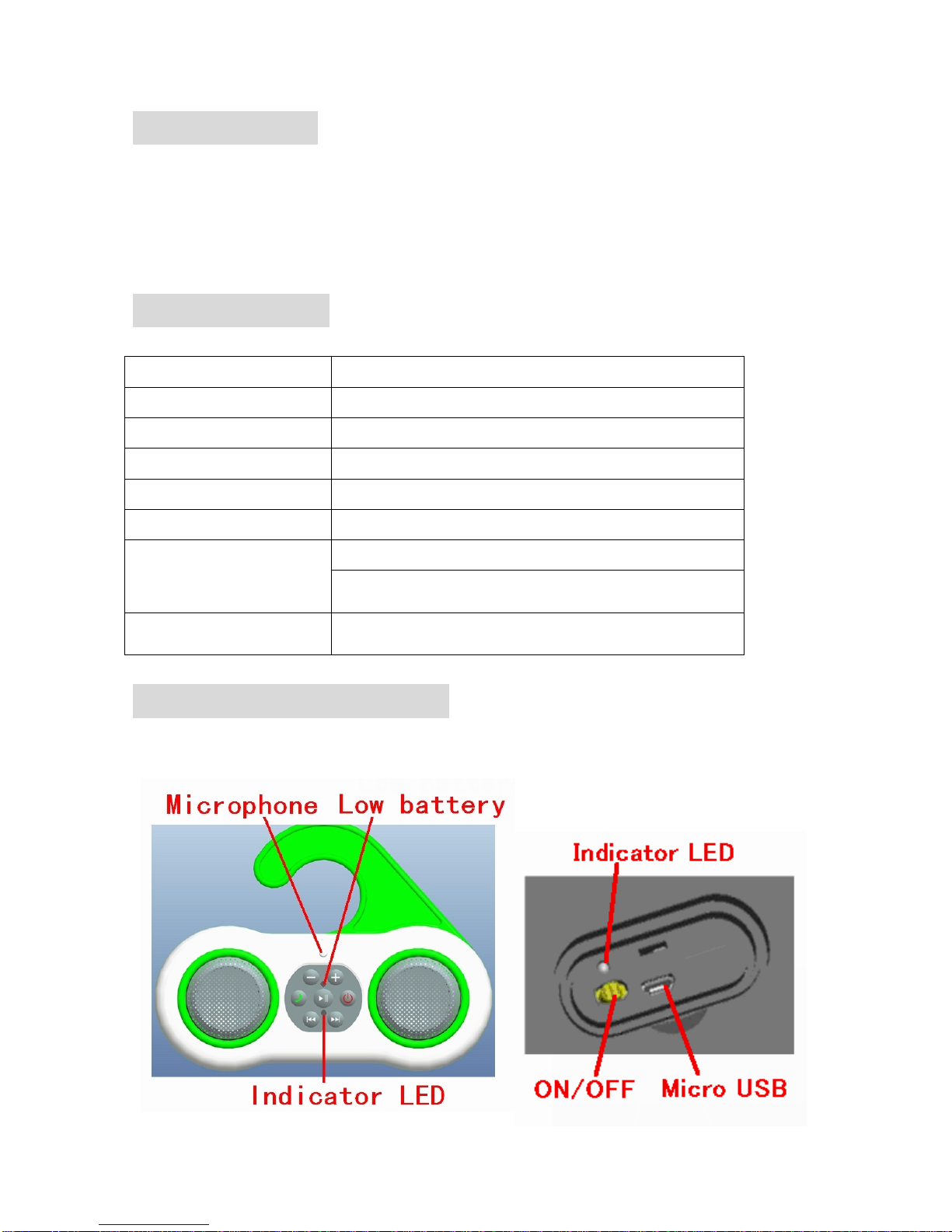
1. Introduction
Thank you for using our Waterproof Bluetooth Speaker.
zThis speaker is one of our portable Bluetooth Speakers.
zThis product is a high-quality speaker, and it has high practical value, so it receives lots of
clients’favors.
2. Specification
Bluetooth version Bluetooth 3.0
Operating frequency 2.402~2.480GHz
Dimension 206*47*155.5mm
Output Power (Total) 3W*2
Speaker Driver Unit 2 inch*2
Sensitivity 550mv/1KHZ
①DC 3.7V/1500mAh Rechargeable lithium battery
Power Supply ②DC 5V by Micro USB
Waterproof Grade IPX6
3. Operating instructions
zFunction Description
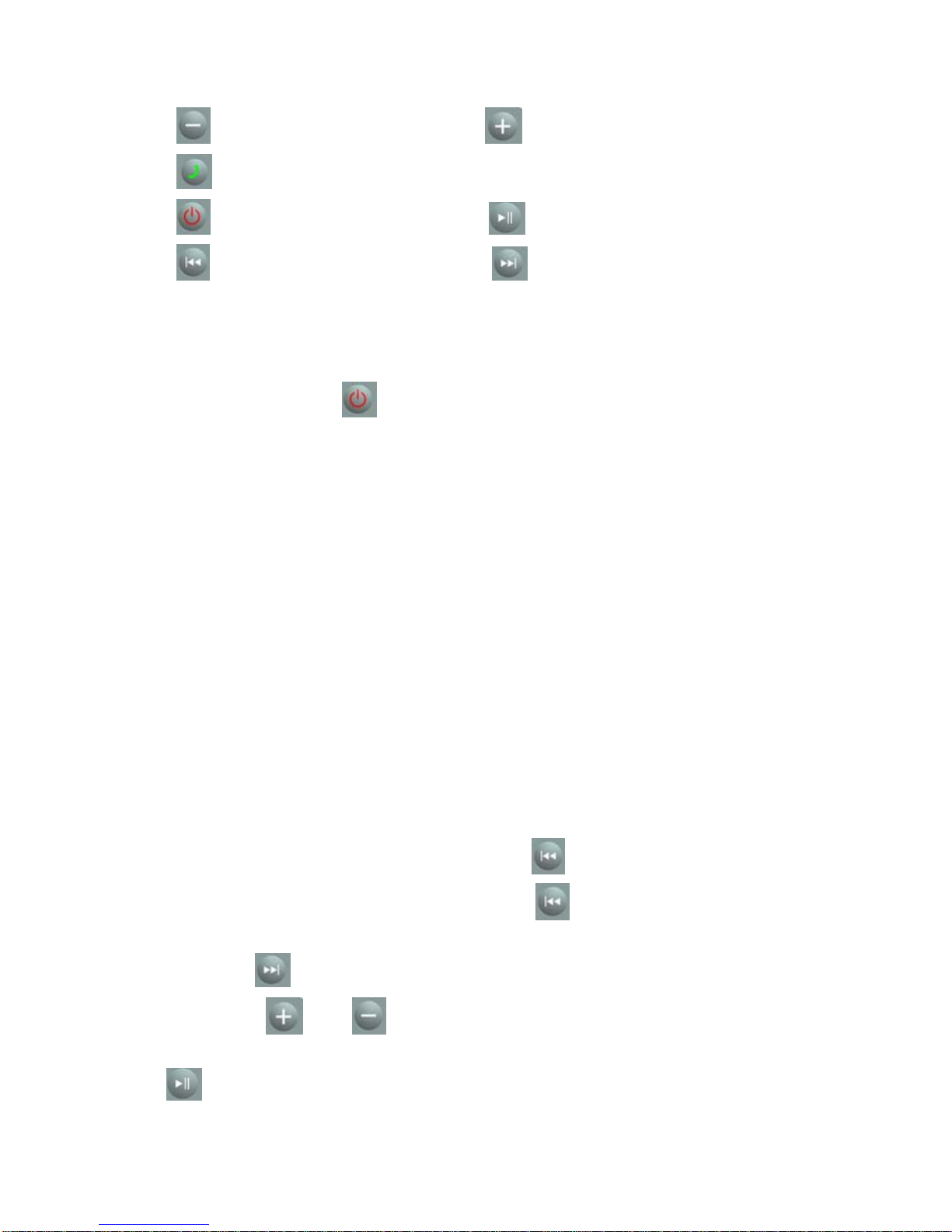
①Volume- ②Volume+
③Answer/ Hang up the phone; Redial the last number
④Pair with the phone; ON/OFF ⑤Play/Pause
⑥Previous song ⑦Next song
zMethod of attachment
Turn ON/OFF on.①
Press and hold the key “②” for a few seconds, until the Indicator LED flashes red and blue
alternately.
Turn on③the phone. Follow these steps to activate the phone's Bluetooth Function.
a) Open the Settings menu
b) Select the General menu> Bluetooth
c) Set the Bluetooth to open
Immediately, the phone begins to search the surrounding Bluetooth devices, and the
Bluetooth devices found will be listed. The speaker will be named :“PBT600” in the list of
the Bluetooth devices, the state is no pairing, no connection.
④Open the mating connector, the phone display prompts that the speaker is connected, the
back of the speaker's Indicator LED starts flashing blue light. You can start music player, for
example, the related functions in the phone can be transmitted to the speaker.
a) You might be asked to enter a password, if prompted, enter 1234.
b) Always follow the guidelines of the operation by your phone.
zBluetooth playing mode
If a song has been played a short time, press the key “①” once to play the previous song.
If a song has been played a long time, press the key “②” once to play the playing song from
beginning.
Press the key“③” once to play the next song.
Press the④keys “ ” and “ ” to control the volume.
In the Bluetooth playing mode, open the musi⑤c player in your phone, then press the key
“”once to play or pause the music.

⑥If someone telephone in, this speaker will inform the number of coming call in English. Press
the key “ ” once to answer the call, and press the key “ ” once again to hang up the
call.
⑦Press and hold the key “ ” for a few seconds to prepare for another connection. Or hold the
key “ ” for longer time to shut down the Bluetooth.
Charging for the power
1. There is a rechargeable lithium battery in this speaker.
2. Charging supply: Computer USB port or DC 5V.
3. To prolong the battery service life, please charge it above 4 hours when it was used up first
time. After the first time, charge it about 2-3 hours will be enough.
4. When it is charging, the Indicator LED light red while the battery is not saturated, and the
LED turn green while the battery is saturated
Precautions
zFor your safety, please read the description and accordance the
instructions to use this product.
zInsure that properly to use this product, and avoid the damages or strong
impacts to this product.
zDo not disassemble, repair or modify this product by yourself.
If the battery is replaced by an incorrect type, it is a risk of explosion.
zThis product can not be boiled or exposed to the sun, and use it at the
room temperature.
zThis product is not a toy, keep away from the children.
zThis product contains the recyclable lithium battery, sent it to the specialty
Recycle Bin for recycling please.

FCC Statement:
This equipment has been tested and found to comply with the limits for Part 15 of the FCC rules. These limits
are designed to provide reasonable protection against harmful interference in a residential installation.
This equipment generates, uses and can radiate radi o frequency energy and, if not inst alled and used in
accordance with the instructions, may cause harmful interference to radio communications.
However, there is no guarantee that interference will not occur in a particular installation. If this equipment does
cause harmful interference to radio or television reception, which can be d etermined by turning the
equipment off and on, the user is encouraged to try to correct the interference by one or more of the follow ing
measures:
• Reorient or relocate the receiving antenna.
• Increase the separation between the equipment and receiver.
• Connect the equipment to an outlet on a circuit different from that to which the receiver is connected.
- Consult the dealer or an experienced radio/TV technician for help.
This device complies with part 15 of the FCC rules. Operation is subject to the following two conditions: (1) This
device may not cause harmful interference, and (2) this device must accept any interference received, including
interference that may cause undesired operation.
Note: Modifications to this product will void the user’s authority to operate this equipment.
Table des matières
Manuels Intervenants populaires d'autres marques


Bowers & Wilkins
Bowers & Wilkins 4 Manuel utilisateur

Sonance
Sonance SONOS OUTDOOR Series Manuel utilisateur

Electro-Voice
Electro-Voice EVID FM4.2 Manuel utilisateur

Pioneer
Pioneer XW-HTD630 Manuel utilisateur

Onn
Onn BWA16AA002 Manuel utilisateur

HP
HP GL313AA - USB Speakers PC Multimedia Manuel utilisateur