Nebula Cosmos Max Manuel utilisateur

User Manual
Nebula Cosmos Laser /
Nebula Cosmos Laser 4K

English
01
Important Safety Instructions
Read all instructions before you use this device. Do not make any
changes or create settings that are not described in this manual. If
physical injury, loss of data, or damage is caused by failure to follow
instructions, the warranty does not apply.
Setup
• Do not place heavy or sharp objects on this device.
• To avoid electric shock, do not disassemble the device.
• Only use attachments or accessories specified by the manufacturer.
• Keep away from any heat sources.
• Place in a dry and well-ventilated area.
• Do not place this device on soft surfaces such as tablecloths or
carpets. The device could catch fire.
• Do not look straight at the projector lens during operation. The
intense light beam may damage your eyes.
• To prevent overheating, do not block or clog the ventilation openings.
• To reduce the risk of fire and/or electric shock, do not expose the
device to rain or moisture. Objects filled with liquids, such as vases,
should not be placed on this device.
• Turn off and remove the cable if this product emits smoke or any
strange odor.
• Unplug from the power source when not in use for a long period of
time.
• Always handle the device with care. Avoid touching the lens.
• Do not allow children to handle the device without supervision.
• Avoid extreme vibrations. It may damage the internal components.
• Due to the enclosure material, the product must be connected to a
USB 2.0 or higher.
• The power cord shall connect to socket-outlet with a grounding/
earthing connection.
• The power supply should be installed near the equipment; for
pluggable equipment, the socket-outlet must be easily accessible.
• Only use the power cord provided by the manufacturer. An
unauthorized power cord may cause danger and violate the
authorization of the projector as well as the guarantee.
• The plug of the power cord is considered as the disconnect device.
Once unplugged, the projector is disconnected from the power
source.
• Do not use the device in an environment where the temperature is

English
02
too high or too low. Never expose the device to strong sunshine or
wet environments.
• Before you make or change any connections, ensure that all devices
are disconnected from the power outlet.
• Never touch the mains cable of the mains connection with wet
hands.
• The suitable temperature range for projector D2341 or D2350 and
its accessories is 32°F-95°F / 0°C-35°C.
• The suitable temperature range for 4K Streaming Dongle D0480 and
its accessories is 32°F-104°F / 0°C-40°C.
• The suitable temperature for remote C008 is 113°F / 45°C
maximum.
• It is recommended to operate the device in an environment with a
temperature that ranges from 41°F-77°F / 5°C-25°C.
• When operating, place the device in an environment that has a
normal room temperature and good ventilation.
• Possibly hazardous optical radiation emitted from this product may
be harmful to the eyes. Do not stare at the operating beam.
Battery
• The remote control contains batteries which can be swallowed. Keep
the remote control out of the reach of children.
• Keep away from heat, direct sunlight, or fire to avoid risk of explosion.
Never dispose of by burning.
• Remove the batteries when the remote control has not been used for
a long period of time.
• Replace the batteries only with the same or equivalent type.
• Batteries contain chemical substances, and they should be disposed
of properly.
CAUTION: RISK OF EXPLOSION IF BATTERY IS REPLACED BY AN
INCORRECT TYPE. DISPOSE OF USED BATTERIES ACCORDING TO THE
INSTRUCTIONS.
Hearing Safety
• To avoid hearing damage, do not listen for extended periods at high
volume. Set the volume at a safe level.
Cleaning
• Use a soft, lint-free cloth. Never use liquid, gaseous, or easily
flammable cleansers to clean.

English
03
• Do not use any liquid cleaning agents to clean the lens to avoid
damaging the coating film on the lens.
• Wipe the surfaces gently. Be careful that you do not scratch the
surface.
• Use lens cleaning paper to clean the lens of the projector.
Repairs
• Do not make any repairs to this device yourself. Only have your
projector repaired by an authorized service center.
• Improper maintenance can result in injuries to persons or damage
to this device.
• Refer servicing to qualified service personnel.
Laser Safety
• RG1 IEC 62471-5:2015
• Complies with IEC 60825-1:2014 Class 1 and IEC 62471-5:2015 Risk
Group 1.
• Potential hazards may exist during lamp or product servicing.
• Service shall be performed only by authorized, trained servicing
personnel.
• Do not open the enclosure of the product.
• When the enclosure of the product is damaged, discontinue use.
• Do not open the enclosure of laser module inside the product.
• When the enclosure of laser module inside the product is damaged,
discontinue use.
• Laser inside, be aware of the risk of skin or corneal burns.
• The lable is located at the bottom of the enclosure.

English
04
What’s Included
1 2 3
4 5 6
QSG
1
Nebula Cosmos Laser / Cosmos Laser 4K
2
Nebula 4K Streaming Dongle
3
Remote Control
4
Power Cord
5
AAA Batteries
x 2
6
Quick Start Guide
At a Glance
Top and Front Panel
7
8
3
4
2
6
5
1

English
05
1Lens
2
Handle
3
Power Button
• Press to power on.
• Press and hold for 3 seconds to power off.
4Navigation Buttons
• Move through the menu.
5Confirm a Selection
6
Volume Up/Down
7Back
• Return to a previous menu.
• When in Bluetooth Speaker Mode, press again to switch to
Projector Mode.
8Settings (Projector)
Rear View
1 4
5
6
2 3
78
1AC IN
• Connect to power supply.
2HDMI
• Connect to a playback device with HDMI output.
3USB
• Connect to a USB storage device.

English
06
4AUX
• Connect to headphones or an external speaker.
5Infrared Receiver
6Back Cover
7Streaming Dongle Compartment
8Micro-USB Connectors
• Connect to the Streaming Dongle.
Bottom View
1
1Tripod socket

English
07
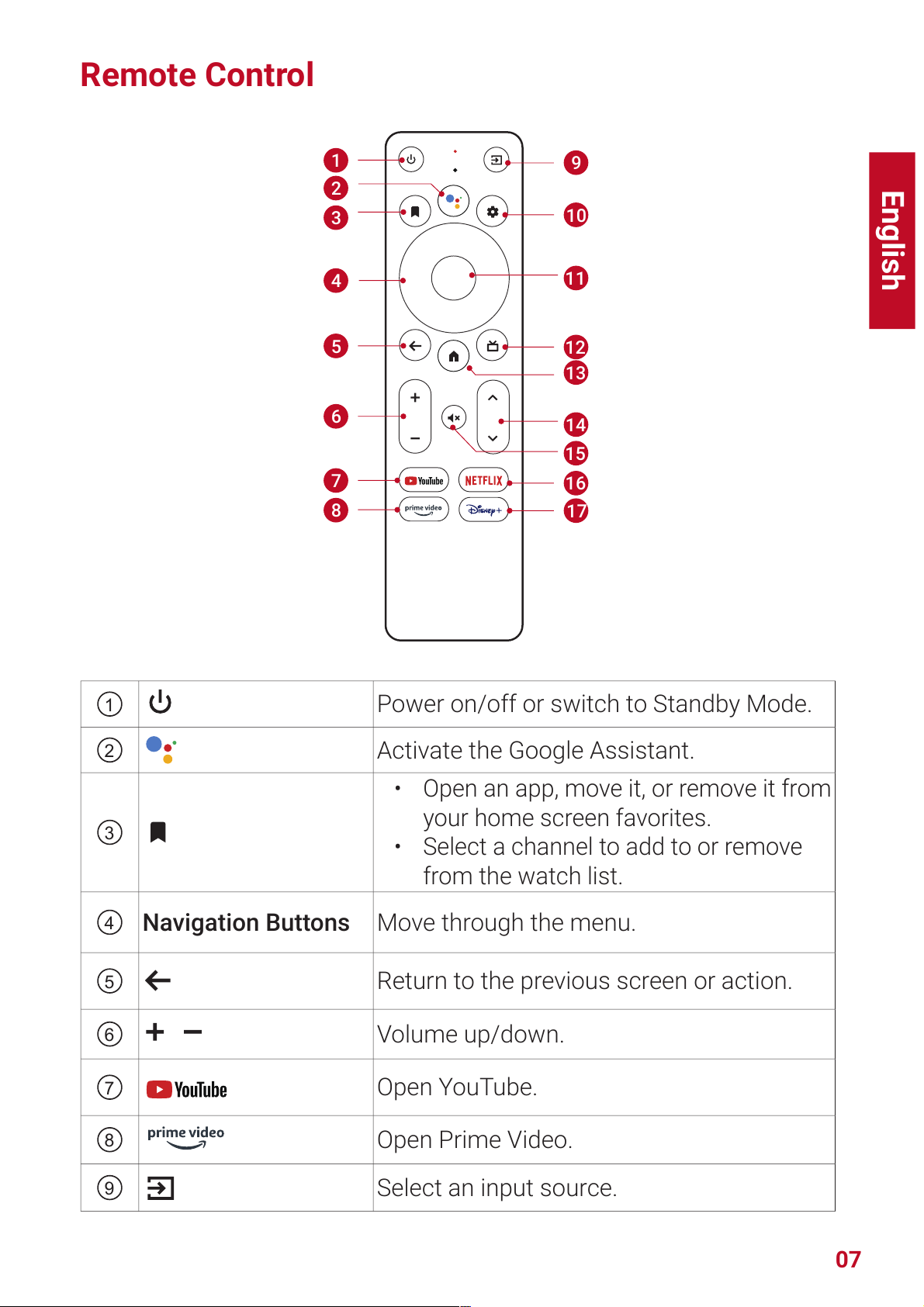
Remote Control
19
10
11
12
13
14
15
16
17
2
3
4
5
6
7
8
1Power on/off or switch to Standby Mode.
2Activate the Google Assistant.
3
• Open an app, move it, or remove it from
your home screen favorites.
• Select a channel to add to or remove
from the watch list.
4Navigation Buttons Move through the menu.
5Return to the previous screen or action.
6Volume up/down.
7Open YouTube.
8Open Prime Video.
9Select an input source.

English
08
10 Access the settings page.
11 Confirm Button Confirm a selection.
12 Guide (Open Live TV EPG)
13 Go to the home screen.
14 Channel up/down.
15 Mute or resume the sound.
16 Open Netflix.
17 Open Disney+ Video.
T
• On the remote, press and hold the Home and Back buttons
simultaneously for about 10 seconds. After Bluetooth connected,
you can operate by using the remote.
Getting Started
Installing 4K Streaming Dongle
1. Press up to open the back cover.
2. Correctly connect the included 4K Streaming Dongle to the Micro-
USB connectors, then close the dongle compartment by pressing
down on the back cover.
open

English
09
Connecting to Power
Connect the power cord to the device, and then to the power supply.
Preparing the Remote
1. Press and slide down to open the battery cover.
2. Insert 2 new AAA batteries, matching the polarity (+ / -) as
indicated. Close the battery cover until it clicks into place.
12
+
+
T
• The distance between the remote and the projector should not
exceed 10 m / 33 ft.
Autres manuels pour Cosmos Max
2
Ce manuel convient aux modèles suivants
1
Table des matières
Langues :
Autres manuels Nebula Équipement d'éclairage
Manuels Équipement d'éclairage populaires d'autres marques

Qazqa
Qazqa Suplux SL 3 Black 103062 Manuel utilisateur

Commercial Electric
Commercial Electric 54568141 Manuel utilisateur

CREE LIGHTING
CREE LIGHTING 304 Series Manuel utilisateur

Goobay
Goobay 49867 Manuel utilisateur

ECOMAN ITALIA
ECOMAN ITALIA LED T8 Manuel utilisateur

Alkalite
Alkalite Krypton KT-81 Manuel utilisateur