
ND Audio Visual ND-FM-12 Manuel utilisateur

ND Audio Visual
WWW.NDAV.IO
Page 1 of 17
USER MANUAL
ND-FM-12/16/32
Flexible Matrix Switchers
ND Audio Visual
WWW.NDAV.IO

ND Audio Visual
WWW.NDAV.IO
Page 2 of 17
Contents
Contents........................................................................................................................................2
1. Introduction ...........................................................................................................................3
2. Application Diagram ...............................................................................................................3
3. Operation ..............................................................................................................................4
3.1 Video Switching Menu ..................................................................................................5
3.2 Configuration Menu - Input Port...................................................................................5
3.3 Configuration Menu - Output Port ....................................................................................6
3.4 Scene Saving Menu ...........................................................................................................6
3.5 Scene Recall Menu............................................................................................................6
3.6 EDID Copy Menu...............................................................................................................7
3.7 System Setup Menu ..........................................................................................................7
3.8 Control Command .........................................................................................................8
3.9 PC Control Software ...................................................................................................10
4.Signal board introduction.......................................................................................................12
4.1 VGA signal Seamless input /output card................................................................12
4.3 DVI signal Seamless input /output card .................................................................13
4.5 HDBaseT signal Seamless input /output card .......................................................15
5. Common faults.......................................................................................................................17

ND Audio Visual
WWW.NDAV.IO
Page 3 of 17
1. Introduction
ND-FM-12 is a high-performance SEAMLESS AV modular matrix switcher with 12 flexible
PCI-E slots for single HDMI, VGA, CVBS, YPBPR, DVI /SDI or HDBaseT input and output
cards.
Its advanced modularization design allows the Flexible Matrix inputs and outputs can be
freely configured such 11x1, 6x6 or 1x11 and can be comprised of HDMI, VGA, DVI, SDI
and HDBaseT. ND-FM-Series will auto-detect the inputs and outputs cards. It features
plug-and-play, and seamless switching of different video signals. Additionally, HDBaseT
cards support PoH function simplifying system installation.
2. Application Diagram
ND-FM-Series inputs and outputs can be populated to suit most popular video interface
formats on the market as shown in the diagram below CVBS, 3G SDI, HDBaseT, HDMI,
YPBPR, VGA, DVI video sources to various display devices. The matrix can also be controlled
via RS232 or TCP/IP. The Matrix could them be controlled via PC control, Web Browser, IPAD
or Third Party Control System.

ND Audio Visual
WWW.NDAV.IO
Page 4 of 17
3. Operation
The Matrix supports a variety of control methods such as front panel touch screen control,
RS232, TCP/IP control protocol, WEB page control, PC-side software, third-party control.
The system uses a common user interface design across the touch screen, WEB and PC
software making it easy to learn. This chapter mainly introduces the operation via the WEB
interface.
The matrix has default IP address is 192.168.0.178. The ip address can be viewed and
changed via the Front Touch LCD.
To connect ensure your PCs ipaddress is in the same range as the Matrix, open the browser
and enter 192.168.0.178 into the address bar and press the Enter key the WEB server page
should be then displayed. As shown below
The default user login details are as below
User: user
Password: 123456
Press Login

ND Audio Visual
WWW.NDAV.IO
Page 5 of 17
The function menu is divided into three sections Video Switching, EDID Distribution, and
System Settings.
3.1 Video Switching Menu
Features Video Switching, Scene Saving and Recall, plus Input and Output board settings.
Click on the corresponding Input buttone and Output button to switch video, click on the Input
button with All button to switch to all the output operation.
Click the Mute button, and then click the corresponding output will turn off the corresponding
output channel.
As shown in the figure below, the highlighted yellow color is for the selected one, the output
status show at the right side.
3.2 Configuration Menu - Input Port
Click on circular button to the left side of input button. A pop up configuration menu will appear.
Different input boards will have different properties.
Input board properties
Port name: Enter a meaningful name and click rename button. This name will displayed on
the input button.
Embedded audio input: used to select embedded external analog audio, if the analog audio is
not connected, no sound.
Interface Type: The system automatically recognizes the signal type of the board.

ND Audio Visual
WWW.NDAV.IO
Page 6 of 17
3.3 Configuration Menu - Output Port
Click on circular button to left of output button. A pop up configuration menu will appear. Different
output boards will have different properties.
Output Board Properties
Port name: Enter a meaningful name and click rename button, it will be displayed on the output
button.
Port type: the system will automatically identify the type of board.
Analog audio output: used to turn on the analog audio extra output.
Resolution settings: used to set the output image resolution, please refer to the card
introduction for output resolution info, the default 1080P @ 60hz.
HDCP settings: you can choose to turn HDCP on or off.
Output Mode: you can choose HDMI or DVI, DVI format is without audio.
3.4 Scene Saving Menu
The menu is for saving the current input and output corresponding to the switching state, the
system supports 32 groups of scenes saved.
3.5 Scene Recall Menu
Menu is for recall the switching status from the system memory.

ND Audio Visual
WWW.NDAV.IO
Page 7 of 17
3.6 EDID Copy Menu
The EDID assignment menu is used to copy EDIDs from outputs connected to displays to
inputs. When the HDMI / DVI / HDBaseT digital board is connected to a display device, the
display EDID is ready to be captured and stored to and input board.
The left side is the output channel EDID, the right is the input channel EDID, select the
corresponding output channel and input channel, EDID will be copied from the corresponding
output port to the input port.
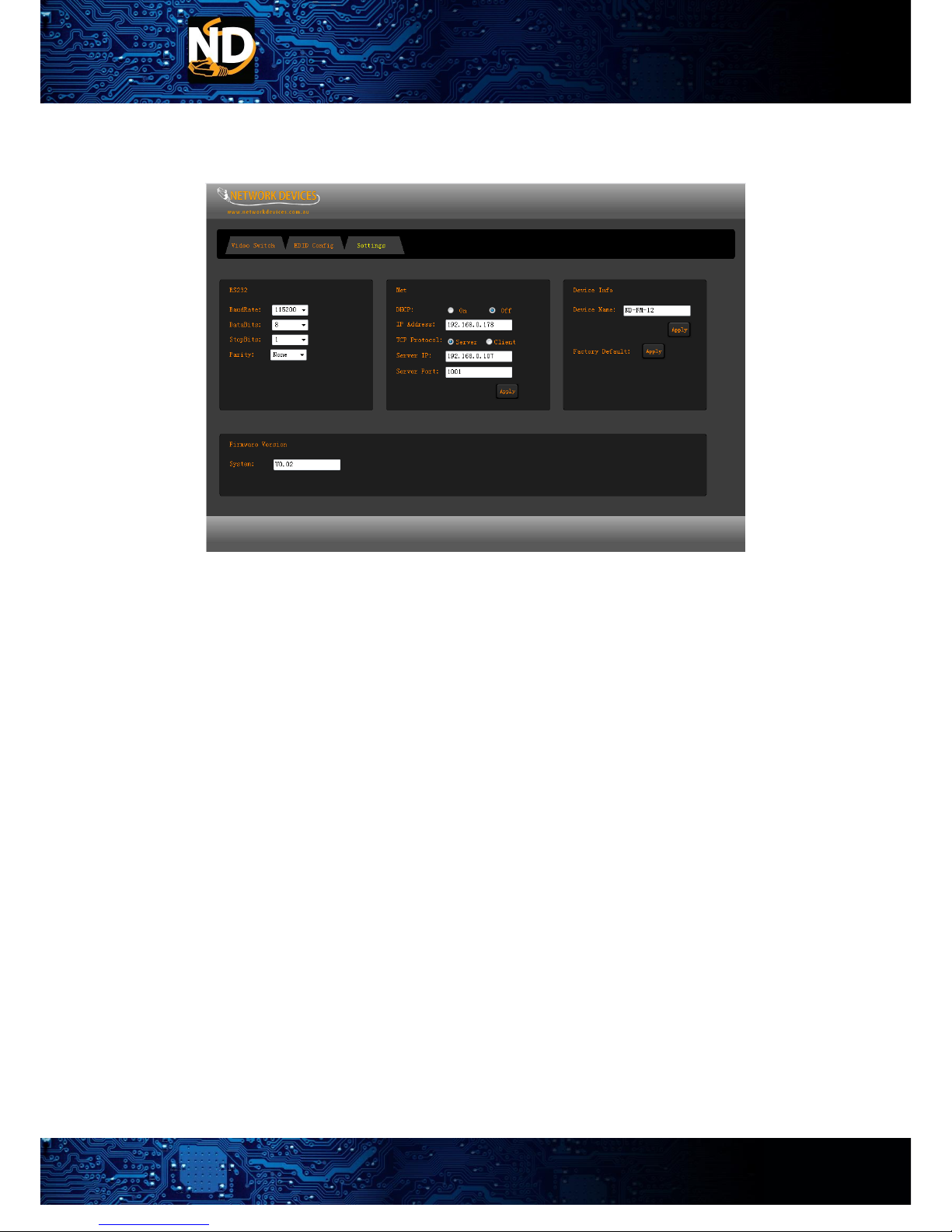
3.7 System Setup Menu
System setup menu is for setting the system control parameters, including serial port settings,
network settings, device information, software version.
Serial port settings include baud rate, data bits, stop bits, parity bit settings
Network settings Include:
DHCP on / off.
IP address, factory default 192.168.0.178.
TCP protocol refers to whether the matrix works in server mode or client mode.
The server IP address is the server address when the matrix working in client mode.
Server IP port is a port number that works on a server.
Device information: The device name box can be used to define the model of the device.
Factory default function is to restore all the factory settings of the board, the user will not
ND Audio Visual
WWW.NDAV.IO
Page 8 of 17
change the data, such as on-site preservation, callback, the system EDID unchanged, click
on the application must be re-power to start the machine before the normal work.
System Software: Displays the software version number of the current system.
3.8 Control Command
The matrix supports third party control system control through RS232 and LAN the protocol is
defined below.
*Is the start character for a set command.
#Is the start character for a get command.
.Is the terminating character.
Video Switching Command
1 to 1 *V1to5.
1 to many *V1to1,2,3,4.
1 to all *V1All.
Mute output *V0to1.
Mute many output *V0to1,2,3,4.
Mute all *V0All.
Save to scene *S1. (1 to 32)
Recall scene *R1. (1 to 32)
Status Querying Command
Output port Querying #V1. *V3to1.
Querying all output #VAll. *V2,4,6,7,8,12.
Input audio select *Audio:IN1,ON. (ON/OFF)
Output extra audio on/off *Audio:OUT1,OFF. (ON/OFF)
Turn on/off HDCP *HDCP:OUT1,OFF. (ON/OFF)
Output DVI Format on/off *DVI:OUT1,ON. (ON/OFF)

ND Audio Visual
WWW.NDAV.IO
Page 9 of 17
Output resolution setting *Resolution:OUT1,720x480@60.
Output resolution query #Resolution:OUT1.
Port type query #Port:IN1.
Output lock *Lock:OUT1.
Output Analog format selection *VGA:OUT1,YPBPR. (VGA/YPBPR/CVBS)
EDID Copy Command
3 to 1 *E3to1.
1 to many *E1to2,3,5.
1 to many *E1All.
RS232 Setup Command
*Rs232:115200,8,1,None
Baud Rate 9600/19200/38400/115200
Data Bit 8/9
Stop Bit 1/2
Check Bit None/Odd/Even
RS232 Query #Rs232.
LAN Setup Command
DHCP on/off *DHCP:ON. (ON/OFF)
IP address setting *IP:192.168.0.1.
Server IP address setting *ServerIP:192.168.0.200.
TCP setup *TCP Protcocol:Server. (Server/Client)
TCP Port setting *TCP Port:4001.
LAN Querying Command
DHCP on/off #DHCP. *DHCP:ON.
IP Query #IP. *IP:192.168.0.1.
Server IP Query #ServerIP. *ServerIP:192.168.0.1.
TCP Query #Protcocol. *Protcocol:Server.
Device name setup *DeviceName:ND-FM-12.
Device name Querying #DeviceName.
Firmware Version Query #FM. *FM:V0.01.

ND Audio Visual
WWW.NDAV.IO
Page 10 of 17
3.9 PC Control Software
Connected matrix to the PC via a serial port or local area network. Install the matrix control
software and run it.
Select the Ethernet Device, enter the port number of matrix. The default is 1001, click on the Refresh
button, the matrix on the LAN will be displayed in the device list, click the connection button.
Serial Device is for the serial port connection,set the corresponding baud rate and serial port.
Run into the matrix control menu interface, including video switching, EDID configure, system settings,
As UI with the same design with WEB, here is no longer a detailed introduction, the following is the
video switch menu.
Ce manuel convient aux modèles suivants
2
Table des matières


