
Naxa NPB252RD Manuel utilisateur


Page 2 Naxa Electronics
Table of Contents
Thank You ..................................................................... 3
In the Box ...................................................................... 3
Before You Start ........................................................... 4
At a Glance .................................................................... 5
Connect Power.............................................................. 8
AC Power.......................................................................................... 8
Battery Power................................................................................. 8
Basic Functions............................................................. 9
Turning the Unit On and Off ........................................................ 9
Adjusting the Volume.................................................................... 9
Using the Radio............................................................. 9
Using the CD/MP3 Player ............................................10
About Compact Discs.................................................................. 10
Loading a Disc............................................................................... 10
Playing a Disc................................................................................. 11
Repeat Playback ........................................................................... 11
Programming a Playlist ...............................................................12
Using the AUX Input ....................................................13
Warnings and Precautions..........................................14
Specications ..............................................................18

Page 3
Thank You
We know you have many choices when it comes to
technology; thank you for choosing us here at Naxa
Electronics. Established in 2001 in Los Angeles, Califor-
nia, we are dedicated to delivering products that en-
tertain and delight.
We trust that you will be happy with your purchase.
Please read this manual carefully and save it for
refer-ence.
In the Box
Please take a moment to make sure that you have ev-
erything in the list below. Although we make every ef-
fort to ensure that each Naxa device is securely packed
and sealed, we know a lot can happen in between us and
you. If anything is missing, check back with your local
retailer to get immediate assistance.
•NB-252 portable MP3/CD player
•AC power cable
•User manual

Page 4 Naxa Electronics
Before You Start
Please take note of the following before you start.
•Do not block the ventilation openings or holes.
•Avoid installing the unit in locations described be-
low:
•Places exposed to direct sunlight or close to
heat radiating appliances (such as electric
heaters, or on top of other stereo equipment
that radiate heat).
•Places lacking ventilation or dusty places.
•Places subject to constant vibration.
•Places that are humid or moist.
•Operate turning controls and switches as instruct-
ed in manual.
• Before turning on the power for the rst time, make
sure that the power cord is properly installed.
•Store your tapes or CD in a cool area to avoid dam-
age from heat.
CAUTION: TO REDUCE THE RISK OF ELECTRIC SHOCK,
DO DOT REMOVE COVER (OR BACK). NO USER SER-
VICEABLE PARTS INSIDE, REFER SERVICING TO QUALI-
FIED SERVICE PERSONNEL.
WARNING: Remove batteries if exhausted or if they will
not be used again for a long period. The incorrect use
of batteries can cause electrolyte leakage and will cor-
rode the compartment or cause the batteries to burst,
therefore:
•Do not mix battery types, e.g., alkaline with zinc
carbonate.
•When inserting new batteries, replace all batteries
at the same time.

Page 5
At a Glance
1 REP key Repeat. Press to change the playback
mode (repeat, random).
2 STOP key Stop. Press to stop playback.
3PROG/+10
key
Program. Press to enter Program mode in
order to create a custom playlist.
+10. Press to skip forward 10 tracks.
4 REW key
(Previous/
Rewind)
Previous: Press to skip to the previous
track.
Rewind: Press and hold to scan quickly in
reverse through the current track.
5 PLAY/PAUSE
key
Play/Pause. Press to start, pause, or re-
sume playback.
6FF key
(Next/Fast
Forward)
Next: Press to skip to the next track.
Fast Forward: Press and hold to scan
quickly forward through the current track.
7 Speakers Full-range drivers deliver powerful stereo
sound.
8 AC power
socket
Connection for the included AC power
cable.

Page 6 Naxa Electronics
9 Program
indicator
Lights up when a program playlist is
playing.
10 Repeat indicator Lights up when the player is in repeat
playback mode.
11 CD compartment Load compact discs here. The label
side should face up.
Never open the compartment while a
CD is playing or spinning!
12 LED screen Displays player status information.
13 Play indicator Lights up during playback.
14 FM antenna Extend the antenna fully and adjust
its position to optimize FM radio
reception.
15 Battery
compartment
Load 6 UM-2 “C” size batteries into
the compartment for portable power.
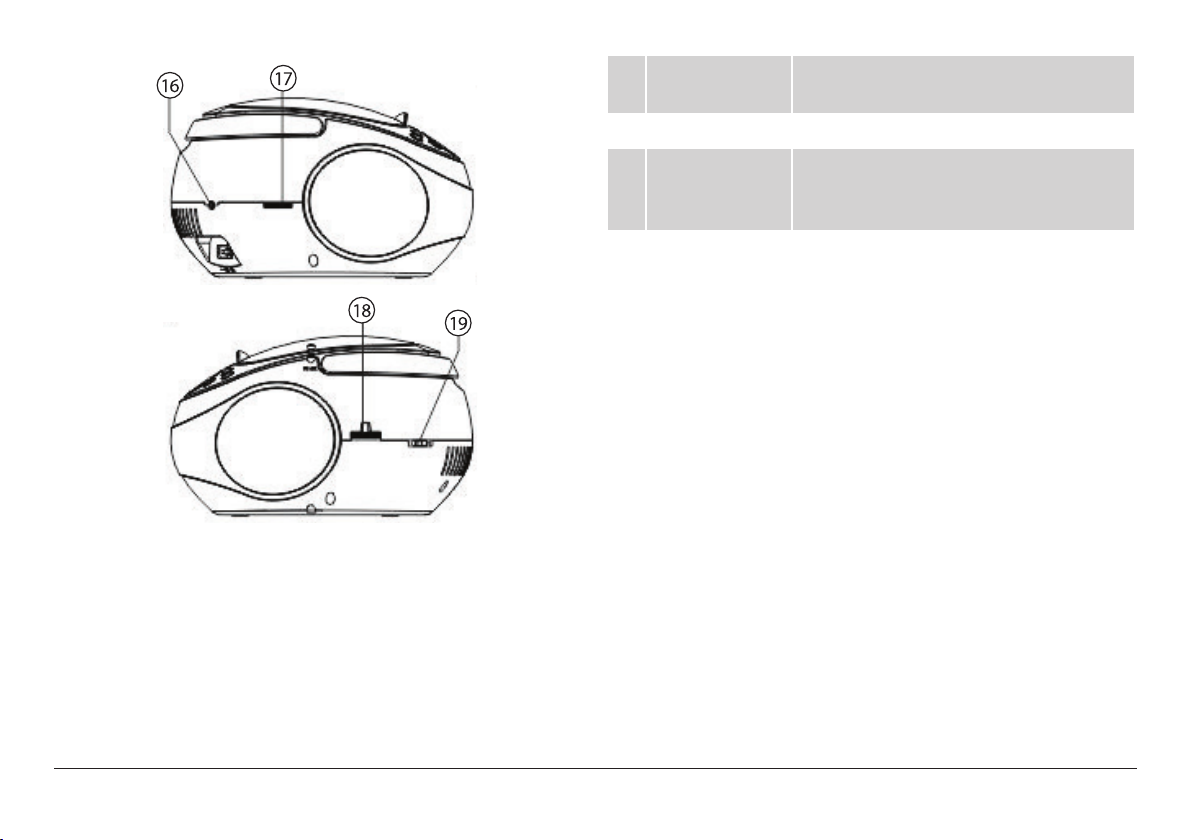
Page 7
16 AUX Input jack Play audio from a device that is con-
nected to this 3.5mm input jack.
17 Volume dial Turn the dial to adjust the volume level.
18 Radio Tuning
dial
Turn the dial to tune to a radio station.
The frequency scale is printed on the
dial.
19 FUNCTION
switch
Set the switch to the position of the
desired function mode (CD, AM, FM,
OFF). Set the switch to OFF to turn the
player off.

Connect Power
The unit can be powered by AC household power, or by
batteries.
AC Power
This unit operates on AC 120 V ~60 Hz power.
With the included AC power cable, connect the AC
power socket [8] found on the rear of the player to a
wall power outlet that provides AC 120V ~60Hz power.
⚠⚠Please be sure the power outlet you plug
this unit into is working and receives con-
stant (unswitched) power.
Contact your local power utility if you are
not sure which type of power you have.
Do not attempt to operate the radio on any
other power source. You could cause dam-
age to the unit and void your warranty.
Battery Power
Install 6 UM-2 “C” size batteries to enjoy music wher-
ever you are.
1. Remove the lid from the battery compartment [15]
found on the bottom of the main unit.
2. Load six “C” size batteries, taking care to match the
polarities marked on the inside of the compart-
ment.
⚠⚠Remove the batteries if they are exhausted
or will not be used for a long time.
Batteries contain chemicals that may be
regulated by your local government. Dispose
of them properly according to regulations.

Page 9
Basic Functions
Turning the Unit On and O
To turn the unit on, set the FUNCTION switch [19] to
one of the function positions (e.g., CD, AM, FM). The
LED screen [12] will light up.
To turn the unit off, set the FUNCTION switch [19] to
the OFF position.
Adjusting the Volume
Turn the VOLUME dial [17] clockwise or counter clock-
wise to increase or decrease the volume level, respec-
tively.
Using the Radio
Set the FUNCTION switch [19] to the AM or FM position
to start using the radio.
1. Select a frequency band.
• To listen to AM stations, set the FUNCTION
switch [19] to the AM position.
• To listen to FM stations, set the FUNCTION
switch [19] to the FM position.
2. Turn the Radio Tuning dial [18] to tune to a radio
station; the current station can be seen on the fre-
quency scale printed on the dial.
3. Optimize radio reception:
• Fully extend the telescopic FM ANTENNA [14]
and adjust its orientation to optimize FM radio
reception.
•The AM antenna is built into the player. Adjust
the orientation and position of the player itself
to optimize AM radio reception.

Page 10 Naxa Electronics
Using the CD/MP3
Player
Set the FUNCTION switch [19] to the CD position to
start using the CD/MP3 player.
About Compact Discs
This player is compatible with all digital audio CDs,
digital audio CD-Recordable discs (CD-R) and CD-Re-
writable discs (CD-RW) that have been nalized, and
CD-DA format digital audio CDs.
This player is also compatible with MP3-CDs. These are
compact discs that contain MP3 audio les on them.
⚠L Only handle a CD by its edge. Avoid touch-
ing the label or the playable side with your
hands or any other object.
Loading a Disc
1. Open the CD compartment [11]. Lift up from the CD
door latch found towards the front of the player.
2. Load a compatible disc. Place the CD into the com-
partment with its label facing up.
3. Close the CD compartment [11]. Lower the door; the
spring hinge will help close the compartment se-
curely.
4. The player will attempt to read the disc once the
compartment is closed.
•The LED screen [12] will show the amount of
playable tracks on the disc.
⚠L To ensure good system performance, wait
until the player recognizes and reads the
disc before proceeding.
MP3-CDs take longer to read because
they have more data on them. Please wait
patiently until the player has recognized
the disc.
Ce manuel convient aux modèles suivants
2
Table des matières
Autres manuels Naxa Lecteur MP3

Naxa
Naxa NMV-173NX Manuel utilisateur

Naxa
Naxa NM-107 Manuel utilisateur

Naxa
Naxa NPB-257 Manuel utilisateur

Naxa
Naxa NMV-149 Manuel utilisateur

Naxa
Naxa NPB-252 Manuel utilisateur

Naxa
Naxa NMV-173 Manuel utilisateur

Naxa
Naxa NPB-427 Manuel utilisateur

Naxa
Naxa NPB-250A Manuel utilisateur

Naxa
Naxa NM-145 Manuel utilisateur

Naxa
Naxa NM-105 Manuel utilisateur


Manuels Lecteur MP3 populaires d'autres marques

Blaupunkt
Blaupunkt Compact Drive MP3 Manuel utilisateur

Memorex
Memorex MMP9008 - 8GB USB 2.0 Manuel utilisateur

Meizu Electronic Technology
Meizu Electronic Technology E5 Manuel utilisateur

Philips
Philips PSA250 Manuel utilisateur

Zipy
Zipy go! Waving Manuel utilisateur

Sylvania
Sylvania SMPK4068 Manuel utilisateur


