
Naxa NDC-402 Manuel utilisateur

0

1
Contents Contents Contents Contents
Contents Contents Contents Contents……………………………………………………………………………………………………….1
Function Function Function FunctionDescription: Description: Description: Description:……………………………………………………………………………………….2
Notice Notice Notice Noticefor for for foruse: use: use: use:………………………………………………………………………………………………..2
System System System Systemrequirements: requirements: requirements: requirements:………………………………………………………………………………………4
Start Start Start Startto to to touse: use: use: use:…………………………………………………………………………………………………5
1.AppearanceandButtons……………………………………………………………………….5
2.Basicoperation…………………………………………………………………………………7
Introductioninterfaceforsoftwareinstallation………………………………………………….14
XvidcodecInstallation:…………………………………………………………………………15
MediaImpressionInstallationandUse:………………………………………………………17
Product Product Product Productspecifications: specifications: specifications: specifications:……………………………………………………………………………………23
Standard Standard Standard Standardaccessories: accessories: accessories: accessories:……………………………………………………………………………………24

2
Function Function Function FunctionDescription Description Description Description
Welcometopurchaseandusethisdigitalvideocamera.Beforeuse,pleasereadthisuser
manualcarefully.
Withthisdigitalvideocamera,youcantakevideoclipsandstillphoto.Withtheplayback
function,youcanplaybackthetakenvideowiththisdigitalvideocamera;inaddition,youcan
downloadthevideofromthedigitalvideocameraintoyourPC.Whenprepared,thisuser
manualreferstothelatestinformation.Thescreensandillustrationsetcinthisusermanual
aretoparticularlyandvisuallydetailtheoperationofthedigitalvideocamera.Dueto
technologydevelopmentanddifferentproductionbatches,thedigitalvideocamerahereinmay
bedifferentfromthatyoubuyanduse.
Notice Notice Notice Noticefor for for foruse use use use
General: General: General: General:
1.Neveropenthehousingofthedigitalvideocamera;otherwise,somepartsmaycause
electricshock.
2.Damp,pressure,collisionandoverheatmaydamagethisdigitalvideocamera.
Memory Memory Memory Memoryand and and andstorage: storage: storage: storage:
1.SD/MMC/SDHCcanbeused(butnotincludedinthepackinglistandmaximalcapacity
16GB).
2.WhenbuyingSD/MMC/SDHCcard,besuretotakethedigitalvideocamerawithyousoas
toensurecompatibility.
3.WhenSD/MMC/SDHCcardisinserted,thememoryofthedigitalvideocamerawillnot
function.
4.SDcardhasawrite-protectswitch,whichcanbeusedtopreventwrongdeletionofdata.
Whenthisswitchispushedtothebottomandlocked,thedatainthecardwillbeprotected.

3
However,whenthecardisinwrite-protectstate,itcannotbeusedforshootingordeletionetc.
5.Thesememorycardscannotbeusedforpermanentstorageofdata.Youmustcopythe
documentsinthedigitalvideocameraintheproperstorageposition.
6.Whenstoringdocumentsintothememoryorthememorycard,makesurethatthesizeof
thedocumentsdoesnotexceedthecapacityofthememory.
Maintenance Maintenance Maintenance Maintenanceand and and andcare: care: care: care:
1.Inuse,alwayswearthewristbandsoastopreventslip.
2.Useproperprotectionsheathtoavoidscratchingthelensandscreen.
3.
To
cleanthelens,firstlyblowawaythedustonitssurface,thenuseproperclothortissuefor
opticaldevicestocleanthelens.Ifnecessary,uselenscleanser.Neveruseorganiccleanser
tocleanthedigitalvideocamera.
4.Nevertouchthelenswithfingers.
5.Whenleftidleforlong,keepthedigitalvideocamerawiththebatterytakenoutindryand
darkplace.
Other Other Other Othernotices: notices: notices: notices:
1.WhenswitchingvideooutputbetweenLCDdisplayandvideodevices,besuretoexitfrom
theplayorrecordstate.
2.Thisdigitalvideocameraissuitabletheenvironmentbetween0℃-40℃(32℉-104℉).
Neverkeepthedigitalvideocameraintheplaceatextremelyhightemperature,suchasinthe
carparkingundertheburningsun,orwithmuchdamp.Inordertopreventthedigitalvideo
camerafromcondensation,whenmovingfromacoldplacetoawarmplace,besuretokeepit
insealedplasticbag,andopenthebagandtakeitoutwhenthedigitalvideocamerareaches
theindoortemperature.
3.TVprograms,movies,music,imagesandotherresourcesmaybeprotectedbycopyright;
therefore,withoutpriorpermission,theshooting/useoftheseresourcesmayviolatecopyright

4
lawsandregulationsrelated.Pleasenotethattheresourcesundertheprotectionofcopyright
canbeusedwithinthepermissionofrelatedlawsandregulations.
System System System Systemrequirements requirements requirements requirements
Whenoperatingandusingthisdigitalvideocamera,besuretomeettherequirementsonthe
basicsystemforcomputer.Itisstronglyrecommendedtousethebestcomputerunitsto
operatethecamerasoastobringitsfunctionsintofullplay.Belowaretherequirementsonthe
basicsystem:
OperationSystemMicrosoftWindows2000,XP ,vista,Windows7
CPUAboveIntelPIII667orCPUofequalperformance
MemoryAbove128MB
SoundcardanddisplaycardDirectX8orabove.
CD-ROM4×speedorabove
HardDisk1GBspaceaboveuseable
OtherOnestandardUSB1.1orUSB2.0port
5
Start Start Start Startto to to touse use use use
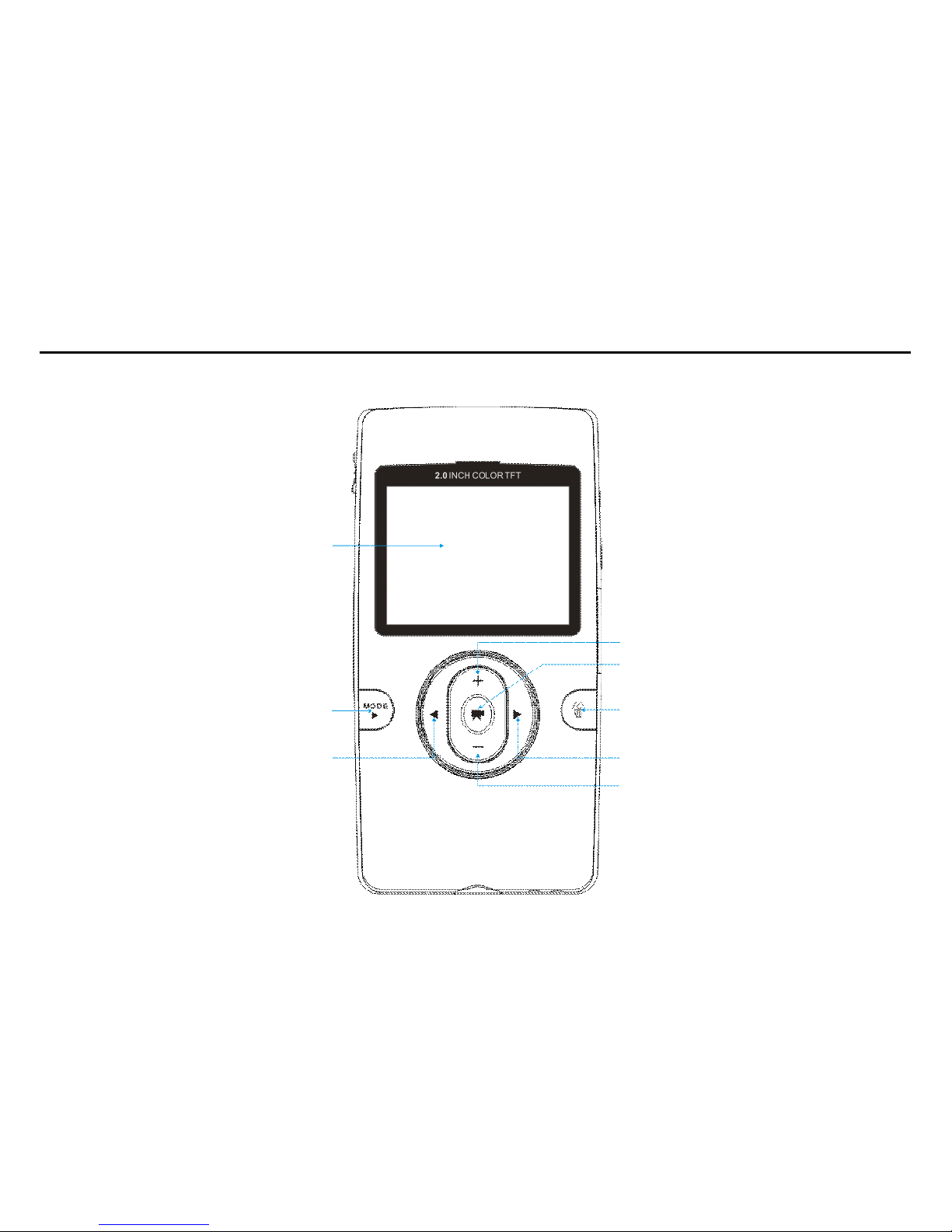
1.AppearanceandButtons
LCD
Deletekey Modekey
Upkey
Rightkey Leftkey
Shutter/OKkey
Downkey

6
USBConnector
PowerKey
TVOutPort
HDMIOutPort
SD/MMC
CardSlot
Speaker
StrapHolder
Microphone
BusyLED
Lens
BatteryCover
Tripod
USBSwitch

7
2.Basicoperation
2.1 2.1 2.1 2.1Install Install Install Installbattery battery battery battery
Press/slidedowntheBatteryCoverandinsertlithiumbattery.Alignwithcorrectpolarityof
batteryterminals.ClosetheBatteryCover.
2.2 2.2 2.2 2.2Charge Charge Charge ChargeBattery Battery Battery Battery
1.Poweroffthecamera.
2.ConnectthecameratothecomputerUSBportorthepoweradapterwithUSBcableto
chargethebattery.
3.Duringcharging,Busylightisonandwillbeoffwhenthebatteryisfullycharged.
2.3 2.3 2.3 2.3Use Use Use UseSD/MMC SD/MMC SD/MMC SD/MMC/SDHC /SDHC /SDHC /SDHCcard card card card
InserttheSDMemorycardintotheSD/MCC/SDHCCardSlot.Pushitdownuntilthecard
stayslatched.Donotforce–checkcard
’
spositionaccordingtothepositionmarkonthe

8
camera.
Pushandreleaseinsertedcardifyouwishtoremoveorreplacethe
card.
TurnyourcamcorderOFFbeforeinserting/removingtheSDCard.
-NotethattheSDCardhasatinyLOCKswitchontheside.Setthe
switchtoun-LOCKpositiontobeabletostorerecordedvideos,still
picturesoninsertedSDMemoryCard.
2.4 2.4 2.4 2.4Power Power Power Poweron/off on/off on/off on/off
Inpower-offstate,pressandholdthepowerkeytopoweronthecamera.
Inpower-onstate,pressthepowerkeytopoweroffthecamera.
Inpower-onstate,letthecameraidlefor1minute(default)topoweroffthecamera
automatically.
Inpower-onstate,whenbatterylevelisverylow,thecamerawillturnoffafterseveral
seconds.Youmustreplacethebatteries.
2.5 2.5 2.5 2.5Setup Setup Setup Setupmenu menu menu menu
Inpower-onstate,pressDELETEkeytoenterthemenu,Therewillbesomeoptionsto
setuporselectforyou:Language、Format、TVMode、Frequency、Date/Time、AutoPower

9
Off、BeepSound、DefaultSetting,etcetera.
2.6 2.6 2.6 2.6Change Change Change Changemode mode mode mode
Afterpoweron,itwillentervideorecordmode,pressMODEkeytochangemodebetween
videorecord,Stillphotorecord,Playback;
2.7 2.7 2.7 2.7Video Video Video Videorecord record record record
InVideorecordmode,pressshutterkeytostartvideorecording,Whilerecording,pressthe
shutterkeyagaintostoprecording.
Atpreviewmode,pressLeftorRightkeycanchangethevideosizebetweenHD(1280x720),
VGA(640x480);Pressupkeyordownkeycanzoominorzoomouttheimage.
2.8 2.8 2.8 2.8Still Still Still Stillphoto photo photo photorecord record record record
InStillphotorecordmode,PressShutterkeycansnaponephoto,Atpreviewmode,press
LeftorRightkeycanchangethevideosizebetween5M(2592X1944),3M(2048x1536),
1.3M(1280x960);Pressupkeyordownkeycanzoominorzoomouttheimage.
Autres manuels pour NDC-402
2
Table des matières
Autres manuels Naxa caméscope


Manuels caméscope populaires d'autres marques


Panasonic
Panasonic AG-HMC152EN Manuel utilisateur

Insignia
Insignia NS-DCC5HB09 - Camcorder - 720p Manuel utilisateur

MYDLINK
MYDLINK DCS-6100LH Manuel utilisateur

Sony
Sony video Hi8 Handycam CCD-TR555 Manuel utilisateur

SECURECOM
SECURECOM V-5014B Manuel utilisateur

Panasonic
Panasonic HDC-SD100 Manuel utilisateur


