
NAiS FP0-A80 Manuel utilisateur
is a global brand name of Matsushita Electric Works.
PROGRAMMABLE CONTROLLER
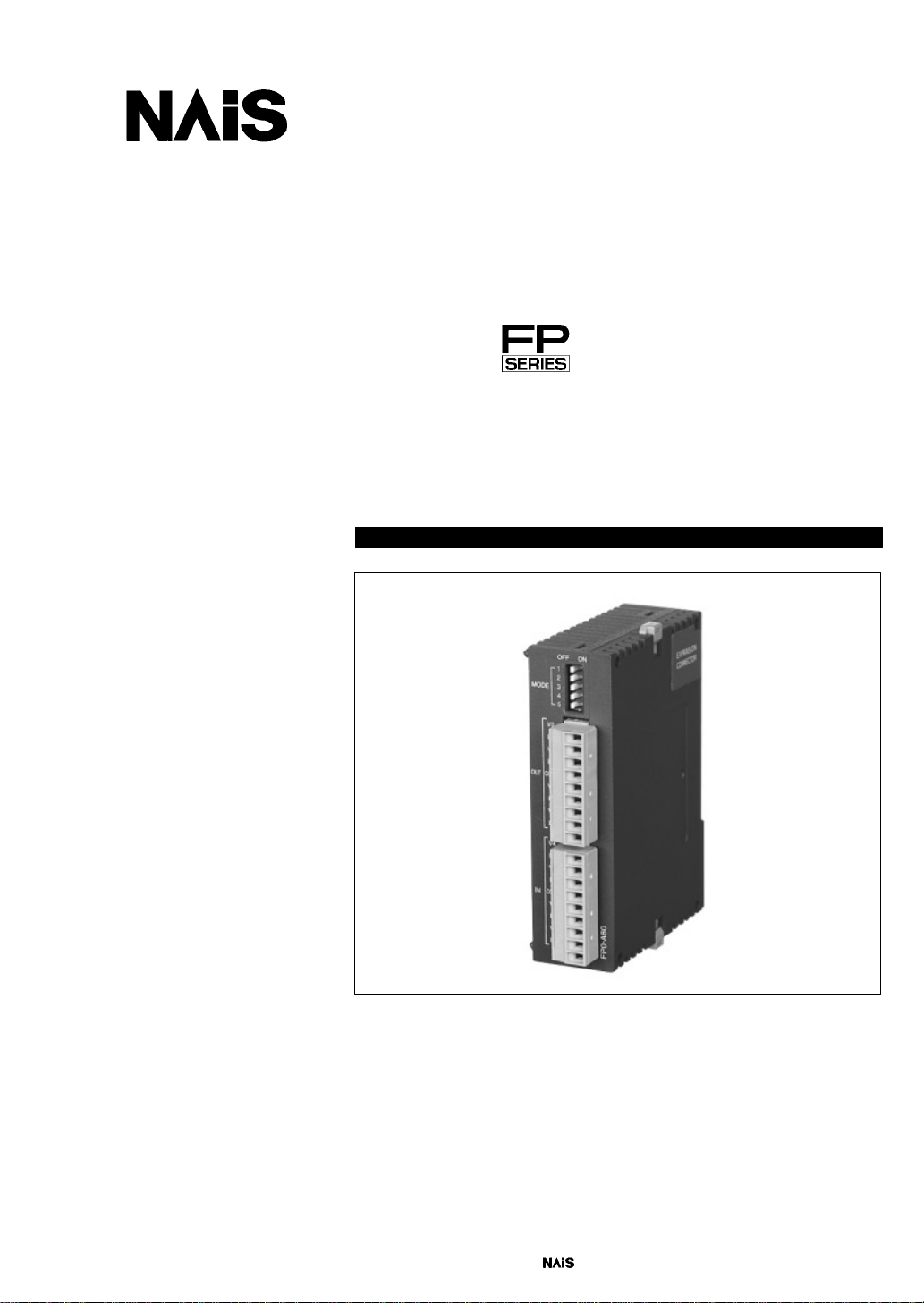
FP0
A/D Converter Unit
Technical Manual

BEFORE BEGINNING
This manual and everything described in it are copyrighted. You may not copy this
manual, in whole or part, without written consent of Matsushita Electric Works, Ltd.
Matsushita Electric Works, Ltd. pursues a policy of continuous improvement of the
design and performance of its products, therefore, we reserve the right to change the
manual/product without notice. In no event will Matsushita Electric Works, Ltd. be
liable for direct, special, incidental, or consequential damage resulting from any
defect in the product or its documentation, even if advised of the possibility of such
damages.
LIMITED WARRANTY
If physical defects caused by distribution are found, Matsushita Electric Works, Ltd.,
will replace/repair the product free of charge. Exceptions include:
DWhen physical defects are due to different usage/treatment of the
product other than described in the manual.
DWhen physical defects are due to defective equipment other than the
distributed product.
DWhen physical defects are due to modifications/repairs by someone
other than Matsushita Electric Works, Ltd.
DWhen physical defects are due to natural disasters.
MS-DOS and Windows are registered trademarks of Microsoft Corporation.
IBM Personal Computer AT is a registered trademark of the International Business
Machines Corporation.

Table of Contents
Chapter 1 Parts and Terminology
1.1 Parts and Functions 1-2. . . . . . . . . . . . . . . . . . . . . . . . . . . . . . . . . . . . . . . . . . . .
1.2 Analog Input Terminal Block 1-3. . . . . . . . . . . . . . . . . . . . . . . . . . . . . . . . . . . . .
1.3 Expansion Limit 1-4. . . . . . . . . . . . . . . . . . . . . . . . . . . . . . . . . . . . . . . . . . . . . . . .
Chapter 2 Wiring and Input Range Setting Switch
2.1 Wiring 2-2. . . . . . . . . . . . . . . . . . . . . . . . . . . . . . . . . . . . . . . . . . . . . . . . . . . . . . . .
2.2 Input Range Setting (DIP) Switches 2-3. . . . . . . . . . . . . . . . . . . . . . . . . . . . . .
Chapter 3 A/D Conversion Characteristics
3.1 Current Range 3-2. . . . . . . . . . . . . . . . . . . . . . . . . . . . . . . . . . . . . . . . . . . . . . . . .
3.2 Voltage Range 3-3. . . . . . . . . . . . . . . . . . . . . . . . . . . . . . . . . . . . . . . . . . . . . . . . .
3.3 Averaging Function for Voltage and Current Ranges 3-6. . . . . . . . . . . . . . . .
Chapter 4 I/O Allocation and Program
4.1 I/O Number of A/D Converter Unit 4-2. . . . . . . . . . . . . . . . . . . . . . . . . . . . . . . .
4.2 Program of A/D Converter Unit 4-4. . . . . . . . . . . . . . . . . . . . . . . . . . . . . . . . . .
Chapter 5 Specifications and Dimensions
5.1 Specifications 5-2. . . . . . . . . . . . . . . . . . . . . . . . . . . . . . . . . . . . . . . . . . . . . . . . .
5.2 Dimensions 5-5. . . . . . . . . . . . . . . . . . . . . . . . . . . . . . . . . . . . . . . . . . . . . . . . . . .
Index
Record of Changes

Table of Contents FP0 A/D Converter Unit
ii Matsushita Electric Works (Europe) AG

Chapter 1
Parts and Terminology
FP0 A/D Converter UnitParts and Terminology
1-2 Matsushita Electric Works (Europe) AG
1.1 Parts and Functions
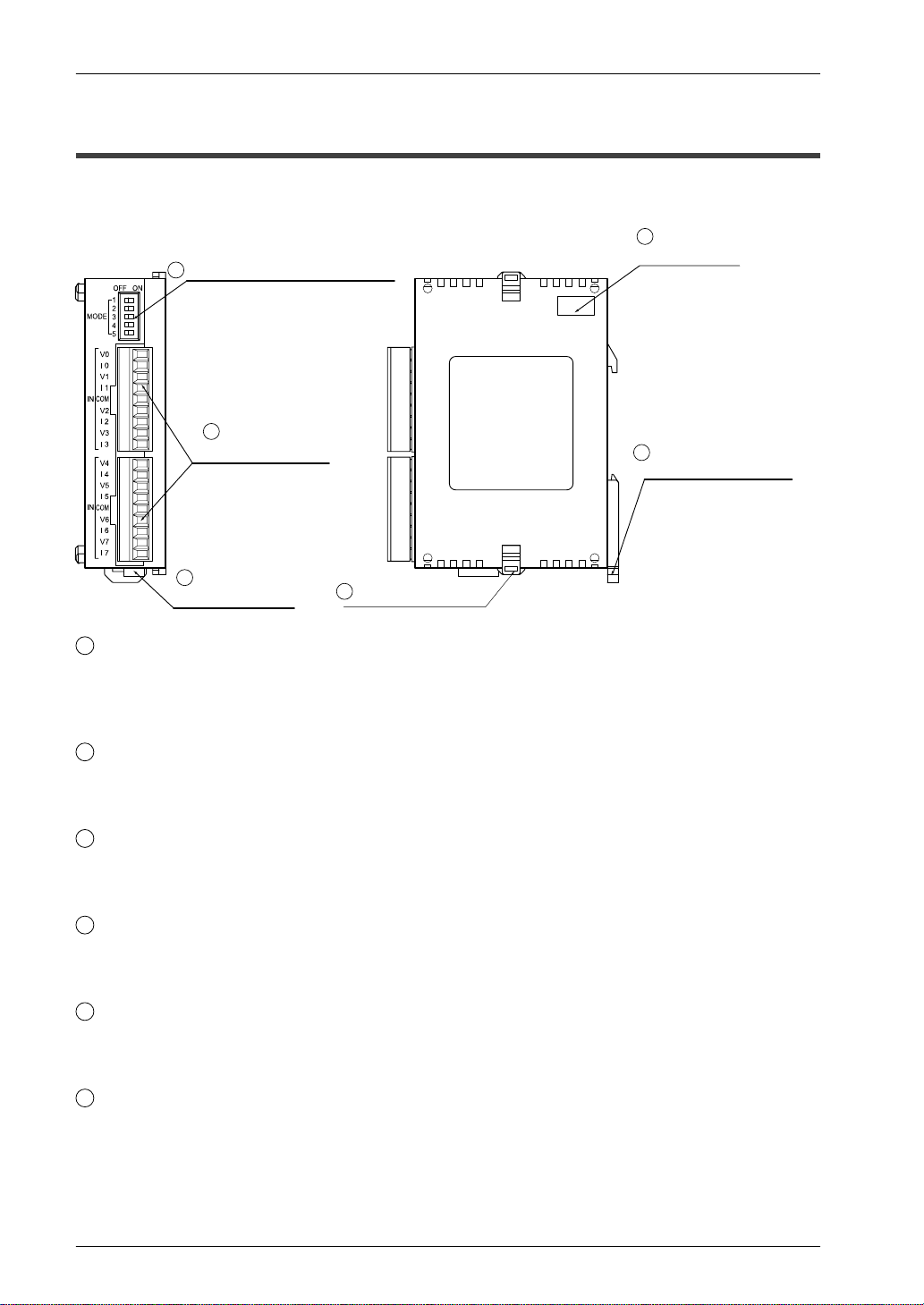
FP0–A80 A/D converter unit
1Input range setting switches
2Analog input
terminal block
3Power supply
connector 6Expansion hook
5DIN rail attachment
lever
4Expansion
connector
FP0 A80
1Input range setting (DIP) switches (voltage/current)
This switch is used to change the input mode (between voltage and current). All eight
input channels of the A/D converter unit operate at the same level. See page 2-3 for
details.
2Analog input terminal block (9-pin)
Use a terminal block socket made by Phoenix Contact Co. (product number: 1840434).
(See FP0 Hardware Manual.)
3Power supply connector
The power supply connector (supply 24V DC) is hooked up by using the power supply
cable (AFP0581) that comes with the unit.
4Expansion connector
The expansion connector hooks up the expansion unit to the internal circuit of this unit.
(See FP0 Hardware Manual.)
5DIN rail attachment lever
The DIN rail attachment lever allows simple attachment to a DIN rail. The lever is also
used for installation on a FP0 slim type mounting plate (AFP0803).
6Expansion hook
The expansion hook is used to secure expansion units.
FP0 A/D Converter Unit 1.2 Analog Input Terminal Block
1-3Matsushita Electric Works (Europe) AG
1.2 Analog Input Terminal Block
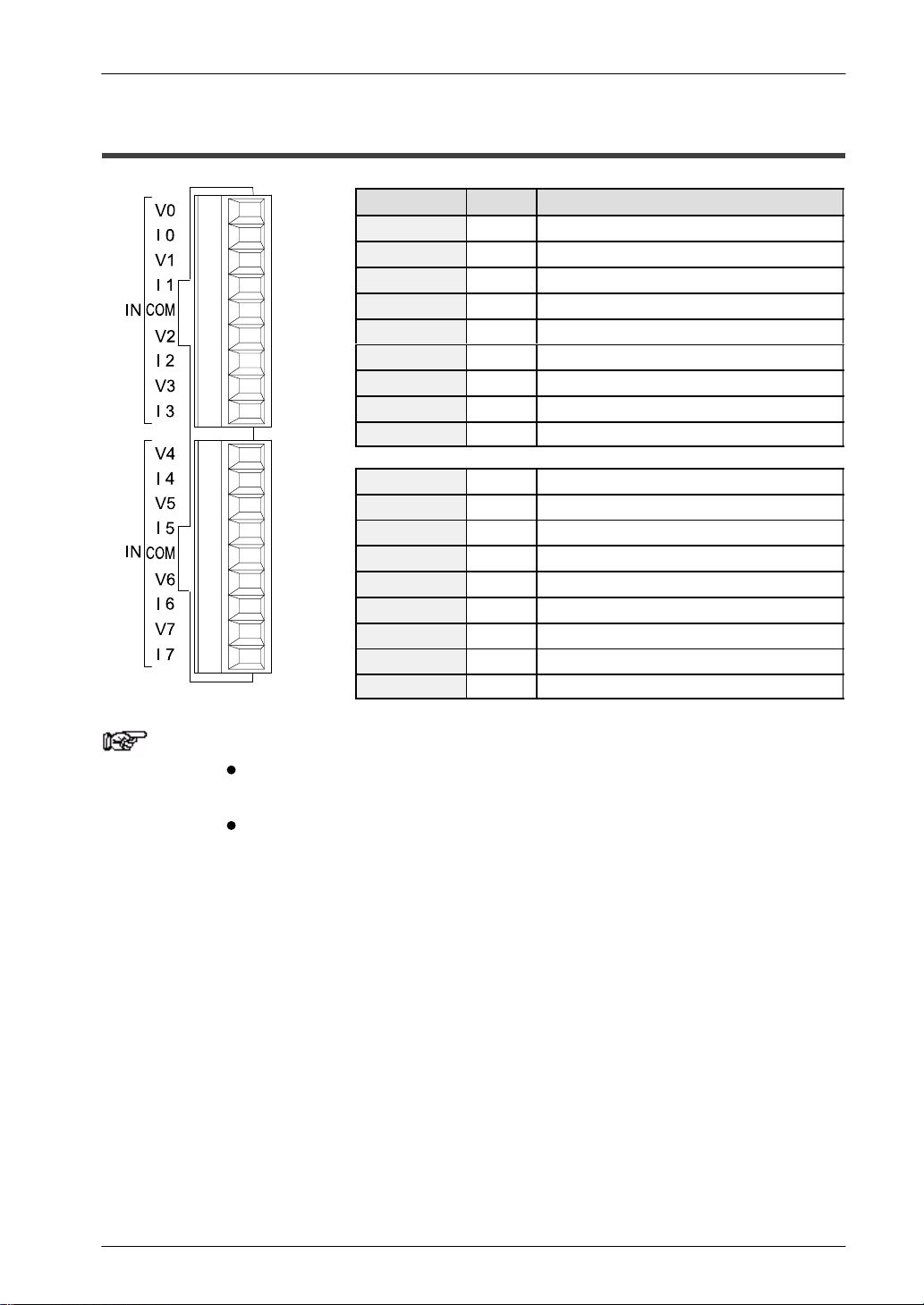
Pin number Name Description
1V0 Analog input channel 0, voltage input
2I0 Analog input channel 0, current input
3V1 Analog input channel 1, voltage input
4I1 Analog input channel 1, current input
5COM Analog input, input common
6V2 Analog input channel 2, voltage input
7I2 Analog input channel 2, current input
8V3 Analog input channel 3, voltage input
9I3 Analog input channel 3, current input
1V4 Analog input channel 4, voltage input
2I4 Analog input channel 4, current input
3V5 Analog input channel 5, voltage input
4I5 Analog input channel 5, current input
5COM Analog input, input common
6V6 Analog input channel 6, voltage input
7I6 Analog input channel 6, current input
8V7 Analog input channel 7, voltage input
9I7 Analog input channel 7, current input
Notes When the analog input is a current signal, bridge the V and I
input pins externally.
The two COM terminals are connected internally.

FP0 A/D Converter UnitParts and Terminology
1-4 Matsushita Electric Works (Europe) AG
1.3 Expansion Limit
The unit can be connection to a combined maximum of three other expansion units and
intelligent units.

Chapter 2
Wiring and Input Range Setting Switch
FP0 A/D Converter UnitWiring and Input Range Setting Switch
2-2 Matsushita Electric Works (Europe) AG
2.1 Wiring
Voltage input Current input
V0
I0
COM
V1
I1
V2
I2
V3
I3
V4
I4
COM
V5
I5
V6
I6
V7
I7
I0
Input instrument (ch2)
Input instrument (ch3)
Input instrument (ch1)
Input instrument (ch0)
Input instrument (ch4)
Input instrument (ch5)
Input instrument (ch6)
Input instrument (ch7)
V0
I0
COM
V1
I1
V2
I2
V3
I3
V4
I4
COM
V5
I5
V6
I6
V7
I7
Input instrument (ch0)
Input instrument (ch1)
Input instrument (ch2)
Input instrument (ch3)
Input instrument (ch4)
Input instrument (ch5)
Input instrument (ch6)
Input instrument (ch7)
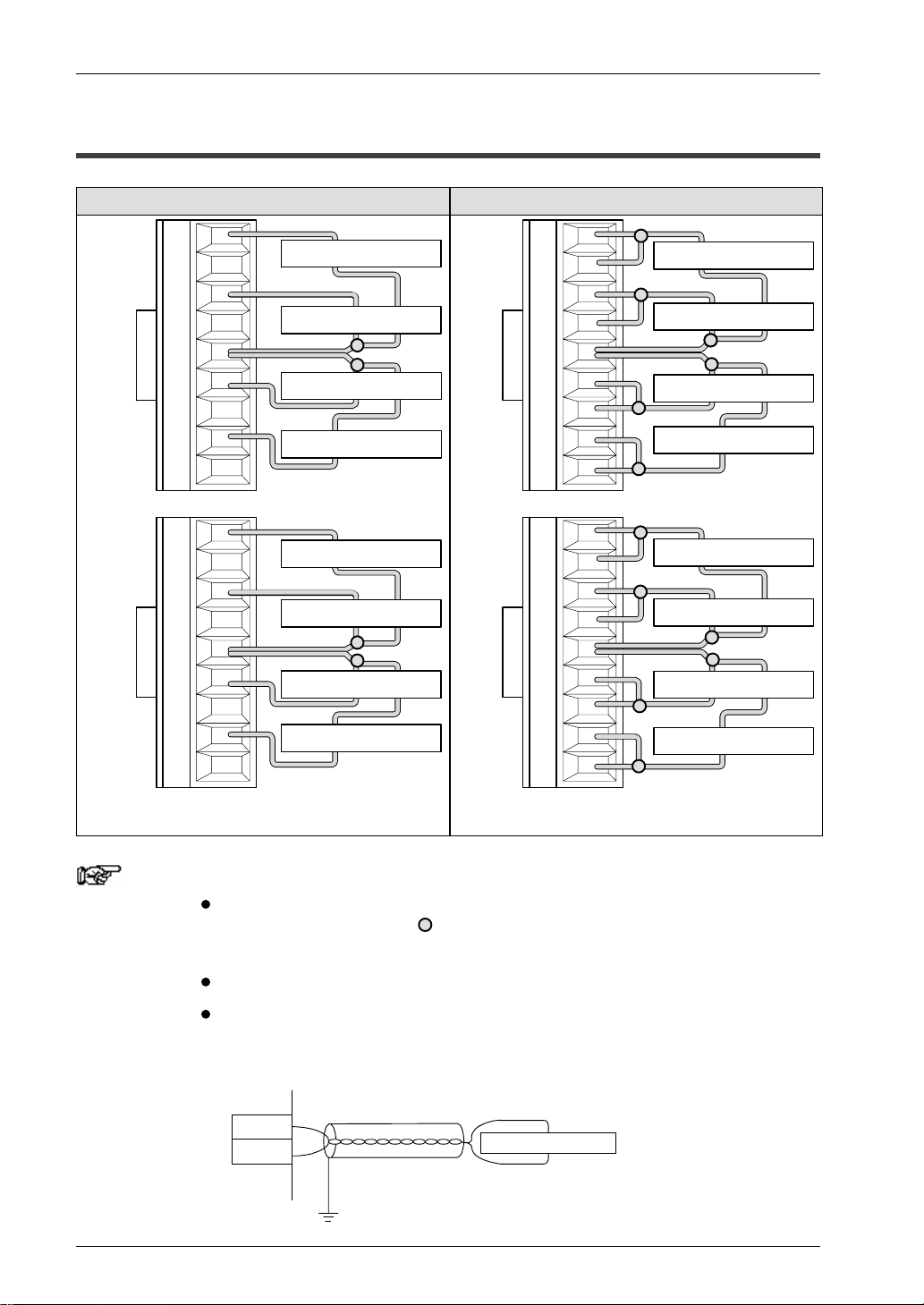
Connect input instrument between V terminal and COM
terminal. First, connect both V terminal and I terminal. And then
connect input instrument between it and COM terminal.
Notes Tie the COM connectors for two channels together as indicated
by the gray circles ( ) in the diagram above so that no more
than two wires go to each COM terminal.
The two COM terminals are connected internally.
We recommend that you use dual–core twisted pair shielded
wiring for the analog input wiring, and that you connect the
shield to earth.
V
COM Input instrument
Table des matières


