MultiTouch MultiTaction Cell MT550 Manuel utilisateur

MultiTaction Cell 55"
MT550 User Manual
(v.1.1)

Notice to Users
This user manual is intented for the owners and operators of MultiTouch Multi-
Taction Cell products. It contains guidelines for the proper usage of the prod-
ucts. Information in this manual is subject to change without prior notice to
product owners. For the latest product details and guidelines please visit the
product website.
Copyright © 2011 Multitouch. All rights reserved.
NOTE: MultiTaction and MultiTouch Cornerstone are trademarks of Multi-
touch. All other trademarks are the property of their respective owners.

Trademarks
MultiTaction and MultiTouch Cornerstone are trademarks of Multitouch.
All other trademarks are the property of their respective owners.
Safety Information
Read carefully through and comprehend all the given safety information before
installing or using the product. Follow instructions found on this manual and
marked on the MultiTaction Cell. Take careful notice of all the warnings and
safety related instructions to install and use the product safely.
Safety Signal Word Explanation
DANGER Indicates a hazard with a high level of risk which,
if not avoided, will result in death or serious injury
AND / OR property damage.
WARNING Indicates a hazard with a medium level of risk
which, if not avoided, could result in death or
serious injury AND / OR property damage.
CAUTION Indicates a hazard with a low level of risk which, if
not avoided, could result in minor or moderate
injury AND / OR property damage.
NOTICE Indicates important information.

Regulatory information
European Union Directive on Restriction of Hazardous Substances (RoHS)
This MultiTaction Cell complies with the following regulatory standards:
•RoHS
• EN 55022
• EN 55024
• IEC 61000-3-2
• IEC 61000-3-3
• IEC 62471
• IEC60950:2005+A1:2009
More information on the complience can be acquired from Multitouch by
delivering the S/N of the MultiTaction Cell in question.

Disposal Guidelines
The Cell complies with the European RoHS -directive. Please consult local
authorities and professionals when planning to dispose the Cell.

Table of Contents
Introduction .................................................................................................................... ........ 1
Device Overview .............................................................................................................. ........ 2
Dimensions .......................................................................................................................... ......... 3
Connection Panel................................................................................................................. ......... 4
Warning Labels ................................................................................................................... ......... 5
Technical Specifications...................................................................................................... ......... 6
Box Contents .................................................................................................................... ........ 10
Unpacking the Cell .......................................................................................................... ........ 11
Installing the Cell ............................................................................................................. ........ 13
Proper Environment............................................................................................................ ......... 13
Ventilation and Heat Control ............................................................................................ ......... 14
VESA Mount Installation.................................................................................................... ......... 15
Custom Installation ............................................................................................................. ......... 17
Desk Stand Installation ....................................................................................................... ......... 20
Multi-Cell Installation......................................................................................................... ......... 22
Display wall installations....... ............................................................................................. ......... 23
Connecting the Cell .......................................................................................................... ........ 26
Normal Operating Conditions.......................................................................................... ........ 27
Guidelines for Maximum Performance........................................................................... ........ 28
Software Setup ................................................................................................................. ........ 29
Operations on the MultiTaction Cell................................................................................ ......... 29
Operations on the Application PC .................................................................................... ......... 30
Finalizing the Setup ............................................................................................................. ......... 31
More information ................................................................................................................ ......... 31
Computer Recommendations ............................................................................................ ......... 32
Installation of Cornerstone................................................................................................. ......... 33
Calibration ........................................................................................................................... ......... 34
Tuning of the Tracking Parameters.................................................................. .........34
Finger Tracking................................................................................................ .........34
Marker Tracking .............................................................................................. .........34
Automatic Geometry calibration 34
On-line Resources................................................................................................................ ......... 35
Maintenance and Cleaning............................................................................................... ........36
Warranty Information ..................................................................................................... ........ 37

INTRODUCTION
1
Introduction
MultiTaction Cells are multi-touch, modular LCD displays intended for (but in
no way limited to) retail businesses, advertising, exhibitions, museums, educa-
tion, and design installations. ‘MultiTaction’ means that Cells can track and
react to several people interacting with them simultaneously. Moreover, the
system tracks a person’s hands instead of points of contact only, further
enhancing interactive possibilities.
The LCD displays deliver Full HD picture quality, have a long life-span, and
need hardly any maintenance. ‘Modular’ means that Cells can be easily
connected to each other to create a single large display array showing interactive
content split into the various screens, while reacting to multiple users’ touch.
The system welcomes customization. Work on Linux, Mac, or Windows envi-
ronments, and create your own tailored apps through the MultiTouch Corner-
stone SDK or many other supported methods.
This manual contains the installing and operating instructions for
MultiTaction Cell 55”.

DEVICE OVERVIEW
2
Device Overview
MultiTaction is an innovative way to build an integrated multi-touch LCD
display. The front glass and LCD package is tuned to allow the integrated optical
imaging system to work effectively through it. Imaging logic and processing
power are embedded in the display unit. The illustration below shows the main
technologies used in MultiTaction.
DIMENSIONS
3
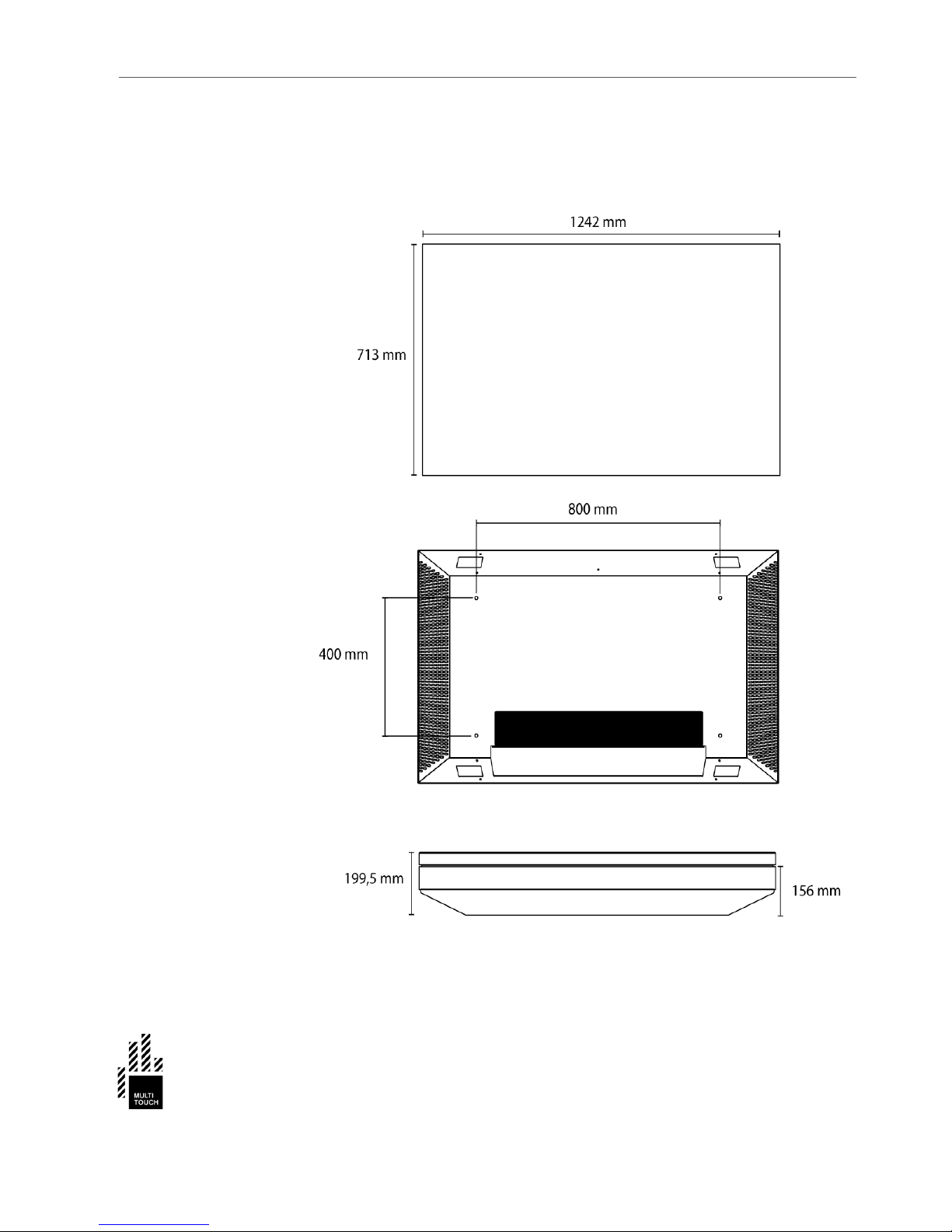
Dimensions
The Cell enclosure holds the following dimensions:
Table des matières
Autres manuels MultiTouch Moniteur