
MultiDyne openGear MDOG-6001-DA8-AESB Manuel utilisateur

Multidyne Video & Fiber Optic Systems Inc.
MDOG-6001-DA8-AESB
1x8 AES/EBU Reclocking Distribution Amplifier 110ohm
User Manual

MDOG-6001-DA8-AESB User Manual
• Multidyne Video & Fiber Optic Systems Part Number: MDOG-6001-DA8-AESBUM
• Release Date: November 14, 2022
The information contained in this User Manual is subject to change without notice or obligation.
Copyright
© 2022 Multidyne Video & Fiber Optic Systems Inc. All rights reserved.
Contents of this publication may not be reproduced in any form without the written permission of
openGear. Reproduction or reverse engineering of copyrighted software is prohibited.
Patents
This product is protected by the following US Patents: 4,205,346; 5,115,314; 5,280,346; 5,561,404;
7,034,886; 7,508,455; 7,602,446; 7,834,866; 7,914,332. This product is protected by the following
Canadian Patents: 2039277; 1237518; 1127289. Other patents pending.
Notice
The material in this manual is furnished for informational use only. It is subject to change without
notice and should not be construed as a commitment by Ross Video Limited. Ross Video Limited
assumes no responsibility or liability for errors or inaccuracies that may appear in this manual.
Trademarks
•
is a registered trademark of Multidyne Video & Fiber Optic Systems Inc.
•
Ross, ROSS, ROSSÒ, and MLE are registered trademarks of Ross Video Limited.
•
openGear® is a registered trademark of Ross Video Limited.
•
DashBoard Control System™ is a trademark of Ross Video Limited.
•
Dolby® is a registered trademark of Dolby Laboratories.
•
All other product names and any registered and unregistered trademarks mentioned in
this manual are used for identification purposes only and remain the exclusive property of
their respective owners.
Important Regulatory and Safety Notices
Before using this product and any associated equipment, refer to the “Important Safety
Instructions” listed below to avoid personnel injury and to prevent product damage.
Products may require specific equipment, and/or installation procedures to be carried out to satisfy
certain regulatory compliance requirements. Notices have been included in this publication to call
attention to these specific requirements.
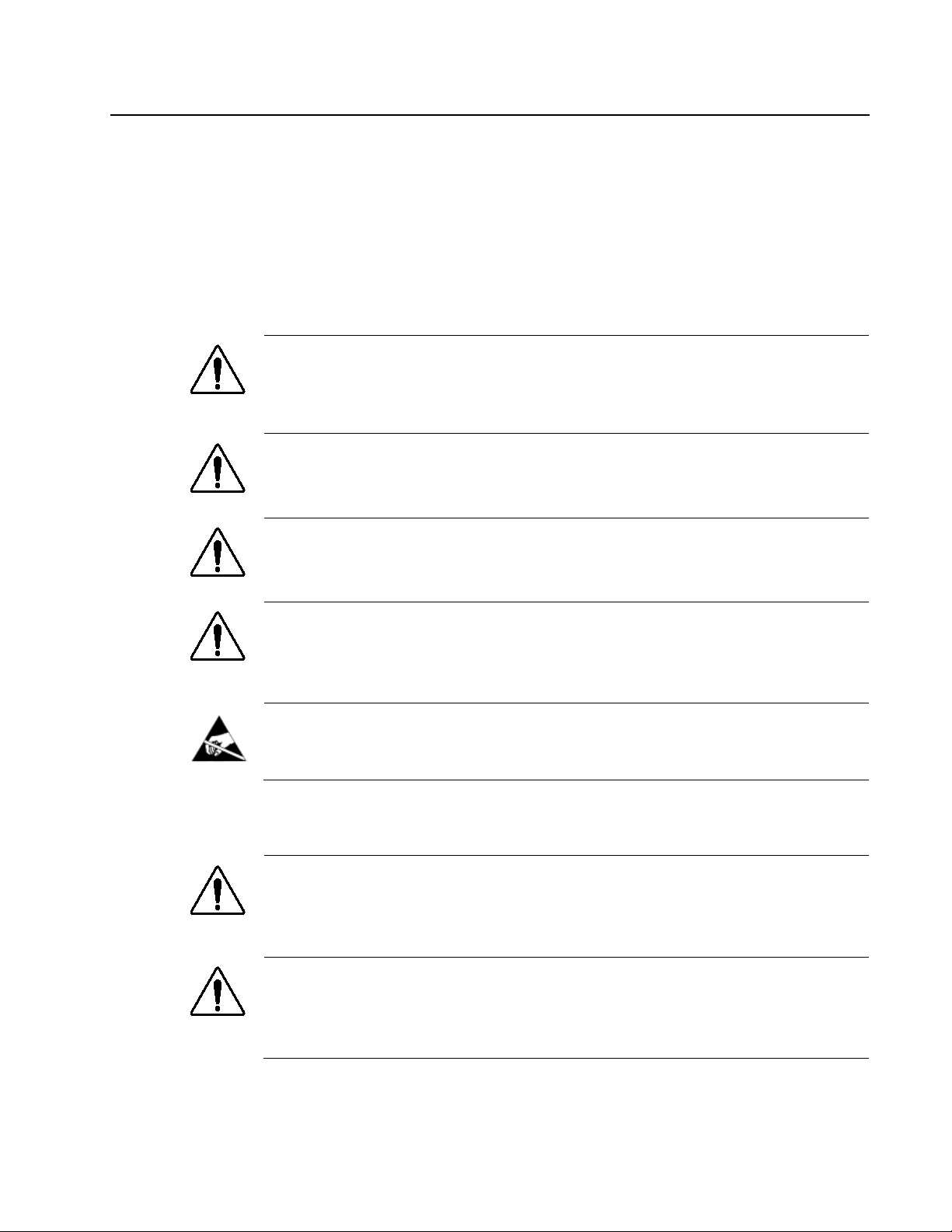
Symbol Meanings
This symbol on the equipment refers you to important operating and maintenance
(servicing) instructions within the Product Manual Documentation. Failure to heed
this information may present a major risk of damage or injury to persons or
equipment.
Warning — The symbol with the word “Warning” within the equipment manual
indicates a potentially hazardous situation which, if not avoided, could result in death
or serious injury.
Caution — The symbol with the word “Caution” within the equipment manual
indicates a potentially hazardous situation which, if not avoided, may result in minor
or moderate injury. It may also be used to alert against unsafe practices.
Notice — The symbol with the word “Notice” within the equipment manual
indicates a situation, which if not avoided, may result in major or minor equipment
damage or a situation which could place the equipment in a non-compliant operating
state.
ESD Susceptibility — This symbol is used to alert the user that an electrical or
electronic device or assembly is susceptible to damage from an ESD event.
Important Safety Instructions
Caution — This product is intended to be a component product of the DFR-8300
series frame. Refer to the DFR-8300 series frame User Manual for important safety
instructions regarding the proper installation and safe operation of the frame as well
as its component products.
Warning — Certain parts of this equipment namely the power supply area still
present a safety hazard, with the power switch in the OFF position. To avoid
electrical shock, disconnect all A/C power cards from the chassis’ rear appliance
connectors before servicing this area.

Warning — Service barriers within this product are intended to protect the
operator and service personnel from hazardous voltages. For continued safety,
replace all barriers after any servicing.
This product contains safety critical parts, which if incorrectly replaced may present a
risk of fire or electrical shock. Components contained with the product’s power
supplies and power supply area, are not intended to be customer serviced and
should be returned to the factory for repair. To reduce the risk of fire, replacement
fuses must be the same time and rating. Only use attachments/accessories specified
by the manufacturer.
EMC Notices
United States of America
FCC Part 15
This equipment has been tested and found to comply with the limits for a class A Digital device,
pursuant to part 15 of the FCC Rules. These limits are designed to provide reasonable protection
against harmful interference when the equipment is operated in a commercial environment. This
equipment generates, uses, and can radiate radio frequency energy and, if not installed and used in
accordance with the instruction manual, may cause harmful interference to radio communications.
Operation of this equipment in a residential area is likely to cause harmful interference in which
case the user will be required to correct the interference at his own expense.
Notice — Changes or modifications to this equipment not expressly approved by
Ross Video Limited could void the user’s authority to operate this equipment.
CANADA
This Class “A” digital apparatus complies with Canadian ICES-003.
Cet appariel numerique de la classe “A” est conforme a la norme NMB-003 du Canada.
EUROPE
This equipment is in compliance with the essential requirements and other relevant provisions of
CE Directive 93/68/EEC.
INTERNATIONAL
This equipment has been tested to CISPR 22:1997 along with amendments A1:2000 and
A2:2002, and found to comply with the limits for a Class A Digital device.
Notice — This is a Class A product. In domestic environments, this product may
cause radio interference, in which case the user may have to take adequate
measures.
Maintenance/User Serviceable Parts
Routine maintenance to this openGear product is not required. This product contains no user
serviceable parts. If the module does not appear to be working properly, please contact Technical
Support using the numbers listed under the “Contact Us” section on the last page of this manual.

All openGear products are covered by a generous 5-year warranty and will be repaired without
charge for materials or labor within this period. See the “Warranty and Repair Policy” section in
this manual for details.

Environmental Information
The equipment that you purchased required the extraction and use of natural resources for its
production. It may contain hazardous substances that could impact health and the environment.
To avoid the potential release of those substances into the environment and to diminish the need for the
extraction of natural resources, Multidyne Video & Fiber Optic Systems encourages you to use the
appropriate take-back systems. These systems will reuse or recycle most of the materials from your
end-of-life equipment in an environmentally friendly and health conscious manner.
The crossed-out wheeled bin symbol invites you to use these systems.
If you need more information on the collection, reuse, and recycling systems, please contact your local
or regional waste administration.
You can also contact Multidyne Video & Fiber Optic Systems for more information on the
environmental performances of our products.

Company Address
Multidyne Video & Fiber Optic Systems Incorporated
10 Newton Place
Hauppauge, NY 11788
United States of America
General Business Office:
+1-516-671-7278
Technical Support:
+1-516-671-7278
After Hours Emergency:
+1-516-671-7278
E-mail (Technical Support):
E-mail (General Information):
Website:
www.multidyne.com


MDOG-6001-DA8-AESB User Manual Contents
•
i
Contents
Introduction 1-1
In This Chapter ........................................................................................................................ 1-1
A Word of Thanks ..................................................................................................... 1-1
Overview ................................................................................................................................. 1-2
Features ..................................................................................................................... 1-2
Functional Block Diagrams ..................................................................................................... 1-3
User Interfaces ......................................................................................................................... 1-4
DashBoard Control System™ ................................................................................... 1-4
Card-edge Controls ................................................................................................... 1-4
Documentation Terms and Conventions ................................................................................. 1-5
Installation 2-1
In This Chapter ........................................................................................................................ 2-1
Before You Begin .................................................................................................................... 2-2
Static Discharge ........................................................................................................ 2-2
Unpacking ................................................................................................................. 2-2
Installing the MDOG-6001-DA8-AESB ................................................................................. 2-3
Rear Modules for the MDOG-6001-DA8-AESB ..................................................... 2-3
Installing a Rear Module ........................................................................................... 2-3
Installing the MDOG-6001-DA8-AESB .................................................................. 2-4
Cabling for the MDOG-6001-DA8-AESB .............................................................................. 2-5
DFR-8321 Series Frames Cabling Overview ............................................................ 2-5
Software Upgrades .................................................................................................................. 2-6
User Controls 3-1
In This Chapter ........................................................................................................................ 3-1
Card Overview ......................................................................................................................... 3-2
Configuring the DIP Switches ................................................................................................. 3-3
Enabling Card-edge Control ..................................................................................... 3-3
Setting the Output Mode ........................................................................................... 3-3
Specifying the Gain ................................................................................................... 3-3
Control and Monitoring Features ............................................................................................ 3-6
Status and Selection LEDs on the MDOG-6001-DA8-AESB .................................. 3-6
DashBoard Menus 4-1
In This Chapter ........................................................................................................................ 4-1
Status Tabs ............................................................................................................................... 4-2
Status Tab .................................................................................................................. 4-2
Product Tab ............................................................................................................... 4-2
Settings Tab ............................................................................................................................. 4-3
Specifications 5-1
In This Chapter ........................................................................................................................ 5-1

ii
•
Contents MDOG-6001-DA8-AESB User Manual
Technical Specifications .......................................................................................................... 5-2
Service Information 6-1
In This Chapter ........................................................................................................................ 6-1
Troubleshooting Checklist ....................................................................................................... 6-2
Warranty and Repair Policy ..................................................................................................... 6-3
Table des matières


