
Mul-t-lock Entr Manuel utilisateur

Smart Door Lock
Quick Start Guide
The full user manual can be found online at:
https://entrlock.com/support/
ENTR®
multlock changes.indd 1 16-Aug-17 18:14:55

(02)
Getting Started
4 - 5 h
!Warning! 12V output
NOT STANDARD USB
iOS Android
App
Warning: Do not attempt to operate the unit until assembled on the door.
IOS 9.0 + Android 4.4 +
ENTR
multlock changes.indd 2 16-Aug-17 18:14:56

(03)
2
1
3
4
5
Cylinder to Unit Assembly (Optional)
If the cylinder is already assembled into
the ENTR® unit, please skip to page 6
multlock changes.indd 3 16-Aug-17 18:14:56

(04)
1
2
3
4
5
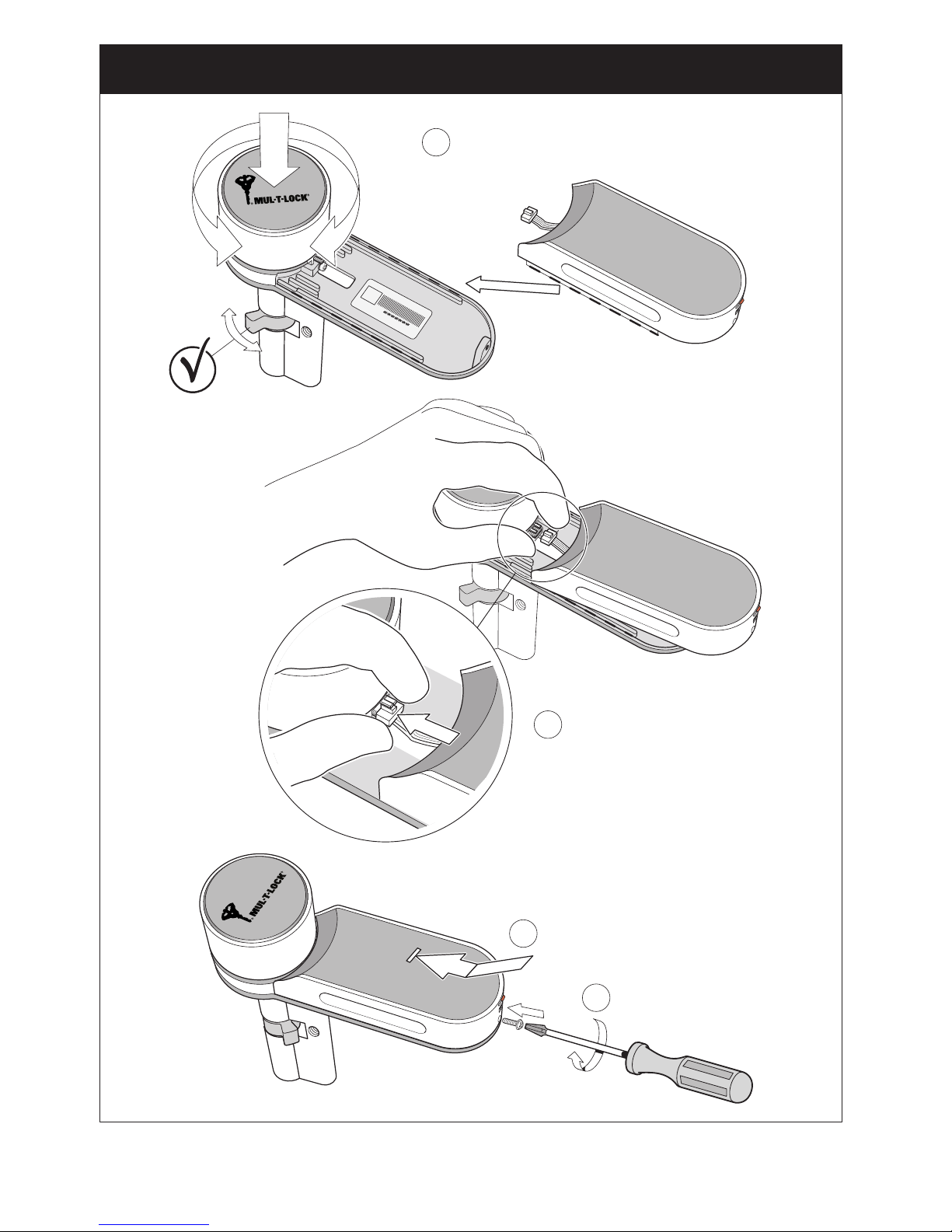
Cylinder to Unit Assembly - Continued
multlock changes.indd 4 16-Aug-17 18:14:56
(05)
TEST
4
3
1
2
Cylinder to Unit Assembly - Continued
multlock changes.indd 5 16-Aug-17 18:14:56

(06)
4
2
21
1
3
TEST
5
Remove Existing Cylinder and Install ENTR®Unit
multlock changes.indd 6 16-Aug-17 18:14:56

(07)
1
2
3
Always leave in “0” position.
Lock can not be operated via
remote or phone if not in “0”.
Warning will light up ( +beep).
Clean surface area before applying magnet
Apply Magnet and Power On ENTR®Unit
multlock changes.indd 7 16-Aug-17 18:14:56

(08)
1-2-3-4-5 - #
Default
Personal
Code
23
“Code”
5 6
Enter a new code
“4 to 10 digits” - #
7
Repeat new code - #
8
Admin Code
1
Wake up !
4
Set Admin Code
multlock changes.indd 8 16-Aug-17 18:14:56

(09)
6
REST DOOR AGAINST
LATCH DURING SETUP
“Do not shut the door”
5
HOLD DOOR SHUT
DURING SETUP
AUTO LOCK IS NOW ENABLED
2
Cfg
7
Cfg
8
3
“Admin Code”
-1- -3-
4
1
Wake up !
If (beep): Process failed, go to
Website - FAQ / Troubleshooting
Set ENTR®Position on Door “Left or Right” and Enable Auto Lock
multlock changes.indd 9 16-Aug-17 18:14:57

(10)
2
Add
3
Admin Code
4
-2-
SWIPE D OWN
TO UN LOCK
SW IPE UP
TO LOCK
ALWAYS UPDATE WHEN AVAILABLE
WELCOME
Set up your new lock
Get Started
Username
Email
Phone - optional
Please register to enable password
recovery and remote lock
management features. Your details
will not be shared.
REGISTER
NEXT
Set Owner Password:
name lock
Please take care to remember
your passsword.
You will need this password
every time you manage your
lock.
ACTIVATE YOUR LOCK
NEXT
Conrm Owner Password:
SECURED LOCK
“lock name”
Update
SECURED LOCK
Update
SECURED LOCK
“lock name”
Update
67
58
There are no available locks
or keys witin range.
To refresh, swipe to the left
you can also try moving
closer to the lock.
OUT OF RANGE
SWIPE
LEFT
1
Wake up !
To add additional mobile users please refer to the full user manual online.
Enable Bluetooth
Pair Mobile Phone
multlock changes.indd 10 16-Aug-17 18:14:57
Autres manuels pour Entr
4
Table des matières
Autres manuels Mul-t-lock Verrouillage


