
Monster Multi-Speaker Selector Manuel utilisateur
455 Valley Drive •Brisbane•CA 94005
Visit us on the web at: monstercable.com
”Monster Cable”, ”Monster”, ”XP” and ”Angled Gold Pin”, are registered
and unregistered trademarks of Monster Cable Products, Inc.
©2002 Monster Cable. All rights reserved.
inv. no. 108516

i
TABLE OF CONTENTS
Page
Important Safety Precautions . . . . . . . . . . . . . . . . . . . . . . . . . . . . . . . . . . . . . . . . . . . . . . . . . . . . . . . . . . . . . . . ii
Introduction . . . . . . . . . . . . 1
Content Checklist . . . . . . . 2
Hookup Instructions . . . . . . 3
Product Features . . . . . . . . 7
Troubleshooting . . . . . . . . . 10
Appendices --
A. Warranty Information. . . 13
B. How to Contact Us . . . . 14

IMPORTANT SAFETY PRECAUTIONS
Please read and observe the following safety points at all times.
WARNING – Liquid: Avoid Electrical Shocks
Do not operate your Monster Cable Multi-Speaker Selector if liquid of any kind is spilled
onto or inside the unit.
Do not operate your multi-speaker selector near rain or water that’s spilled or contained (e.g., bathtub,
kitchen or bathroom sink).
WARNING – Amplifier/Receiver Power Rating
Your Monster Multi-Speaker Selector is designed for use with amplifiers and receivers that operate within a maximum
power output rating of 150 watts per channel at 8 ohms. Using your speaker selector with an amplifier or receiver
that has a higher power output may damage the unit and will void the warranty. If you don’t know the power rating
of your amplifier or receiver, consult your amplifier or receiver’s owner manual or contact the manufacturer.
WARNING – Amplifier Overload Protection
If you use an amplifier (tube or solid state) to power your system, please note that it must ALWAYS have a speaker
pair (load) connected from the amplifier to the Monster Multi-Speaker Selector and at least one speaker pair selected
on your multi-speaker selector. Amplifier overload or damage to the amplifier’s internal circuitry may occur if you turn on
the amplifier and there is no pair load connected from the amplifier to the Monster Multi-Speaker Selector and at least
one speaker pair selected on your speaker selector.
ii

CAUTION – Exposure to Heat
Do not expose your Monster Multi-Speaker Selector to direct sunlight or place it near wall heaters, space heaters,
or any enclosed space prone to temperature increase (e.g., car trunk).
CAUTION – Do Not Place Multi-Speaker Selector In An Unprotected Area
Place your Monster Multi-Speaker Selector indoors, in a protected area that has adequate air flow, and is free
from excessive dust. Do not expose the unit to humidity, rain, heat emitting sources, or direct sunlight.
CAUTION – To Prevent Fire, Use Only CL3-Rated Speaker Cable for In-Wall Installations
Most areas of the U.S. regulate fire safety ratings for in-wall cable. Check with your local municipality to be sure
your installation meets specifications. In order to conform with local building codes, you must use CL-rated speaker cable
for in-wall installations. We recommend Monster CL-rated speaker cable that is 16 gauge or larger. Use Monster 14 gauge
or larger for long runs (over 35 ft.).
iii

INTRODUCTION
Thank You
Thank you for purchasing Monster’s Multi-Speaker Selector. This easy-to-use, high quality speaker selector ensures
that no matter where you are, relaxing on the couch in the living room or lounging poolside, you can enjoy
the convenience and flexibility of listening to multiple speaker pairs simultaneously.
Monster’s Multi-Speaker Selector also provides invaluable protection for your amplifier. Most amplifiers aren’t designed
to power multiple speaker pairs. If they are used for this purpose, impedance (ohms) may drop to a dangerously low level,
potentially damaging or overloading your amp. Your Monster Multi-Speaker Selector is specially designed for use
with high power amplifiers and features high current, low-loss Amplifier Protection circuitry. Monster’s Amplifier Protection
circuitry delivers the stable impedance your amplifier needs to power multiple speaker pairs safely and effectively.
This owner’s manual describes how to easily operate and maintain your Monster Multi-Speaker Selector.
Please read it carefully.
1

CONTENT CHECKLIST
Before You Begin
Before you do anything, make sure you have everything you need to enjoy your Monster Cable Multi-Speaker Selector.
You’ll need the following items to get started:
1) This owner’s manual.
2) Your favorite pen or a computer with internet browser (for registering your warranty information).
3) One Monster Cable Multi-Speaker Selector (MSS-4 or MSS-6).
2

HOOKUP INSTRUCTIONS
STEP 1 Amplifier to Speaker Selector Hookup (Using Pre-Terminated Speaker Cable)
IMPORTANT NOTE
Your Monster Multi-Speaker Selector is designed to accept any size cable terminated with Monster® Angled Gold Pin®
connectors and up to 14 gauge non-terminated speaker wire. If you’re using non-terminated speaker wire, do not use
any speaker wire that is larger than 14 gauge. The lower the gauge number, the larger the cable (e.g., 12 gauge is larger
in actual physical size than 14 gauge).
The following hookup instructions are based on usage of pre-terminated cable (connectors are already attached
to the speaker wire). Non-terminated stranded conductors can frey and cause electrical shorts, and may not provide
maximum signal transfer.
If you have unterminated speaker wire, terminate it on both ends with push-pin (aka "tip") connectors before hooking up
your amplifier to your multi-speaker selector. For maximum conductivity, signal transfer and corrosion resistance,
we recommend terminating your speaker cable with Monster 24k gold contact Angled Gold Pin connectors.
3
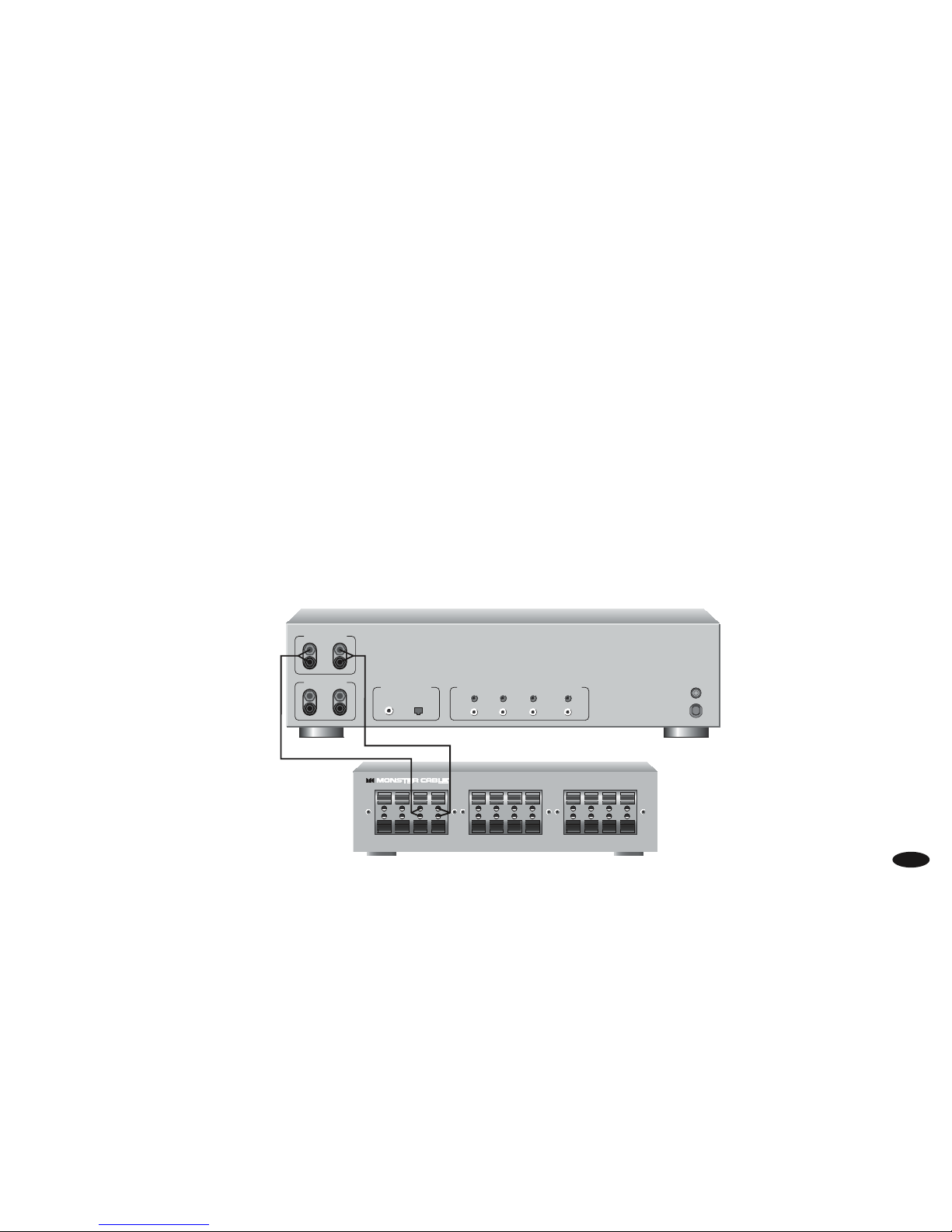
A) Before you do anything, turn off power to all components in the signal path, including your amplifier
and Monster Multi-Speaker Selector.
B) Using speaker cable, hook up the “Left” channel (red for “+” and black for “-”) from the Speaker Output terminals
found on the back of your amplifier to the matching Amplifier Input terminals on the back of the Monster
Multi-Speaker Selector.
C) Using speaker cable, hook up the “Right” channel (red for “+” and black for “-”) from the Speaker Output
terminals found on the back of your amplifier to the matching Amplifier Input terminals on the back
of the Monster Multi-Speaker Selector.
Amplifier
MSS-4
4
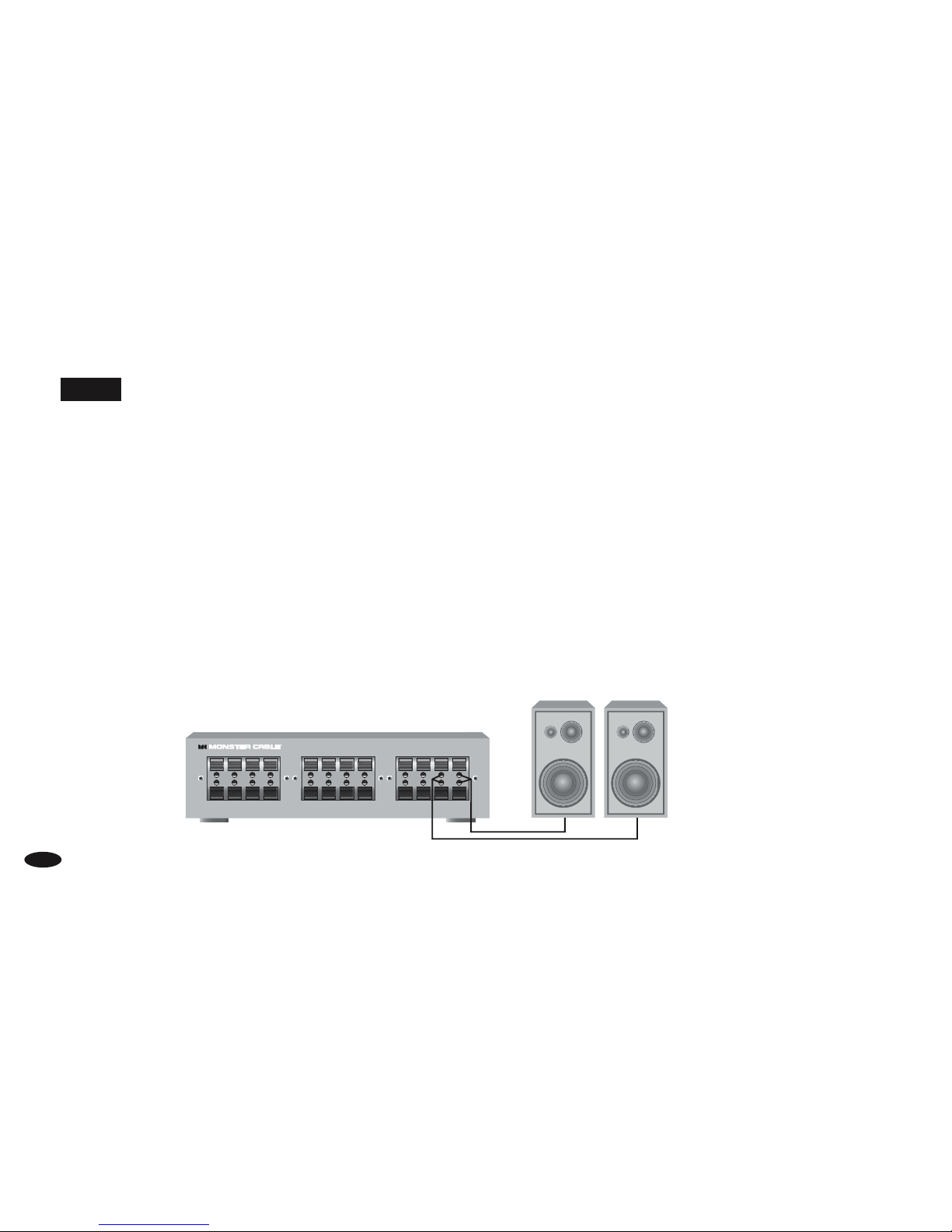
STEP 2 Main Speaker Pair-to MSS-4/MSS-6 Speaker 1 Hookup
NOTE
For the best possible audio quality, we recommend only using a high performance speaker cable, such as Monster® XP,
not the ordinary “zip” cord that comes free in the box with your speakers.
A) Hook up the “Left” channel (red for “+” and black for “-”) found on the back of your speaker to the matching
Speaker 1 Input terminals on the back of the Monster Multi-Speaker Selector.
B) Hook up the “Right” channel (red for “+” and black for “-”) found on the back of your speaker to the matching
Speaker 1 Input terminals on the back of the multi-speaker selector.
C) For additional speaker pair hookup, repeat steps A and B.
4
MSS-4
Speakers
5

STEP 3 Selecting Speakers
NOTE
The selector buttons on the front panel enable you to engage or disengage the speaker pair they correspond to.
If you want to adjust the volume of each speaker pair individually, you must use separate volume controls.
For maximum performance, we recommend using Monster Cable® Stereo Volume Control.
A) Turn on your amp or receiver and select a source (e.g, CD player).
B) Adjust the volume control to the desired level. Remember, if you’re not using separate volume controls
for each speaker pair, you can’t individually adjust the volume level. So, the volume you set on your amplifier
will determine the volume level for each speaker pair throughout the house.
C) Press the selector button on your speaker selector which corresponds to the speaker pair you wish to use.
For example, if you want to use the speakers connected to Speaker 1, Speaker 2, and Speaker 3, press those buttons.
D) To disengage all other connected speaker pairs, deselect each speaker pair’s corresponding selector button.
56
Table des matières
Manuels Équipement d'enregistrement populaires d'autres marques


Strymon
Strymon NIGHTSKY Manuel utilisateur

Mitsubishi Electric
Mitsubishi Electric 16CH DIGITAL RECORDER DX-TL5000U Manuel utilisateur

Tews Technologies
Tews Technologies TPMC465 Manuel utilisateur

Honeywell
Honeywell Excel 50 Manuel utilisateur

SeaLevel
SeaLevel COMM+8.LPCI Manuel utilisateur

Arturia
Arturia AUDIOFUSE STUDIO Manuel utilisateur


