
Monoprice MW300A Manuel utilisateur


Copyright Statement
is the registered trademark of
Monoprice. All the products and product names
mentioned herein are the trademarks or registered
trademarks of their respective holders. Copyright of
the whole product as integration, including its
accessories and software, belongs to Monoprice.
Without the permission of Monoprice, any individual or
party is not allowed to copy, plagiarize, imitate or
translate it into other languages.
All the photos and product specifications mentioned in
this manual are for references only. As the upgrade of
software and hardware, there will be changes. And if
there are changes, Monoprice is not responsible for
informing in advance. If you want to know more about
our product information, please visit our website at
www.monoprice.com.

Table of Contents
Chapter 1 Product Overview.......................... 1
1.1 Features........................................... 2
1.2 Package Contents .............................. 3
1.3 LED Indicator and Panel Description .... 3
Chapter 2 Hardware Installation .................... 7
Chapter 3 Web Configuration ........................ 9
3.1 Web Login ........................................ 9
3.2 Setup Wizard .................................. 11
3.3 System Status ................................ 12
3.4 LAN Settings ................................... 13
Chapter 4 Wireless Settings ........................ 15
4.1 Working Mode ................................. 15
4.1.1 Access Point (AP) Mode .............. 16
4.1.2 P2P (Point to Point) Bridge Mode . 33
4.1.3 P2MP Bridge Mode ..................... 38
4.1.4 Wireless Repeater Mode ............. 43
4.1.5 Wireless Client Mode .................. 50
4.2 Advanced Settings ........................... 53

4.3 WPS Settings .................................. 56
4.4 Access Control ................................ 58
4.5 Connection Status ........................... 59
4.6 PING ............................................. 60
Chapter 5 SNMP Setting ............................. 61
5.1 SNMP Introduction .......................... 61
5.2 SNMP Configuration ......................... 61
Chapter 6 System Tools .............................. 63
6.1 Password Change ............................ 63
6.2 Restore to Factory Default Settings .... 64
6.3 Backup/Restore............................... 65
6.4 Time Settings ................................. 66
6.5 Reboot System ............................... 67
6.6 Firmware Upgrade ........................... 67
6.7 Syslog ........................................... 69
Appendix I: Glossary.................................. 70
Appendix II: Setting the TCP/IP Address in
Windows XP .............................................. 73

1
Chapter 1 Product Overview
The MW300A adds flexibility and extended wireless
range to your existing wired or wireless network.
When configured as a Repeater, the MW300A fills holes
in your existing wireless network coverage or extends
your coverage over a wider area, thereby allowing a
continuous wireless connection across the area
covered by the original wireless router and multiple
repeaters.
When configured as a Wireless Access Point (WAP), the
MW300A allows you to create a new wireless LAN, with
a different network name and password. Multiple units
can be connected to an existing network to give
customized access points to different clients, making it
ideal for large offices sharing a common internet
connection, hotel/motel operations for access to
individual rooms, or even to control access times and
limits for your kids!
The MW300A is fully IEEE802.11n compliant with the
full range of security options and encryption methods,
including 64/128 bit WEP, WPA, and WPA2, with AES or
TKIP. It supports up to 300 Mbps speeds for both
reception and transmission and can be powered with
either the included AC adapter or using a Power over

2
Ethernet (PoE) wired connection, for coverage to areas
where external power is unavailable.
1.1 Features
Complies with IEEE802.11n, IEEE802.11g, and
IEEE802.11b standards
Configurable as Wireless Access Point, Repeater,
P2P, P2MP, and Wireless Client
Provides up to 300 Mbps reception and up to 300
Mbps transmission rates
Includes MIMO technology to improve data
throughput and minimize signal errors
Supports 64/128-bit WEP, WPA, and WPA2 with
AES or TKIP encryption and security protocols
Powered by included AC adapter or Power Over
Ethernet (PoE)
Provides Intelligent QoS for higher-bandwidth
applications, such as online gaming, VOIP, and
streaming multimedia
Supports 802.1x user authentication in
conjunction with an external RADIUS server
Supports both Simple Network Management
Protocol (SNMP) and Web-based management
interfaces
Includes one Gigabit auto-negotiating RJ45 port
for direct LAN connection (up or down)

3
1.2 Package Contents
The following items should be included in the package:
One MW300A Wireless AP
One AC Power Adapter
One RJ45 Network Cable
One Quick Installation Guide
One CD-ROM
If any of listed items are missing or damaged, please
contact the Monoprice reseller from whom you
purchased this product for immediate replacement.
1.3 LED Indicator and Panel Description

4
LED indicator description on front panel
(from L to R)
WPS
A blinking LED indicates that the device is
negotiating with clients in WPS mode.
POWER
A steady green LED indicates that the device is
properly connected to a power source.
SYS
A blinking LED indicates that the system is
operating properly.
WLAN
A steady green LED indicates that the wireless
function is enabled, but that there is no current
transmission or reception activity. A blinking
green LED indicates that the device is actively
transmitting and/or receiving data.
LAN
A steady LED indicates that the device is properly
connected to an Ethernet source. A blinking LED
indicates that the device is transmitting and/or
5
receiving data. If the LED is green it indicates that
the device is operating with a link speed of
1000Mbps. If it is orange, the link speed is
10/100Mbps.
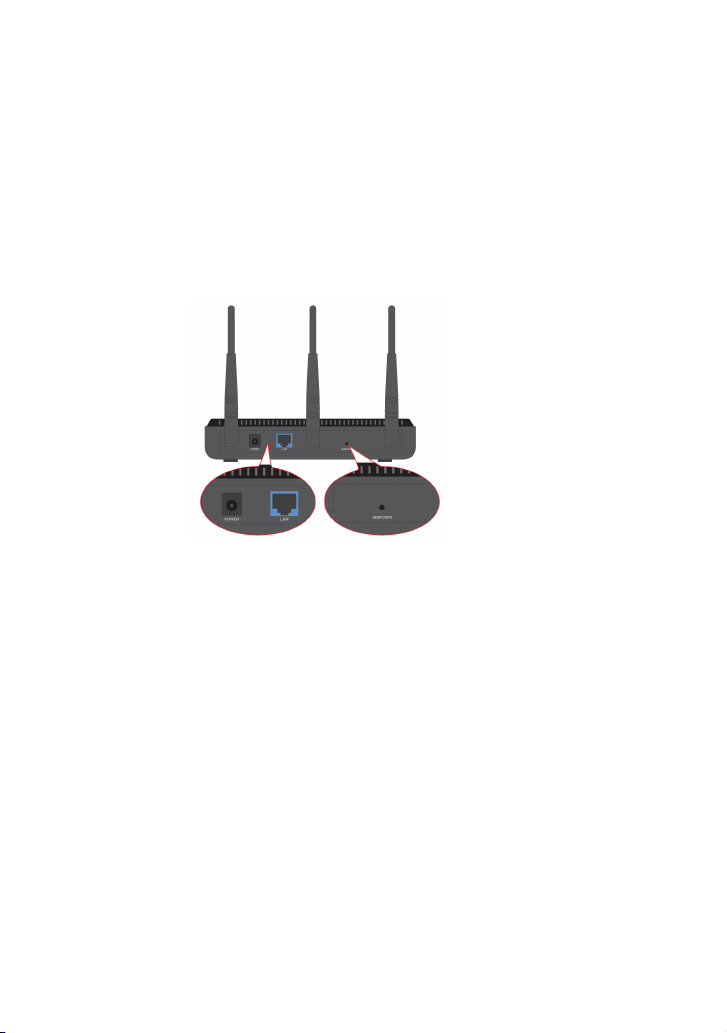
Rear Panel:(From L to R)
POWER
The power jack is for the power adapter
connection. Please use the included 12V DC
power adapter.
LAN
The Gigabit Ethernet port is for connection to a
computer’s NIC or an Ethernet switch. It can
also be used as a PoE interface. When both PoE

6
and the external power adapter power are
connected, the device will draw power from the
physical power adapter.
RESET/WPS
This multifunction button is for both the system
reset function and to activate WPS. When you
press and hold this button for 7 seconds, the
device will restore the configured settings to
factory default settings. When you press and
hold the button for only 1 second, the WPS
function will be enabled.
Antennas
The detachable antennas are for the wireless
radio communications. Keep these antennas
securely attached to the system to maintain
optimal wireless performance.
Autres manuels pour MW300A
1
Table des matières
Autres manuels Monoprice Point d'accès sans fil


Manuels Point d'accès sans fil populaires d'autres marques

D-Link
D-Link DWL-2100AP - AirPlus Xtreme G Manuel utilisateur

Ubiquiti
Ubiquiti NanoStation NSM2 Manuel utilisateur

Cisco
Cisco Aironet 1550 Series Manuel utilisateur

Aruba
Aruba IAP-335 Manuel utilisateur

Advantek Networks
Advantek Networks AWN-AP-54MR Manuel utilisateur

IP-COM
IP-COM AP355 Manuel utilisateur


