Minuteman SNMP-SSL Manuel utilisateur

SNMP-SSL
UPS SNMP Card
(Web-Based monitoring SNMP Card)
User’s Manual

SNMP-SSL
2
Table of Contents
Electronic Emission Notice.............................................................................................. 3
Safety Information............................................................................................................. 3
Chapter 1 Introduction...................................................................................................... 4
Features ........................................................................................................................4
Package Contents......................................................................................................... 5
System Application........................................................................................................ 5
Chapter 2 Installation........................................................................................................ 6
Hardware Installation .................................................................................................... 6
Configuration trough the Serial Port.............................................................................. 7
Configuration through Telnet ......................................................................................... 17
Configuration through a Web Browser .......................................................................... 18
Chapter 3 Managing the SNMP-SSL/UPS via Web Browser ......................................... 21
UPS Monitoring ............................................................................................................. 21
Comprehensive View .................................................................................................... 21
Help Menu..................................................................................................................... 22
UPS Identification.......................................................................................................... 22
Battery Parameters ....................................................................................................... 23
Input Parameters........................................................................................................... 23
Output Parameters........................................................................................................ 24
Alarm Table ................................................................................................................... 24
Client Table ................................................................................................................... 25
Chapter 4 UPS Management ............................................................................................ 26
UPS Configuration ........................................................................................................ 26
UPS Control .................................................................................................................. 27
UPS Battery Test........................................................................................................... 27
UPS Battery Test Schedule........................................................................................... 28
UPS Shutdown.............................................................................................................. 29
Weekly Schedule .......................................................................................................... 30
Special Day Schedule ................................................................................................... 30
EMD Configuration........................................................................................................ 31
Chapter 5 SNMP-SSL Management ................................................................................. 32
Date and Time............................................................................................................... 32
SNMP-SSL Configuration.............................................................................................. 32
SNMP-SSL Control ....................................................................................................... 34
SNMP-SSL Upgrade ..................................................................................................... 35
SNMP-SSL RADIUS Configuration ............................................................................... 36
SNMP-SSL Change Trap Level..................................................................................... 37
SNMP/HTTP Access Control ........................................................................................ 38
SNMPv3 USM Table...................................................................................................... 39
SNMP Trap Receivers................................................................................................... 40
WakeOnLAN Targets..................................................................................................... 41
Homepage Refresh Rate .............................................................................................. 42
Email Notification .......................................................................................................... 42
External Links................................................................................................................ 44
Chapter 6 History and Events Logs ................................................................................ 45
UPS History Log Data ................................................................................................... 45
UPS Extended log Data ................................................................................................ 46
UPS Events Log Data ................................................................................................... 47
SNMP-SSL Events Log Data......................................................................................... 48
Clear & Save log Data................................................................................................... 49
Chapter 7 Monitoring SNMP-SSL/UPS via Java Applet ................................................. 50
Java Monitor.................................................................................................................. 50
Status Bar...................................................................................................................... 51
Alarm Windows ............................................................................................................. 51
UPS History Log............................................................................................................ 52
UPS Extended History Log ........................................................................................... 53
Extra Browsing Options PDA & WAP ............................................................................ 54

SNMP-SSL
3
PDA ............................................................................................................................... 54

WAP .............................................................................................................................. 54

Chapter 8 Managing SNMP-SSL/UPS via SNMP............................................................. 55
SNMP Access Control Setting....................................................................................... 55
SNMP Trap Receivers Setting....................................................................................... 55
Setting up the NMS ....................................................................................................... 55
Chapter 9 Shutdown Software ......................................................................................... 56
Installing the Shutdown Software in Windows............................................................... 56
View the Connected Client from a Web Browser .......................................................... 57
Shutdown Process in Windows ..................................................................................... 58
Uninstalling the Shutdown Software.............................................................................. 58
Installing the Shutdown Software in SCO OpenServer UNIX........................................ 59
UGuard Parameters Description ................................................................................... 61
Deleting uGuard ............................................................................................................ 61
Installing the Shutdown Software in Linux kernel 2.0.x ................................................. 62
Installing the Shutdown Software in Solaris .................................................................. 63
UGuard Command Descriptions ................................................................................... 64
Appendix A SNMP-SSL Upgrade Utility Software .......................................................... 66
General Information....................................................................................................... 66
Updating the SNMP-SSL card’s Firmware form Windows ............................................ 66
Updating the SNMP-SSL card’s Firmware form UNIX................................................... 67
Appendix B HTTP Security Control ................................................................................. 68
Flow Chart of the “HTTP Security Control” Option ........................................................ 68
Appendix C Technical Information .................................................................................. 69
Specification ..................................................................................................................69
Dipswitch Definition ....................................................................................................... 69
LED Definition ............................................................................................................... 69
Obtaining Technical Assistance..................................................................................... 70
Limited Product Warranty.............................................................................................. 71
DOS, Windows 95, 98, Me, Windows NT, 2000, XP, 2003 are registered trademarks of Microsoft
Corporation. All other trademarks belong to their respective proprietors.
Electronic Emission Notice
Federal Communications Commission (FCC)
This equipment has been tested and found to comply with the limits for a Class B digital device,
pursuant to Part 15 of the FCC Rules. These limits are designed to provide reasonable protection
against harmful interference when the equipment is operated in a commercial environment.
CE Notice
This device complies with the EMC directive of the European Community and meets or exceeds
the following technical standards:
• EN 55022:1998 ”Limits and Methods of Measurement of Radio interference
Characteristics of information Technology Equipment.” This device complies with the CISPR
Class B standard
• EN 55024:1998 ”Electromagnetic compatibility Generic immunity standard Part1:
Residential, and light industry.”
Safety Information
All the service of this equipment must be perform by qualified service personnel. Remove
rings, watches and other jewelry before servicing the unit.
Before plugging in or pulling out the SNMP-SSL card to and/or from the UPS, please make
sure that the UPS is in the OFF position.
© Copyright 2008

SNMP-SSL
4
Chapter 1 Introduction
Features
• Network connection through RJ45 connector
Allows connection of the UPS directly to the network through a RJ45 connector
without using RS232 ports on the computer and without loading any individual UPS
management software on the network server.
• Network UPS management
Allows remote management of the UPS from any workstation through Internet or
Intranet.
• Remote UPS monitoring via SNMP, HTTP and JAVA applets
Allows monitoring of the UPS using SNMP-SSL card’s MIB (Management
Information Base) files - provided with SNMP-SSL card, Internet Browser or Java
monitoring applets.
• Configure UPS and SNMP-SSL card’s functions from any client (password
protected)
Set UPS and SNMP-SSL card’s parameters from any SNMP management station or
through Internet Browsers.
• Monitor power quality via Java Applets
Provides visual indication on screen through dynamic graphics.
• Keep event logs & metering data in flash memory
Provides a history file of the UPS: power events, power quality, status, and battery
condition.
• Notification of system administrator via SNMP Traps, Java applets
• RTC supported
• Shutdown Watchdog enabled
• Telnet support for configuration
• BOOTP/DHCP supported
• GUI for homepages and Java applets
• Online configuration supported
• Standard UPS MIB (RFC1628) supported
• Enhanced HTTP security
• No restart needed for IP change
• System parameters/log write to flash memory simultaneously
• SSH and SSL supported
• WOL function supported
• Supports SSL-EMD (Environmental Monitoring Device) to measure the
temperature and humidity.
• Supports SSL-SMOKE (Smoke Detector Device) to detect smoke
• Supports SSL-WATER (Water Leak Sensor Device) to detect water leaks
• Supports SSL-DOOR (Door Sensor Device) to detect open doors
• Supports SSL-VIBRATION (Vibration Sensor Device) to detect vibrations
• NTP & ICMP supported
• SNMPv3 supported

SNMP-SSL
5
Package Contents
1. SNMP-SSL card with mounting bracket
2. RJ45 to RS232 serial cable for console operation
3. CD-ROM contains the User’s Manuals, Quick Installs, MIB file, SSL-Upgrade Utility
software, SSL-Manager Software, SSL-Shutdown Software
4. Quick Install and Warranty Registration
System Application
SNMP-SSL card is an interface between UPS and the network. It can obtain the status
from a UPS and issue commands to it. SNMP-SSL card supports two kinds of protocol –
SNMP and HTTP for user access. Through the SNMP NMS and Web Browser, user can
obtain the UPS status, issue commands to UPS and setting up the SNMP-SSL card
through the network.
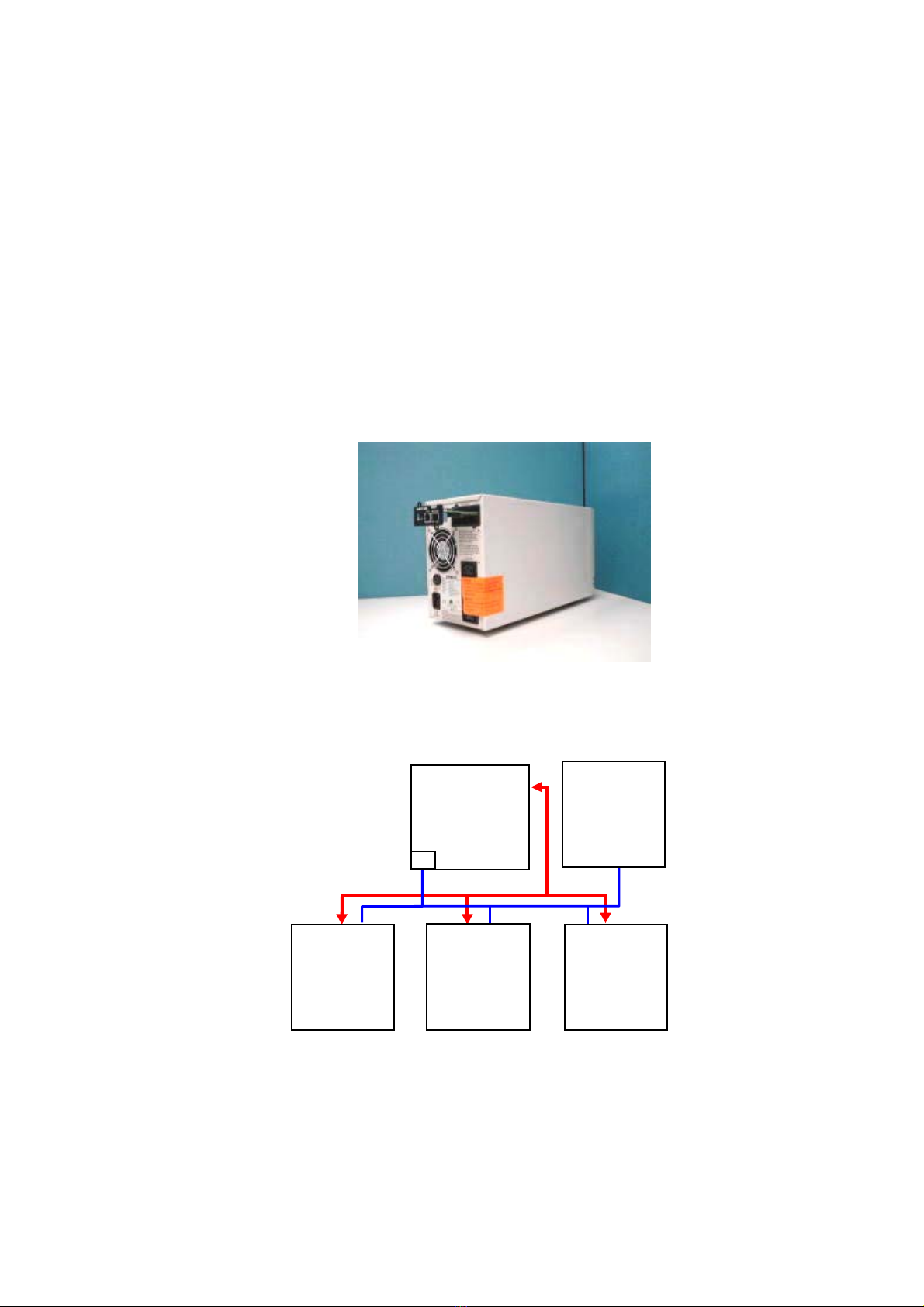
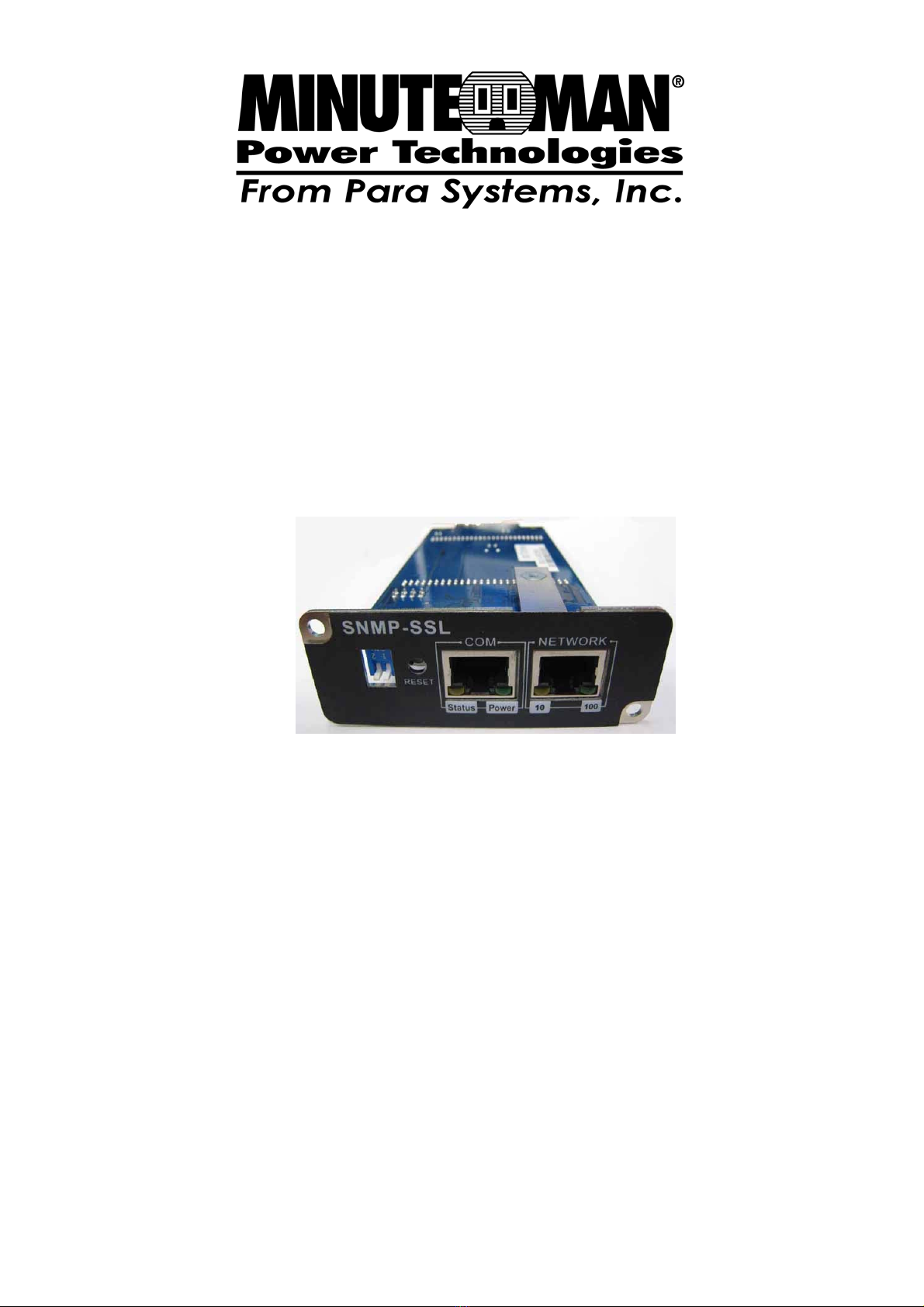
Figure 1-1: SNMP-SSL Card.
Figure 1-2: SNMP-SSL Card System Application Diagram.
UPS
SNMP-SSL
SNMP Card
NMS Station or
Web Browser
Computer 1 Computer 2 Computer 3
Power Line Ethernet

SNMP-SSL
6
Chapter 2 Installation
To install SNMP-SSL card on a network you need a workstation running Microsoft
Windows (9x, Me, NT4.0, 2000, XP or later). If your network dynamically configures the IP
address, all you need is a workstation with a Web Browser.
There are three methods for setting the SNMP-SSL card’s configuration:
1. Set up via serial port
2. Set up via Telnet
3. Set up via Web Browser
Hardware Installation
Note: The SNMP-SSL cards are designed to be Hot Swappable, but there is a remote
chance that when Hot-Swapping the SNMP-SSL card that the UPS will shutdown.
MINUTEMAN recommends following steps 1 through 4 when installing the SNMP-SSL
card, but to hot-swap, skip to step number 3.
1. Turn off all the equipment that is plugged into the UPS.
2. Turn off the UPS and unplug the UPS’s power cord from the AC wall outlet.
3. Remove the Option Slot cover plate from the rear panel of the UPS.
4. Insert the SNMP-SSL card into the option slot and secure with the retaining screws.
Figure 2-1: SNMP-SSL card and UPS connection

SNMP-SSL
7
Configuration through the Serial Port
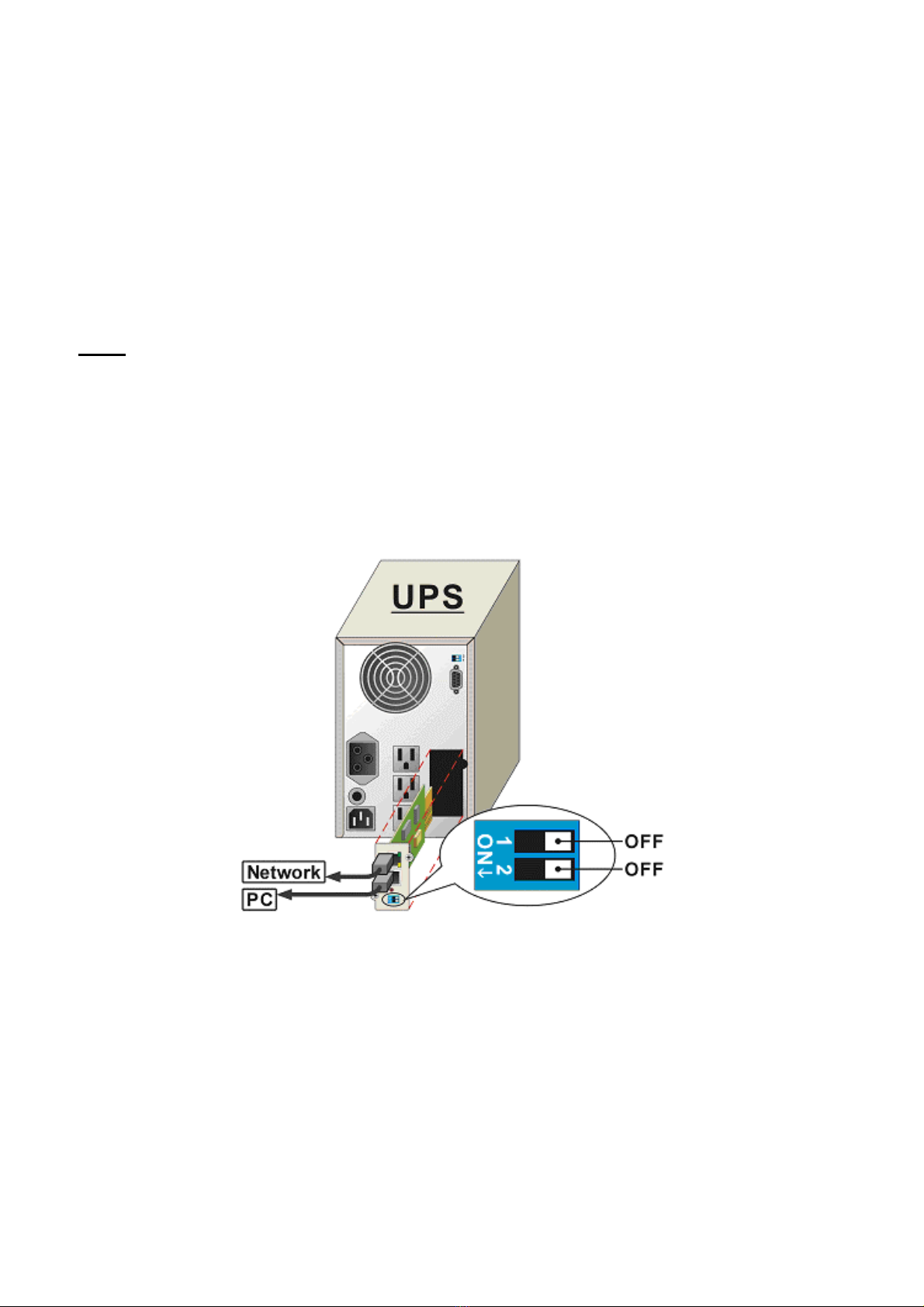
1. Use the RJ45 to RS232 serial cable to connect between the SNMP-SSL card’s COM
port and the COM port on the workstation.
2. Set both the DIP-switches of the SNMP-SSL card to the OFF position (operating
mode) for configuration.
Figure 2-2: Serial cable connection of SNMP-SSL
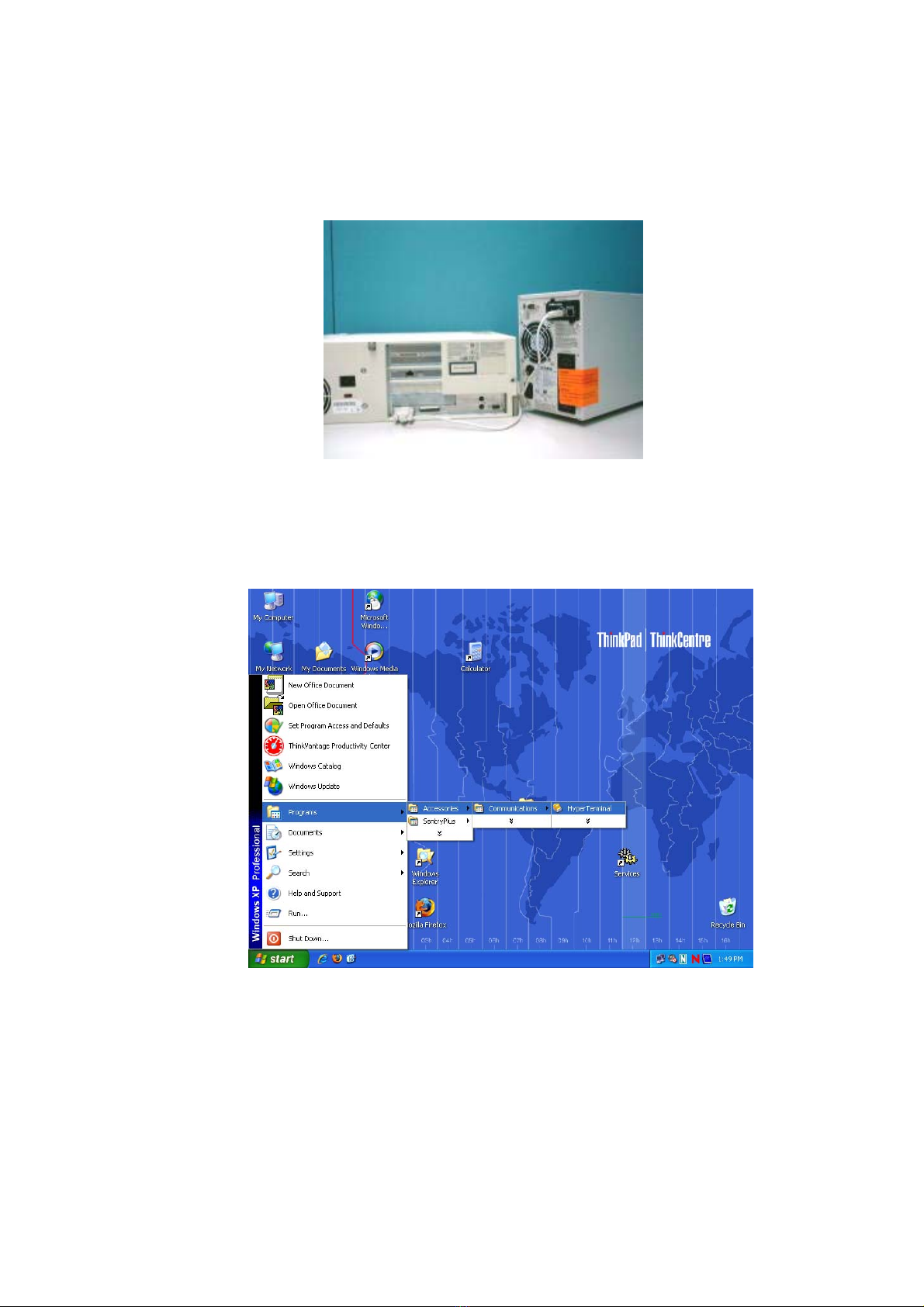
3. From a workstation running Microsoft Windows (9x, Me, NT4.0, 2000, XP, 2003 or
later), open HyperTerminal of the Accessory Program Group.
Figure 2-3: HyperTerminal in the Accessory programs group

SNMP-SSL
8
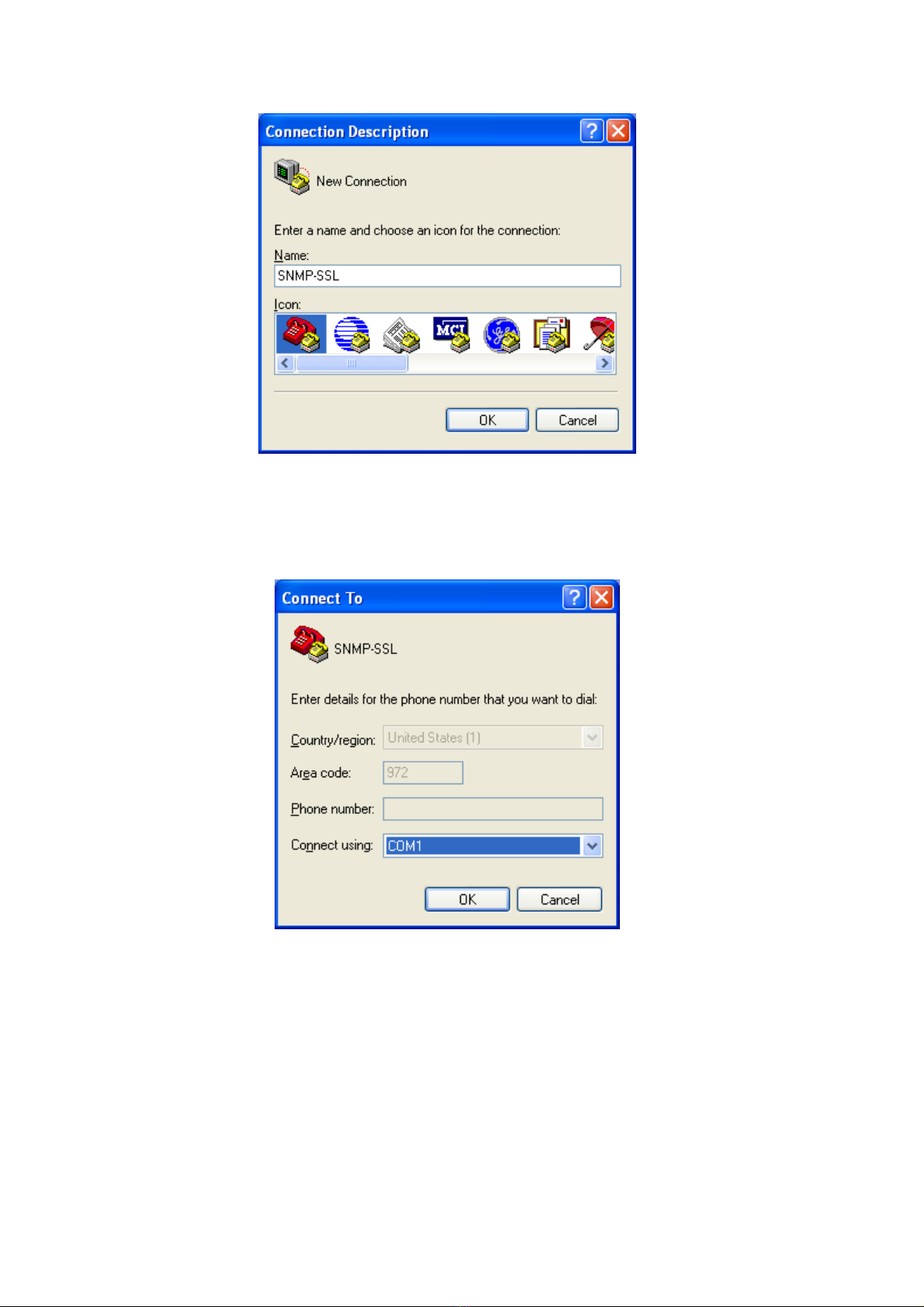
4. Enter a name and choose an icon for the connection and then click OK.
Figure 2-4: New HyperTerminal connection
5. Select direct COM port connection. Select the appropriate COM port and then click
OK.
Figure 2-5: Select Direct to COM port connection

SNMP-SSL
9
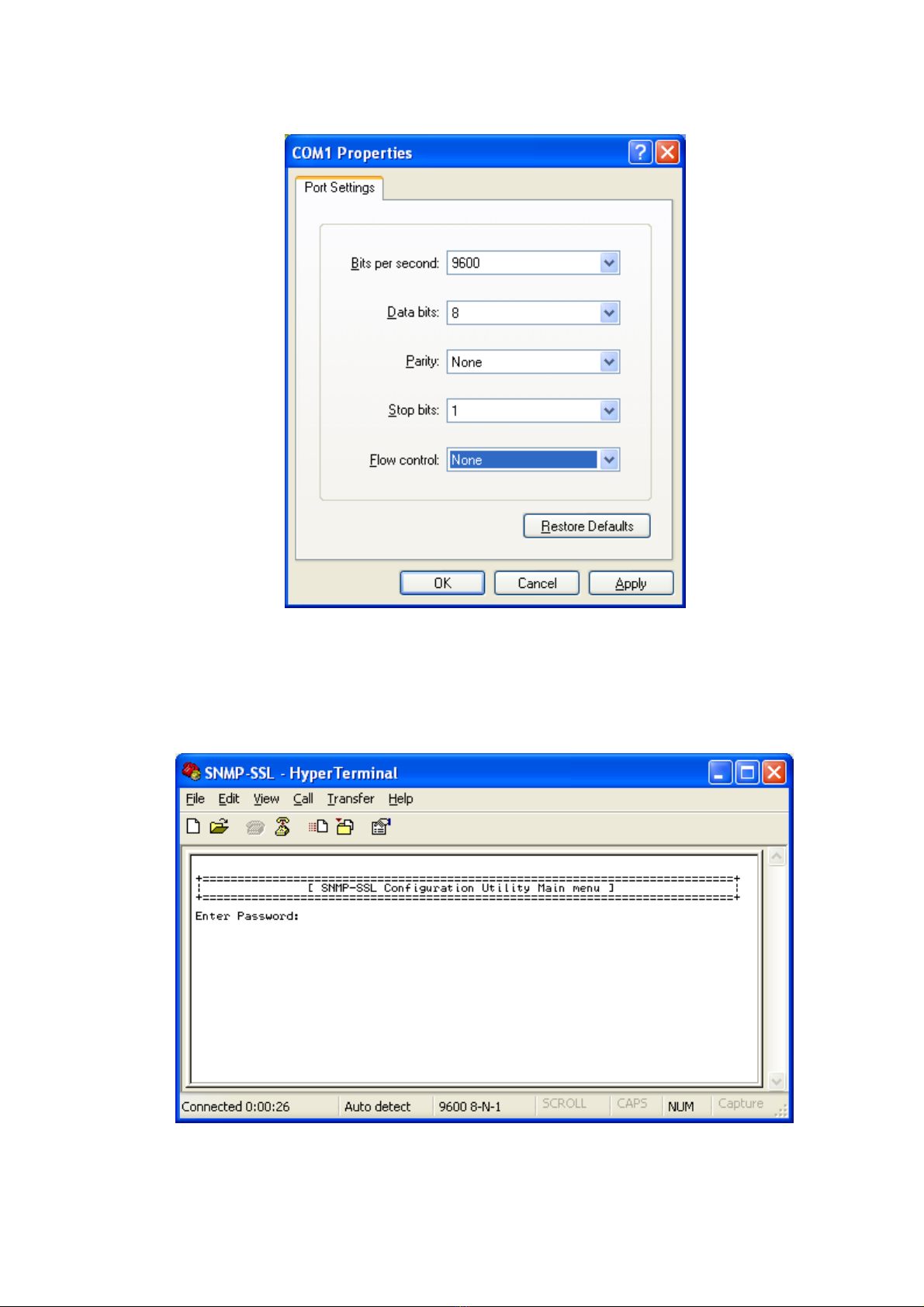
6. Set up the COM port parameters - 9600 bps, 8 data bits, no parity, 1 stop bit and no
flow control, then click Apply and then OK.
Figure 2-6: Setup of the COM port parameters
7. Power on the UPS and wait for SNMP-SSL card to boot up. Hit the “Enter” key once
to display the menu below. Enter the password (default password is admin) and hit
the “Enter” key.
Figure 2-7: SNMP-SSL Configuration Utility Main Menu

SNMP-SSL
10
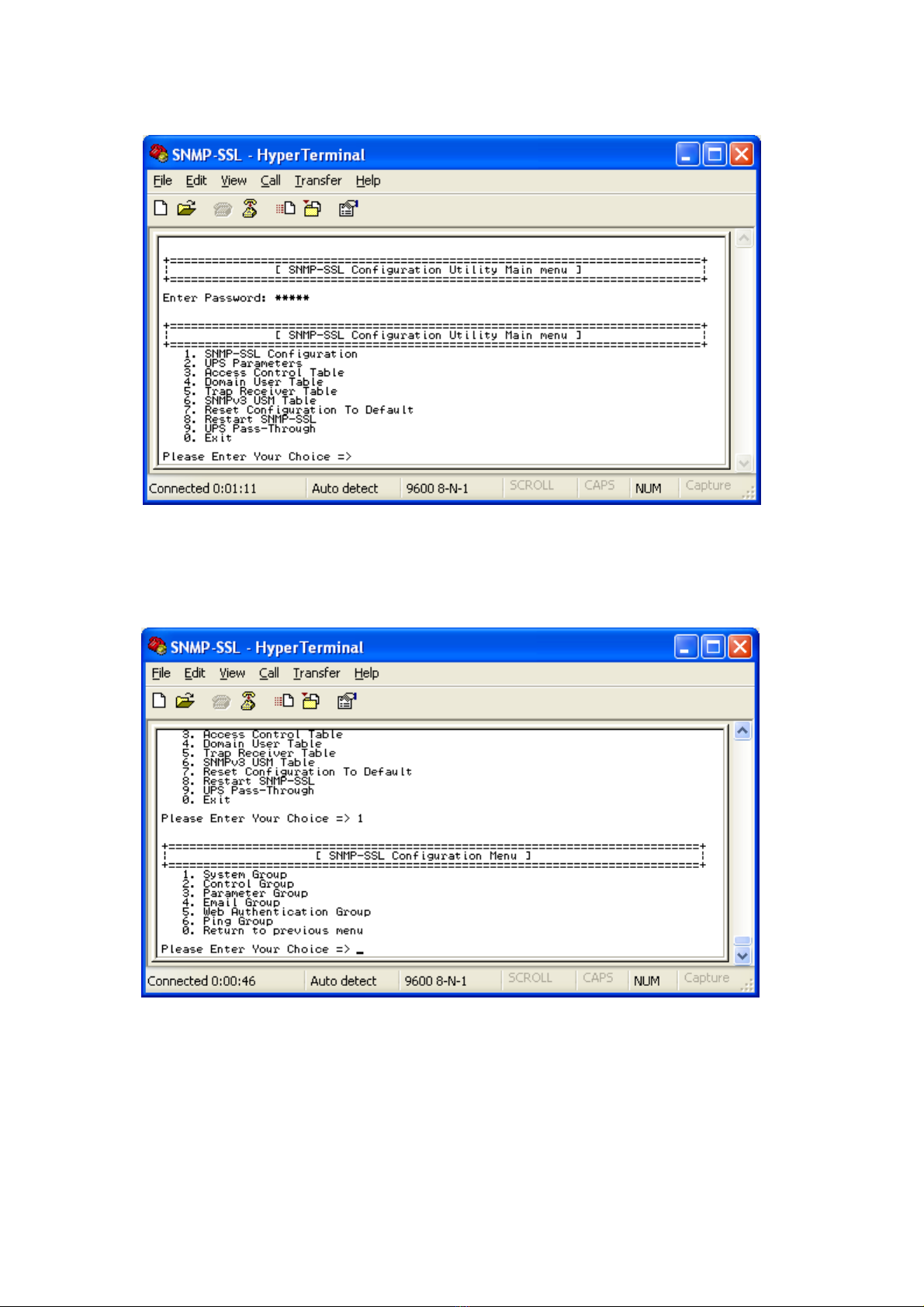
8. The SNMP-SSL Configuration Utility Main Menu will be displayed. Select “1” to enter
the SNMP-SSL Configuration Menu.
Figure 2-8: SNMP-SSL Configuration Utility Main Menu
9. The SNMP-SSL Configuration Menu will be displayed. Select “1” to enter the System
Group Configuration Menu.
Figure 2-9: SNMP-SSL Configuration Menu
Table des matières