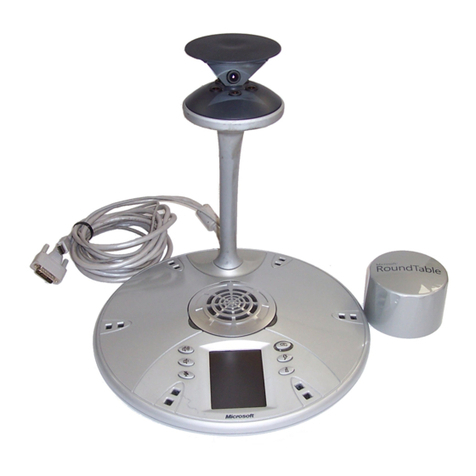
Microsoft RoundTable Manuel utilisateur

Microsoft®RoundTable™
Setup Guide
X14-49386-01

2 Microsoft RoundTable Setup Guide
Microsoft may have patents, patent applications, trademarks, copyrights, or other intellectual property rights covering subject
matter in this document. Except as expressly provided in any written license agreement from Microsoft, the furnishing of this
document does not give you any license to these patents, trademarks, copyrights, or other intellectual property.
© 2007 Microsoft Corporation. All rights reserved.
Microsoft, MS-DOS, Windows, Windows Server, Windows Vista, Windows XP, Office Communications Server, Office
Communicator, Office Live Meeting and Microsoft RoundTable are either registered trademarks or trademarks of Microsoft
Corporation in the United States and/or other countries.
All other trademarks are property of their respective owners.

3 Microsoft RoundTable Setup Guide
Contents
Contents ......................................................................................................................3
Warnings .....................................................................................................................4
Regulatory Information ................................................................................................6
Introduction...........................................................................................................7
How Microsoft RoundTable Works....................................................................7
Unpacking.............................................................................................................9
System Requirements...................................................................................... 10
Microsoft RoundTable device.......................................................................... 11
Power Data Box components.......................................................................... 12
Microsoft RoundTable device rear section.................................................... 13
Microsoft RoundTable device base bottom section..................................... 14
Microsoft RoundTable external dial pad and satellite microphones.......... 14
Setting up Microsoft RoundTable ......................................................................... 15
Positioning the Microsoft RoundTable device.............................................. 15
Setting up the Power Data Box and connections......................................... 16
Connecting the external dial pad and satellite microphones...................... 18
Cleaning Instructions........................................................................................ 21

4 Microsoft RoundTable Setup Guide
Warnings
This symbol identifies safety and health messages in this guide and RoundTable accessories
guides.
WARNING
Failure to properly set up, use, and care for the Microsoft RoundTable device can increase
the risk of damage to the RoundTable device, or even serious injury or death.
DO NOT ATTEMPT REPAIRS
Do not attempt to take apart, open, service, or modify the RoundTable device, power data
box, or any peripherals. Doing so increases the risk of electric shock, fire, or damage to the
device. Any evidence of an attempt to open or modify any component of the RoundTable
system, including any peeling, puncturing, or removal of any of the labels, is a violation of
your license and warranty, and renders the RoundTable device ineligible for authorized
repair.
If any part is damaged, malfunctioning, or if any internal parts become visible, contact
Microsoft Support.
WARNING
Do not attempt to open up the unit and do not attempt to replace the lithium battery. There
is a risk of explosion if the lithium battery is replaced by an incorrect type.
WARNING
To avoid damage to the power data box and components, use the following guidelines:

5 Microsoft RoundTable Setup Guide
•Protect cords from being walked on.
•Protect cords from being pinched or sharply bent, particularly where they connect to
the power outlet, the power data box, and the RoundTable device.
•Do not jerk, knot, sharply bend, or otherwise abuse the power cords.
•Do not expose the power cords to sources of heat.
•When disconnecting the power cords, pull on the plug—do not pull on the cord.
•If the power cord or power data box becomes damaged in any way, stop using the
device immediately, and contact Microsoft Support for a replacement.
•Unplug the RoundTable device during lightning storms or when unused for long
periods of time.
•Use only the power supply unit and AC power cord that came with your device or that
you received from an authorized repair center.
•Do not use non-standard power sources, such as generators or inverters, even if the
voltage and frequency appear acceptable. Only use AC power provided by a
standard wall outlet.
•Do not overload your wall outlet, extension cord, power strip, or other electrical
receptacle. Confirm that they are rated to handle the total current (in amps [A]) drawn
by the device (indicated on the power supply unit) and any other devices that are on
the same circuit.
•For devices with an AC power cord that connects to the power supply, always
connect the power cord according to the following instructions:
•Plug the AC power cord into the power supply until it stops.
•Plug the other end of the AC power cord into the wall outlet.
WARNING
Mains powered voice telephony without emergency dialing
WARNING
This equipment will be inoperable when main power fails.

6 Microsoft RoundTable Setup Guide
Regulatory Information
Microsoft® RoundTable™ is approved for use in countries listed in the table below.
Country Approval marking on product label Note 3
USA &
Canada
EU
Note 1
EFTA
Note 2
Same as above.
Japan
Australia
The table below describes the Notes for the above table.
Notes Description
Note1
EU member countries: Austria, Belgium, Bulgaria, Cypress, Czech Republic,
Denmark, Estonia, Finland, France, Germany, Greece, Hungary, Ireland, Italy,
Latvia, Lithuania, Luxembourg, Malta, Netherlands, Poland, Portugal,
Romania, Slovakia, Slovenia, Spain, Sweden and United Kingdom.
Note2
2EFTA includes: Iceland, Liechtenstein, Norway and Switzerland.
Note3
The product label is located on the bottom of the Power Data Box (PDB).

7 Microsoft RoundTable Setup Guide
Introduction
When you want to meet with people who are geographically separated, video
conferencing gives you a greater sense of immediacy than a conventional telephone
conference call. Microsoft®RoundTable™ is a next generation video conferencing
system that provides a comprehensive conferencing experience through the use of 360
degree video and active speaker detection.
This guide will help you install the Microsoft RoundTable device hardware and begin
using it for your meetings.
How Microsoft RoundTable Works
First and foremost, Microsoft RoundTable, when used with Microsoft®Office Live
Meeting 2007 and Microsoft®Office Communicator 2007, is a video conferencing
device. Video conferencing is a set of interactive telecommunication technologies that
allow two or more locations to interact using video and audio transmissions
simultaneously. It has also been called visual collaboration.
With Microsoft RoundTable, you can do any of the following:
•Place an outgoing phone call.
•Answer an incoming phone call.
•Conduct an audio-only session.
•Conduct an audio/video conference.
Microsoft RoundTable is placed in the center of your conference table and connected to
a computer, computer network, public switched telephone network (PSTN) analog
phone line, and power data box. The Microsoft RoundTable cameras capture the entire
panoramic view of your conference room, as well as the voices coming from any
location around the table, as shown in Figure 1 below.

8 Microsoft RoundTable Setup Guide
Figure 1.Microsoft RoundTable conference in session

9 Microsoft RoundTable Setup Guide
Unpacking
The Microsoft RoundTable product package contains the following items, as shown in
Figure 2 below.
Figure 2. Unpacking the box
1. Microsoft RoundTable device.
2. Power data box.
3. External dial pad.
4. Satellite microphones.
5. Microsoft RoundTable Setup Guide and Quick Reference Card.
6. Privacy cover.
7. Phone adapter for specific locale.
8. RJ45 network cable.
9. Power cord.
10. RJ11 telephone cable.
Note
For determining the correct phone line adapter for your location, see Appendix A: International Phone
Adapters, later in this document. Always plug the RJ11 telephone cable into the power data box first and
attach the phone adapter to the opposite end of the RJ11 telephone cord prior to plugging into your phone
jack.

10 Microsoft RoundTable Setup Guide
System Requirements
The following are the minimum system requirements for Microsoft RoundTable hardware
and software:
•Computer running the Windows XP™ operating system (SP2 or later, 32-bit only) or
Windows Vista™ operating system (32-bit and 64-bit).
•Computer with 2.0 gigahertz or higher processor.
•Recommended 2.0 gigabyte (GB) of RAM or higher.
•1.5 gigabytes (GB) of available hard disk space.
•Video card with 128 MB of RAM or higher.
•Super VGA (1280 × 1024) or higher-resolution video adapter and monitor.
•Keyboard and mouse, or compatible pointing device.
•Ethernet network adapter appropriate for the type of local-area or wide-area network
to which you will connect. Your computer requires an active wired Ethernet
connection for running Microsoft RoundTable.
•Graphics hardware running in full hardware acceleration mode.
•An analog PSTN phone line.
•Office Live Meeting 2007 or Office Communicator 2007 (as an active speaker
device).
Autres manuels pour RoundTable
1
Table des matières
Autres manuels Microsoft Système de conférence
Manuels Système de conférence populaires d'autres marques

Kramer
Kramer VIA GO Manuel utilisateur

AVT
AVT MAGIC AC1 Go Manuel utilisateur

ProSoft Technology
ProSoft Technology AN-X4-AB-DHRIO Manuel utilisateur

Sony
Sony PCS-I150 Manuel utilisateur

Middle Atlantic Products
Middle Atlantic Products VTC Series Manuel utilisateur

Prentke Romich Company
Prentke Romich Company Vanguard Plus Mode d’emploi