
Microseven Systems MSHRC080W Manuel utilisateur
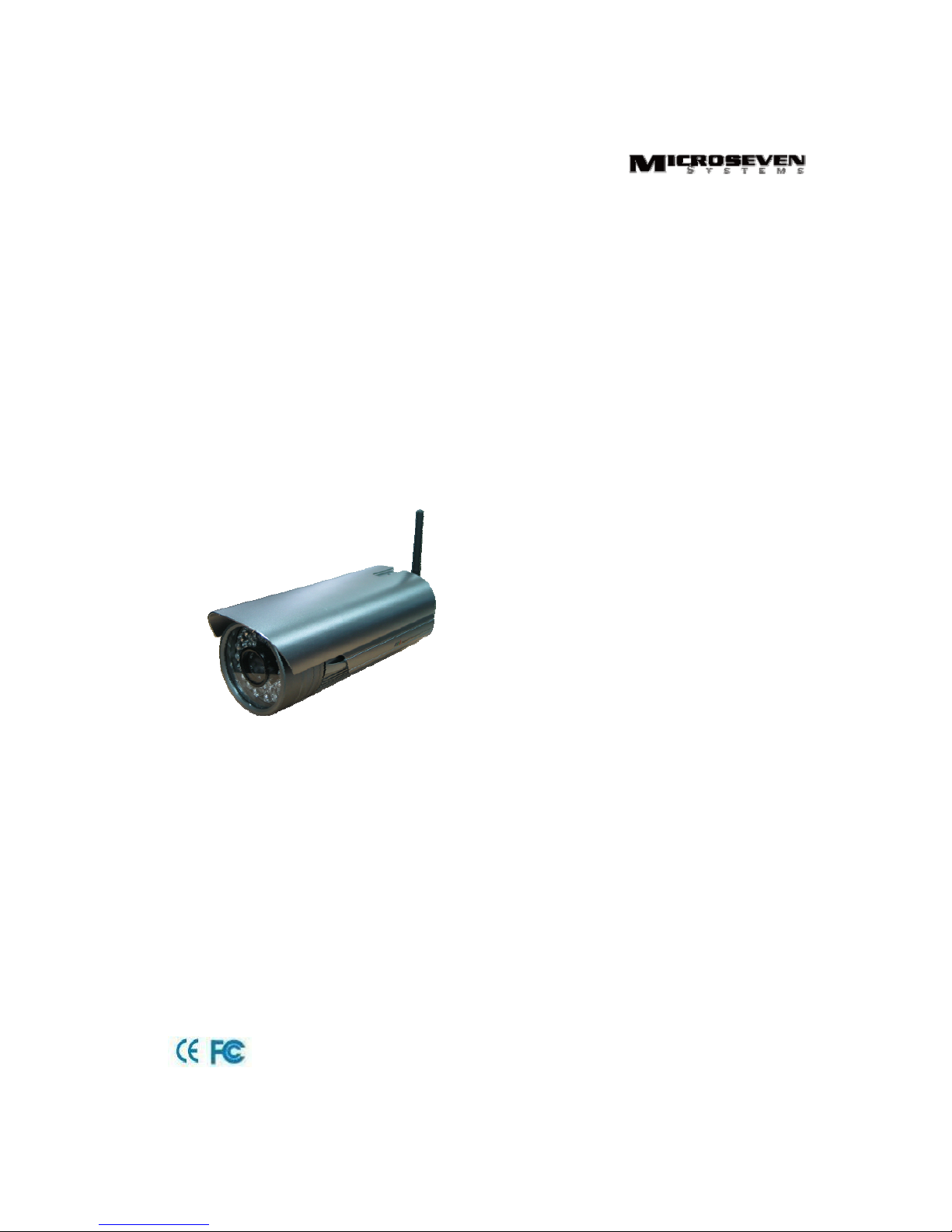
ProductOperationManual
MSHRC080W Network IP Camera
Microseven Systems, Inc.
Walnut, California 91789, USA

Microseven®MSHRC080W IR Network IP Camera
© 2002-2008 Microseven Systems, Inc. All Rights Reserved.
- 2-
First Edition (April 2008)
Copyright Notice
Copyright © 2002-2008 Microseven Systems, Inc.
All Rights Reserved.
Microseven Systems, Inc. provides this operation manual “as is” without warranty of any kind, either
express or implied, including, but not limited to the implied warranties of merchantability and fitness
for a particular purchase. Microseven Systems, Inc. may make improvements and/or changes in the
product(s) and/or the program(s) described in this manual at any time and without notice.
This publication could contain technical inaccuracies or typographical errors. Changes are made
periodically to the information herein; these changes will be incorporated in new editions of this
publication.
Microseven Systems, Inc.
675 Brea Canyon Road, Suite 12
Walnut, California, USA
TEL (909) 598 – 8553
FAX (909) 598 – 1415
Email [email protected]
Website www.microseven.com
Trademarks
Any product names used herein are for identification purposes only and may be trademarks of their
respective companies. Microseven is a registered trademark of Microseven Systems, Inc.
Microseven®MSHRC080W IR Network IP Camera
© 2002-2008 Microseven Systems, Inc. All Rights Reserved.
- 3-
Notes:
Please read the following label before connecting or operating the equipment.
Notes:
Please not move the cover (or back) to reduce
the danger of electric shock. No part inside
can be repaired by users. Refer servicing to
qualified personnel.
The lightning flash with arrowhead symbol,
within an equilateral triangle, is intended to
alert the user to the presence of exposed
wiring within the product’s enclosure that
may be of sufficient magnitude to constitute
a risk of electric shock to people.
The serial number of this product can be
found on the top of the unit. Please note
the serial number of this unit in the space
provide and retain this book as a
permanent record of your purchase to aid
identification in the event of theft.
Model:
Product №:
The exclamation point within an equilateral
triangle is intended to alert the user to the
presence of important operating and
maintenance (servicing) instructions in the
literature accompanying the appliance.
Notes:
Please not move the cover (or back) to
reduce the danger of electric shock. No part
inside can be repaired by users. Refer
servicing to qualified personnel.

Microseven®MSHRC080W IR Network IP Camera
© 2002-2008 Microseven Systems, Inc. All Rights Reserved.
- 4-
Contents
1. Preface ………………………………………………………………………………… 5
2. Key Features ………………………………………………………………………………… 5
3. Notes …………………………………………………………………………………………… 6
4. Instructions of Main Parts ………………………………………………………….…… 7
5. Connections …………………………………………………………………………………. 7
6. Installation …………………………………………………………………………………………… 9
7. Basic System Diagram and Operating Circumstance ………………….……………… 11
8. Specification …………………………………………………………………..……………… 11
9. Frequently Asked Questions ……………………………………………….……………… 13
10. Accessories …………………………………………………………………..……………… 13

Microseven®MSHRC080W IR Network IP Camera
© 2002-2008 Microseven Systems, Inc. All Rights Reserved.
- 5-
1. Preface
MSHRC080W Network IP cameras adopts SONY CCD, with bright and exquisite images. As
video & audio multi-media equipment that based on network transmission, which adopts built-in
and multi-media communication technology, the camera is a multi-media network terminal that
can directly connect to the network.
The camera adopts all-built-in technology, which can be connected to the TCP/IP network without
any other equipment and realize the video & audio collection, code compression and
transmission function. Outstanding H.264 compression code arithmetic guarantees the minimum
occupation of bandwidth, and built-in Web Server enables users to visit the IP camera through IE
or special surveillance management software.
Furthermore, the camera adopts big body design and built-in fans, which not only makes it have
good appearance, but also guarantees the reliable running of the camera.
2. Key Features
Minimum Illumination:
Color : 0.5 Lux
B&W : 0 Lux
Horizontal resolutions: 480TVL
H.264 compression format can optimize the image quality and the bandwidth occupation.
Built in web server, can be viewed directly by IE
Image capture
Email and FTP network linkage alarm.
Can be equipped with wireless transmission module to provide IEEE 802.11b/g standard
wireless transmission, and to improve the flexibility of installation.
Other Features
Powerful software function: provide network video server hardware and total software solution.
Unique video decoding function: can decode the data package of network camera to
composite video signal, and display it on monitors.
Flexible visit mode: one end to multi-end, multi-end to one end.
Adopt high quality IR LED, night vision distance reaches up to 40m.
Motion detection alarm, I/O status alarm and LOGO update alarm function, with 12x16
detecting areas& 9 level sensitivity ;When the moving objects are discovered in set areas, an
alarm signal will be transmitted to appointed client-end through network, image capturing &
recording or other relevant actions can be set.
Built in multi network protocol: Support TCP/IP protocol, allow data sending and receiving by
WAN or LAN.
Built-in Linux operation system.

Microseven®MSHRC080W IR Network IP Camera
© 2002-2008 Microseven Systems, Inc. All Rights Reserved.
- 6-
3. Notes
A. Do not attempt to disassemble the camera yourself.
To prevent electric shock, do not remove screws or covers. No part inside can be repaired by
users. Ask a qualified service person for serving.
B. Handle the camera with care.
Avoid striking or shaking. The camera could be damaged by improper handling or storage.
C. Wireless model does not support waterproof.
D. Do not use strong or abrasive detergents when cleaning the camera body. Use a dry soft
cloth to clean the camera when dirty. In case the dirt is hard to remove, use a mild detergent
and wipe gently.
E. Never face the camera towards the sun.
Do not aim the camera at bright objects. Whether the camera is in use or not, never aim it at
the sun or other very bright objects. Otherwise, blooming or smear maybe caused.
F. Do not operate the camera beyond the specified temperature, humidity or power source.
Use the camera under conditions where temperature is between -10° -+ 50° and humidity is
below 90%.
G. The power supply for MSHRC080W is DC12V.
The adapter with electric current of over 2A is recommended.
Microseven®MSHRC080W IR Network IP Camera
© 2002-2008 Microseven Systems, Inc. All Rights Reserved.
- 7-
4. Instructions for Main Parts
O
U
TI
N
⑨
1
2
3
4
1
2
11
12
①
②
③
④
⑤
⑥
⑦
⑧
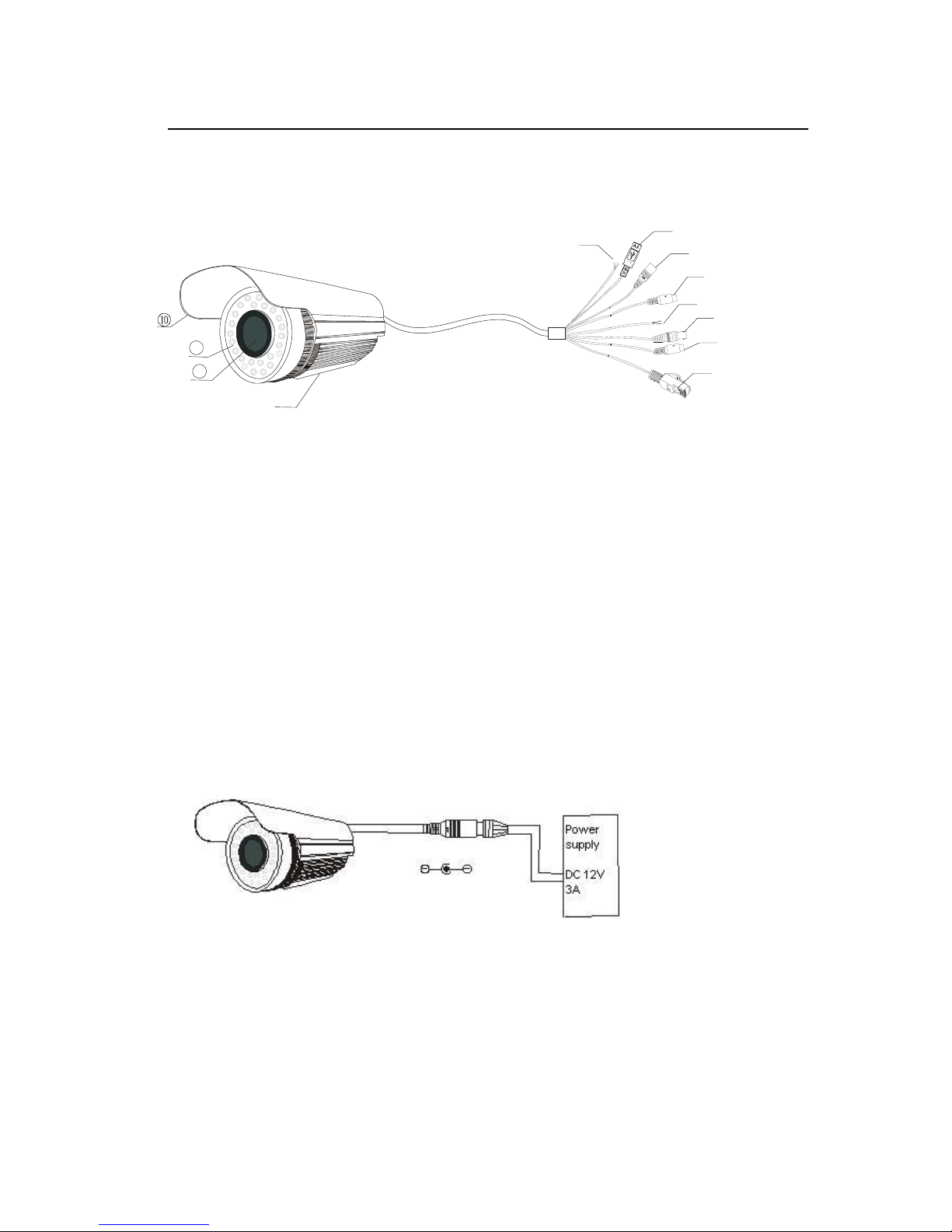
① Network connector
② Video output terminal
③ Alarm input/output cable
④ Audio input terminal (black)
⑤ Power supply terminal
⑥ RS485 port
⑦ Shell
⑧ Shield
⑨ LED panel
⑩ Lens
5. Connections
5.1 Power Supply Connection
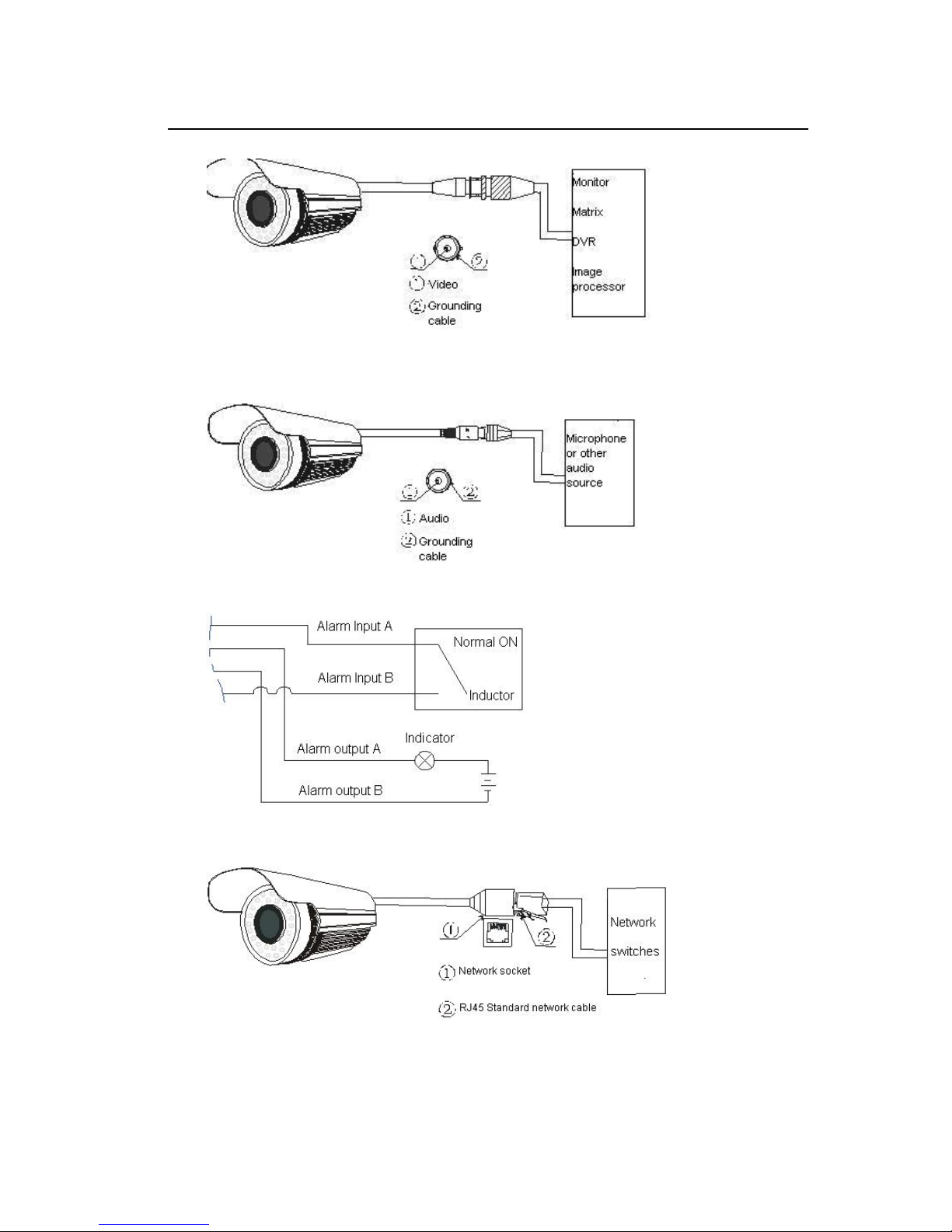
5.2 Video Output Connection
Microseven®MSHRC080W IR Network IP Camera
© 2002-2008 Microseven Systems, Inc. All Rights Reserved.
- 8-
5.3 Audio Input Connection
5.4 Alarm Connection
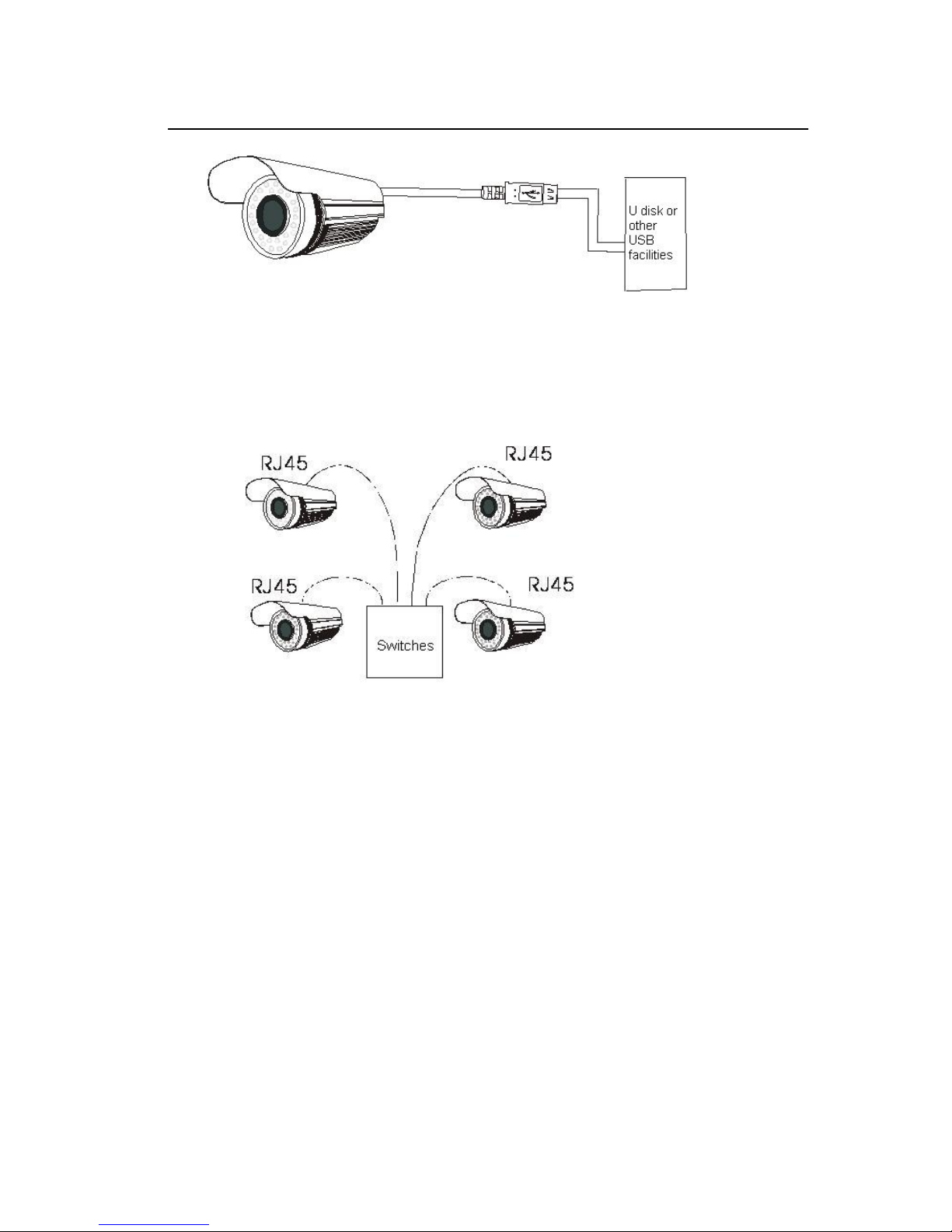
5.5 Network Port Connection
5.6 RS485 Communication Port Connection
Alarm cable:
Green cable: passive alarm input A
Brown cable: passive alarm input B
Red cable: passive alarm output A
Purple cable: passive alarm output B
Microseven®MSHRC080W IR Network IP Camera
© 2002-2008 Microseven Systems, Inc. All Rights Reserved.
- 9-
5.7 Connection Mode of RJ45
●RJ45 network cable
●Ultra-five cable
●Recommended maximum length: 80mm
6. Installation
6.1 Preparation
●Check product packing and if any accessories missing.
●Select proper installing position with enough bearing, such as surface of concrete
wall or metal bracket.
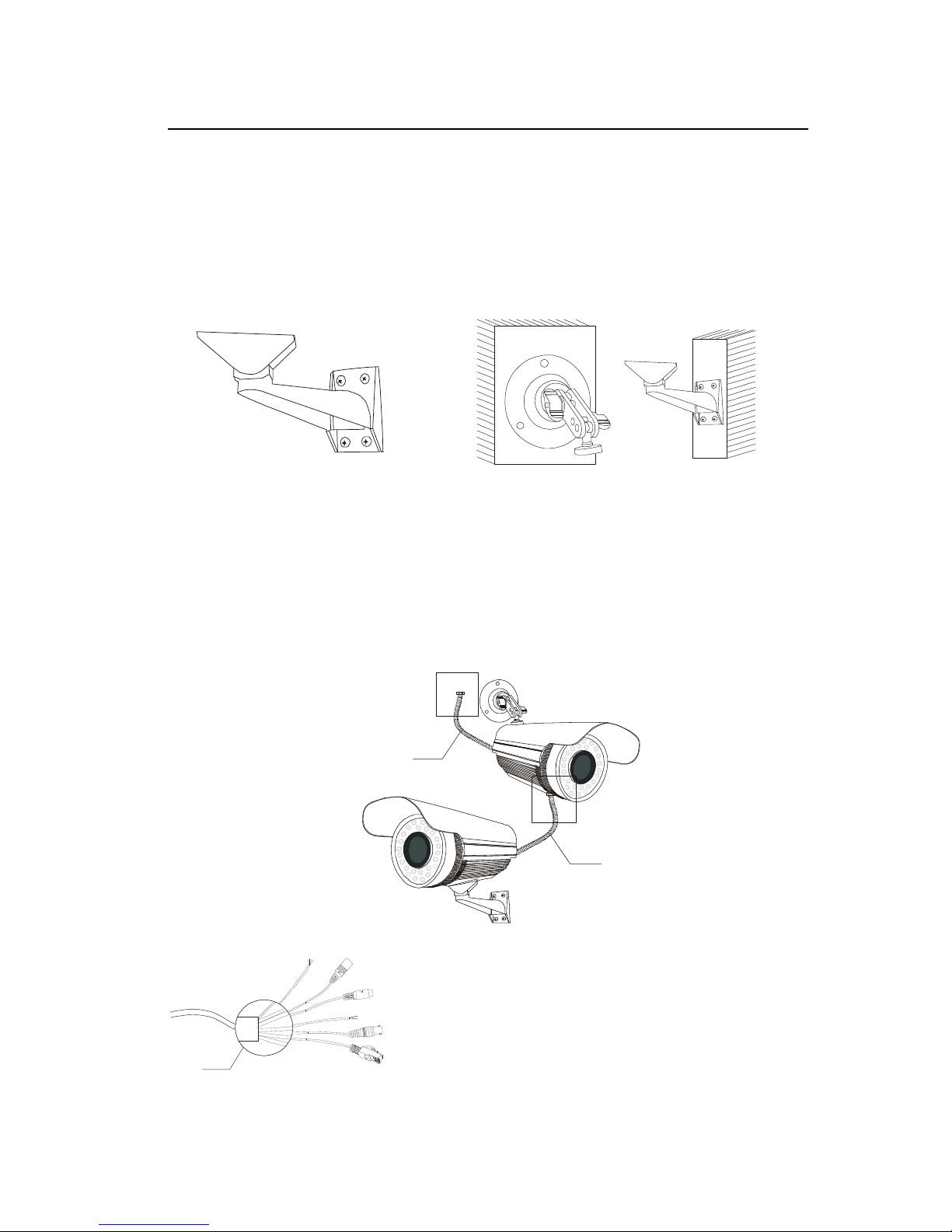
6.2 Outdoor Wall Installation
6.3 Installation Steps:
Step 1. Preparation
Select wall or hang installing brackets.
a. Selection of installation surface
Microseven®MSHRC080W IR Network IP Camera
© 2002-2008 Microseven Systems, Inc. All Rights Reserved.
- 10 -
Note: Please consult with expert about weight bearing capacity of installation
surface and structure. If the bearing capacity is not enough, the camera
may drop and damage. Please refer to weight of camera in specification
sheet.
b. Prepare hardware which will be used on installing surface, e.g. nut or fixing
bolt, etc.
Step 2. Installing bracket
Install bracket on installing surface by using bolts, which come with product.
A: The bracket B: Wall installation
Step 3. Install camera
Bracket above camera
As the following figure shows, the camera can be installed from the bottom. Size of install
hole should be fit for standard camera bolt size.
Bracket above camera
As the following figure shows, the camera can be installed from the bottom. Size of install
hole should be fit for standard camera bolt size.
< Bracket above camera >
Junction box
Junction box
< Bracket under camera >
②
I
N
1
2
3
4
1
2
①
①
Table des matières
Autres manuels Microseven Systems Caméra IP

Microseven Systems
Microseven Systems M7B57-WPS Manuel utilisateur

Microseven Systems
Microseven Systems M7B15 Manuel utilisateur

Microseven Systems
Microseven Systems MSH-HSD080W-18X Manuel utilisateur

Microseven Systems
Microseven Systems MSH-RD080PTW Manuel utilisateur

Microseven Systems
Microseven Systems MSHCX080 Manuel utilisateur


