
MFU A903S Manuel utilisateur

1
MFU
A903S
User Manual
V2.0
2
1 Introduction
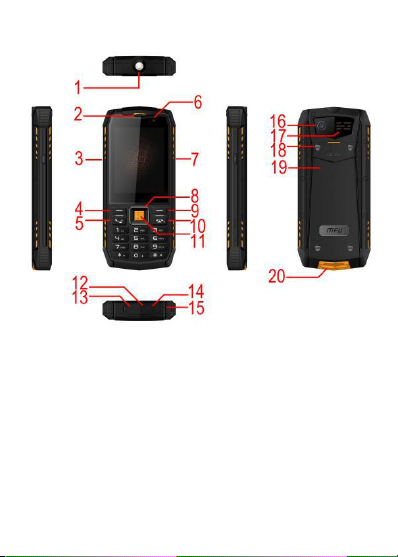
1Torch 2Receiver 3SOS key
4Leftsoft key 5SEND/Dial key
6Front camera 7Torch key
8Up/Down/Left/Right navigation key
9Right softkey 10 END/Power key
11 OK key 12 Water-proof cover
13Earphone Jack 14 USB port
15 MIC 16 Rear Camera
17 Speaker 18 Screw
19 Battery cover 20 Hook
3
NOTE:Softkey means its functions are
same as the meanings of words showed
on the left and right bottom corner of LCD
screen and always different when screen
content changes.
Normally, left softkey stands for asserting
actions, such as Option, Save or Ok.
Right softkey stands for canceling actions,
such as Back, Cancel,or No.
2 Installation
Step:
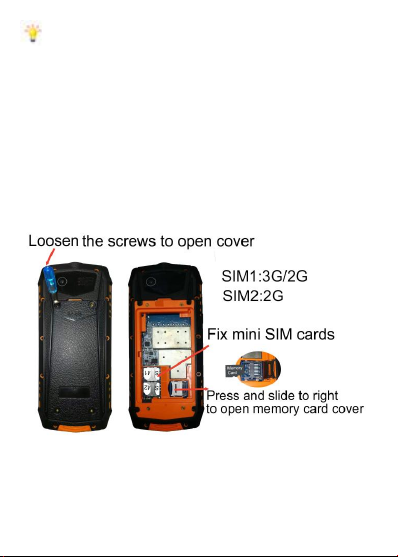
1Loosen the four screws to open battery
cover
2Fix mini SIM1/2 card and memory card.
4
3Install battery, close the battery cover
and tighten the screws.
3 Basic Function Overview
Note: SHORT PRESS means to press
and release the key quickly or within 2
seconds. LONG PRESS means to press
and hold for 3 up to 5 seconds.
Power on and off
Long press END key (power key) to power
on or power off phone.
Lock and Unlock keypad
Short press END key to lock keypad, Long
press Unlock key(Left softkey) or * key to
unlock keypad.
Change Language

5
Language set to English by default. Also
support 17 languages, including Russian,
France, Spanish, Portuguese, Italian,
Arab, Germany, Chinese, etc, in
Settings->phone settings->Language.
Note:Input *#0000#, then press SEND
key to reset language to English directly.
Change default password
Phone can be locked by password when
power on. Default is 0000. Change it in
Settings->Security settings->Phone
security->Change password menu.
Make sure keep your new password in
safety place.
Open Torch
Press Torch key on right edge side of
phone to open or close torch. There are
four modes of light: dull light, strong light,
SOS light and flickering light.
Add a phonebook
Input digits in Idle screen and press OK
key and select Save to phonebook or
option->add to contact menu to add it into
phone or SIM memory. You can edit the
name and select a photo for it.
Press # key to switch input method when
editing name.

6
Make a phone call
Input digits in Idle screen and press SEND
key.
After connected, press Right softkey to
open or close loud speaker, press Up and
Down key to adjust volume.
NOTE: This phone supports 2 SIM
cards with 3G/2G cellular system.
Send a message (SMS)
Press Right navigation key to enter Write
message screen, edit number and
content.
When editing content, press * key to input
symbol, # key to change input method,
such as Abc, 123 or smart method. Check
option menu for all other functions.
NOTE: To switch input method for
special language, change writing
language first in writing language menu by
# key.
Use SOS call
Open menu->SOS menu to enter SOS list
and edit SOS number.
Long press SOS key on left edge side of
phone for 3 seconds to activate SOS call.
The call will not stop until connected or
canceled by pressing END key. While

7
calling, a alert message will also be sent
to that number.
NOTE:There are 5 SOS numbers.
Use Family contacts
Press OK key to enter Family contacts
screen. You can edit 4 contacts with big
photo showed on screen and make a call
directly. These photos can be stored in
phone memory and no need external
memory card.
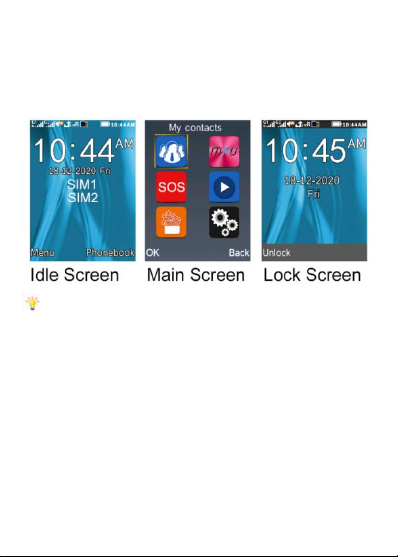
Browse mainmenu
Press Left softkey to enter mainmenu in
idle screen.You will find 6 big menu icons:
1) My Contacts: Support Messaging,
Phonebook and Call logs.
2) Mapps: Support Help, Family contacts,
Games, Auto call record, Mobile tracker,
Data protection and Lock keypad by END
key.
3) SOS settings: Edit SOS number, Set to
ON or Off of SOS function in SOS button
active menu. Edit SOS alert message in
Emergency SMS menu.
By default SOS is on.
4) Multimedia:support Audio player,
Camera, FM radio, Video player, Video
recorder, Image viewer, Sound recorder

8
and Internet.
5) Tools: Support Alarm, Calendar, World
clock, Calculator, Bluetooth, Ebook, Email,
My files.
6) Settings:
--Call settings:
Set advanced call settings, such auto
redial and reject by SMS.
--Phone settings:
Set time, date, language, clear all internal
data and restore to default settings.
--Display settings:
Change wallpaper ,backlight time, etc.
Wallpaper can be set from memory card.
--Security settings:
Change phone password, etc.
--Profiles:
Change volume, ringtone or SMS tone,
etc. Tone can be set from memory card.
Quick function of navigation keys
Up : Multimedia menu
Right: My contacts->Write message
Down: Adjust volume
Left : Mapps list
4 Advanced Functions
Take picture

9
Multimedia->Camera. By default, only
several pictures can be stored in phone
memory card, we should use a memory
card for more pictures.
Play music
Multimedia ->Audio player. Find play list
through option menu.
Press OK key to play, Up/ Down, or */ #
key to adjust volume.
Within player screen press END key to
turn into background playing mode.
In idle screen, short press END key to
stop background playing.
Play video
Multimedia ->Video, or Multimedia->My
Files->video directory, find video files to
play. This phone support MP4 and 3gp
video format.
Play FM radio
Multimedia->FM radio. Search FM
channels in options menu. Press OK to
start/stop playing. Up/Down key to adjust
volume.
Press END key to go into background
playing mode.
In idle screen, short press END key to
stop background playing.

10
Manager your file system
Phone supports unmovable phone
memory space and removable memory
card(micro SD card). Connecting phone
with computer using USB cable and
selecting U-disk mode in phone’s USB
configuration menu. On computer side,
manage files in phone memory and SD
card locations.
Before disconnecting USB cable, you
should securely quit connection from
computer side.
Data protection
In MApps menu, Open Data protection
menu to set items which need password
protection.
Mobile tracker
In MApps menu. The password is same
as phone password. First set tracker
number which is be used on another
phone and will receive an alert message
sent from this phone.
After setting the status to On, the current
SIM card will be bound to this phone
which,then,will send out an alert message
SIM card changed.
Auto call record
Table des matières
Autres manuels MFU Téléphone portable


