Meusburger T7 Manuel utilisateur

Rev. 1.00.03a | 23.06.23 11:09
Technische Änderungen vorbehalten
Meusburger Georg GmbH & Co KG
Kesselstraße 42 | 6960 Wolfurt | Austria
T +43 5574 6706
oce@meusburger.com
www.meusburger.com
T7
Start-up, Service and Operating Manual


CONTENT
1 Introduction 1
1.1 General information 1
1.2 Safety Instructions 2
1.3 Warranty conditions 2
1.4 Transport and storage 2
1.5 Disposal 3
1.6 Symbol meanings 3
2 Operation 5
2.1 Touch operation gestures 5
2.2 Image layout 5
2.3 Process data and parameter display 6
2.3.1 Standard 6
2.3.1.1 Selection of the number of zones per screen page 6
2.3.1.2 Select zone area 8
2.3.1.3 Background colour 8
2.3.1.4 Output value display (as bars) 8
2.3.2 Table 8
2.3.2.1 Select zone area / parameter 9
2.3.2.2 Background colours 9
2.3.3 All 9
2.3.3.1 Background colours 10
2.4 Entering input 10
2.4.1 Procedure for entering input 10
2.4.2 Copy zone parameters 12
2.4.3 Assign zone names 13
2.5 The controller unit 14
2.6 Login 14
2.7 Alarm status 15
2.8 Switch controller on/o 16
2.9 Info Centre 16
2.9.1 Code number 16
2.9.2 Position menu bar 17
2.9.3 Select language 17
2.9.4 Cleaning the screen 17
2.9.5 Communication parameters 17
2.9.6 User Management 17
2.9.7 Date / time 19
2.9.8 Hardware setup 19
2.9.9 System parameters 19
3 Start-up 20
3.1 Electrical start-up 20
3.1.1 Power supply and digital outputs 20
3.1.2 Interfaces 20
3.1.2.1 Ethernet 20
3.1.2.2 CAN 21
3.2 Setup 21
3.2.1 Ethernet 22
3.2.1.1 Addressing 22
3.2.1.2 Integrate controller 22
3.2.2 CAN 24
3.2.2.1 Addressing 24
3.2.2.2 Interface settings 24
3.2.2.3 Integrate controller 24
3.3 Device update 26
3.3.1 Update device software 26

3.4 Installation of a third language 26
4 Technical data 27
4.1 Installation plan 27
5 Annex 29
5.1 Version history documentation 29
5.2 Accessories 29

Rev. 1.00.03a
Technical changes reserved 1
Chapter 1 - Introduction
1 INTRODUCTION
1.1 GENERAL INFORMATION
FUNCTION
The T7 is an operating and display unit for parameterisation and visualisation of systemp and flexotemp
control systems with the following features:
»Compact and sturdy unit for operation and display of one or more controller components
»Usable with systemp and flexotemp controllers
»7“ TFT display with capacitive touch screen
»Clear presentation of all process values
»Access to process-relevant parameters
»Supports MPI02/ MPI05
»Communication to control systems via CAN bus or Ethernet
»Placement independent from controller
The following functions are not intended:
»Project planning of flexotemp control systems. This can be done using the flexotempMANAGER tool.
SUPPORTED DEVICES
The T7 supports the following controller series:
Series Controller(s) CAN Ethernet
systemp II ETR132 II, ETS132 II, ETR 112
systemp net ETR 132 net, ETS132 net, ETR 112 net
systemp PNIO ETR132 PNIO, ETR 112 PNIO
flexotemp PCU
flexotemp PNIO PCU PNIO, PCU NEXT
flexotemp MPI 02 (under PCU/PCUPNIO)
flexotemp MPI 05
PURPOSE OF THIS DOCUMENTATION
This user manual contains information that you need for the start-up, operation and maintenance of the T7
operating unit.
TARGET GROUP
This documentation is intended for qualified personnel in the following fields:
»Operators, project planners and programmers
»Electrical specialists who assemble, connect and commission the product/system
LEGAL INFORMATION
This manual contains information that you must observe for your personal safety and to avoid damage to
property. Before the installation and operation of the product/system, please read through this start-up and
service manual completely and carefully.
QUALIFIED PERSONNEL
The product/system described in this documentation may only be handled by personnel qualified for the
respective task. The documentation associated with the respective task, in particular the safety instructions
contained therein, must be observed. Due to their training and experience, qualified personnel are able to
recognise the risks in handling these products/systems and avoid possible hazards.
All persons involved with the installation/start-up/maintenance/servicing of the device must
»strictly observe this start-up and service manual
»regard this start-up and service manual as part of the product
»maintain this start-up and service manual during the lifetime of the product

www.meusburger.com
2
Start-up, Service and Operating Manual T7
»pass on this start-up and service manual to all successive owners or operators of the product
»make sure that every obtained amendment is integrated in this start-up and service manual.
INTENDED USE
The T7 may only be used for the applications described in this technical documentation.
When properly used, the safety of the user and the device is guaranteed. The device may only be used
for its intended purpose.
DISCLAIMER
Uses other than those listed above are considered improper uses, and exclude the liability of the manufac-
turer/supplier for any related damage to persons or property and any consequential damage.
We have checked the contents of this publication for compliance with the hardware and software de-
scribed. Nevertheless, deviations cannot be ruled out, so we do not assume any guarantee for complete
compliance. The specifications in this publication are checked regularly and necessary corrections are
included in the following editions.
1.2 SAFETY INSTRUCTIONS
Before installation, handling or operation of the device, please read through this start-up and service
manual completely and carefully.
All persons responsible for the installation/start-up/operation/maintenance/servicing of the device must:
»be suitably qualified
»strictly observe this start-up and service manual
»regard this start-up and service manual as part of the product
»maintain this start-up and service manual during the lifetime of the product
»pass on this start-up and service manual to all successive owners or operators of the product
»make sure that every obtained amendment is integrated in this start-up and service manual.
1.3 WARRANTY CONDITIONS
This product is subject to the legal warranty time periods for errors or defects in production.
CONTENT OF THE WARRANTY
If a malfunction occurs due to a manufacturing fault, the manufacturer/supplier will repair or replace the
defective product at to their own discretion.
The following repairs are not covered by the warranty and are subject to a charge:
»Malfunctions after the legal deadlines have expired.
»Malfunctions caused through operating error and/or incorrect parameterisation by the user (if the de-
vice is not operated as described in the start-up and service manual).
»Malfunctions caused by other devices.
»Changes or damage to the device which do not originate from the manufacturer/supplier.
If you wish to use services within the framework of this guarantee, please contact the manufacturer/suppli-
er.
1.4 TRANSPORT AND STORAGE
TRANSPORT
The components of the T7 system are delivered in a robust carton, in shockproof packaging.
This ensures sucient protection under normal circumstances.

Rev. 1.00.03a
Technical changes reserved 3
Chapter 1 - Introduction
UNPACKING
Check the package and the product delivered for visible transport damage. If damage is identified, please
contact the transport company.
Damage to the system
Damaged parts can lead to damage to the system. Do not put any damaged components of the T7
system into operation!
STORAGE
If the unpacked device is not immediately put into operation, it must be stored so it is protected from dirt
and moisture.
Please refer to the technical specifications for permissible operating temperature and humidity. If there is
any dirt contamination, liquid penetration, condensation build up, damage or other breaches of the storage
conditions, start-up is not permitted until further action has been agreed with Meusburger Deutschland
GmbH.
1.5 DISPOSAL
Meusburger Deutschland GmbH as a manufacturer within the meaning of ElektroG (Electrical and Elec-
tronic Equipment Act), which implements the European WEEE directive 2002/96/EC in German law, is
registered under number WEEE registration number DE 66448978. The components of the T7 system are
considered here too.
1.6 SYMBOL MEANINGS
The following symbols and conventions are used in this document for quicker orientation:
Attention This symbol indicates references and information which are
decisive for the operation of the device. Failure to comply may
result in damage to the device or personal injury.
Information / notes This symbol indicates additional information and explanations,
which serve to provide better understanding.
Example With this symbol, a function is explained by means of an exam-
ple.
Operation This symbol explains the operating steps for a function.
Reference This symbol refers to information in another document.
FAQ FAQs (Frequently Asked Questions) are answered here.
Data on the internet This symbol refers to additional documents on the internet.
Installation / assembly This symbol indicates instructions for assembly and electrical
installation.
Settings This symbol provides information on the settings of the configu-
ration parameters.

www.meusburger.com
4
Start-up, Service and Operating Manual T7
REFERENCES IN THE OPERATING MANUAL
äCross reference: In the PDF version of the document the link brings you to the cross
reference.
Equations Calculation specifications and examples
<View> Menu points e.g. view are represented through a < > bracket.
{Project} Windows (e.g. project) are represented through a { } bracket.
n.a. not available / not applicable

Rev. 1.00.03a
Technical changes reserved 5
Chapter 2 - Operation
2 OPERATION
During operation, access to all setting values (configuration parameters, system settings of the controller,
and T7, ...) is controlled via one user 2.9.6 User Management . In this manual it is assumed that the user
Admin has full access to all data. If you do not have the appropriate rights, please contact the user with
full access rights to assign the setting or to give you rights to edit the setting value.
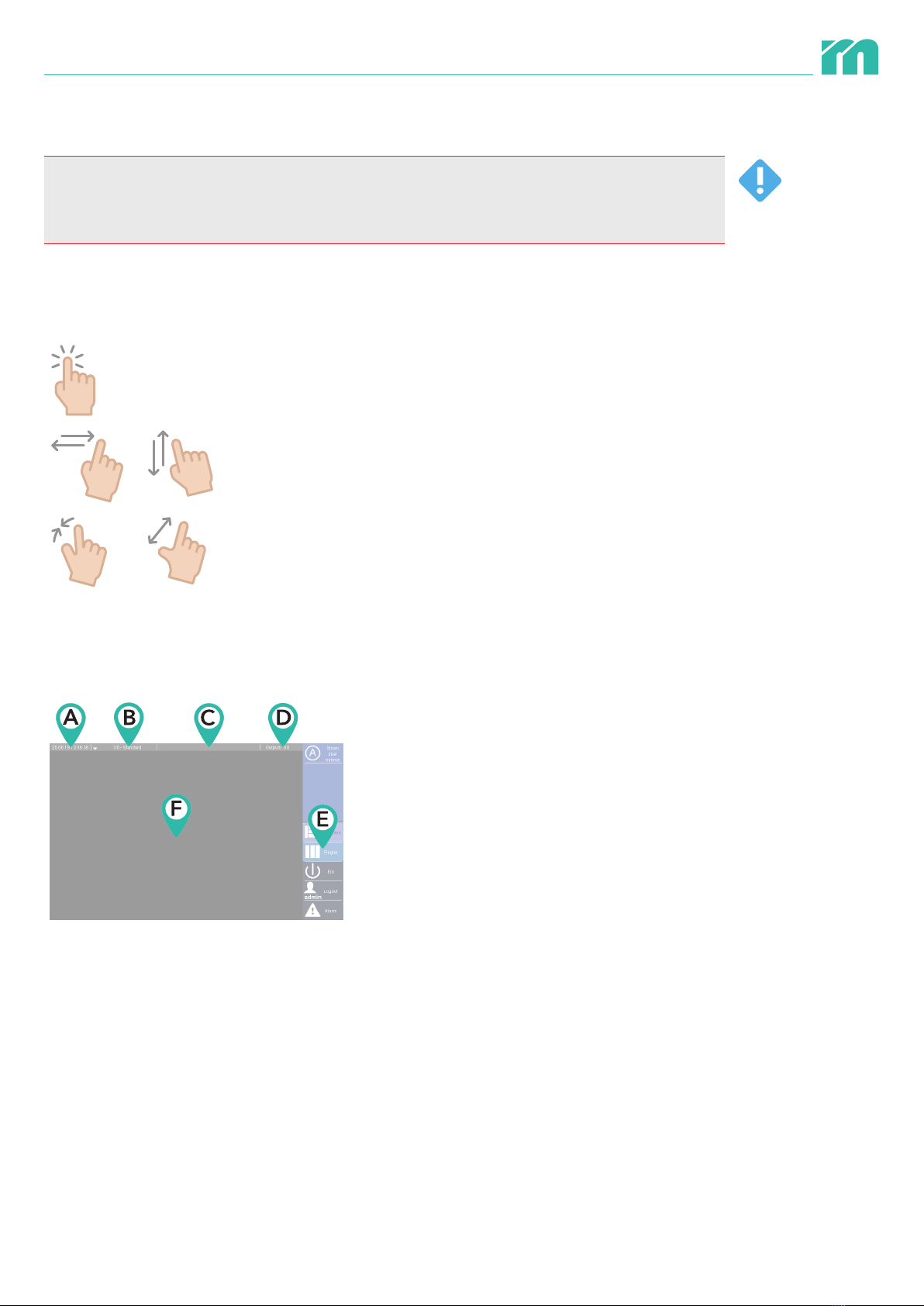
2.1 TOUCH OPERATION GESTURES
The following gestures are supported on the capacitive touch screen depending on the menu item.
Tapping (once)
Swiping left/right or up/down
Spread and pinch with 2 fingers
2.2 IMAGE LAYOUT
Screen pages in which process data is displayed are structured as follows.
ACurrent date and time
BType of display of process data (Standard, Table,
All). If the Standard display mode is selected, the
currently selected page and the total number of
pages are also displayed.
CShows the respective controller type, the interface
via which the T7 communicates with the controller
and the address of the controller.
DShows the status of the alarm outputs of the T7.
EThe menu for selecting the display mode of the
process data and calling up various functions. The
menu bar can also be placed on the left side of the
screen (2.9.2 Position menu bar),
Finformation field. This includes the display of the
process data selected in the menu.

www.meusburger.com
6
Start-up, Service and Operating Manual T7
2.3 PROCESS DATA AND PARAMETER DISPLAY
The process data (actual temperature values, temper-
ature set point values, output value, and heating cur-
rent) can be displayed in three variants. The display
mode is selected via the menu bar which appears
when you click on the ‘Views’ button.
2.3.1 STANDARD
In this display mode, the process values (actual temperature value, temperature set point value, heating
current, output value) are displayed by zone.
The ‘Standard’ display mode is ac-
cessed via the ‘Standard’ button, which
can be found under the menu item
‘Views’.
The T7 has saved the number of zones per page
selected in this display mode during the last use and
switches it on.
2.3.1.1 SELECTION OF THE NUMBER OF ZONES PER SCREEN PAGE
The number of zones displayed on one screen page can be selected. It also depends on the maximum
number of zones of the specific controller. The information displayed per zone depends on the number of
zones on the screen page.
Zone display Number of
zones per
screen page
Continuously visible process
values
Additionally selectable process
values
6 »Zone number / zone name
»Set point value
»Actual value
»Output value (numeric)
»Heating current
12 »Zone number / zone name
»Set point value
»Actual value
»Output value (numeric)
»Heating current
Table des matières