1
HANDLING COMPACT DISCS
NOTES ON CDS
MOISTURE CONDENSATION
DIGITALAUDIODIGITALAUDIO DIGITALAUDIODIGITALAUDIO DIGITALAUDIODIGITALAUDIO
RECORDABLE RECORDABLE
On a rainyday or ina very damparea, moisture maycondense on thelenses inside the unit.
Should this occur, the unit will not operate properly. In such a case, remove the disc and wait
for about anhour until themoisture has evaporated.
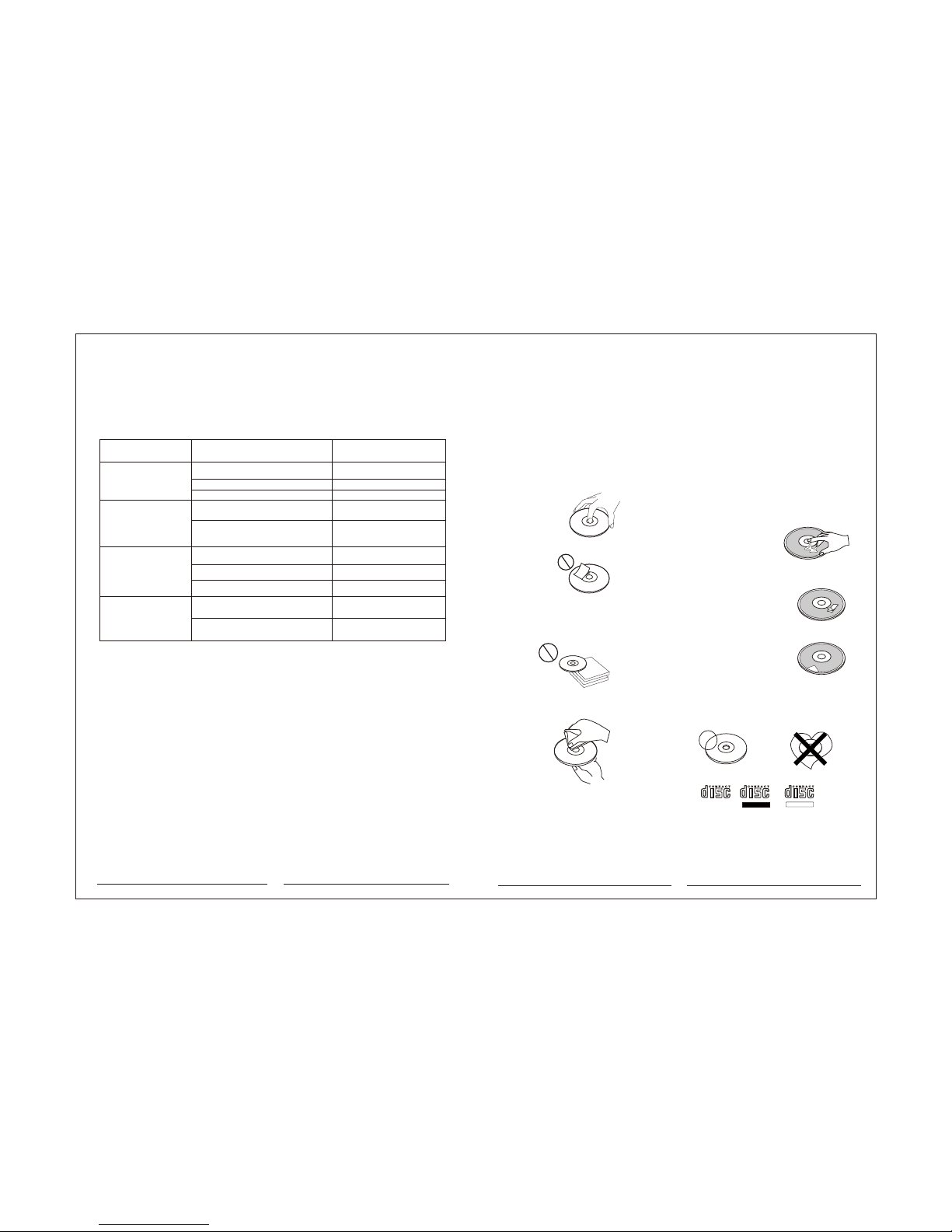
1. Adirty or defectivedisc may cause sound
dropouts while playing.Toenjoy optimum
sound, handle thedisc as follows.
Handle the discby its edge.Tokeep the disc
clean, do nottouch the surface(P.1)
2. Do notstick paper ortape on thedisc (P.2)
3. Do notexpose the discsto direct sunlightor
heat sources suchas hot air-ducts,or leave
them in acar parked indirect sunlight where
there can bea considerable risein
temperature inside thecar (P.3).
4. Before playing,clean the discswith an
optional cleaning cloth.Wipe each disc from
the centre out(P.4).
5. Do notuse solvents suchas benzine,
thinner, commerciallyavailable cleaners, or
antistatic spray intendedfor analog discs.
CD-Rs and CD-RWswhich have not undergone finalization processing cannot be played.
(For more informationon finalization processing, refer to the manual for your CD-R/
CD-RW writing softwareor CD-R/CD-RW recorder.) Addition software or depending on
the recording status,it may proveimpossible to playcertain Cds record on CD-R or CD-RW.
Only for thisunit.
Be Sure to use Cds with disc mark
Be sure touse round shapeCds only for
this unit anddo not useany special shape
Cds. Use ofspecial shape Cdsmay cause
the unit tomalfunction.(P.8).
Do Not UseSpecial Shape Cds
Labels are attached(P.7).
Do not useyour Cds withlabels or stickers
attached.
Do not userental Cds withold labels that
are beginning topeel off.
If you usethe discs explainedbelow, the
sticky residue cancause the CDto stop
spinning and maycause malfunction or ruin
your discs.
Do not usesecond-hand or rentalCds that
have a stickyresidue on thesurface (for
example, from peeled-offstickers or from
ink, or glueleaking from underthe stickers).
Stickers that arebeginning
to peel away, leaving a
sticky residue (P.6).
There are pasteresidue.
Ink is sticky(P.5).
NOTES ON DISCS
P.1
P.5
P.6
P.7
P.8
P.2
P.3
P.4
8
Yellow wire not connected or incorrect voltage
Red wire not connected or incorrect voltage
Black wire not connected
Fuse blown
Speaker wires not connected
One or more speaker wires touching each
other or touching chassis ground
Yellow or red wire touching chassis ground
Speaker wires touching chassis ground
Incorrect fuse rating
Unit is not mounted correctly or back strap is
not secure
Physical defect in media(CD)
Unit will not turn on
(no power)
Unit has power
(but no sound)
Unit blows fuses
Excessive skipping
Check connections for proper voltage
(11-14.4VDC)
Check connection to ground
Replace fuse
Check connections at speakers
Insulate all bare speaker wires from
each other and chassis ground
Check for pinched wire
Check for pinched wire
Use fuse with correct rating
Check mounting sleeve and back strap
support
Check media for scratches
Problem Cause Action
TROUBLESHOOTING