Meridian 818 Manuel utilisateur

818 Reference Audio Core
User Guide

ii
Preface Important safety instructions
Read the instructions.
Keep these instructions.
Follow all instructions.
Do not use this apparatus near water.
Clean only with a dry cloth.
Install only in accordance with the manufacturer’s
instructions.
Refer all servicing to approved service personnel.
WARNING: TO REDUCE THE RISK OF FIRE OR
ELECTRIC SHOCK, DO NOT EXPOSE THIS
APPARATUS TO RAIN OR MOISTURE.
This apparatus has been designed with Class 1
construction and must be connected to a mains socket
outlet with a protective earthing connection (the third
grounding pin).
This apparatus uses a single-pole power switch. As
a result it is not isolated from AC mains power when
switched off at the rear panel. The apparatus may
be isolated from mains power either by unplugging
the power connector from the rear of the unit, or by
unplugging the connector at the opposing end of the
power cord or cable from its supply outlet. As a result,
either or both of these connectors should remain
accessible.
Safety warnings
Do not expose the unit to dripping or splashing.
Do not place any object filled with liquid, such as a
vase, on the unit.
Do not place naked flame sources, such as lighted
candles, on the unit.
•
•
•
•
•
•
•
•
•
•
To avoid overheating
Leave at least 10cm around the equipment to ensure
sufficient ventilation.
Do not position the unit:
In direct sunlight.
Near heat sources, such as a radiator.
Directly on top of heat producing equipment, such as
a power amplifier.
To avoid interference
Do not position the unit:
Near strong electrical or magnetic radiation, such as
near a power amplifier.
Radio interference
FCC Warning: This equipment generates and can
radiate radio frequency energy and if not installed and
used correctly in accordance with our instructions may
cause interference to radio communications or radio
and television reception. It has been type-tested and
complies with the limits set out in Subpart J, Part 15 of
FCC rules for a Class B computing device. These limits
are intended to provide reasonable protection against
such interference in home installations.
EEC: This product has been designed and type-tested
to comply with the limits set out in EN55013 and
EN55020.
•
•
•
•
•

iii
Contents
Contents
Introduction 1
The 818 Reference Audio Core 2
Specifications 3
Using the 818 Reference Audio Core 5
Front panel keys 6
MSR+ keys 7
Switching on and off 8
Selecting a source 9
Adjusting the system volume 10
Changing the treble or bass 11
Changing the balance or phase 12
Changing the loudness or subwoofer mode 13
Loudspeaker setup controls 14
Changing the front-panel display 15
Installing the 818 Reference Audio Core 17
Unpacking 18
Applications 20
Configuring the 818 Reference Audio Core 29
Choosing a standard setting 30
Setting up sources 31
Setting up SpeakerLink 32
Installing the Meridian Configuration Application 33
Index 35

iv
Preface Copyright and acknowledgements
Designed and manufactured in the UK
Meridian Audio Ltd
Latham Road
Huntingdon
Cambridgeshire
PE29 6YE
England
Copyright © 1999-2012 Meridian Audio Ltd.
Visit us on the Web
http://www.meridian-audio.com
Part no: 818U/1 (P88407)
MHR: this product incorporates copyright protection technology
covered by certain patent applications and intellectual property
of Meridian Audio Ltd. This technology is provided for the
express purpose of securely containing copyright audio within
the Meridian System only. Reverse engineering or circumvention
of this protection is strictly prohibited.
Boothroyd|Stuart Meridian, Meridian, and Sooloos are
registered trademarks of Meridian Audio Ltd.
This guide was produced by:
Human-Computer Interface Ltd,
http://www.interface.co.uk

1
Introduction
Introduction
Welcome to the Meridian 818 Reference Audio Core.
This User Guide provides full information about using the 818 in
conjunction with your other equipment, to achieve the superb results you
can expect from it.

2
Introduction The 818 Reference Audio Core
Incorporating the advanced technology from Meridian’s
popular 808.3 Signature Reference CD Player, the
Meridian 818 Reference Audio Core is a stereo audio
controller with a wide range of digital and analogue
inputs.
Outputs
The 818 Reference Audio Core provides two Meridian
SpeakerLink connectors for simple, straightforward
connection to Meridian DSP Loudspeakers via Cat 5
cables.
Alternatively, balanced and unbalanced analogue
outputs are provided for connecting to an external
power amplifier or preamplifier.
The digital outputs support MHR (Meridian High
Resolution) and operate at up to 96kHz 24-bit.
Inputs
On the input side, the 818 Reference Audio Core
provides a wide range of possibilities.
The 818 Reference Audio Core provides a network
socket to connect directly to a Sooloos network,
allowing it to play music from and control a Sooloos
Digital Media System.
Three SpeakerLink inputs are provided for connecting
to other Meridian sources with SpeakerLink outputs.
In addition, three digital coaxial S/PDIF inputs and five
Toslink optical digital inputs are provided, for connecting
to other digital sources. All digital inputs operate at
sample rates up to 96kHz.
A USB B-type connector is provided to allow the 818
Reference Audio Core to be connected to a computer
system and used as an external sound card.
Six stereo analogue inputs are provided on gold-plated
phono connectors.
Audio processing
The 818 Reference Audio Core features high-quality
audio processing. Analogue inputs are converted to
digital at 96kHz sampling, and digital inputs accept
signals up to 96kHz. High resolution files, up to
192kHz/24 bit, may be replayed from a Meridian
Sooloos Digital Media System.
Signals are processed with Meridian’s exclusive
apodising filter that ensures maximum audio quality
with outputs at 96kHz/24 bit (digital) or 192kHz/24 bit
(analogue).
When used with Meridian DSP Speakers, the 818
Reference Audio Core provides additional audio
processing in the speakers, such as treble and
bass tone controls and enhanced room boundary
equalisation.
System integration
An RS232 interface provides full remote control
capability as well as the ability to configure the unit
with Meridian’s innovative Windows-based graphic
configuration application.
Three programmable trigger outputs are provided
for direct control of external devices, for example
powering-up amplifiers, etc.
The 818 Reference Audio Core is supplied with the
MSR+ learning/programmable remote control, which
not only operates all Meridian products but also
includes an extensive database of third-party products
and the capability to learn commands from existing
remotes.

3
Introduction
Specifications
Audio outputs
2-channel balanced audio output.
2-channel unbalanced audio output.
2-channel digital coax output.
Two 2-channel Meridian SpeakerLink outputs.
Optional MHR encryption on digital outputs at high
rate.
Audio inputs
Six 2-channel unbalanced analogue inputs.
Adjustable sensitivity.
Three 2-channel digital coax inputs. 44.1kHz to
96kHz sampling and up to 24-bit precision.
Three 2-channel Meridian SpeakerLink inputs.
44.1kHz to 96kHz sampling and up to 24-bit
precision.
Five 2-channel digital optical inputs. 44.1kHz to
96kHz sampling and up to 24-bit precision.
One network input (Ethernet) for connection to a
Meridian Sooloos Digital Media System.
One USB input, for connection to a computer.
All inputs provide renameable legends.
Signal processing
The 818 uses Meridian’s proprietary DSP software to
provide the following powerful features:
Apodising filter.
Upsampling.
FIFO and error correction.
Resolution enhancement.
•
•
•
•
•
•
•
•
•
•
•
•
•
•
•
•
Controls
Front-panel facia controls for:
Source, Play/Pause, Previous, Next, Mute, Volume
Up and Down, and On/Off.
A hinged control panel provides additional controls for:
Volume +/-, Source, Display, Mute, Setup, Fast
Forward/Reverse, and Menu keys.
Display
20-character dot-matrix display with adjustable
brightness and contrast.
Indicators for Emphasis and Phase.
•
•
•
•

4
Introduction

5
Using the 818
Reference Audio Core
Using the 818 Reference Audio
Core
This chapter provides a summary of the functions of the 818 Reference
Audio Core to identify the controls which you use to operate the unit.
It also provides step-by-step instructions for operating the 818, using
either the front panel or the MSR+.

6
Using the 818
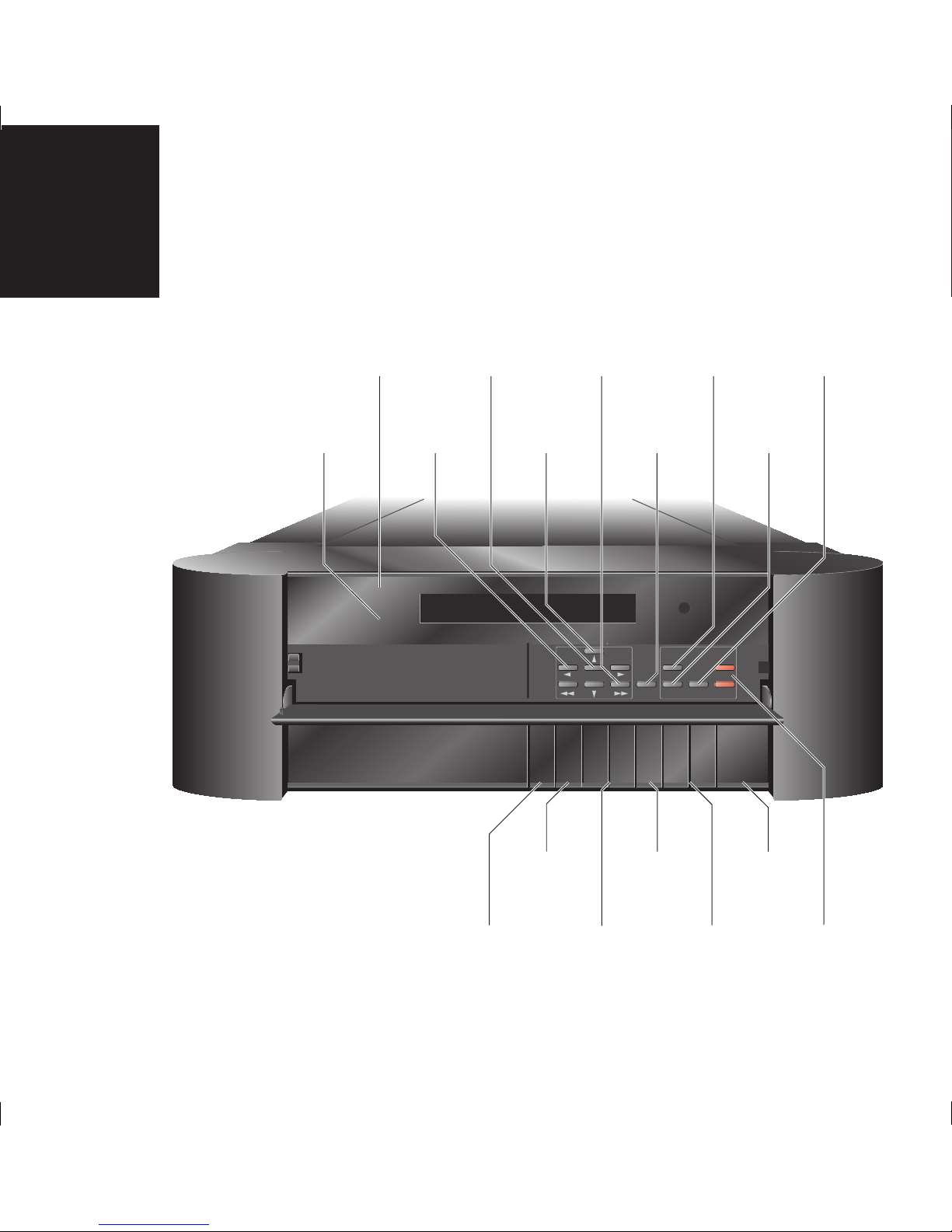
Reference Audio Core Front panel keys
Eq
Phase-
OffSource Mute A V[> = ]Reference Audio Core 818
Volume +
Volume –Mute
Menu
Setup Display
Source
Reference Audio Core 818
Fast Forward/
Fast Reverse
Scans forwards/
backwards
Source
Selects a source
Play/Pause
Plays or pauses
the track
Previous/Next
Selects the
previous or next
track
Mute
Mutes or restores
the sound
Volume keys
Change the
system volume
Off
Switches to
standby
Source
Selects a
source
Display
Changes the
information
displayed
Eq
Emphasis
indicator
Setup
SpeakerLink
Setup
Up/Down
Changes a menu
parameter
Left/Right
Selects a menu
parameter
Menu
Not currently
used
Volume keys
Change the
system volume
Phase –
Indicates inverted
phase
Mute
Mutes or restores
the sound
Table des matières
Autres manuels Meridian Système stéréo