
Meos dvd121b Manuel utilisateur
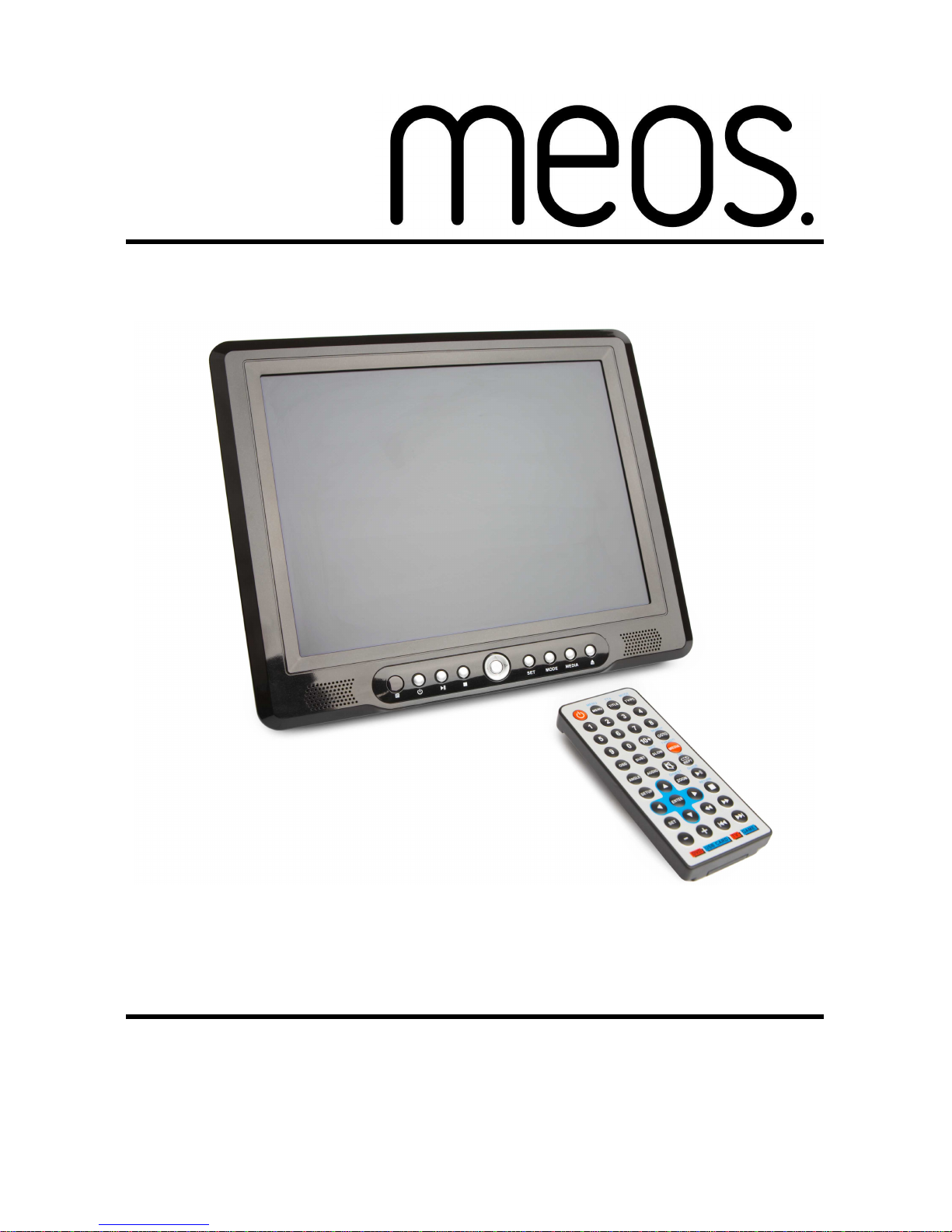
12.1” portable tv/dvd player dvd121b
Instruction manual
PLEASE READ CAREFULLY BEFORE USE


1
Table of Contents
1. INTRODUCTION.............................................................5
How to Use this Manual ......................................................................5
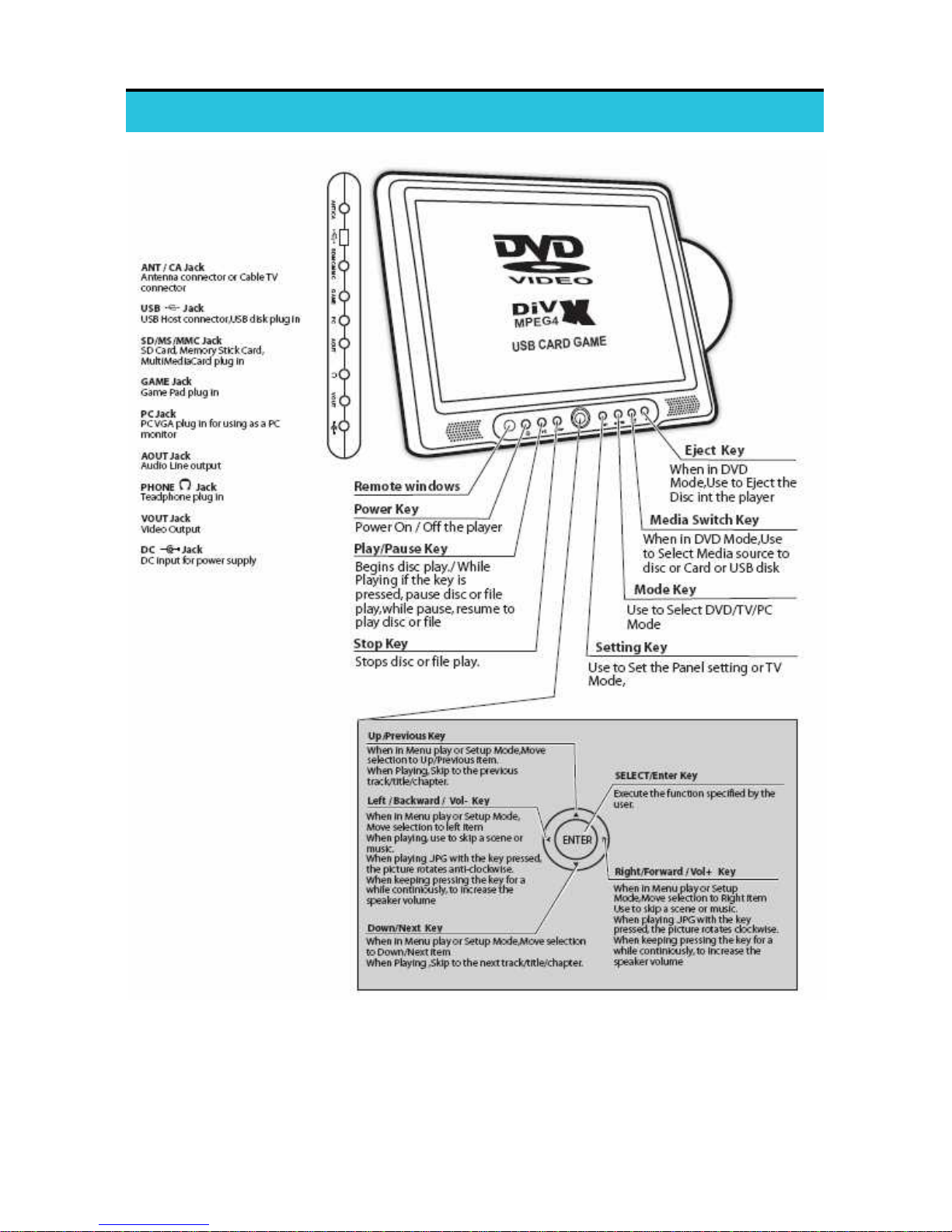
Controls and Connectors....................................................................6
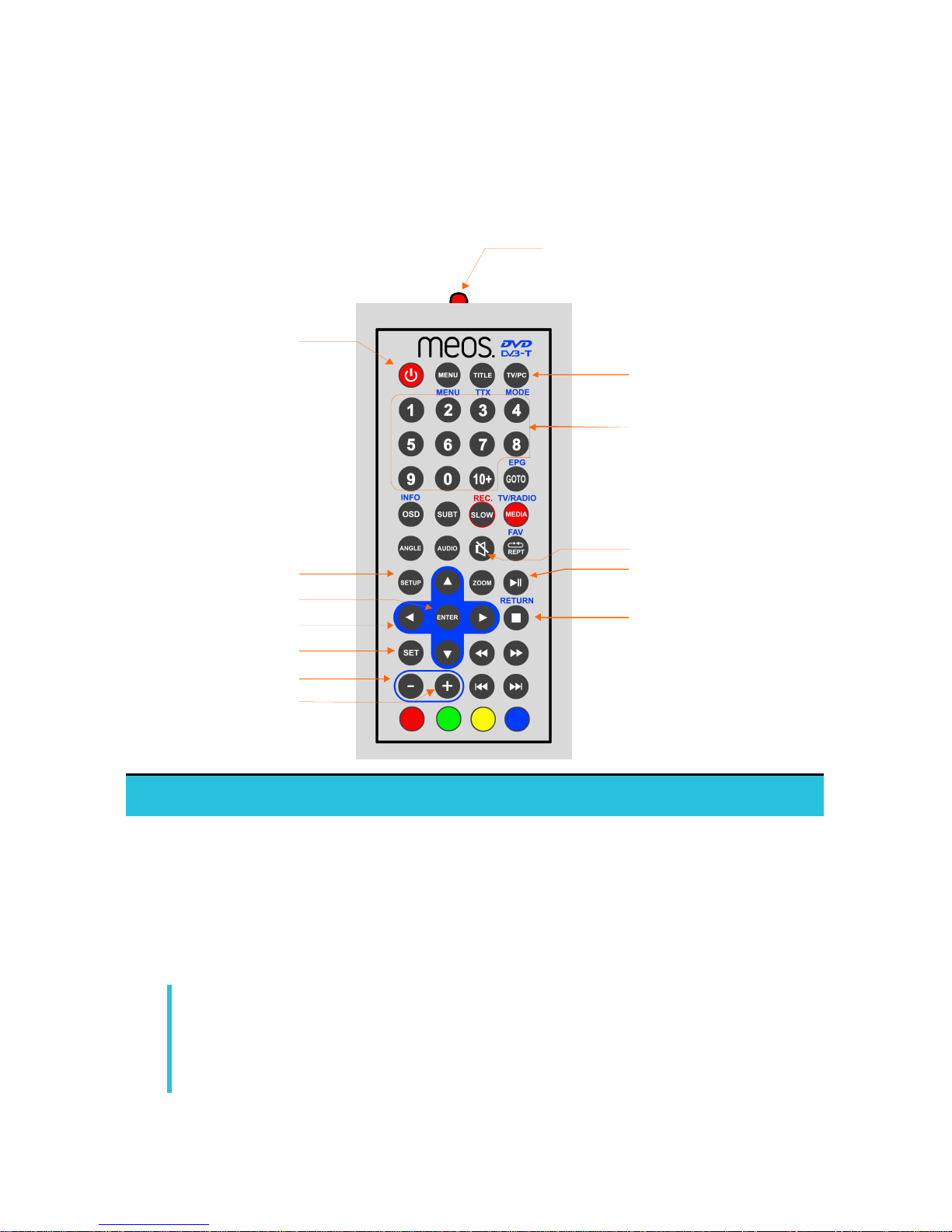
Remote Controller..................................................................................................7
Power and battery-charging ...............................................................7
Connecting a TV aerial........................................................................8
Connecting to a TV..............................................................................9
Reading a USB Device or Memory Card ..........................................9
Connecting AV Equipment ...............................................................10
Using your Player as a PC Monitor..................................................11
2. PLAYING DVD/CDs......................................................12
Inserting a Disc ...................................................................................12
Playing Audio CDs..............................................................................13
Basic Operation ..................................................................................13
Setting Parental Controls .................................................................14
3. RECEIVING ANALOG TV.............................................15
Select Analog TV Mode.....................................................................15
Search for Channels ...........................................................................15
4. RECEIVING DIGITAL TV (FREEVIEW)........................16
Getting Started...................................................................................16
Initial Setup .........................................................................................16
Setting up Digital TV at Other Times.............................................18

2
Viewing Digital TV .............................................................................19
Changing Channels.............................................................................19
Using the EPG.....................................................................................20
Recording Digital TV .........................................................................21
Direct Recording....................................................................................................21
Recording from the EPG......................................................................................21
Manually Scheduling a Recording........................................................................22
Replaying Recorded Programs .........................................................24
Using the Hot Key .................................................................................................24
From the Digital TV Menu...................................................................................24
Deleting Recordings...........................................................................24
5. PLAYING GAMES.........................................................25
NES Games .........................................................................................25
Onboard Games .................................................................................26
6. PHOTOS, MUSIC AND VIDEO.....................................27
Viewing Media.....................................................................................27
Viewing Photos ...................................................................................28
7. CHANGING SETTINGS................................................29
Adjusting the player’s picture...........................................................29
Changing the DVD Setup..................................................................30
System Setup ...........................................................................................................30
Language Setup........................................................................................................30
Audio Setup .............................................................................................................31
Video Setup..............................................................................................................31
Speaker Setup..........................................................................................................31
Digital Setup.............................................................................................................31
Changing the DVB-T Setup ..............................................................32
Channel Manager....................................................................................................32
Installation................................................................................................................33

3
Configuration...........................................................................................................34
Using Parental Control.........................................................................................37
8. IN-VEHICLE USE..........................................................38
Fitting the Headrest Bracket............................................................38
Mounting the Player...........................................................................38
Releasing the Player...........................................................................38
9. TROUBLESHOOTING..................................................39
TV .........................................................................................................39
DVD......................................................................................................40
General.................................................................................................40
10. SPECIFICATION...........................................................42
Features ...............................................................................................42
Technical Details ................................................................................43
Accessories..........................................................................................44

4
5
1. INTRODUCTION
Thank you for buying the Meos 12.1” Portable TV/DVD Player.
The 12.1” Portable TV/DVD Player supportsboth digital DVB-T (Freeview) and
analog TV formats. It is a DVD and CD Player, a digital photo viewer, it can play
and rip CDs, offers AV input and output, reads USB devices and SD memory
cards.
How to Use this Manual
This section shows you where you can find the information you need to use your
Meos 12.1” Portable TV/DVD Player:
Function Task Page
Playing a DVD Controlling playback
Setting parental controls
Changing settings
13
14
30
Playing a Music CD Controlling playback 13
Watching Digital TV
(Freeview)
Connecting the antenna
Tuning the player to digital channels
Setting parental controls
Changing setting
8
37
30
Watching
Analog TV
Connecting the antenna
Tuning the player to analog channels
8
15
Playing Games Playing the games on the CD
Playing the onboard games
25
26
Using the player as a
PC Monitor
Connecting the player to your PC
Setting up the player’s display
11
29
Using the player to
view photos
Where to fit an SD or MMC memory card.
Playing a photo slideshow
6
27
Viewing media on a
camera, camcorder,
or other digital device
How to connect an AV device 10
6
Controls and Connectors
7
Remote Controller
Many of the buttons support different functions in the player’s DVD and DVB-T
modes. Blue text indicates general functions (shown here), black text relates to a
button’s function in DVD mode (see page 13) and green text describes the
buttons function in DVB-T mode (see page 19).
Setup Menu
Enter/OK
Direction keys
Mode
Main Menu
Numeric keypad
Volume -
Volume +
Infrared transmitter
Mute
Play/Pause
On/Off
Stop/Return
Power and battery-charging
The player is a cable-free device. It can operate independently using power from
its internal high energy rechargeable Lithium Ion battery. Before you start to use
your new Player ‘cable-free’, we recommend that you fully charge the battery.
Simply connect the player to the mains supply using the supplied cable. If the
player is switched on and in use,it will take longer for the battery to become fully
recharged than if it is switched off.
As the battery becomes exhausted, the screen may flash or darken although the
sound output may continue as normal. This is a symptom of the low battery state
–it takes more power to operate the screen –and not that there is anything
wrong with the player.
8
Connecting a TV aerial
Whether you intend to view analog or digital (Freeview) TV, you will need to
connect your player to a good quality and compatible antenna or aerial. Use a
connection to an external, roof-top, aerial if possible. You may be able to get
good reception using an indoor aerial but this will depend on the transmission
strength in your area and the positioning of the aerial.
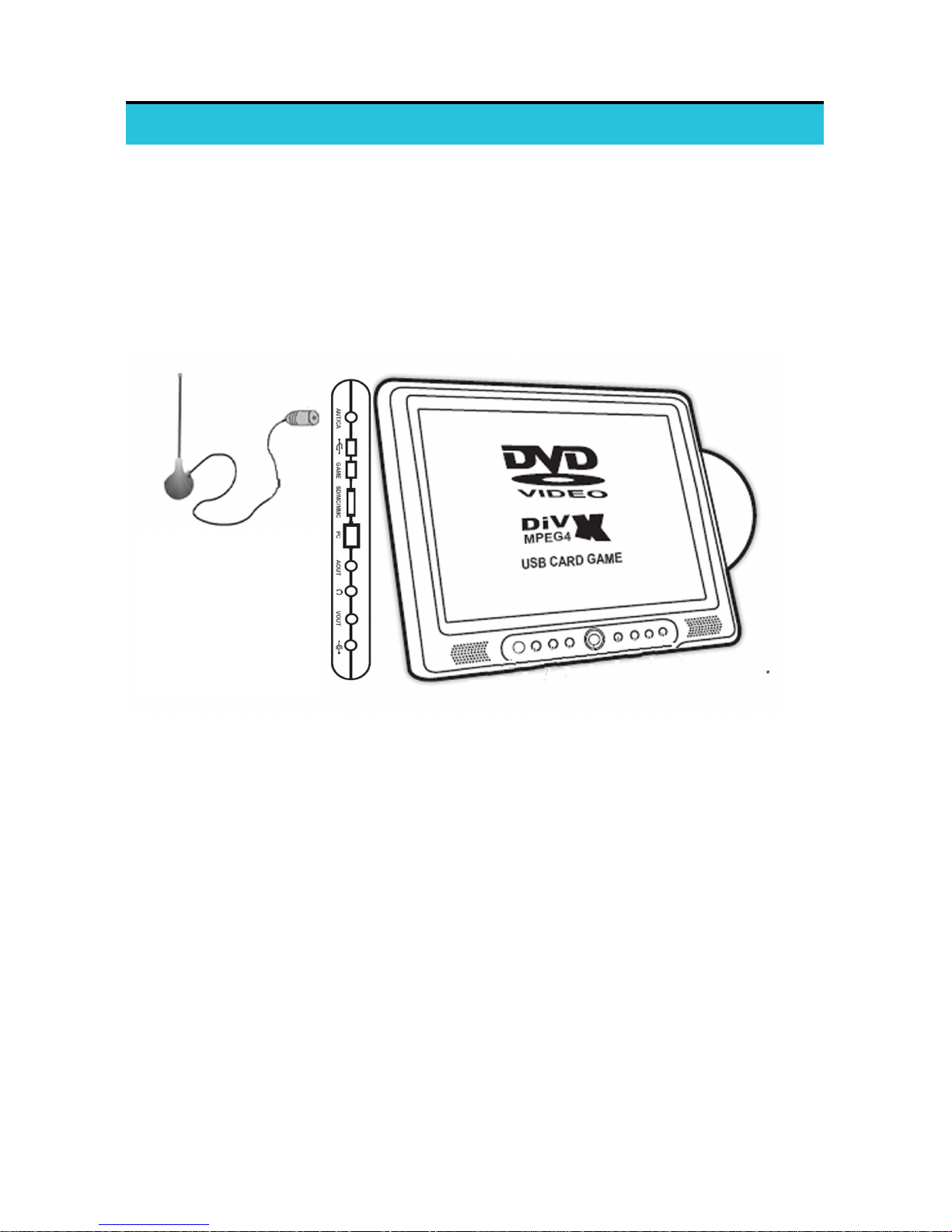
Connect the aerial or TV cable to the Antenna socket on the left side of the
player:
To set up the player to receive digital TV, see page 16.
To set up the player to receive analog TV, see page 15.
Table des matières


