
Medion MD 31438 Manuel utilisateur

55“ (138.8 CM) SMART 4K ULTRA HD TV
WITH HDR X15538
User Manual

Dok./Rev.-Nr. 31438 EN UK Cover 30028852 RC
Contents
Overview .................................................................................................................. 4
Device parts.............................................................................................................. 6
Information about these operating instructions ................................................... 9
Safety instructions ...................................................................................................11
EU – Declaration of Conformity...............................................................................16
Device overview...................................................................................................... 17
Getting started ........................................................................................................19
Operation.................................................................................................................27
Teletext ................................................................................................................... 30
Using the On-Screen Display menu (OSD menu) ................................................... 31
The menu system in detail...................................................................................... 31
HbbTV system..........................................................................................................57
MEDION® Life Remote app ......................................................................................57
Data protection MEDION® Smart TV....................................................................... 59
Troubleshooting..................................................................................................... 60
Cleaning...................................................................................................................63
Storing the device when not in use.......................................................................63
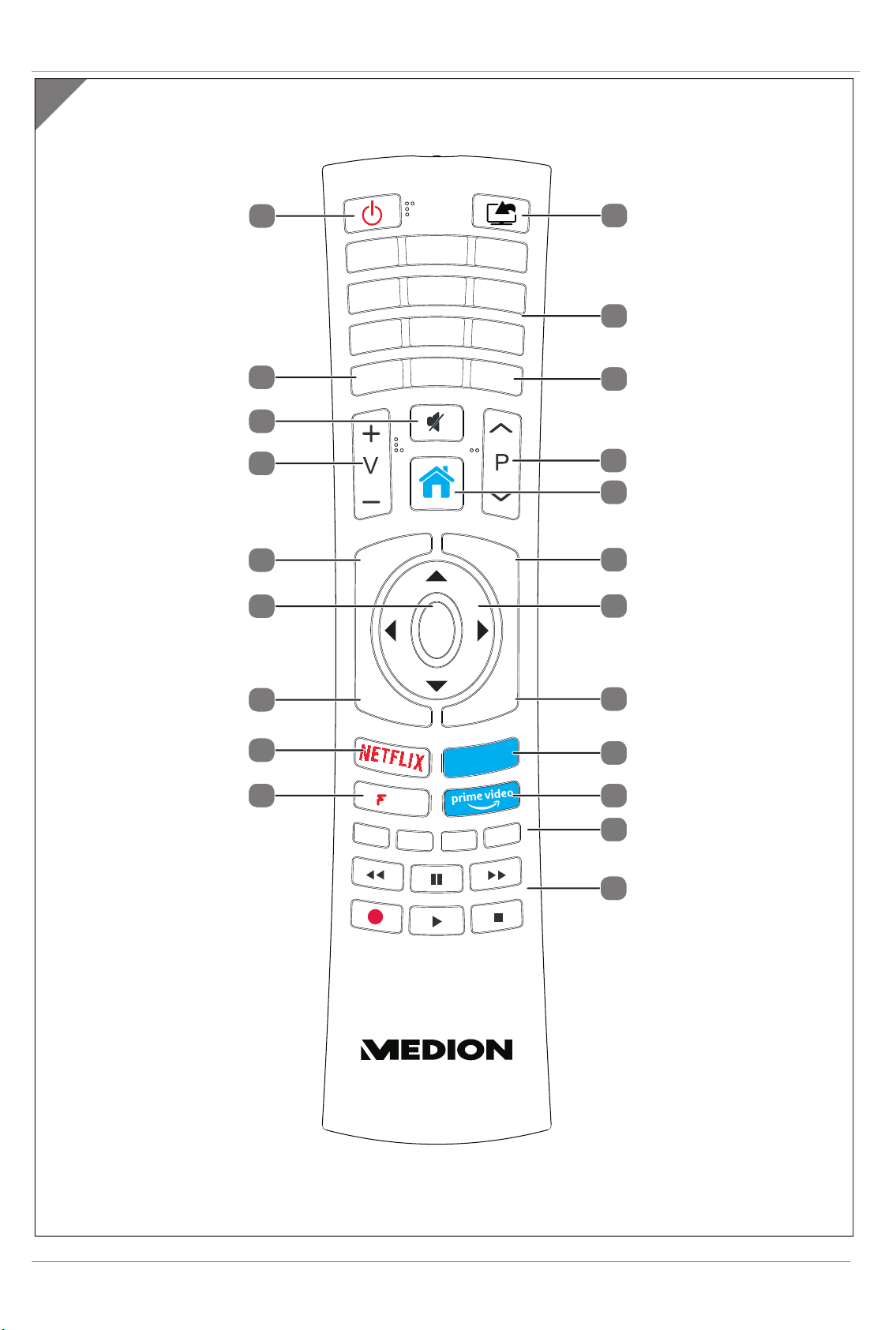
Disposal................................................................................................................... 64
Technical specifications ......................................................................................... 65
Service information ................................................................................................67
Legal Notice ............................................................................................................ 68
Privacy statement .................................................................................................. 68
Index....................................................................................................................... 69

3

4
Overview
A
B
3
1
2
14
(ARC)
8
9
10
12
13
SPDIF
Optic. out
11
L
RVideo
BACK AV IN
USB
5Vdc
Max. 500mA
USB
5Vdc
Max. 500mA
4
5
5
6
7
4
5
Overview
C
MEDION
Play
15
35
16
17
18
20
22
23
24
25
26
27
28
29
31
32
34
21
30
19
33

6
Device parts
1LCD screen
2Infrared sensor / Operating light
3STANDBY
4COMMON INTERFACE (CI+)
5USB (5V , 500 mA max.)
6HDMI 1
7
8HDMI 2-3
9ANT.
10 VGA
11 BACK AV IN
12 SPDIF Optic. OUT
13 LAN: Network connection to connect
to the Internet
14 Fixing holes for a wall mount
15 (SOURCE)
16 Number buttons
17 TXT
18 P/
19 (Menu)
20 INFO
21 Direction button
22 EXIT
23 MEDION
24 AMAZON PRIME VIDEO
25 Red button: For teletext or menus,
HbbTV
Green button: For teletext or menus
Yellow button: For teletext or menus
Blue button: For teletext or menus
26 Media buttons
27
Play
28 NETFLIX
29 BACK (SWAP)
30 OK
31 EPG
32 V-/+
33
34 LANG.
35
Device parts

Contents
Overview ............................................................................................................................................................. 4
Device parts ......................................................................................................................................................... 6
Information about these operating instructions............................................................................................... 9
Explanation of symbols............................................................................................................................................. 9
Proper use..................................................................................................................................................................10
Ultra HD.......................................................................................................................................................................10
Package contents .....................................................................................................................................................10
Safety instructions.............................................................................................................................................. 11
Operating safety ........................................................................................................................................................11
Set-up location ......................................................................................................................................................... 12
Repairs........................................................................................................................................................................ 13
Environmental temperature................................................................................................................................... 14
Safety when connecting.......................................................................................................................................... 14
Handling batteries.................................................................................................................................................... 15
EU – Declaration of Conformity ..........................................................................................................................16
Device overview................................................................................................................................................. 17
Front............................................................................................................................................................................ 17
Rear and right-hand side........................................................................................................................................ 17
Remote control.......................................................................................................................................................... 17
Getting started ...................................................................................................................................................19
Unpacking..................................................................................................................................................................19
Mounting................................................................................................................................................................... 20
Inserting batteries in the remote control............................................................................................................. 20
Connecting the antenna.......................................................................................................................................... 21
Connecting the power supply ................................................................................................................................ 21
Switching the smart TV on and off ......................................................................................................................... 21
Using the multimedia connections........................................................................................................................ 21
Station search after switching on for the first time .............................................................................................24
Operation............................................................................................................................................................27
Channel selection .....................................................................................................................................................27
Sound settings ..........................................................................................................................................................27
Screen settings..........................................................................................................................................................27
Displaying information ........................................................................................................................................... 28
Opening the favourites list..................................................................................................................................... 28
Selecting the source................................................................................................................................................ 29
Wireless display ........................................................................................................................................................ 29
Teletext .............................................................................................................................................................. 30
Using the teletext..................................................................................................................................................... 30
Using the On-Screen Display menu (OSD menu)...............................................................................................31
Navigating in the menu........................................................................................................................................... 31
The menu system in detail................................................................................................................................. 31
Home page ................................................................................................................................................................ 31
Source menu .............................................................................................................................................................33
Applications menu................................................................................................................................................... 34
Settings menu .......................................................................................................................................................... 34
7

TV menu..................................................................................................................................................................... 50
Media browser menu.............................................................................................................................................. 56
HbbTV system .................................................................................................................................................... 58
MEDION® Life Remote app ................................................................................................................................ 58
Data protection MEDION® Smart TV.................................................................................................................. 60
Troubleshooting.................................................................................................................................................61
Do you need more help?......................................................................................................................................... 63
Smart TV pixel faults ................................................................................................................................................ 63
Cleaning............................................................................................................................................................. 64
Storing the device when not in use ................................................................................................................. 64
Disposal.............................................................................................................................................................. 65
Technical specifications..................................................................................................................................... 66
Product data sheet ...................................................................................................................................................67
Trademark information........................................................................................................................................... 68
Service information........................................................................................................................................... 68
Legal Notice ....................................................................................................................................................... 69
Privacy statement ............................................................................................................................................. 69
Index .................................................................................................................................................................. 70
8

Information about these operating instructions
Thank you for choosing our product. We hope you enjoy using this device.
Read the safety instructions carefully before using the device for the first time. Note the warnings on
the device and in the operating instructions.
Always keep the operating instructions close to hand. If you sell the device or give it away, please ensure that you
also pass on these operating instructions. They are an essential component of the product.
Explanation of symbols
DANGER!
This signal word indicates a hazard with a high level of risk which, if not avoided, will result in death or serious
injury.
WARNING!
This signal word indicates a hazard with a medium level of risk which, if not avoided, could result in death or
serious injury.
CAUTION!
This signal word indicates a hazard with a low level of risk which, if not avoided, could result in minor or moderate
injury.
NOTICE!
This signal word warns of possible damage to property.
This symbol gives you useful additional information on assembly or operation.
Declaration of conformity (see section ‘EU – Declaration of Conformity’): Products that
feature this symbol meet the requirements of the EC directives.
Safety class II
Electrical appliances in protection class II are electrical appliances that permanently have
double or reinforced insulation and do not have any connection options for a protective
earth. The housing of an electrical appliance in protection class II that is enclosed in
insulated material can partially or fully act as the additional or reinforced insulation.
9
Information about these operating instructions

Proper use
This is an entertainment electronics device and is also suitable for multimedia applications. This device is designed
to receive and play back television channels. The various connection options enable the additional extension of
the reception and playback sources (receiver, DVD player, DVD recorder, video recorder, PC etc.). Your device can be
used in a variety of ways.
The device is only intended for private use and not for industrial/commercial use.
• Please note that we shall not be liable in cases of improper use.
• Do not modify the device without our express agreement and do not use any accessories that have not been
supplied or approved by us.
• Only use replacement parts or accessories that we have supplied or approved.
• Comply with all the information in these operating instructions, especially the safety information. Any other use is
considered improper and can cause personal injury or property damage.
• Do not use the device in extreme environmental conditions.
• This device is only suitable for use in dry interior rooms.
• This device is not suitable for use as a data monitor for office workstations.
Ultra HD
Your Smart TV features “Ultra HD” technology. This means that it can play back high-resolution images with four
times the resolution of Full HD. An Ultra HDTV signal is required.
HDR (High Dynamic Range)
HDR technology provides a greater dynamic range in terms of the brightness of the colours shown. That means
that every colour value reproduced can be displayed in 1024 shades instead of the previous maximum of 256. This
fourfold increase in the dynamic range makes the darkest areas of the picture even darker and the brightest areas
even brighter. It creates a more realistic impression and makes details visible that were previously unrecognisable
with a smaller brightness range. The station, streaming service or hardware of the connected device must support
HDR and Blu-ray must be supported.
If HDR content is to be played back, select the HDMI inputs in the SOURCES > SOURCE SETTINGS menu
and then the ENHANCED setting.
Package contents
Please check your purchase to ensure that all items are included. If anything is missing, contact us within 14 days
of purchase. Also contact us in the event of defective or partly defective delivery.
The following items are supplied with your product:
• Ultra HD Smart TV
• Remote control (RC1823) incl. 2 x LR03 (AAA) 1.5 V batteries
• Feet incl. fixing screws
• Operating instructions and warranty card
DANGER!
Risk of choking and suffocation!
Packaging film can be swallowed or used improperly, creating a risk of choking and suffocation.
− Keep packaging material such as plastic film or plastic bags away from children.
10
Information about these operating instructions
Table des matières
Autres manuels Medion Téléviseur UHD

Medion
Medion MD 31437 Manuel utilisateur

Medion
Medion LIFE P15511 Manuel utilisateur

Medion
Medion X14946 Manuel utilisateur

Medion
Medion LIFE P15001 Manuel utilisateur

Medion
Medion LIFE P15522 Manuel utilisateur

Medion
Medion LIFE X14020 Manuel utilisateur

Medion
Medion MD 31435 Manuel utilisateur

Medion
Medion MD 31436 Manuel utilisateur

Medion
Medion LIFE S16599 Manuel utilisateur

Medion
Medion 31438 Manuel utilisateur


