
MediaTech MT4039 TRINIUM HD Manuel utilisateur

Page 1
MT4039 TRINIUM HD
User’s Manual

Page 2
Contents
1 Overall Introduction................................ 6
1.1 System Requirements.......................................6
1.2 Features................................................................6
1.3 Accessories.........................................................7
1.4 External View.......................................................8
1.5 Adjusting LCD Display......................................9
2 Getting Started....................................... 10
2.1 Inserting SD Card(s) ........................................10
2.2 Loading the Battery ......................................... 11
2.3 Charging the Battery .......................................13
2.4 The gestures of using the touch screen.....14
2.4.1 Single touch .............................................. 14
2.4.2 Slide ........................................................... 15
2.4.3 Rotate ........................................................ 15
2.5 Buttons & Functions........................................16
2.6 About LED Indicators......................................17
2.7 Initial settings before use...............................18
2.7.1 Setting Date and Time ............................. 18
3 LCD Display Information..................... 19
3.1 In DV Mode.........................................................19
3.2 In Voice Recording Mode ...............................21
3.3 In DSC Mode ......................................................21

Page 3
4 Using the Camera.................................. 24
4.1 Shooting a Movie Clip .....................................24
4.2 Voice Recording Mode....................................26
4.3 Movie clip / Voice Clip Playback...................27
4.4 Shooting / Playback images ..........................30
4.4.1 Taking a picture ........................................ 30
4.4.2 Images Playback ...................................... 31
5 LCD Display Information..................... 33
5.1 DV Playback Mode ...........................................33
5.2 Voice Recording Playback Mode..................35
5.3 DSC Playback Mode ........................................36
6 Menu Mode.............................................. 38
6.1 Menu options of DV Mode..............................38
6.1.1 Movie clip Resolution .............................. 38
6.1.2 White Balance .......................................... 39
6.1.3 Effect .......................................................... 40
6.1.4 Metering .................................................... 41
6.1.5 Backlight .................................................... 42
6.1.6 Night Mode ................................................ 43
6.1.7 Motion Detection ...................................... 44
6.1.8 EV Compensation .................................... 45
6.2 Menu options of DV/Voice Playback............46
6.2.1 Delete ........................................................ 46
6.2.2 Protect ....................................................... 48
6.3 Menu options of DSC Mode ...........................49
6.3.1 Still Image Resolution .............................. 49

Page 4
6.3.2 White Balance .......................................... 50
6.3.3 Effect .......................................................... 51
6.3.4 Metering .................................................... 52
6.3.5 Backlight .................................................... 53
6.3.6 Night Mode ................................................ 54
6.3.7 Self-timer ................................................... 55
6.3.8 Burst ........................................................... 56
6.3.9 EV compensation ..................................... 57
6.4 Menus of DSC Playback .................................58
6.4.1 Delete ........................................................ 58
6.4.2 Protect ....................................................... 60
6.4.3 Autoplay .................................................... 61
6.4.4 Rotate ........................................................ 62
6.4.5 DPOF ......................................................... 63
6.5 Setting Menu......................................................65
6.5.1 Information ................................................ 65
6.5.2 Date / Time ................................................ 65
6.5.3 Beep ........................................................... 66
6.5.4 Default ....................................................... 67
6.5.5 TV standard .............................................. 68
6.5.6 Auto Power Off ......................................... 69
6.5.7 Frequency ................................................. 70
6.5.8 Language .................................................. 71
6.5.9 Format ....................................................... 72
6.5.10 File Number(Default: Series) .................. 73
6.5.11 LCD brightness ......................................... 74

Page 5
6.5.12 Instant Review .......................................... 75
6.5.13 Memory...................................................... 76
6.5.14 Volume ....................................................... 77
6.5.15 Start-up LOGO ......................................... 78
6.5.16 Face Detection ......................................... 80
7 PC and TV Connection......................... 81
7.1 Connecting to the Computer.........................81
7.2 Connecting to a Standard TV ........................81
7.3 Connecting to a HD TV....................................82
8 Installing the Software......................... 83
9 Editing Software .................................... 84
10 Appendix ................................................. 85
Specifications ..............................................................85
Troubleshooting..........................................................87

Page 6
1 Overall Introduction
Please read this chapter carefully to understand the features and
functions of this Digital Video Camera. The description of this
chapter also includes the description of system requirement,
package contents, and hardware components.
1.1 System Requirements
This Digital Video Camera requires a PC computer with the following
specifications:
•Windows XP/Vista/7 operating system
•CPU Intel Pentium 4 2.8GHz or higher
•RAM 2GB or more
•Interface USB 2.0
•Graphic card with DirectX9.0 support
1.2 Features
This Digital Video Camera provides many features and functions
including:
•High resolution pixel camera (DV:maximum 1080P, DSC:
maximum 16 million pixels)
•Touch screen
•Dual card slot (1 SD and 1 Micro SD)
•Slow motion Playback
In addition, the device may also serve the function as a USB/SD
card reader.
Page 7
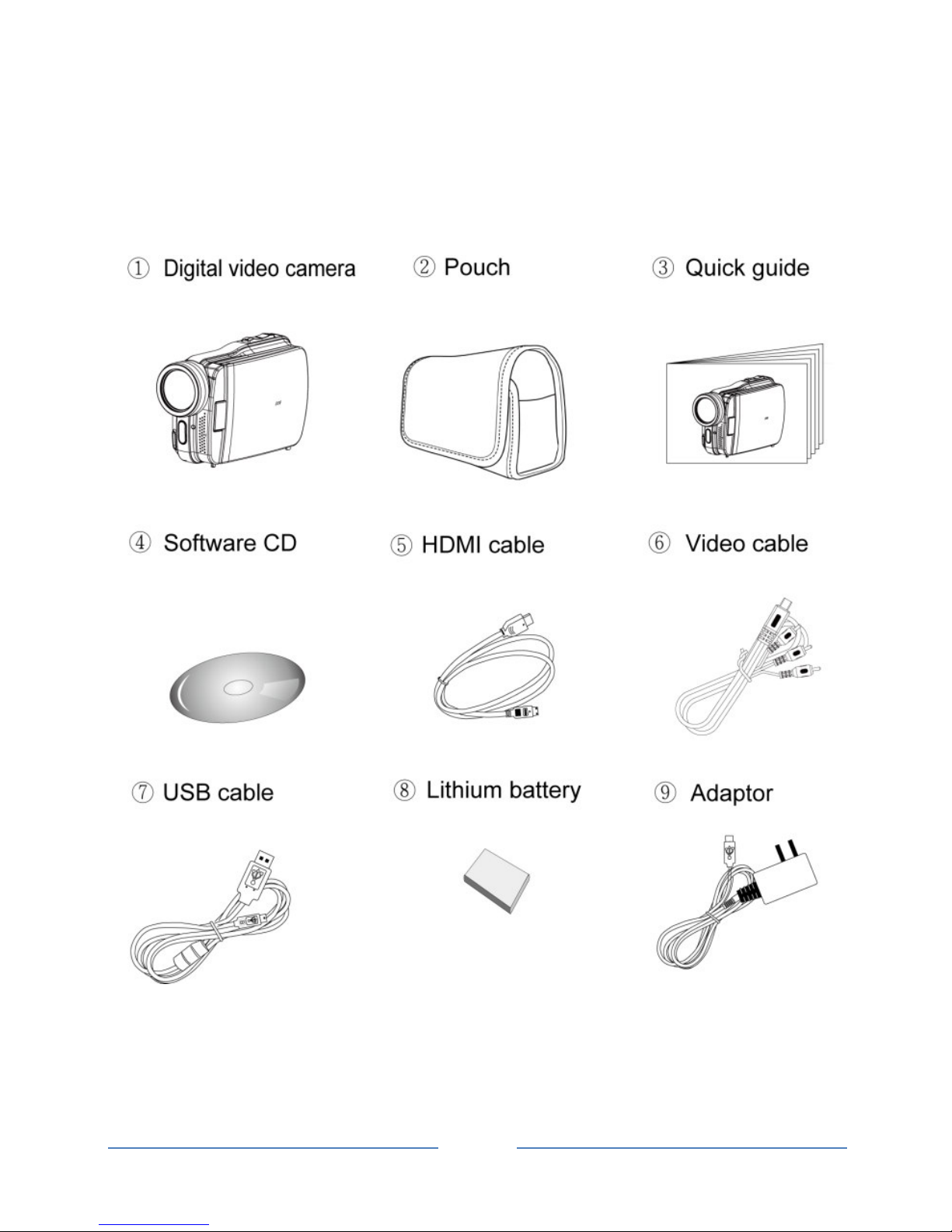
1.3 Accessories
This package should contain the following items. In case there is
any missing or damaged item, please contact your dealer
immediately.
Page 8
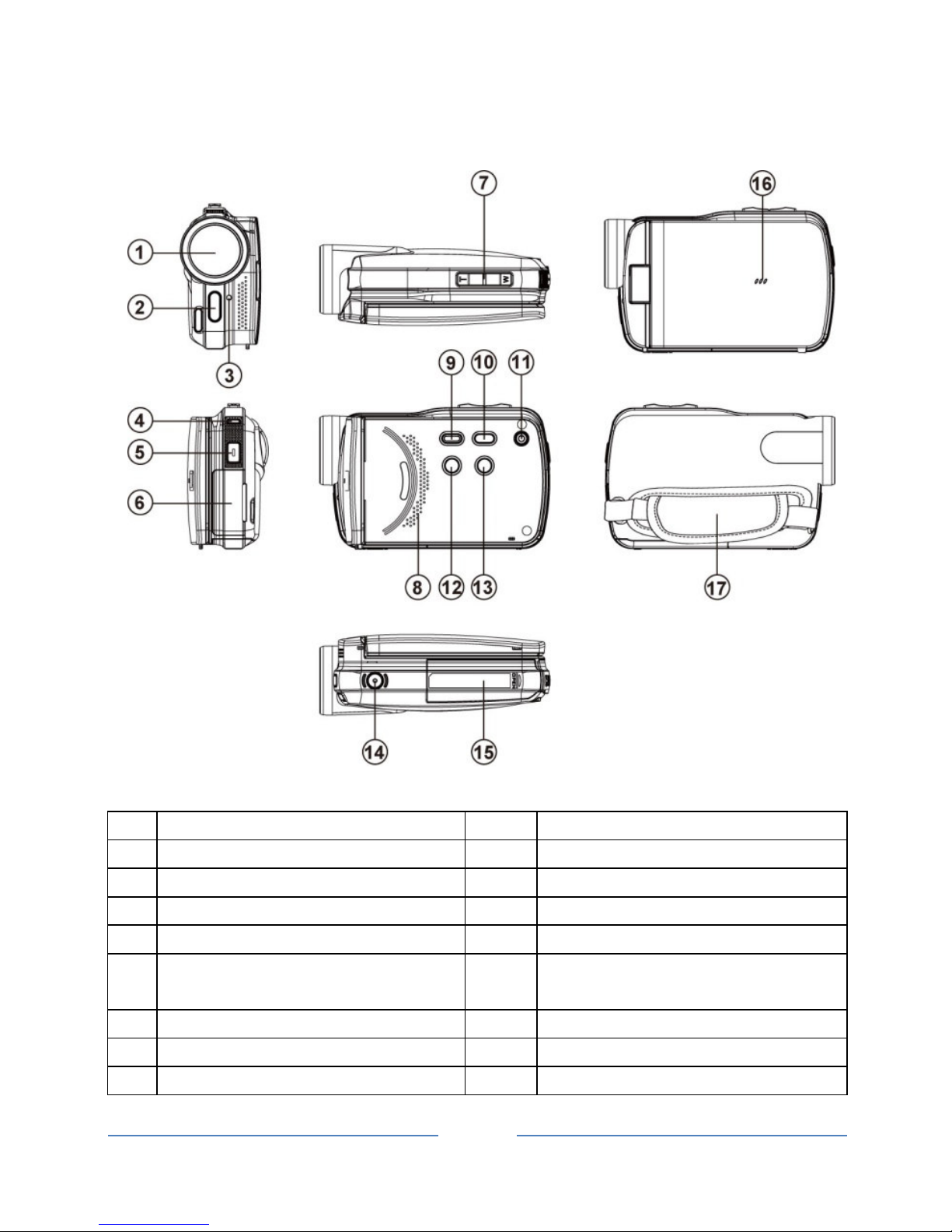
1.4 External View
1 Lens 10 Menu Button
2 LED Torch 11 Power
3 Self-timer Indicator 12 Light Button
4 Status Display 13 Mode Button
5 Recording Button 14 Tripod socket
6 USB/HD/TV Output 15 Battery / Memory Card
Compartment
7 Zoom Button 16 Microphone
8 Speaker 17 Hand Strap
9 Playback Button
Page 9
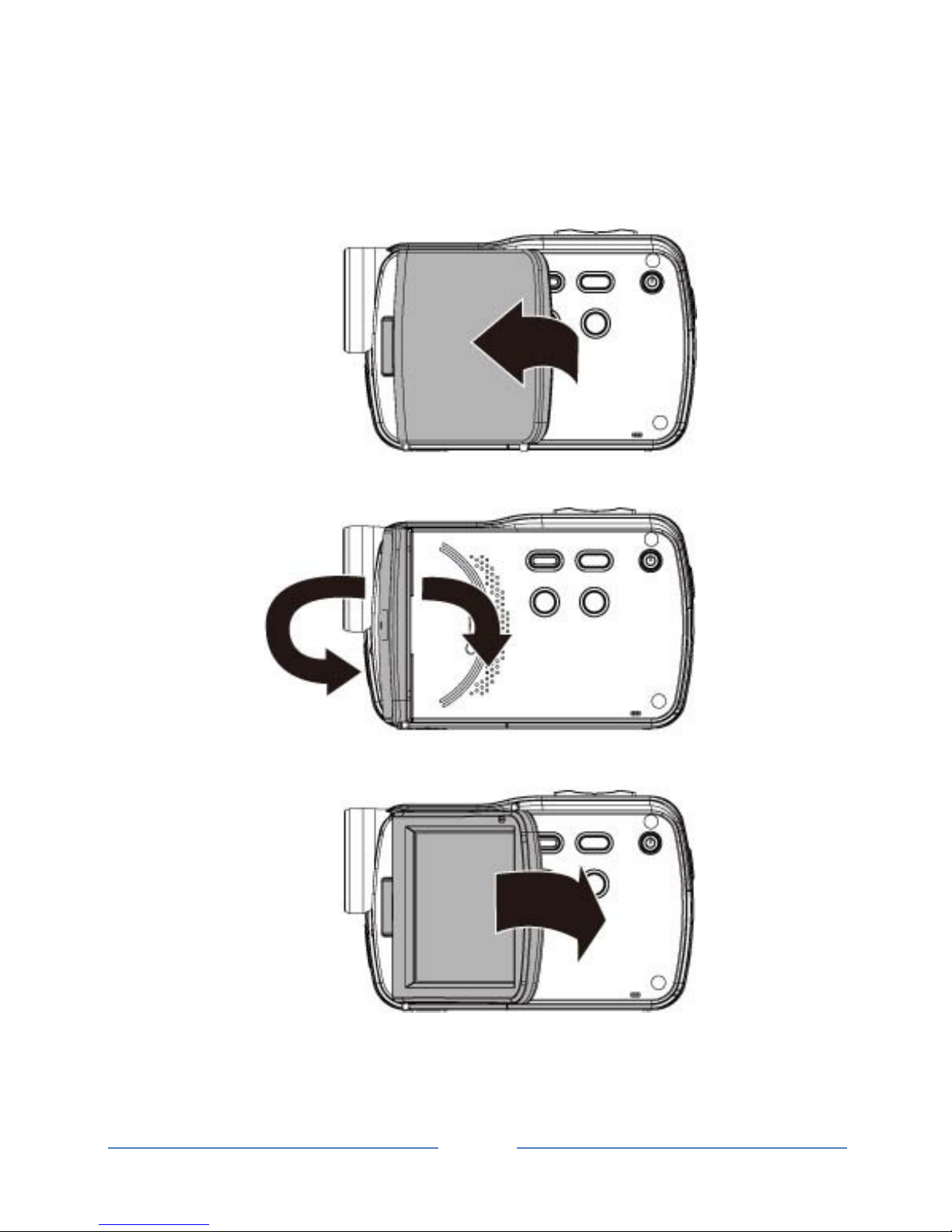
1.5 Adjusting LCD Display
Before taking picture or recording movie clips, please rotate
according to the illustrations below.
Page
10
2 Getting Started
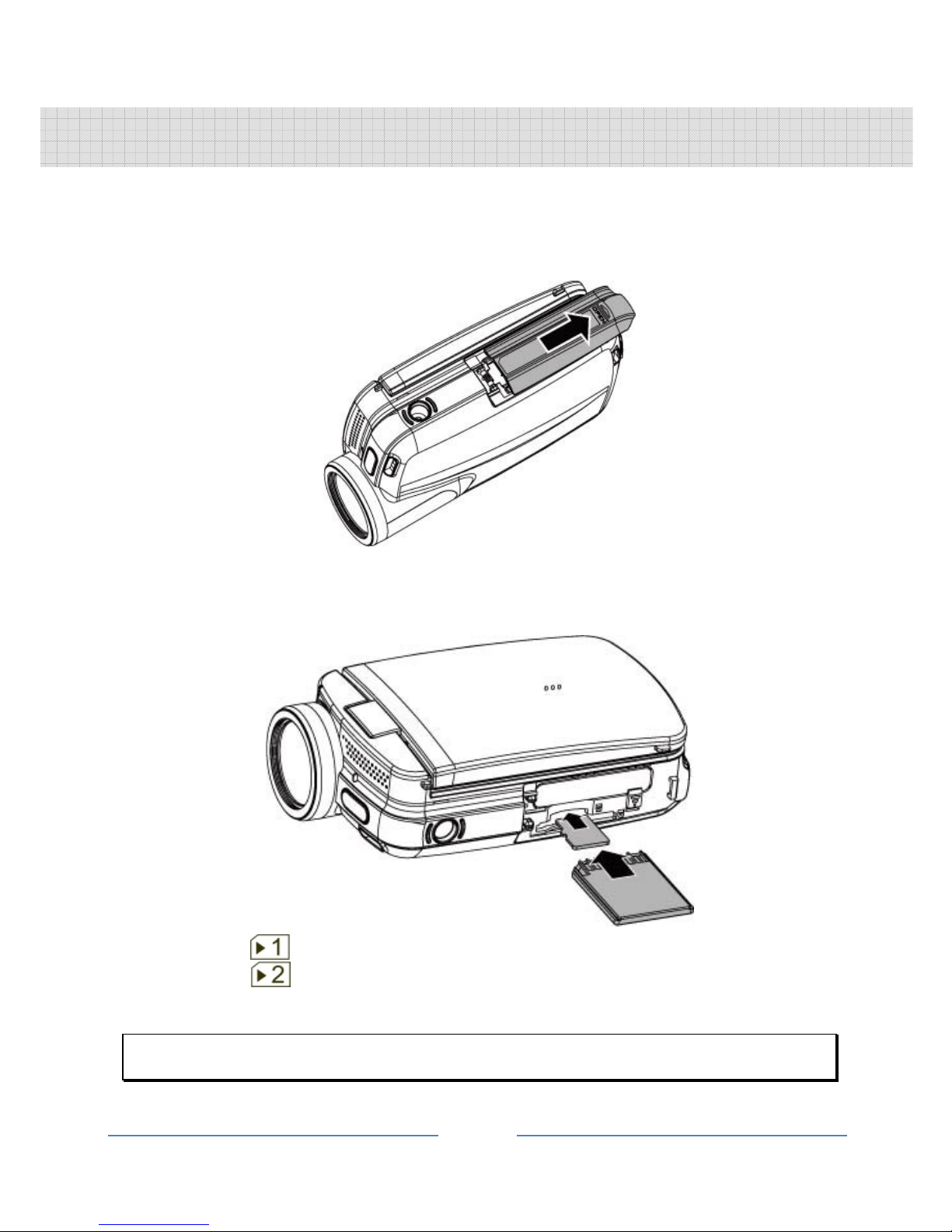
2.1 Inserting SD Card(s)
1. Open the battery cover.
2. Insert the SD card gently into the slot. Make sure the
copper contact faces upwards.
SD card 1: : SD card;
SD card 2: : Micro SD card
Do not remove or insert SD cards when the power of the Digital Video Camera is on
to avoid damaging files.
Table des matières
Autres manuels MediaTech caméscope


Manuels caméscope populaires d'autres marques


Panasonic
Panasonic AG-HMC152EN Manuel utilisateur

Insignia
Insignia NS-DCC5HB09 - Camcorder - 720p Manuel utilisateur

MYDLINK
MYDLINK DCS-6100LH Manuel utilisateur

Sony
Sony video Hi8 Handycam CCD-TR555 Manuel utilisateur

SECURECOM
SECURECOM V-5014B Manuel utilisateur

Panasonic
Panasonic HDC-SD100 Manuel utilisateur


