page 2 www.mechapro.de • mechapro GmbH • Roermonder Str. 63 • D-52134 Herzogenrath
• In use, depending on the environment, it may be necessary to use an additional fan for
cooling. If the casing is already well ventilated, it may not be necessary to use an additional
fan, if the board is mounted in the air-stream.
Initial Operation
Before the initial operation do a visual test of all the soldering joints and the components.
Make sure all ICs have been inserted in the proper orientation. Check for short cuts on the
parallel port connector (LPT) as well as the soldering joints on the L298s. All potentiometers
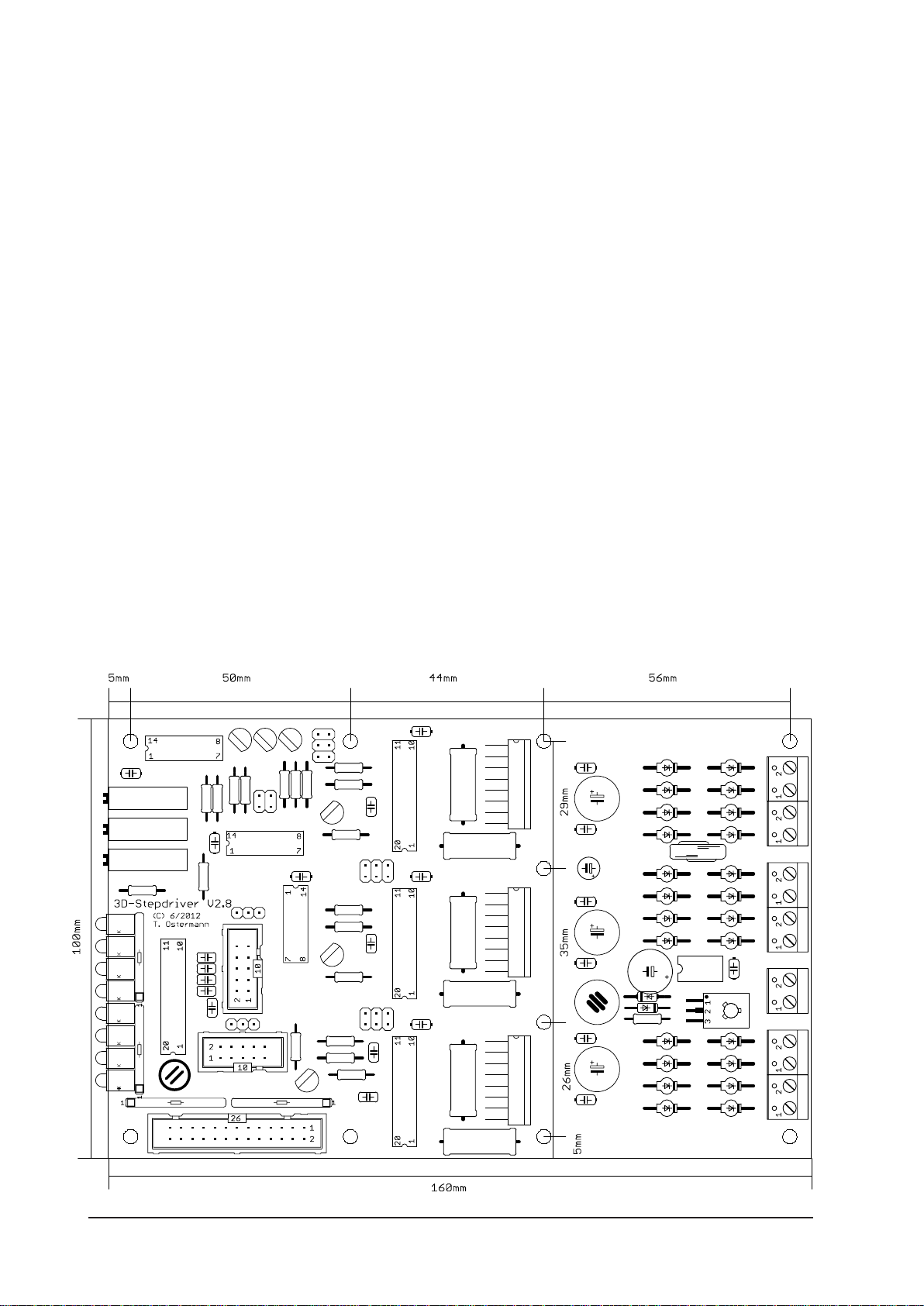
and jumpers should be set to the default positions according to the layout diagram. Leave
the stepper motors and the PC disconnected.
At first open JP1 and apply power the board. The right pin on JP1 (in direction of screw ter-
minals) should carry 5V DC with respect to ground. If the voltage is OK (+/-5%), close JP1.
For the following tests some of the jumpers have to be changed. Normaly this should be
done when the power is switched off only. But if the PC is disconnected and the motors
are disconnected, the jumpers may be changed without switching the logic voltage off.
After power on all green LEDs and the red NOTAUS (e-Stop) LED should be lit. When both
jumpers JP4 (SLEEP) are turned by 90 degree, the green SLEEP LED turns off and the yellow
NORMAL LED is lit. After changing the jumper JP3 (BOOST), the NORMAL LED turns off
and the red BOOST LED is lit instead. By changing JP2 the DISABLE LED is turned off. Now
set the jumpers JP2 and JP3 back to their default positions, while keeping JP4 turned by
90°.
Now you can adjust the reference voltages for the current regulators with the trimmers
R28, R29 and R30. If the NORMAL LED is not lit, change both SLEEP jumpers JP4 to the
“on low” position (see jumper desciption for details), JP3 (BOOST) to “disable”, disconnect
the PC. The reference voltages are measured with respect to ground at R3, R8 and R13 on
the side facing towards the trimmers. The set/measured voltage V(ref) has the following
interrelation with the motor current:
V(ref)=I(motor)*R(sense)*sqrt2 (sqrt2=1.41)
Therefor V(ref) gives the set value for the current regulator. R(sense) is the respective sen-
sing resistor on the board (0.47 ohms in the standard assembly). For 1A motor current you
have to set V(ref) to 0.665V for example. If the adjustments are done, set back the jumpers
to the default settings as before.
The chopper frequency can be measured on the sync-pins (pin no. 1) of the L297, however,
be sure not to short cut with pin no. 2!
Now you are ready to test the card with the motors. To do this you’ll have to connect the
card to the LPT- port of the PC. Than boot the PC. Always make sure to boot the PC first
and start the software. Only then apply the voltage to power the board and supply the
stepper motors. During the boot process of the computer some signal levels might change
leading to unexpected reactions of the motors.
For the test itself we recommend the free demo version of WinPCNC but you may also wri-
te a small program yourself. For the beginning you should start with moderate low supply-
voltage of 12 - 15 V for the steppers. This may be taken from a laboratory power supply
with current limitation if available.