
MCP XLT-1560-OpenFrame-AU1 Manuel utilisateur

User Manual
Open Frame Touch Monitor
15.6 inch Full HD(1920x1080)
Capacitive Touch Screen
Model : XLT-1560-OpenFrame-AU1
Preliminary
Version JAN 2014
A-909, Woolim Lion’s Valley, 371-28, Gasandong, Geumchoen-Gu
SEOUL, South KOREA 153-803
Tel : +82 -2-839-0182~3
Fax: +82 -2-839-0184

User Manual Page 2
Before Installation
It is very important to mount the equipment in a suitable surface.
Make sure the place has a good ventilation, is out of direct sunlight, away from sources
of excessive dust, dirt, heat, water, moisture and vibration.
Unpacking
The equipment comes with the standard parts shown in package content. Check and
make sure they are included and in good condition. If anything is missing, or damaged,
contact the supplier immediately.
Caution
■ To avoid the risk of electric shock, make sure your hands are dry before unplugging
your monitor from or plugging your monitor into an electrical outlet.
■ When you clean your monitor, do not press down on the Touch Screen and LCD.
Pressing down on the screen can scratch or damage your display. Pressure damage is
not covered under warranty.
■ Do not use alcohol (methyl, ethyl or isopropyl) or any strong dissolvent. Do not use
thinner or benzene, abrasive cleaners or compressed air.
■ To clean the touch screen, use window or glass cleaner. Put the cleaner on the rag
and wipe the touch screen.
Technical Support and Assistance
-Visit the MCP website at http://www.mcpia.com where you can find
the latest information about the product.
Document Feedback
-To assist us in making improvements to this manual, we would welcome comments
and constructive criticism. Please send all such – in writing to : [email protected]
**This User manual is subject to change without notice.

User Manual Page 3
Introduction
The 15.6" XLT Open Frame monitor is a large format display integrated with projected
capacitive touch. With ten touch points, interacting with the screen has never been easier.
The monitor is Windows 7/8 or Android OS ready.
Specifications
- Touch Screen -
Item Spec
Touch Screen Size 15.6 inch
Touch Type Projected Capacitive with cover lens
Touch Structure G + F + F , Film type
Touch Resolution (WxH) 1920(W) x 1080(H)
Outline Dimension (WxH) 306.83 x 216.24 mm
View Area (WxH) 345.23 x 194.54 mm
Transmittance / Haze ≥ 88% / < 3%
Cover Lens Material Chemically Strengthened Glass , attached the protective film
Cover Surface Hardness 7H
Life Expectancy Over 350 Million
Touch Controller Board type controller
Interface USB(HID) High-Speed USB 2.0
Finger Point Multi-Touch 10 point
Touch Driver Windows7/8(HID compliant)
Android - support kernel source
- Display -
Item Spec
LCD Panel Size 15.6inch (15.55”) FULL HD 16:9
LCD Panel Brand AUO (B156HW01 V.0)
LCD Backlight WLED
LCD Resolution 1920 x 1080 max, FULL HD 1080p
LCD Display Mode TN, Normally White, Transmissive
LCD Brightness 300 cd/m2 (Typ.)
Contrast Ratio 500:1
Support Color 262K
Viewing Angle 70°(R)/70°(L)/60°(H)/60°(V)

User Manual Page 4
- System -
Item Spec
Display Controller Rear mounted
Video Inputs VGA, DVI, HDMI
Audio Input PC AUDIO IN
Audio Output Ear-Phone Jack / Speaker connector
Control Button Rear mounted
OSD Key Function POWER,MENU,UP,DOWN,ENTER
OSD Language 8 Languages
Power supply DC 12V
Weight 1.2kg
Dimension 396(W) x 238(H) mm
- Environment -
Item Spec
Operating Temperature 0 ~ 50° C
Storage Temperature -20 ~ 60° C
Humidity Operating : 10 ~ 80% (non-condensing)
Non-operating : 5 ~ 90% (non-condensing)
Applications
Application scenarios - self-service applications:
■ KIOSK / POS machine
■ Transportation and Ticketing machine
■ Financial ATM
■ Entertainment / Gaming / Slot machine
■ HMI (Human-Machine Interface) equipment controller monitor
User Manual Page 5
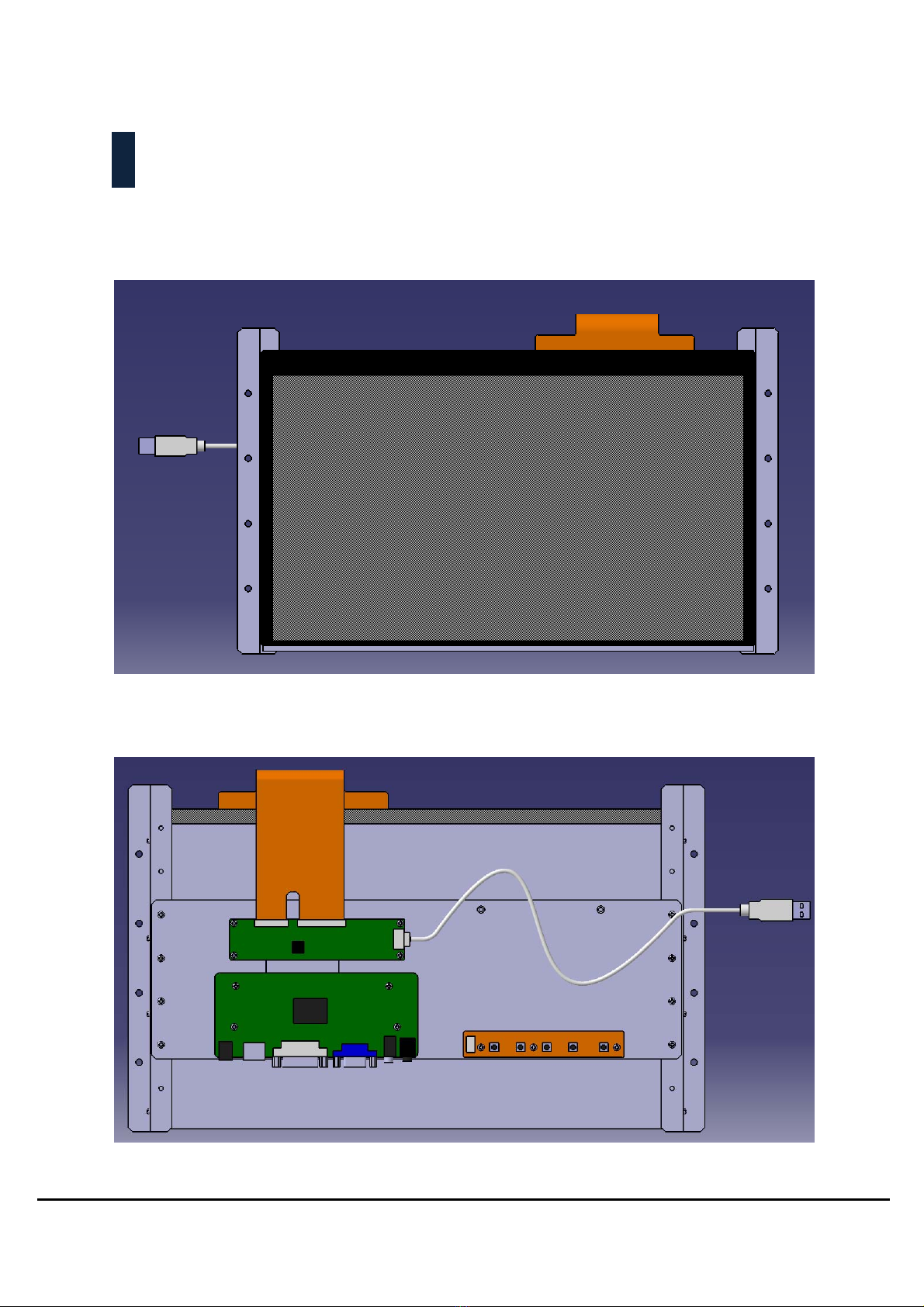
Product Overview
Front View
Back View

User Manual Page 6
Display Controller Description
Label Description
1 DC power Input
2 HDMI Input
3 DVI Input
4 VGA Input
5 Audio Input
6 Headphone Jack
7 Speaker connector , 2×1W(8Ω)
Touch Controller Description
Label Description
1 Touch Screen FPC Connector 40pin
2 Touch Screen FPC Connector 60pin
3 USB Interface Connector
User Manual Page 7
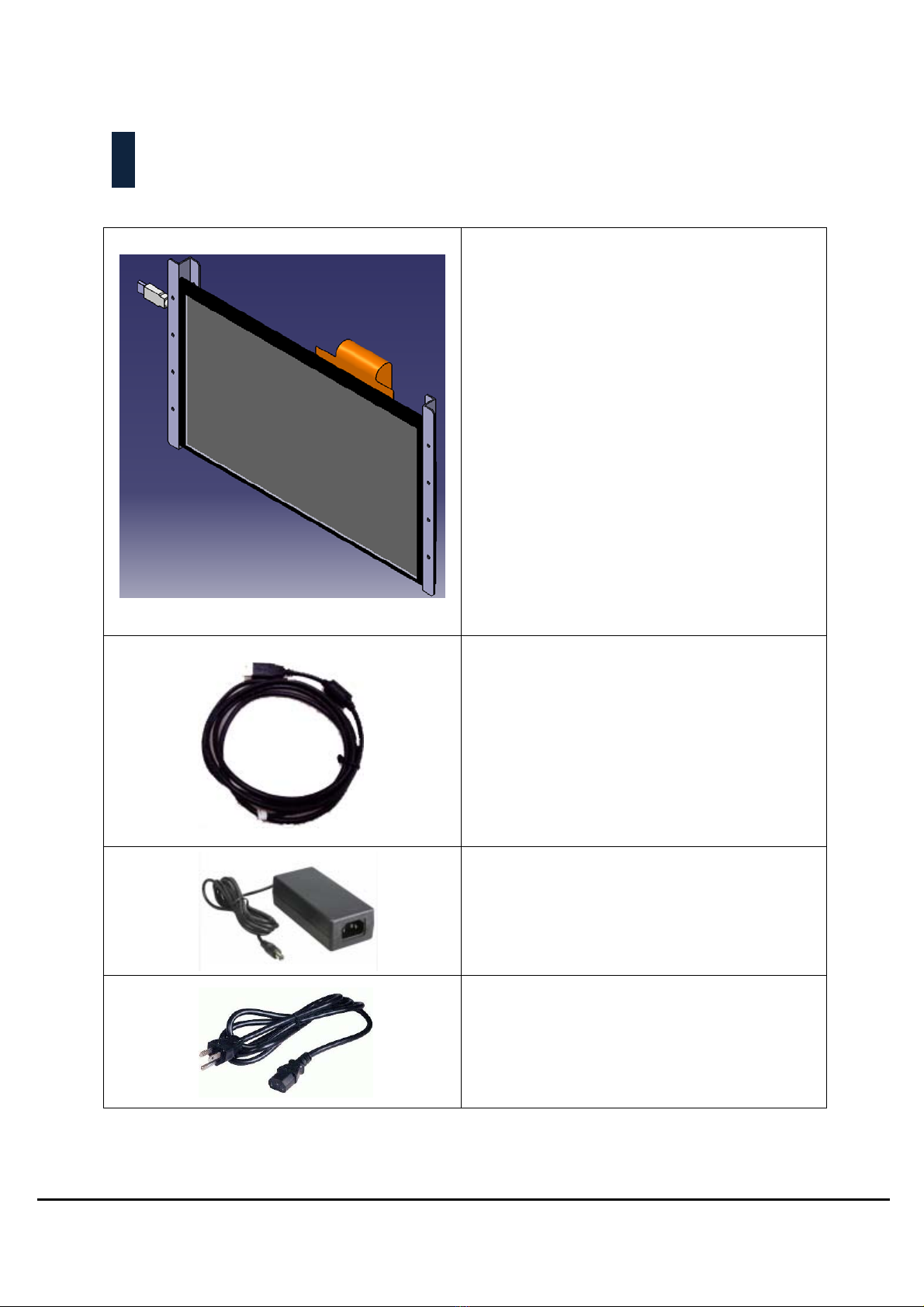
Packing List
Your monitor ships with the components shown below.
15.6” Open Frame Touch Monitor
1 x USB Cable(for touch) 1.5 meter
1 x DC12V/3.33A Power Adapter
1 x Power Cord
(Type of power cord included will depend on the
where the LCD monitor is to be shipped)
Note : Not included video cables(HDMI , DVI, VGA)

User Manual Page 8
Rear Mounting Solution
Rear mounting solution is a collection of different kinds of mounting methods
that can help you to know how to mount your product correctly and rapidly.
Mounting solution can also guide you to fine the product that really fit your
needs.

User Manual Page 9
Installation Step & Application
This monitor can be mounted to the wall with 8 screws and two pairs of brackets.
Mounting method that mounts products from the rear and secured by bracket on left
and right sides. They are widely used when there is a safety consideration, for example,
ATMs.
Step1. Put Monitor on the fixture(Wall, panel……) from the rear.
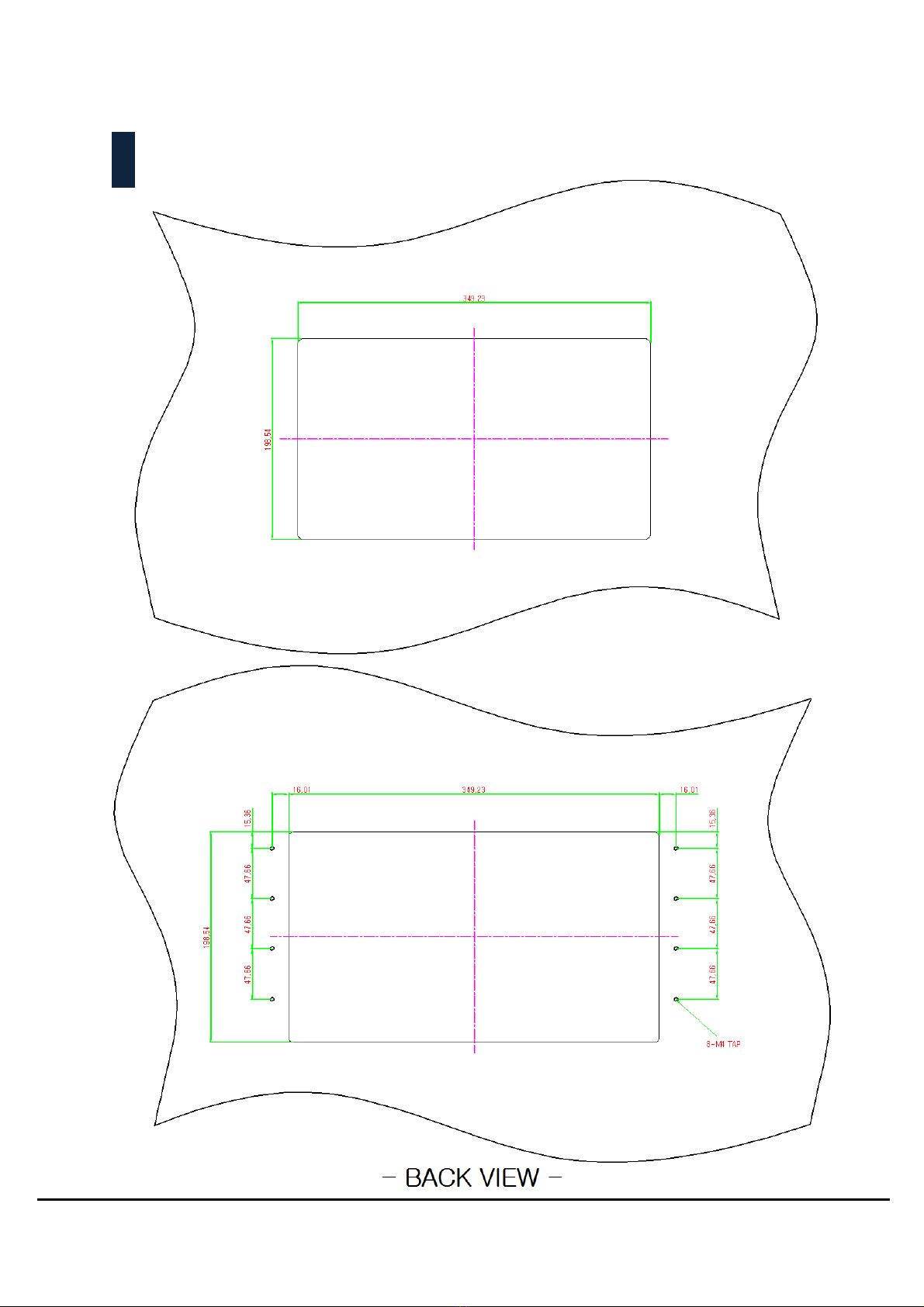
Customer's fixture Cut-out dimension and mounting hole base on drawing
Step 2. Fasten with M4 screw from the front of customer’s fixture.
**The length of screws depends on the thickness of customer’s fixture
User Manual Page 10
Recommended Customer Panel Cut-Out
- FRONT VIEW -
Table des matières
Manuels Écran tactile populaires d'autres marques


IBASE Technology
IBASE Technology ASTUT-152-RE1S Manuel utilisateur

YASKAWA
YASKAWA TP 610C Manuel utilisateur

B&R
B&R Power Panel C Series Manuel utilisateur

Beijer Electronics
Beijer Electronics X2 control Manuel utilisateur

AXIOMTEK
AXIOMTEK GOT321W-521 Manuel utilisateur

TRIDONIC.ATCO
TRIDONIC.ATCO x-touchBOX Manuel utilisateur


