MCM Custom Audio MPA-20 Manuel utilisateur

Please follow the instructions in this manual to obtain the optimum results from this unit.
We also recommend that you keep this manual handy for future reference.
MIXER AMPLIFIER
MPA-40
OPERATION MANUAL
MPA-20
MPA-120
MPA-60
PUBLIC ADDRESS SYSTEM
MIC1
INPUT
BASS TREBLEMIC2 TEL
OUTPUT LEVEL
2 4 6810
PROT POWER
MIC1 AUX
MASTER
ON
OFF
0 0 0 0
1 1 1 1
2 2 2 2
3 3 3 3
4 4 4 4
5 5 5 5
6 6 6 6
7 7 7 7
8 8 8 8
9 9 9 9
10 10 10 10 -5 -5
0 0
-1 -1
-2 -2
-3 -3
-4 -4
+1 +1
+2 +2
+3 +3
+4 +4
+5 +5
5
0
1
2
3
4 6
7
8
9
10
MIXER AMPLIFIER
MPA-20
ON
OFF
MIC1
INPUT
BASS TREBLE
MIC1 MIC2 MIC3 AUX1 AUX2 TEL MASTER
POWER
2
PROTTEMP
46810 12
OUTPUT LEVEL
MIXER AMPLIFIER
MPA-60
www.mcmelectronics.com

TABLE OF CONTENTS
2
SAFETY PRECAUTIONS ............................................................................3
MPA-20,MPA-40
1. FEATURES................................................................................................5
2. ...........................................................6
........................................................................................ 6
.......................................................................................... 7
CONNECTIONS......................................................................................... 8
4. .............................................................................. 9
........................................................................................10
.....................................................................................11
.....................................................................................12
.........................................................................13
1. FEATURES...............................................................................................14
2. ..........................................................15
....................................................................................... 15
.........................................................................................16
CONNECTIONS........................................................................................17
4. ............................................................................18
........................................................................................19
....................................................................................20
.....................................................................................21
.........................................................................22
NOMENCLATUREAND FUNCTIONS
2.1 FRONT PANEL
2.2 REAR PANEL
3.
MACHINE OPERATION
5. APPLICATIONS
6. BLOCK DIAGRAM
7. SPECIFICATIONS
8. DIMENSIONAL DIAGRAM
MPA-60,MPA-120
NOMENCLATUREAND FUNCTIONS
2.1 FRONT PANEL
2.2 REAR PANEL
3.
MACHINE OPERATION
5. APPLICATIONS
6. BLOCK DIAGRAM
7. SPECIFICATIONS
8. DIMENSIONAL DIAGRAM

Be sure to read the instructions in this section carefully before use.
Make sure to observe the instructions in this manual as the conventions of safety symbols and messages
regarded as very important precautions are included.
We also recommend you keep this instruction manual handy for future reference.
Safety Symbol and Message Conventions
Safety symbols and messages described below are used in this manual to prevent bodily injury and property
damage which could result from mishandling. Before operating your product, read this manual first and
understand the safety symbols and messages so you are thoroughly aware of the potential safety
Indicates a potentially hazardous situation which, if mishandled, could
result in death or serious personal injury.
Indicates a potentially hazardous situation which, if mishandled, could
result in moderate or minor personal injury, and/or property damage.
When Installing the Unit
Do not expose the unit to rain or an environment
where it may be splashed by water or other liquids,
as doing so may result in fire or electric shock.
Use the unit only with the voltage specified on the
unit. Using a voltage higher than that which is
specified may result in fire or electric shock.
Do not cut, kink, otherwise damage nor modify the
power supply cord. In addition, avoid using the
power cord in close proximity to heaters, and never
place heavy objects -- including the unit itself -- on
the power cord, as doing so may result in fire or
electric shock.
Be sure to replace the unit's terminal cover after
connection completion. Because high voltage is
applied to the speaker terminals, never touch these
terminals to avoid electric shock.
Be sure to ground to the safety ground (earth)
terminal to avoid electric shock. Never ground to a
gas pipe as a catastrophic disaster may result.
Avoid installing or mounting the unit in unstable
locations, such as on a rickety table or a slanted
surface. Doing so may result in the unit falling
down, causing personal injury and/or property
damage.
When the Unit is in Use
Should the following irregularity be found during
use, immediately switch off the power, disconnect
the power supply plug from the AC outlet and
contact your nearest dealer. Make no further attempt
to operate the unit in this condition as this may cause
fire or electric shock.
If you detect smoke or a strange smell coming
from the unit.
If water or any metallic object gets into the unit
If the unit falls, or the unit case breaks
If the power supply cord is damaged (exposure of
the core, disconnection, etc.)
If it is malfunctioning (no tone sounds.)
To prevent a fire or electric shock, never open nor
remove the unit case as there are high voltage
components inside the unit. Refer all servicing to
your nearest dealer.
Do not place cups, bowls, or other containers of
liquid or metallic objects on top of the unit. If they
accidentally spill into the unit, this may cause a fire
or electric shock.
Do not insert nor drop metallic objects or
flammable materials in the ventilation slots of the
unit's cover, as this may result in fire or electric
shock.
SAFETY PRECAUTIONS
3

An all-pole mains switch with a contact separation of at least 3 mm in each pole shall be incorporated in
the electrical installation of the building.
When Installing the Unit
Never plug in nor remove the power supply plug
with wet hands, as doing so may cause electric
shock.
When unplugging the power supply cord, be sure
to grasp the power supply plug; never pull on the
cord itself. Operating the unit with a damaged
power supply cord may cause a fire or electric
shock.
When moving the unit, be sure to remove its power
supply cord from the wall outlet. Moving the unit
with the power cord connected to the outlet may
cause damage to the power cord, resulting in fire or
electric shock. When removing the power cord, be
sure to hold its plug to pull.
Do not block the ventilation slots in the unit's cover.
Doing so may cause heat to build up inside the unit
and result in fire.
Avoid installing the unit in humid or dusty locations,
in locations exposed to the direct sunlight, near the
heaters, or in locations generating sooty smoke or
steam as doing otherwise may result in fire or
electric shock.
When the Unit is in Use
Do not place heavy objects on the unit as this may
cause it to fall or break which may result in
personal injury and/or property damage. In
addition, the object itself may fall off and cause
injury and/or damage.
Make sure that the volume control is set to
minimum position before power is switched on.
Loud noise produced at high volume when power is
switched on can impair hearing.
Do not operate the unit for an extended period of
time with the sound distorting. This is an indication
of a malfunction, which in turn can cause heat to
generate and result in a fire.
Contact your dealer as to the cleaning. If dust is
allowed to accumulate in the unit over a long
period of time, a fire or damage to the unit may
result.
If dust accumulates on the power supply plug or in
the wall AC outlet, a fire may result. Clean it
periodically. In addition, insert the plug in the wall
outlet securely.
Switch off the power, and unplug the power supply
plug from the AC outlet for safety purposes when
cleaning or leaving the unit unused for 10 days or
more. Doing otherwise may cause a fire or electric
shock.
SAFETY PRECAUTIONS
4

1. FEATURES
1. Rated Power:20W and 40W.
2. 100V,70V constant voltage outputs and 4~16Ohms constant resistance output.
3. 1 channel MIC2 one-port input (5mv 1Kohms) and 1 channel (300mv 10Kohms) AUX input
4. 1 channel MIC1 balanced/unbalanced input (2.5/5mv 1/2Kohms)
5. 1 channel TELinput (sensitivity 350mV/10Kohms)
5
Aux is default signal
MIC1 input will override MIC2 and Aux inputs
Telephone input will override both MIC1, MIC2 and AUX inputs
7. Built in priority functions. Priority level is as follows:
6. Built in treble and bass adjustment
bass: +/-10dB @ 100Hz
treble: +/- 10dB @ 10KHz

1 2 349
85 6 7
10
11
2.1 20W/40W FRONT PANEL
1. MIC1 INPUT
MIC1 input Microphone jack input
2. MIC1 \MIC2
MIC volume control (MIC1/MIC2)
3. AUX
AUX volume control
4. TEL
TEL volume control
5. BASS
Adjust bass response. Rotate clockwise to
increase bass output and anticlockwise to
reduce it.
6. TREBLE
Adjust treble response. Rotate clockwise to
increase treble output and anticlockwise to
reduce it.
7. MASTER
Master volume control
2. NOMENCLATURE AND FUNCTIONS
8. POWER
Power indicator
9. POWER SWITCH
On top of the opening Power
Press the end, power shut down
10. LEVEL INDICATORS
Level meters 5 output level indicators
11. PROTECTION
When the machine is in protection status,
this indicator will be lit: in normal operation
status, the LED is off. If the product is in
protection status due to overheating,
overload or direct current, the indication
LED will be lit while the output relay will be
disconnected. (Signal indicator is just used
to indicate the use of input music signal.
In the protection status, signal indicator is
still lit according to the size of input signal.)
6
MIC1
INPUT
BASS TREBLEMIC2 TEL
OUTPUT LEVEL
2 4 6810
PROT POWER
MIC1 AUX
MASTER
ON
OFF
0000
1111
2222
3333
4444
5 5 5 5
6666
7777
8 8 8 8
9 9 9 9
10 10 10 10 -5 -5
0 0
-1 -1
-2 -2
-3 -3
-4 -4
+1 +1
+2 +2
+3 +3
+4 +4
+5 +5
5
0
1
2
3
4 6
7
8
9
10
MIXER AMPLIFIER
MPA-20

NOMENCLATURE AND FUNCTIONS
2.2 20W/40W REAR PANEL
12. ~120V 60Hz AC POWER INPUT
13.SPEAKER TERMINALS
Connectors for 4-16 ohms or 70V and 100V
speaker
14.Mute adjust
Adjust the mute degree from 0-30dB
when MIC1 input override all
the other inputs( except TEL).
15.MIC input with phantom power
MIC1 input compatible of XLR and
stereo connector
16. MIC 1 PHANTOM +48V Power switch
17.MIC 2 MIC input
MIC2 input of Microphone
18.AUX input
AUX for extra equipment input
19.Line output
Connect to other audio processing
equipments
20.TEL INPUT
7
12 13 14 15 16 18 19 20
17
LINE
OUT
AUXMIC 2
~120V 60Hz 40W
T2AL 250V MUTE
MIC 1
XLR/6.30 INPUT
BAL/UNBAL +48V
PHANTOM
OUTPUTS
COM 4-16 70V 100V
TEL INPUT
G

70V 100V
COM 4-16 70V 100V
COM 4-16
(MPA-20)
500
100V LINE
70V 100V
COM 4-16
(MPA-20)
245
70V LINE
3.1 SPEAKER CONNECTIONS
4-16
3. CONNECTIONS
70V/
8
(MPA-40)
125 (MPA-40)
250
Balanced Connections
Unbalanced Connections
Tip: Signal
Sleeve: Ground
3.2 The combination input accepts either XLR or 1/4" microphone plugs.
1/4" sources can be either balanced or unbalanced as shown.

1 Tel has priority over all inputs.
2 MIC 1 is second priority, adjust mute electric
potential can override other input signal except
tel signal.
3 It is the same level of MIC 1, when one of the
two port connect with MIC, another conn ect
MIC port is in vain.
MUTE FUNCTION
1 Machine is in protection
condition in case of high
temperature
2 Wrong wire connection
OPERATIONATTENTION
The four output connectors only can choose two
connectors work together. If voltage is 70V/100V,
the speakers must be with transformer and make
sure the total power wattage of speaker is 15%
less than the power wattage of amplifier.
GUIDANCE OF EXCLUDING ERRORS
No voice output in
normal condition
All the wires are
connected well
but no voice output
Cause
1 No power or wrong
plug connection
2 Fuse is burned
3 Volume is town off
4 No input signal
Power on but ala-
rming signal
1 Overloading or short
circuit
2 Voltage is not stable,
too high or low
Phenomena
4. MACHINE OPERATION
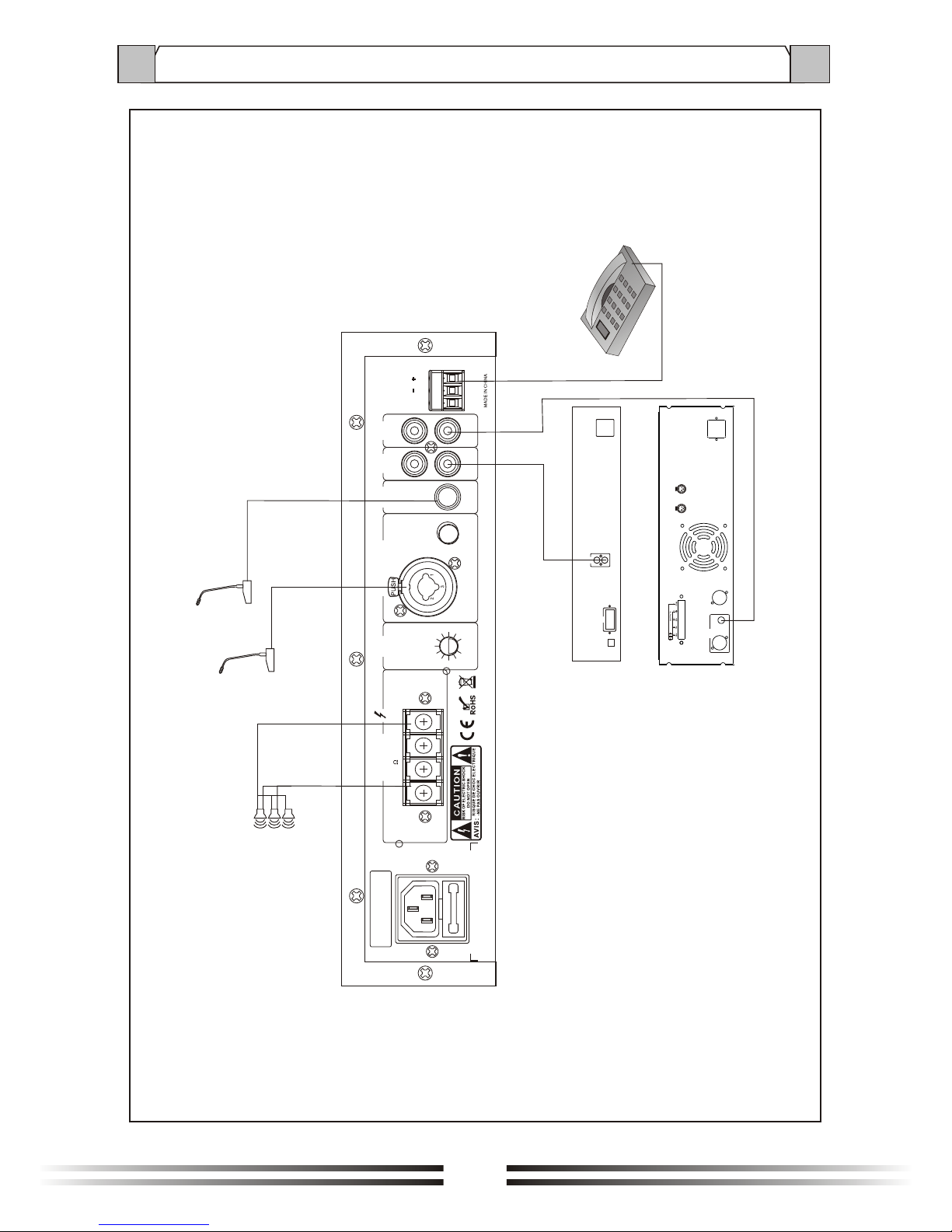
9

5. APPLICATIONS
10
TEL INPUT
MIC2
MIC1
AUDIO
OUT
R
L
COM
AUDIO SOURCES
LINK
INPUTS
XLRBAL
1-GND
2-HOT+
3-COLD
1
2
3
12
3
OUTPUTS
INPUTS
POWER AMPLIFIER
SPEAKERS
LINE
OUT
AUXMIC 2
~120V 60Hz 40W
T2AL 250V MUTE
MIC 1
XLR/6.30 INPUT
BAL/UNBAL +48V
PHANTOM
OUTPUTS
COM 4-16 70V 100V
TEL INPUT
G
Ce manuel convient aux modèles suivants
3
Table des matières
Autres manuels MCM Custom Audio Amplificateur

MCM Custom Audio
MCM Custom Audio ZPA-60 Manuel utilisateur

MCM Custom Audio
MCM Custom Audio 50-14820 Manuel utilisateur

MCM Custom Audio
MCM Custom Audio 555-26105 Manuel utilisateur

MCM Custom Audio
MCM Custom Audio 50-14802 Manuel

MCM Custom Audio
MCM Custom Audio 50-14845 Manuel utilisateur

MCM Custom Audio
MCM Custom Audio MPA-10 Manuel utilisateur