
MC Referenz mc 611 Manuel utilisateur


Table of Contents
A. Important A1. Precautions 3
A2. Safety 3
A3. Warranty 3
B. General B1. Scope of delivery 4
B2. Placement 4
B3. Maintenance 4
B4. mc 611 front view 5
B5. mc 611 rear view 6
C. Installation C1. Outputs 7
C2. Inputs 8
C3. Optional inputs 9
C4. RS232 port 9
C5. Ground connector (GND) 9
C6. Connection to the outlet 10
C7. Power on/o 10
D. Operation D1. Standby on/o 10
D2. Control & display panel 11
D3. Input selectors 12
D4. Function buttons 12
D5. Option selectors 13
D6. Volume control 13
D7. Level adjustment 14
mc 611 preamplier
1

Table of Contents
E. Features E1. Modules 15
F. Specications F1. mc 611 Specications 17
G. Remote Control G1. Preamplier functions 18
G2. CD player functions 19
G3. Tuner functions 20
G4. D/A converter functions 21
G5. Changing the batteries 22
G6. General precautions 23
G7. Specications 23
mc 611 preamplier
2

A. Important
A1. Precautions
!Keep the preamplier away from high humidity, vibration, excessive dust and direct sun-
light. Exceeding heat or cold will aect the preamplier´s functionality.
!The permitted operating temperature is between 10°C up to 40°C (50°F up to 104°F).
Avoid extreme dierences in temperature.
!Do not operate the preamplier near other electric appliances (e.g. neon light, motors).
!Do not connect any musical instruments to the preamplier. This can result in irrepara-
ble damage to the equipment.
!Do not operate the device under condensation! Allow the preamplier to warm up to
room temperature for at least 3 hours after it has been exposed to low temperatures.
!Make sure the preamplier is never exposed to water or other uids.
!Never connect your preamplier to the outlet with an inadequate voltage setting, this
will result in heavy damage!
!The preamplier should not be opened without the assistance of a qualied technician!
A2. Safety
Your MC component complies with the household power and safety requirements in your area.
A3. Warranty
Please pay attention to the details on the warranty card which accompanies the unit. You
can also nd our warranty details on our homepage music-culture.com/warranty.
Warranty is only issued if you send back the warranty card.
mc 611 preamplier
3back to TOC

B. General
B1. Scope of Delivery
The following components are included in your delivery:
mc 611 preamplier
A/C power cord
MC system remote control
B2. Placement
Make sure to leave a minimum space of 2 cm
(approx. 1”) on all sides of the preamplier to
allow heat to escape.
Never completely cover the preamplier during
operation!
B3. Maintenance
Unplug the unit before cleaning!
To clean the exterior surfaces of your MC preamplier, use a dry, soft cloth. To remove
nger prints and other grease spots use a soft cloth moistened with a mild detergent dis-
solved in water.
The cloth must never be dripping wet! If water or other uids enter the cabinet, you risk
to damage the preamplier.
Never use scouring pads, steel wool, scouring powders or harsh chemical agents, alcohol,
thinners, benzine, insecticide or other volatile substances, as these will destroy the nish
of the cabinet.
minimum space 2 cm
mc 611 preamplier
4back to TOC


C. Installation
C1. Outputs (connecting power ampliers)
Your preamplier features two output groups to
connect up to 4 power ampliers in stereo or mono
mode. For stereo connection choose RCA cables, for
mono connection XLR (balanced) cables.
On the back of the preamplier you will nd the re-
spective output groups. The connectors are labeld
with Lfor left and R for right channel, as well as
tagged black and red, OUT1 and OUT2 for RCA.
R
L
OUTPUT 2BALANCEDOUT1 OUT2
LR
R
L
OUTPUT 1
BALANCEDOUT1 OUT2
LR
XLR left
XLR right
stereo connection
RCA left
RCA right
output groups
XLR left
XLR right
RCA left
RCA right
mono connection
RCA cable XLR cable
mc 611 preamplier
7back to TOC

C2. Inputs (connecting music sources)
On the back of the preamplier you will nd input
sockets for your music sources. For the connections
use RCA or XLR audio cables as described below.
input cable music source
BALANCED XLR balanced-in source
CD1 RCA CD player at input CD 1
CD2 RCA CD player at input CD 2
TUNER RCA tuner
AUX RCA tape (play), mp3 player, smartphone, computer
FIXED OUT RCA tape (record)
PROCESSOR* RCA surround sound processor
*Attention! Never use the PROCESSOR input for unregulated high level signals (e.g. CD
player). Otherwise you risk defects in connected ampliers and speakers.
CD2CD1 TUNER AUX FIXED OUT BYPASS
PLAY REC PROCESSOR
L
R
INPUT BALANCED
CD1
CD2
TUNER
AUX
FIXED OUT
PROCESSOR
BALANCED
input panel
mc 611 preamplier
8back to TOC
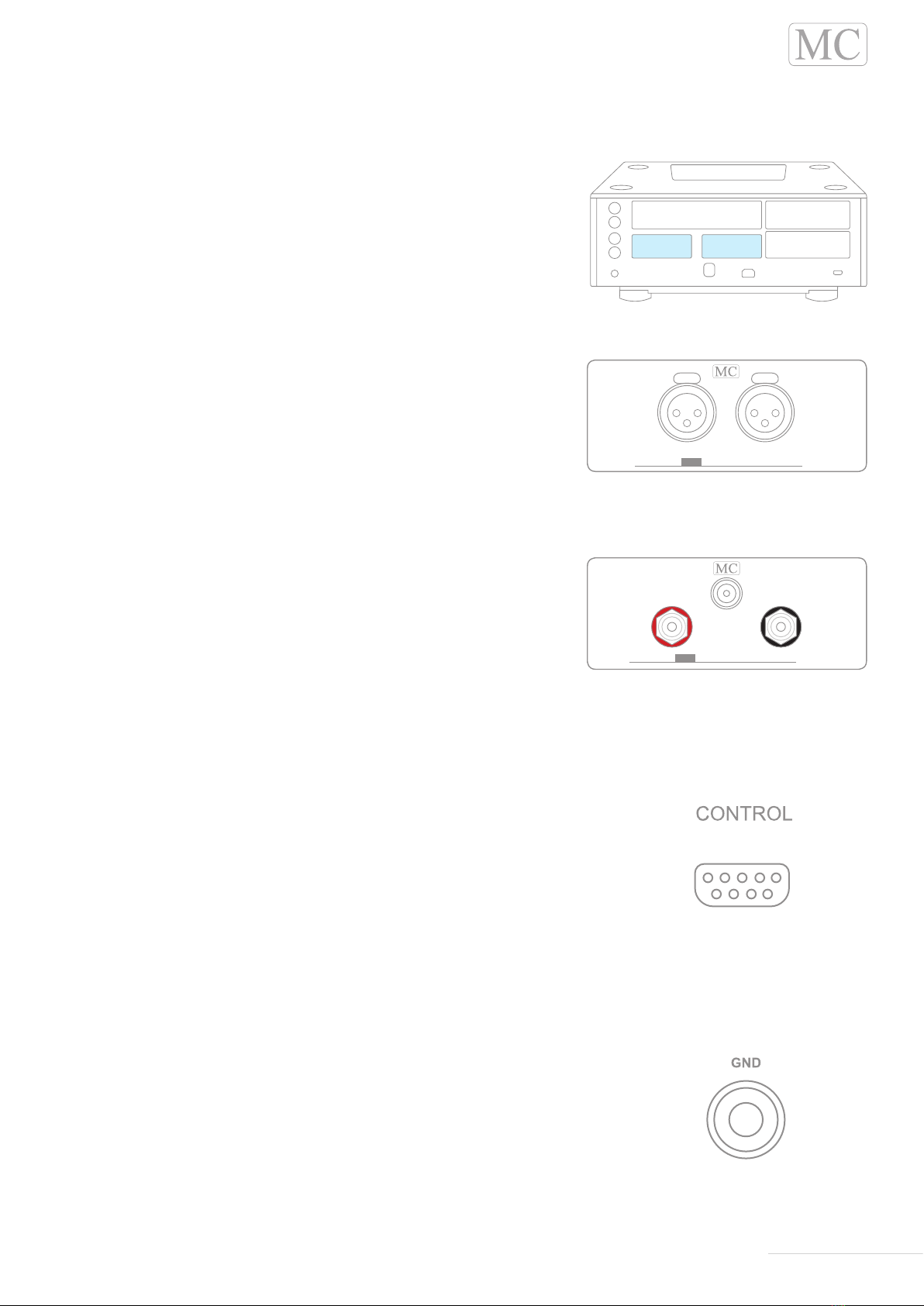
C3. Optional inputs
Optionally, you can upgrade your mc 611 preampli-
er with two additional inputs for RCA or XLR connec-
tors. The panels for the optional inputs are located
on the back of the preamplier.
The additional XLR input allows you to connect one
more balanced source.
The additional RCA input allows you to connect
one more unbalanced source (e.g. CD direct, phono
MM/MC.)
C4. RS232 port
Your preamplier is equipped with an automation control sys-
tem. It allows you to expand any automation such as IR, RS232
or LAN. In the future even environment control will be possible.
You will nd the RS232 port on the right side of the back of your
preamplier.
C5. Ground connector (GND)
If you want to connect a ground wire (e.g. from your turntable) to
the preamplier, you will nd the ground connector on the left
side of the back of the preamplier.
INPUT BALANCED
INPUT CD Direct
CD DirectRCA
L
R
optional XLR input
optional RCA input
RS232 port
ground connector
mc 611 preamplier
9back to TOC
Table des matières
Langues :
Autres manuels MC Amplificateur


