
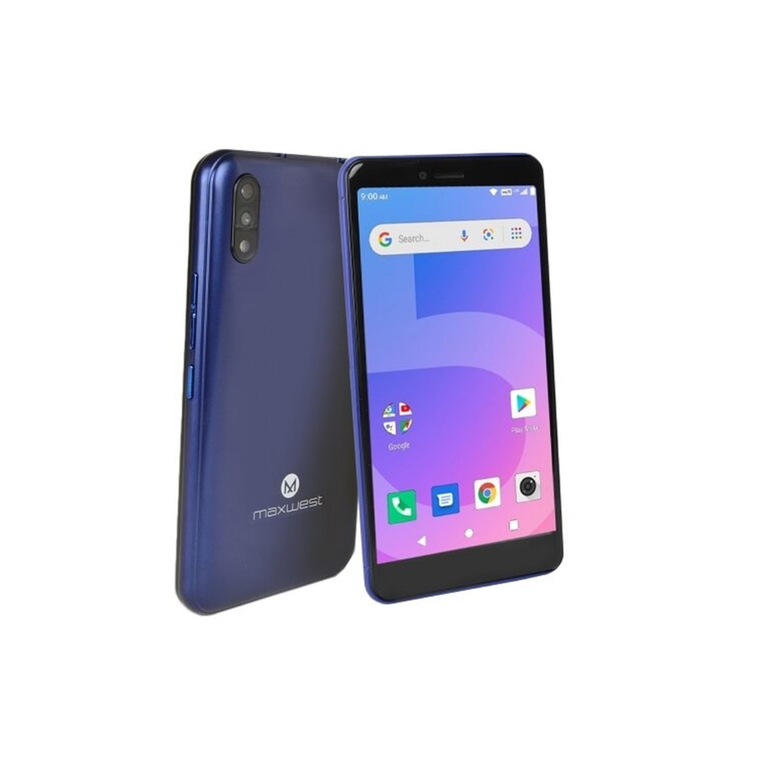
MaxWest Orbit 5700T Manuel utilisateur

UserManual
Model:Orbit5700T
Brand:MAXWEST
FCCID:ONGORBIT5700T

-1-
Content
1General Information.................................................................................................................................................5
1.1Profile.............................................................................................................................................................. 5
1.2Safety warning and Attentions........................................................................................................................ 5
2Your phone.................................................................................................................................................................8
2.1Phone keys overview ................................................................................................................................... 8
2.2Functions of Keys........................................................................................................................................... 9
2.3Functions of icons........................................................................................................................................... 9
2.4Status bar......................................................................................................................................................... 9
3Getting started.........................................................................................................................................................11
3.1Installing the SIM Card and the Battery ........................................................................................................11
3.2Charging the Battery..................................................................................................................................... 12
3.3Linking to the Networks and devices............................................................................................................ 14
3.4Using the touch screen.................................................................................................................................. 16
3.5Using the onscreen keypad ........................................................................................................................... 17
3.6Dialing Calls ................................................................................................................................................. 17

-2-
4Using the Menus......................................................................................................................................................18
4.1Browser......................................................................................................................................................... 18
4.2Calculator...................................................................................................................................................... 21
4.3Calendar........................................................................................................................................................ 21
4.4Camcorder..................................................................................................................................................... 23
4.5Camera.......................................................................................................................................................... 23
4.6Clock............................................................................................................................................................. 23
4.7Currents......................................................................................................................................................... 23
4.8Downloads .................................................................................................................................................... 24
4.9Email............................................................................................................................................................. 24
4.10File Explorer ................................................................................................................................................. 25
4.11FM Radio...................................................................................................................................................... 26
4.12Gallery .......................................................................................................................................................... 26
4.13Gmail ............................................................................................................................................................ 26
4.14Latitude......................................................................................................................................................... 26
4.15Local ............................................................................................................................................................. 26
4.16Maps.............................................................................................................................................................. 26

-3-
4.17Messaging..................................................................................................................................................... 26
4.18Video studio.................................................................................................................................................. 27
4.19Music ............................................................................................................................................................ 27
4.20Navigation..................................................................................................................................................... 29
4.21News & Weather........................................................................................................................................... 29
4.22People............................................................................................................................................................ 29
4.23Phone ............................................................................................................................................................ 29
4.24Play store....................................................................................................................................................... 30
4.25Portable hotspot ............................................................................................................................................ 30
4.26Profile manager............................................................................................................................................. 30
4.27Search............................................................................................................................................................ 30
4.28Settings.......................................................................................................................................................... 30
4.29SIM Toolkit................................................................................................................................................... 37
4.30Sound Recorder............................................................................................................................................. 37
4.31Stopwatch...................................................................................................................................................... 37
4.32Talk ............................................................................................................................................................... 37
4.33Videos ........................................................................................................................................................... 37
4.34Voice dialer ................................................................................................................................................... 38

-4-
4.35Whether......................................................................................................................................................... 38
4.36World Clock.................................................................................................................................................. 38
4.37YouTube........................................................................................................................................................ 38
5Appendix..................................................................................................................................................................39
5.1How to read/check the internal flash storage and external TFlash card........................................................ 43

-5-
1General Information
1.1 Profile
Please read this pamphlet carefully in order to make your phone in perfect condition.
Our company may change this mobile phone without prior written notice and reserves the final right to
interpret the performance of this mobile phone.
Due to different software and network operators, display on your phone may be different, refer to your
phone for details.
1.2 Safety warning and Attentions
Safety warning
¾ROAD SAFETY COMES FIRST
Do not use a hand-held phone while driving. Use hands-free fittings when calls are unavoidable while
driving. In some countries, dialing or receiving calls while driving is illegal!
¾SWITCH OFF IN AIRCRAFT
Wireless devices can cause interference in aircraft. Using a mobile phone in flight is illegal and risky.
Please make sure that your mobile phone is powered off in flight.
¾SWITCH OFF BEFORE ENTERING RISKYAREAS
Strictly observe the relevant laws, codes, and regulations on the use of mobile phones in risky areas.
Turn off your mobile phone before entering a place susceptible to explosion, such as an oil station, oil tank,

-6-
chemical plant or a place where a blasting process is under way.
¾OBSERVE ALL SPECIAL REGULATIONS
Follow any special regulations in force in any area such as hospitals and always switch off your phone
whenever it is forbidden to use it or, when it may cause interference or danger. Properly use your mobile
phone near medical apparatuses, such as pacemakers, hearing aids and some other electronic medical devices,
as it may cause interference to such apparatuses.
¾INTERFERENCE
The conversation quality of any mobile phone may be affected by radio interference. An antenna is built
inside the mobile phone and located below the microphone. Do not touch the antenna area during a
conversation, lest that the conversation quality deteriorate.
¾QUALIFIED SERVICE
Only qualified personnel may install or repair phone equipment. Installing or repairing the mobile phone
on your own may bring great danger and violates the warranty rules.
¾ACCESSORIES AND BATTERIES
Use only approved accessories and batteries.
¾USE SENSIBLY
Use only in a normal and proper manner.
¾EMERGENCY CALLS
Ensure the phone is switched on and in service, enter the emergency number, e.g. 112, then press the
Dial key. Give your location and state your situation briefly. Do not end the call until told to do so.
Note: Just like all other mobile phones, this mobile phone does not necessarily support all the features

-7-
described in this manual due to network or radio transmission problems. Some networks even do not support
the emergency call service. Therefore, do not rely solely on the mobile phone for critical communications
such as first aid. Please consult the local network operator.
Precautions
This mobile phone is well designed with fine art. Please exercise special care when using it. The
following suggestions will help your mobile phone survive the warranty period and extend its service life:
¾Keep the mobile phone and all its fittings beyond children's reach.
¾Keep the mobile phone dry. Keep away from rain, moisture, liquid or other substances that may corrode
electronic circuits.
¾Do not use or store the mobile phone in dusty places, lest that active parts of the mobile phone be damaged.
¾Do not store the mobile phone in a high-temperature place. High temperature will shorten the life of
electronic circuits and damage the battery and some plastic parts.
¾Do not store the mobile phone in a chilly place. Otherwise, moistures will be formed inside the mobile
phone to damage electronic circuits when the mobile phone is moved to a constant temperature place.
¾Do not throw, knock or shock the mobile phone, as that will destroy the internal circuits and high-precision
components of the mobile phone.

-8-
2Your phone
2.1 Phone keys overview

-9-
2.2 Functions of Keys
The mobile phone provides the following keys:
Power key
Power key situates at the top of the phone. While using the phone, you can press this key to lock screen;
if you press and hold this key, a phone-options dialog would pop out. Here, you can select to adjust the
profile mode or power off.
Volume key
Volume key situates at the right side of the phone. You can press it to adjust ringer volume.
2.3 Functions of icons
Menu icon
Touch this icon to access options of a selected function;
Home icon
Touch it to open home screen. If you’re viewing the left or right extended Home screen, Touch it can
enter the central screen.
Back icon
Touch this icon to return to the previous screen;
2.4 Status bar
Various indicators are provided in status bar to show ongoing activities. Tap the status bar and scroll
down to view notifications or view system information.
Ce manuel convient aux modèles suivants
1
Table des matières
Autres manuels MaxWest Téléphone portable

MaxWest
MaxWest UNO X2 Manuel utilisateur
MaxWest
MaxWest BB-9 Manuel utilisateur

MaxWest
MaxWest ASTRO 5.5 Manuel utilisateur

MaxWest
MaxWest ORBIT 5400T Manuel utilisateur

MaxWest
MaxWest MX110 Manuel utilisateur

MaxWest
MaxWest Nitro 5P Manuel utilisateur

MaxWest
MaxWest NITRO 5W Manuel utilisateur

MaxWest
MaxWest NEO CLAM Manuel utilisateur

MaxWest
MaxWest Gravity 5 Manuel utilisateur

MaxWest
MaxWest MX-100 Manuel utilisateur


