
Maximum XO-110T Manuel utilisateur

English User manual .........................................................3
Deutsch Gebrauchsanleitung..........................................23
Dansk Brugervejledning ...............................................43
Svenska Bruksanvisning..................................................63
Česky Návod k obsluze ................................................82
Polski Instrukcja obsługi............................................101
MAXIMUM
XO-110T
Item no. 7955 / 7953

2

3
CONTENT
Important Safeguards .......................................................................... 4
Safety precautions ...................................................................................................... 4
Front panel............................................................................................ 5
Rear panel ............................................................................................. 5
Remote control ..................................................................................... 6
Installing the batteries................................................................................................. 7
Using the remote control............................................................................................. 7
Connections.......................................................................................... 8
First time installation ............................................................................9
Basic operation ........................................................................................................... 9
Program Manage Settings .................................................................................... 9
Program Edit ......................................................................................................... 9
EPG (Electronic program guide .......................................................................... 11
Sort...................................................................................................................... 12
Video Setting ...................................................................................................... 12
Channel Search .................................................................................................. 13
Time Setting ........................................................................................................ 14
Option.................................................................................................................. 15
System Setting.................................................................................................... 16
USB..................................................................................................................... 16
PVR function ....................................................................................................... 17
Time shift............................................................................................................. 18
Troubleshooting ................................................................................. 19
Technical Specications.................................................................... 20
ENGLISH

4
IMPORTANT SAFEGUARDS
Safety precautions
The receiver has been manufactured in accordance with international safety standards.
For your own safety you should read the notes on safety precautions carefully, and take
note of them, before operating your new receiver. For your own safety please be sure to
follow these safety precautions;
1. When installing the receiver, ensure there is a gap of approximately 5 cm around the
receiver to enable air to circulate freely and prevent overheating.
2. Do not install this equipment in a con ned space such as a book case or similar unit.
The ventilation should not be impeded by covering the ventilation openings with
items such as newspaper, table-cloths, curtains etc.
3. No naked ame sources, such as lighted candles should be placed on the apparatus.
4. The receiver shall not be exposed to dripping or splashing; No objects lled with
liquids, such as vases should be placed on the apparatus.
5. The mains plug is used as disconnect device, the disconnect device shall remain
readily operable.
6. Power cord must be placed correctly. Do not touch the power Cord and switch when
your hand is dankest.
7. The normal operating temperature of the receiver is between 5ºC and 40ºC.
Use the apparatus only in moderate climates (Not in tropical climates).
8. The batteries shall not be exposed to excessive heat such as sunshine, re etc.
Take attention to the environmental aspects of battery disposal.
CAUTION
To reduce the risk of electric
shock, do not remoce cover
(or back). No user servicable
parts inside, refer servicing to
qualied service personnel.

5
FRONT PANEL
1. USB JACK
2. REMOTE CONTROL SENSOR
3. STANDBY INDICATOR
4. LED DISPLAY WINDOW
5. CH-
6. CH+
7. POWER
REAR PANEL
1. RF IN
2. RF OUT
3. LAN
4. HDMI OUT
5. SCART OUT
6. POWER INPUT
1
1
2
2
3
3
4
4
5
5
6
6
7

6
REMOTE CONTROL
01. LIST: Used to show the record program list
on the current disk.
02. MUTE: Mute or Restore Audio Output.
03. INFO: Displays additional channel
information.
04. TTX: Displays Teletext Information.
05. SUBTITLE: Selects Subtitles Language.
06. EXIT: Exits the current Menu or returns to
the previous Menu.
07. UP / DOWN: Navigates through the
Menus. Selects the next or previous mode.
08. OK: Conrms an entry or selection.
Displays the list of channels.
09. RIGHT / LEFT: Navigates through the
Menus. Increases or decreases volume.
10. TV/RADIO: Switches from TV function to
Radio function and from Radio to TV.
11. RECALL: Used to switch between the last
two viewed channels.
12. GOTO: Selects the play time of media.
13. PREV: Skips to the previous track during
playing media and skips to the previous
channel during playing DTV.
14. NEXT: Skips to the next track/channel
during playing media/DTV.
15. STOP: Stops media play.
16. REPEAT: Selects Repeat or turn off
Repeat mode.
17. REC: Used to record the program.
18. STANDBY: Switch the product to on
or standby.
19. EPG: (Electronic Program Guide)
Turns the program guide on.
20. AUDIO: Selects an Audio Language
or Audio Mode.
21. MENU: Turns on Main Menu.
22. FAV: (Favourite) Turns on Favourite Menu.
23. 0-9 (Numeric Buttons): Selects a
channel or setting.
24. FWD: Searches forwards during media play.
25. REV: Searches backwards during media
play.
26. PLAY: Starts or resumes media play.
27. PAUSE: Pauses media play.
28. COLOUR BUTTONS: Operate different
function in TEXT screen.
7
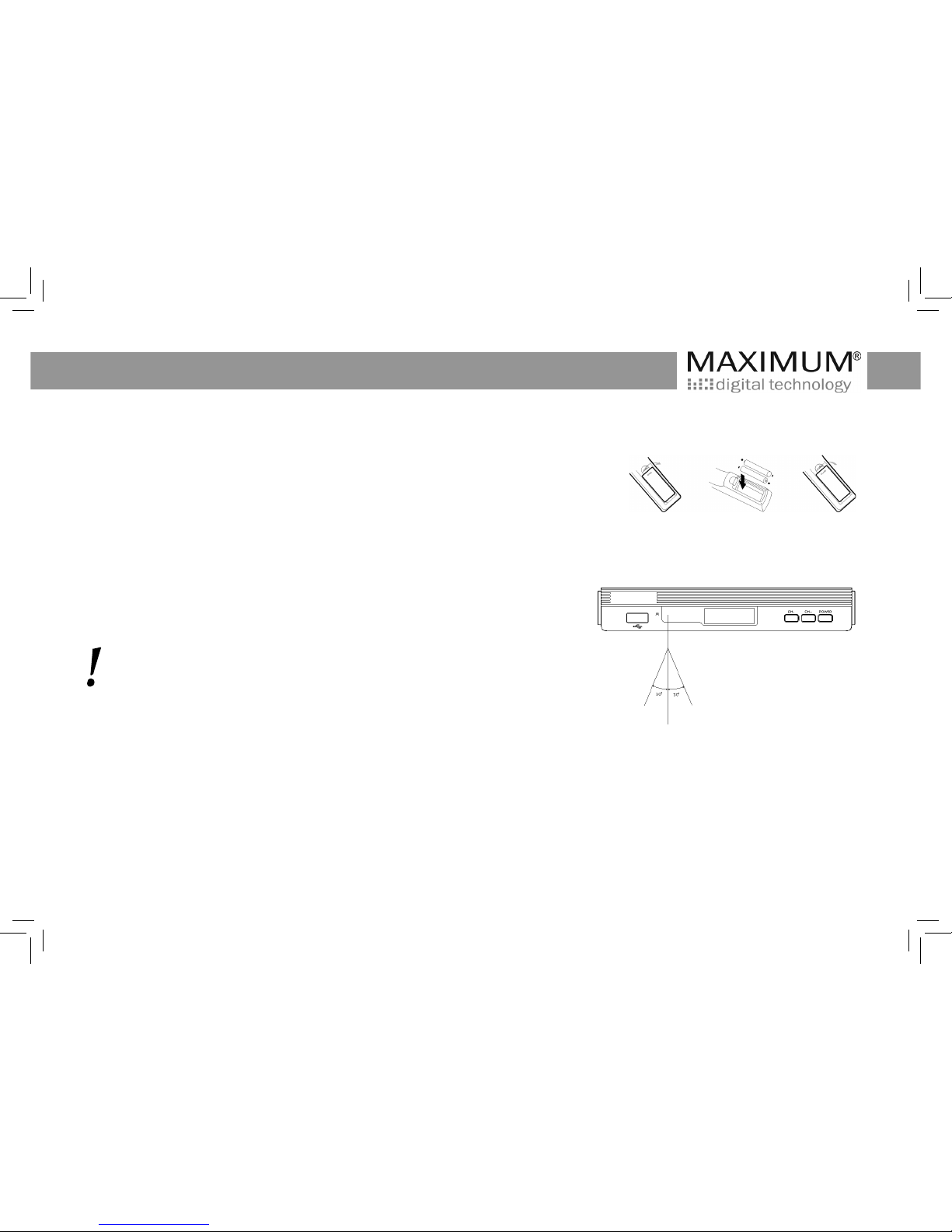
INSTALLING THE BATTERIES
Remove the battery cover from the Remote Control and put 2xAAA size batteries
inside the compartment.
The diagram inside the Battery Compartment shows the correct way to install the
batteries.
USING THE REMOTE CONTROL
To use the Remote Control, point it towards the front of the Digital Set Top Box.
The Remote Control has a range of up to 7 metres from the Set Top Box at an
angle of up to 60 degrees.
The Remote Control will not operate if its path is blocked.

8
CONNECTIONS
When connecting the receiver to other equipment, e.g., TV, VCR and amplier, make sure to refer to relevant user manual
for instruction. Also, make sure you disconnect all the equipments from the mains supply before the connection.
CAUTION
Make sure to check the voltage
specication of the wall outlet
is the same rating with the
receiver.
To prevent the risk of electric
shock, do not open the cover
or the back of the receiver.

9
FIRST TIME INSTALLATION
After all connections have been made properly, switch on TV and make sure
the receiver is connected to the Main Power. Press Power button to switch the
receiver on. If you are using the receiver for the rst time or restored to Factory
Default, the Main Menu will appear on your TV screen.
1. Select [OSD Language] and press RIGHT/LEFT key to select an language
2. Select [Country] and press RIGHT/LEFT key to select your country of residence
3. Select [Channel Search] and press RIGHT or OK key to begin Automatic
channel search
4. Once channel tuning is complete, you are now ready to watch TV
BASIC OPERATION
Program Manage Settings
To access the Menu, press the MENU button and select [Program]. The Menu
provides options to adjust the Program Manage Settings. Select an option and
press OK or RIGHT to adjust that setting. Press the EXIT button to exit the
Menu.
Program Edit
To edit your program preferences (lock, skip, favourite, move or delete), you will
need to enter the Program Edit Menu. This Menu requires a password to access.
Enter the default password ‘000000’.

10
Set Favourite Program
You can create a shortlist of favourite programs that you easily can access.
Set Favourite TV or Radio program:
1. Select the preferred program then press the FAV button.
A heart-symbol will appear next to the program.
2. Repeat the previous step to select more Favourite programs.
3. To conrm and exit the Menu, press the EXIT key
Deletion of a favourite TV or Radio Program:
Press the FAV button on the Remote Control, so the heart- symbol disappear.
View Favourite Program
1. Press the Favourite button and the Favourite Menu will appear.
2. Press UP/DOWN to select your Favourite Programs.
3. Press OK to select your favourite program.
Delete a TV or Radio Program
1. Select the Program and then press the BLUE button
A message will appear. Press OK to delete the program
2. Repeat the previous step to select more programs to delete.
Skip TV or Radio Program
3. To conrm and exit the menu, press EXIT key. Activate a skip TV or Radio
program: Press the GREEN button so the skip symbol dissapear.
Table des matières
Langues :
Autres manuels Maximum Récepteur

Maximum
Maximum 7846 Manuel utilisateur

Maximum
Maximum TS-4000 Manuel utilisateur

Maximum
Maximum S-6002 CI HD Manuel utilisateur

Maximum
Maximum XO-4200 Hybrid Manuel utilisateur

Maximum
Maximum TS-3000 CX-CI Manuel utilisateur

Maximum
Maximum 7974 Manuel utilisateur

Maximum
Maximum T-105 FTA PVR Manuel utilisateur

Maximum
Maximum S-2000 FTA PVR Manuel utilisateur

Maximum
Maximum T-1300 FTA Manuel utilisateur

Maximum
Maximum T-102 FTA Manuel utilisateur


