
Maxima SOLAR ME-203DC Manuel utilisateur
INSTRUCTION MANUAL
Please read the following instructions carefully and retain a copy of his information for future reference.
When using this electrical appliance, the following safety precautions should be strictly followed.
Simple Introduction
Caution
Model: ME-203DC 42" DC ceiling fan
This product adopts the direct current frequency converted motor that is high efficiency, saving,
durable and environmental protection
It carries a unique & superior structural design, vague appearance, convenient and time
saving installation
This product claims at giving you considerate service by unique 5-speed se ling, independent
light control switch. 1/4/8 timer setting
1.
2.
3.
READ AND SAVE THESE INSTRUCTIONS
This product is with input voltage: DC 24v.
Before installing or removing a ceiling fan, you should swich off the power first
When Installing a ceiling fan, all parts with screws must be tightened firmly.
1.
2.
3.
4.
Choose a location for mounting the fan where the blades will be clear from
all obstructions and maintain a minimum of 2.3 meters from the floor
5.
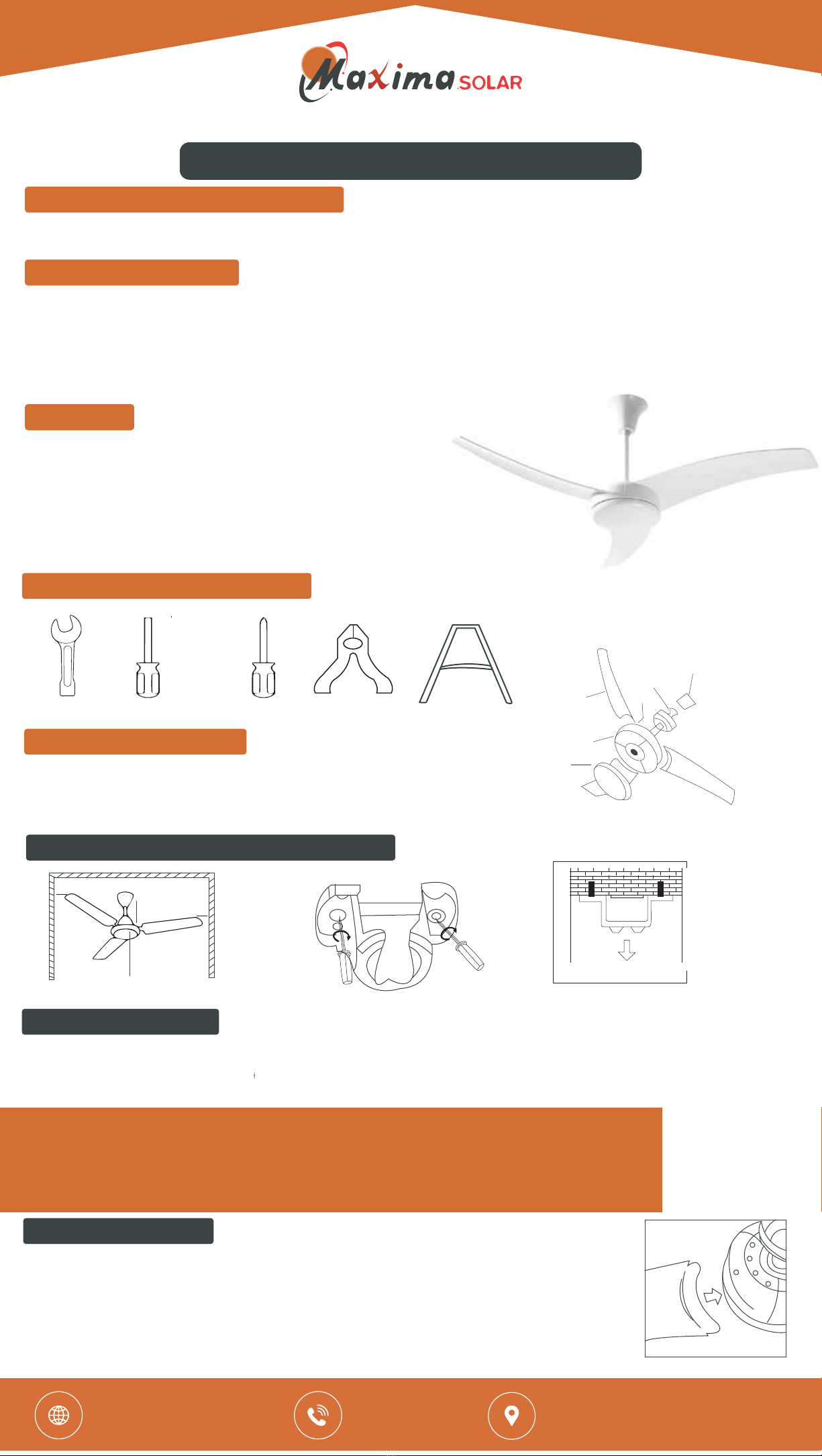
10# Spanner Slotted screwdriver philips screwdriver plastic clamp ladder
1
2
34
5
6
Installation preparation tool
Cover plate
1. 4.
5.
6.
2.
3.
Motor
Blade
Screw fro blade
Downrod with ball
Bracket
7. Remote control
Setup Details of parts
Note: after the brocke tis secured, must ensure the selected ceiling location with the fixings are
capable of supporting a minimum weight/gravity of 60 Kgs (use hand try to pull the bracket
for safety assurance).
Note, please pay attention to different materials of celling and select the appropriate type
of screws to fix the bracket. Do not Fix the bracket directly on the plywood to avoid screw loosenin
that causes danger.
1. Minimum space for Installation (see Fig 1)
2.3m
0.2m 0.5m
0.5m
For wooden celling, the brackets should be fixed on the beam by 1.5 inches
wooden threaded screw! (see Fig 2)
For the cement ceiling, firstly use with 8mm impact drilling bit to drill a hole to fit the expansion
screw than secure the bracket on the ceiling by tightening M6 expansion screw see Fig 3)
1. Insert the far blades to the motor installation slot. Firm pressure is needed. see Fig 4).
Secure all fan blades using ST<x16 screw by Philips screwdriver until tightered it on the
motor cover. Fig 4
2. Bracket installation
o
3. Blades Installation
Fig 1 Fig 2 Fig 3
Fig 4
If you or familiar with electrical installation, be sure have a licensed
electrician to install the product for you.
Visit Our Website
www.maxima.solar
Call Us
+971 4 2231185
Our Address
Shop 5&6, 7 States building Baniyas
Square, Deira, Dubai, UAE

Fig 5
Fig 6
Fig 7
Fig 8
Fig 9
4. Fix the fan to the bracket
Place the calling for to the brocket. Carefully lift the fan and make sure
the groove of the ball is locked on the pin from the metal bracet (see fig 6)
5. Wires connection
1. According to the label on terminal block, connect the + polarity
wire and -polarity wire. Make sure the secured screws are tightened
firmly. Wires should not be loosed. (see fig 7)
2. Slide the upper conopy to the ceiling, lighten the screw. (see figure8)
6. Wall control installation
REMOTE CONTROL FUNCTION
Align the centre of cover plate on the motor shaft by rotating clockwise
until tightened, <see fig 9>
1. switch on/off the fan by pressing this button. You will hear a "Bi "sound,
it means the receiver has got your instruction. (You can oso hear a "Bi"
sound by pressing each button of remote controller. This notation will not
repeat in the following instructions.) 2. The fan is preset at speed 4
Switch on and off independently by pressing this button. (It is inapplicable
for the fan without lighting)
1) Speed-1 is the lowest and 2/3/4/5 is gradually increased in air flow.
Speed-5 is the highest.
To cycle through these 3 timer settings (1/4/8 hours) by pressing those buttons.
1) Battery specification of remote controller. A23/12V alkaline battery, other
battery specificciors are inapplicable
2) Open the cover of battery compartment, identify the polarity of battery and ensure
it is in appropiate match: Attention: the polarity must not be wrongly matched. 3) Fix the
holder of controller by screw on the wall
This function is designed for two circumstances:
This function is not applicable for this DC fan
1) Within an area of radius 8M where more than 1 celling fan installed, able
to control them by only one remote control.
2) When the controller is out of order, you have to replace a new one.
Code matching steps:
a) install batteries into the remote controller
b) Make sure the fan is disconnected with power before code matching
c) Re-connect the power supply.
d) It can run 1 fan or more by using his remote controller.
1) FAN ON/OFF button
2) Light (ON/OFF) button
3) Forword/Reverse(F/R) button-
4) 1/2/3/4/5(speed button)
5) 1H/4H/8H
6) Codes detection
7) Operating instructions of remote controller installation
Trouble Shooting
Wiring diagram.
Ref: ME -203DC/20141222
Terminal block
Input DC 24v
+
-
Ensure the supply cables have been well connected, you should focus on
checking the wires connection of the + and - polarity in correct match.
Identify the polarity of battery in the remote control is in appropriate match. Or
check if the battery is too old and dead. Press the remote control, check the
indicating light is on.
Note: if you fail to overcome the above failures, do not make attempt to open
the motor cover for repair. You should contact the qualified electrician to fix it
Ensure the fan-blades have beer firmly secured in place. Ensure the position of each
blade be aligned with each other. Ensure the mounting screws are firmly tightened.
Motor cannot work
Fan vibration
Problems Solutions
Light
ON/OFF
4
F/R
5
8H
4H
1H
1
2
3
FAN
ON/OFF
Visit Our Website
www.maxima.solar
Call Us
+971 4 2231185
Our Address
Shop 5&6, 7 States building Baniyas
Square, Deira, Dubai, UAE
Table des matières


