
MANTAFOILS VOLT 2 REMOTE Manuel utilisateur

VOLT 2 REMOTE
USER MANUAL

Warranty
Warranty
The product is subject to a warranty that is limited to a period of 12 months from the shipping
date of the related product order. For full details about the warranty, please visit https://ww-
w.mantafoils.com/tofs

Content List
Getting to know your remote
Features 1
Homescreen 2
Second Page 3
Third Page 4
Settings Page 5
Connecting to your Efoil 6
Unlocking the remote 8
Trigger Calibration 9
Setting the Power Limit 10
Setting the Units 11
Metric Settings 12
Navigation 13
Customizing Display Cell 14
Display Color Settings 16
Throttle Start Setting 17
Throttle Ramp Setting 18
Downloading Firmware Update 19
Installing Firmware Update 20
Resetting your remote 21
Logs Access 22
Charging your Remote 24
Hardware Reset 25
Troubleshooting 26

Features
GPS Positioning Technology
Waterproof
Sunlight Readable
Safety Lock
Ride Logging
Configurable Display
Cruise Control
Wireless Charging
1

Homescreen
Power ON the remote by long pressing the ‘O’ button. When remote is powered ON, the
homescreen will display the following:
1. The voltage of your E-foil
2. The GPS
3. The Remote Battery Voltage
4. Maximum power output. The Default is set to 25.
5. Remaining minutes: This indicates the remaining minutes of your ride time.
The remote needs to be paired to your e-foil to begin use.
1
00
25
NO GPS
REM-MIN
F
E-FOIL VOLTAGE
GPS
REMOTE BATTERY VOLTAGE
MAXIMUM POWER OUTPUT
REMAINING MINUTES
Single press the
‘O’ button to
switch Menu
Long press the
‘O’ button for
Power On/Off
2
The bars indicate signal
strength between the remote
and the receiver.
Foil battery charge should
appear, turning green.
The safety lock feature
will be activated when
receiver is paired
1
00
25
REM-MIN
F
LOCKED
85
Remote after pairing to
your e-foil. Follow the
instructions under
‘Connecting to the E-foil’
section to pair your remote.
Long press the ‘+’ button to
reset the ride.
Remote when powered
on the first time.
1
00
F
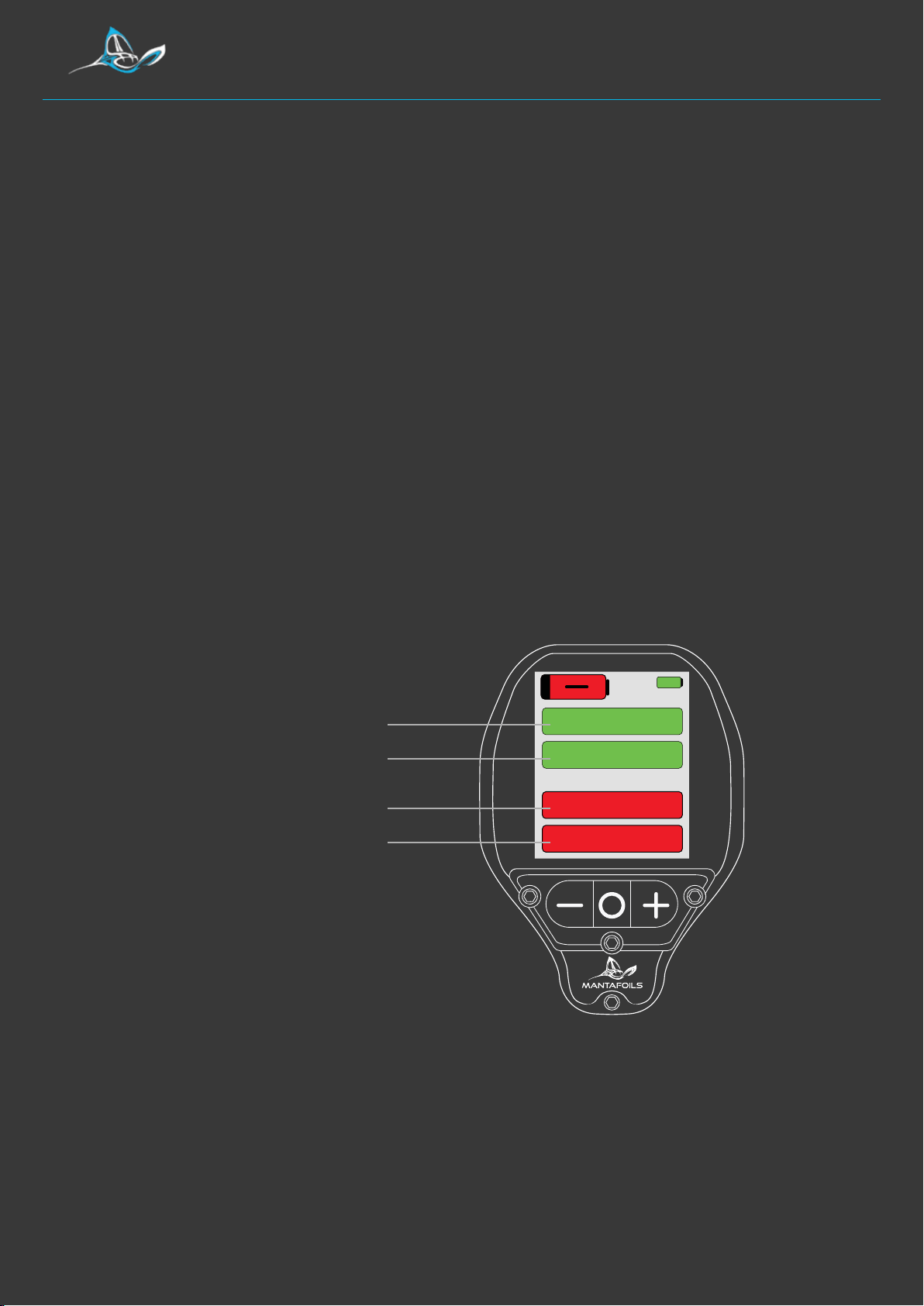
Second Page
ELAPSED MINUTES
ELAPSED KILOMETERS
REMAINING MINUTES
REMAINING KILOMETERS
The second page records:
1. Elapsed minutes: The time covered since the start of your ride.
2. Elapsed Kilometers: The kilometers covered since the start of your ride
3. Remaning Minutes: Time remaining for your ride depending on the
battery charge.
4. Remaining Kilometers: Kilometers remaining for your ride depending on
the battery charge.
REM-MIN
ELA-KM
REM-KM
ELA-MIN
3

1
00
F
Third Page
The third page records:
1. E-Foil Power: The wattage power of the e-foil.
2. Efficiency: The peak level of your foil performance in real time
3. Battery current: The battery current of the e-foil.
4. E-Foil temperature: The temperature of the e-foil
POWER
EFFICENCY
BATTERY CURRENT
E-FOIL TEMPERATURE
BAT CUR-A
EFF-W/KM
F TEMP-C
POWER-W
4

Settings Menu
Hold the ‘-’ and ‘+’ together for 3 seconds to enter the settings menu and to exit
hold the ‘-’ button for 3 seconds or until you arrive on the homescreen page.
In the menu:
1. The first page is used for pairing the remote with the efoil board.
To pair Receiver
1> Press O button
2> Power ON efoil
3> Remote restart
Once paired
Connect Efoil
5
Press and hold ‘-’ & ‘+’
together to enter the
settings menu
Long press ‘-’ button
to exit settings menu

Connecting to the Efoil
To connect your remote to the E-foil follow the instructions as shown on the screen.
. Press the ‘O’ button to enter into pairing mode. This will take you to the
screen shown below:
. When on this page, close down the lid of your board to power on the E-foil.
.Your remote will power off indicating the remote is paired.
pairing...
Power ON the efoil
Connect Efoil
6

Connecting to the Efoil
. Restart the remote by long pressing the ‘O’ button. When the remote
restarts, you should read ‘LOCKED’ on the home screen page. On
pairing, the GPS is also activated.
The bars indicate signal
strength between the remote
and the receiver.
E-foil battery charge should
appear, turning green.
The safety lock feature
will be activated when
receiver is paired
1
00
25
REM-MIN
F
LOCKED
85
Long press the ‘+’ button to
reset the ride.
7
Table des matières
Manuels Télécommande populaires d'autres marques

Panasonic
Panasonic EUR7622KB0 Manuel utilisateur

Bang & Olufsen
Bang & Olufsen Beo4 Manuel utilisateur

Sunwave Tech.
Sunwave Tech. RemoteComm SRC-7000 Manuel utilisateur

Multiplex
Multiplex PROFI TX 9 Manuel utilisateur

One Remote
One Remote RMB4 Manuel utilisateur

FUTABA
FUTABA 9ZAP - PART2 Manuel utilisateur


