
Magicfx Smokebubble Blaster Manuel d'utilisation

SMOKEBUBBLE
BLASTER.
®
BUBBLE FX PART01224
rev 01-03
USER AND INSTALLATION MANUAL
ENGLISH

2 MAGICFX®SMOKEBUBBLE BLASTER —User and Installation Manual
DISCLAIMER
WARNING Read this manual carefully before installing and/or using this
product. Failure to read the manual and to follow the printed
instructions may lead to personal injury and/or damage to the
product.
© 2019 MAGICFX®
All rights reserved.
Nothing from this publication may be copied, reproduced and/or published by
means of printing, photocopying or by any other means, without the prior written
approval of MAGIC FX.
MAGIC FX reserves the right to modify specications stated in this manual.
TRADEMARKS
Any brand names mentioned in this manual are registered trademarks of their
respective owners.
LIABILITY
MAGIC FX accepts no liability for claims from third parties arising from unauthorised
use, use other than that stated in this manual, and use other than in accordance with
the General Conditions registered at the Chamber of Commerce.
We further refer to the General Conditions. These are available on request, free of
charge.
Although considerable care has been taken to ensure a correct and comprehensive
description of all relevant components, the manual may nonetheless contain errors
and inaccuracies.
Should you detect any errors or inaccuracies in the manual, we would be grateful if
you would inform us. This helps us to further improve our documentation.

MAGICFX®SMOKEBUBBLE BLASTER —User and Installation Manual 3
TABLE OF CONTENTS
Disclaimer 2
Trademarks 2
Liability 2
Foreword 4
Language 4
Revision table 4
1 Meet the MAGICFX®SMOKEBUBBLE BLASTER! 5
1.1 Main parts 6
1.2 Technical data 7
1.7 Display panel 9
2.2 Indoor use 13
2.3 Rigging 13
3.1 Install the machine 15
3.6 Connect power and setup DMX 22
3.7 Setup multiple machines in a sequence with DMX 23
3.9 Clean up 24
4 Maintenance 34
6 Correct disposal 34

4 MAGICFX®SMOKEBUBBLE BLASTER —User and Installation Manual
FOREWORD
Congratulations! You have bought a great new product from MAGIC FX.
This manual contains all information required for the intended use of the equipment.
Deviation from the described intended use can result in a hazardous situation and/or
property damage.
This manual includes notes and warnings on safe operation of the equipment. These
notes and warnings are accompanied by the following icons. Read them attentively!
DANGER Indicates a hazardous situation that, if not avoided, will result in
death or serious injury. This signal word is to be limited to the most
extreme situations.
WARNING Indicates a hazardous situation that, if not avoided, could result
in death or serious injury.
CAUTION Indicates a hazardous situation that, if not avoided, could result
in minor or moderate injury.
NOTICE Indicates information considered important, but not hazard-
related (e.g. messages relating to property damage).
LANGUAGE
This document contains the original instructions in English. In case you require other
languages please contact MAGIC FX.
REVISION TABLE
Doc nr Revision Date Description Author Approved
PART01224 01-00 29-08-2017 Initial release TFR TVA
PART01224 01-01 01-03-2018 Revised jerrycan lid TFR TVA
PART01224 01-02 26-02-2019 Soware update TFR TVA
PART01224 01-03 01-08-2019 A4 to A5 format TFR TVA

MAGICFX®SMOKEBUBBLE BLASTER —User and Installation Manual 5
1 MEET THE MAGICFX®SMOKEBUBBLE BLASTER!
The MAGICFX® SMOKEBUBBLE BLASTER is a special eects machine that launches
bubbles (optionally lled with smoke) into the air with a capacity of 6 000 bubbles a
minute.
The MAGICFX® SMOKEBUBBLE BLASTER pumps bubble uid from a jerrycan to the
bubble heads. The bubble uid leaves a bubble head through the double-walled
exterior. A servo-driven wiper frequently wipes the head. This creates a small
membrane on the head. The air from an overpressurized chamber behind the
bubble heads blows the air into the membrane. This creates a trail of bubbles from
the bubble head.
A pair of fans blow air into the chamber behind the bubble heads. This creates the
overpressure conditions in the chamber. Another pair of fans is positioned
underneath the heads. The controllable air ow from the fans will launch the bubbles
high into the air.
Optionally smoke uid is pumped from a jerrycan, vaporized into smoke by two
heating elements and led to the bubble heads. The smoke output is located inside
the bubble head. The smoke from the output is mixed with the air that makes the
bubbles.
Unused bubble uid from the bubble heads will fall into a drip tray. A drain and
connected hose transports the remains back into the jerrycan with bubble uid.
The MAGICFX® SMOKEBUBBLE BLASTER is outtted for operation:
• in Manual mode with multiple options (e.g setting a timer and the output
distance);
• with DMX and optionally RDM;
• in sequence with multiple machines.

6 MAGICFX®SMOKEBUBBLE BLASTER —User and Installation Manual
1.1 MAIN PARTS
TOP LID
BUBBLE HEADS
DRIP TRAY
FLIGHTCASE
LAUNCH FANS
DISPLAY WITH BUTTONS
AND LED INDICATORS
BUBBLE CABINET
SMOKE CABINET
ON/OFF SWITCH
(RESETTABLE FUSE)
FX LED INDICATOR
DMX INPUT & OUTPUT
(5-POLE)
POWER INPUT & OUTPUT
(220 240 Vac)

MAGICFX®SMOKEBUBBLE BLASTER —User and Installation Manual 7
1.2 TECHNICAL DATA
Product Product Name MAGICFX®SMOKEBUBBLE BLASTER
Product Code MFX1603
Product Type BUBBLE FX
Main
Dimensions
Length 800 mm 31.5 in
Width 600 mm 23.6 in
Height 920 mm 36.2 in
Weight Weight 92 kg 202.8 lb
Environment Minimum Temperature 5 °C 41 °F
Maximum Temperature 50 °C 122 °F
Humidity (Relative) 20 % to 90 % (non condensing)
IEC 60529 (IP) Rating IP12
Electrical Voltage Input 220 – 240 Vac
Voltage Frequency 50 Hz
Power Consumption 600 W
Power Connector Neutrik®powerCON TRUE1 (in & out)
Controlling Control Options DMX / Manual / Timer
Control Protocols DMX512-A (ANSI E1.11)
RDM (ANSI E1.20)
Control Connectors Neutrik®5 pole male / female XLR
Congure Options On Device & RDM
Usage Consumable(s) MAGICFX®BUBBLE FLUID
MAGICFX®SMOKE FLUID
Consumable Consumption MAGICFX® BUBBLE FLUID: 8.5 L/h
MAGICFX® SMOKE FLUID: 0.275 L/h
Technical data
1.3 PRODUCT IDENTIFICATION
Type plate

®SMOKEBUBBLE BLASTER —User and Installation Manual
1.4 FX FLUIDS
The MAGICFX® SMOKEBUBBLE BLASTER uses bubble uid and smoke uid from MAGIC
FX to create smoke bubbles. The uids are delivered in jerrycans. The 20 litre jerrycan
with bubble uid is placed and connected in the bubble cabinet, see Section 3.2. The
5 litre jerrycan with smoke uid is placed and connected in the smoke cabinet, see
Section 3.3. The sheet metal interiors of the cabinets hold the jerrycans in place.
Do not use other uids than those that are approved and supplied by MAGIC FX, see
following table.
Code Volume
MFX3027 MAGICFX SMOKEBUBBLE BLASTER®- SMOKE FLUID 5 litre
MFX3003 MAGICFX®PRO BUBBLE FLUID - READY TO USE 20 litre
Approved FX Fluids
1.5 MANUAL MODE
In Manual mode the machine starts bubbling instantly when switched on. In the
menu on the display you can set the following values for Manual mode:
Manual operation menu items Values
Manual mode ON / OFF
Run timer 0 – 600 (s)
Pause timer 0 – 600 (s)
Reduced output ON / OFF
Smoke 0 % / 50 % / 100 %
Output distance 0 – 255
Manual mode
1.6 DMX CONTROL
When connected to DMX and with Manual mode OFF the MAGICFX®SMOKEBUBBLE
BLASTER is controlled with 1 safety address and 4 operational addresses:
DMX Address Address range
Safety address 1 – 512
Start address (Bubble setting) 1 – 509
Start address + 1 (Smoke setting) 2 – 510
Start address + 2 (Fan speed) 3 – 511
Start address + 3 (Go trigger) 4 – 512
DMX addresses
MAGICFX®SMOKEBUBBLE BLASTER —User and Installation Manual 9
The safety address cannot be the same as (one of) the operational address(es).
Operating of these addresses results in the following:
DMX Address DMX Value (decimal) Result
Safety address
0 99 Device disabled
100 155 Device enabled
156 255 Device disabled
Start address
(Bubble setting)
0 127 50 % bubble capacity
128 255 100 % bubble capacity
Start address + 1
(Smoke setting)
0 85 No smoke
86 170 50 % of bubbles contain smoke
171 255 100 % of bubbles contain smoke
Start address + 2
(Fan speed)
0 9 Fan OFF
10 255 Minimal speed -> Full speed
Start address + 3
(Go trigger)
0 199 Eect OFF
200 255 Eect ON
Operation of the DMX addresses
When you link multiple machines with DMX, we advise you to use the same Safety
address for all machines.
CAUTION Always plug in a DMX Terminator into the DMX output of the nal
unit in the control sequence. Using a DMX Terminator improves
signal reliability.
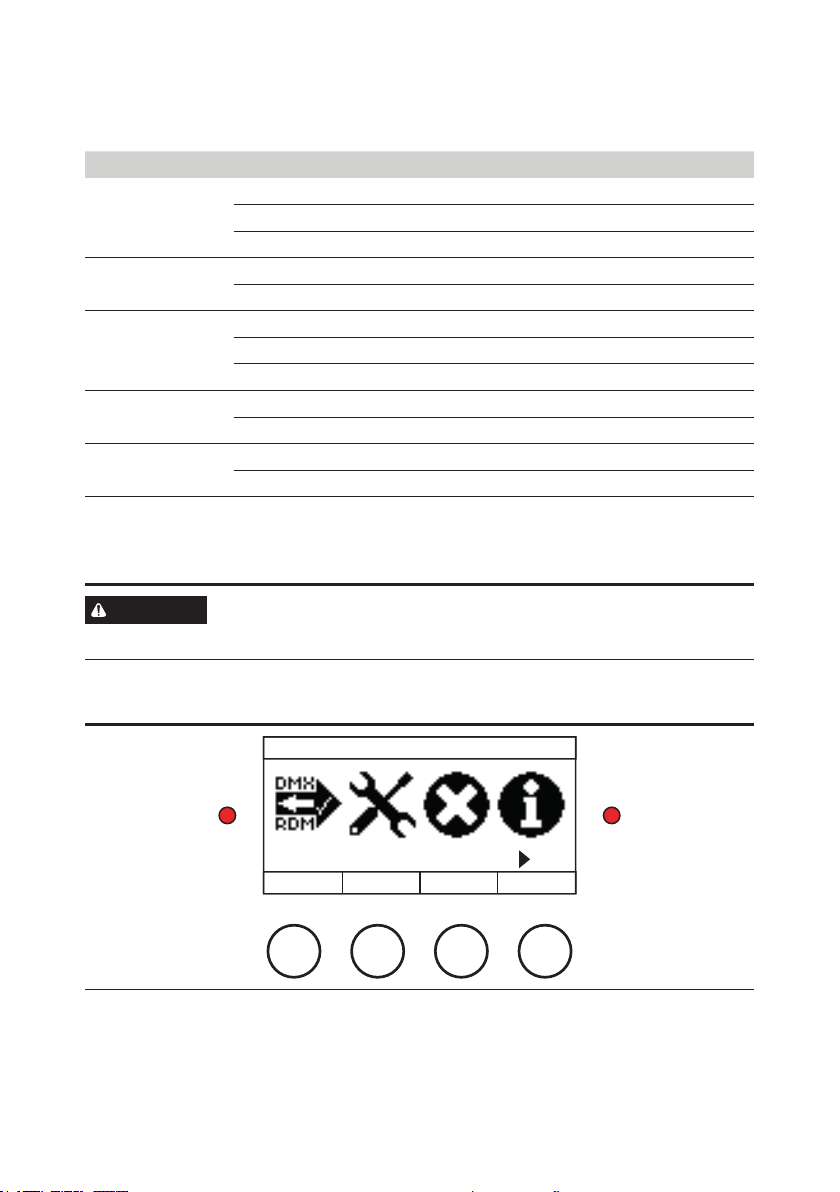
1.7 DISPLAY PANEL
MAIN MENU
DMX/RDM SETTINGS
BACK PREV NEXT
SELECT
Display panel
The display panel is located on the backside of the MAGICFX®SMOKEBUBBLE BLASTER.
Check the following menu structure for all options in the menu. Use the buttons for
navigation and selection. The le-hand LED blinks red when DMX is active. The right-
hand LED continuously lights red when an error is present.

10 MAGICFX®SMOKEBUBBLE BLASTER —User and Installation Manual
Idle Display
Main Menu
DMX Start Address (1–509)
DMX Safety Address (1–512)
DMX Footprint (Fixed)
Lock/Unlock Controller
(press and hold for 5 seconds)
Reset Errors
DMX/RDM Settings
Error History
continues on next page
Configuration
RDM (ON/OFF)
Type (Alarm/Error)
Run Timer (0–600 (s))
Smoke (0%/50%/100%)
Manual Mode (ON/OFF)
Output Distance (0–255)
Manual Operation
Pause Timer (0–600 (s))
Reduced Output (ON/OFF)
Wiper position le (370–420)*
Wiper position right (190–240)*
Display Dimmer (ON/OFF)
(dims aer 30 seconds of button inactivity)
Factory Defaults (YES/NO)
Table des matières
Autres manuels Magicfx Machine à brouillard

Magicfx
Magicfx MFX1150 Manuel utilisateur

Magicfx
Magicfx CO2JET II Manuel utilisateur

Magicfx
Magicfx SMOKEJET Manuel utilisateur

Magicfx
Magicfx CO2 Dominator Manuel utilisateur

Magicfx
Magicfx PSYCO2JET Manuel d'utilisation

Magicfx
Magicfx CO2 Gun Manuel utilisateur

Magicfx
Magicfx SMOKEJET Manuel d'utilisation
Manuels Machine à brouillard populaires d'autres marques

Antari
Antari ICE Manuel utilisateur

Boost
Boost BOOST-FOG400LED-BK Manuel utilisateur

Home Accents Holiday
Home Accents Holiday FM1000-ASH Manuel utilisateur

EuroLite
EuroLite ZEITGEIST FOG-1200 Manuel utilisateur

Dyna-Fog
Dyna-Fog CYCLONE ULTRA 2734 Manuel utilisateur

PROEL
PROEL DRAGO HEAVY PLFD150HY Manuel utilisateur


