
LivePure LP1200FAN Manuel utilisateur
English
Models:
LP1200FAN
LP1200FAN-M
LP1200FAN-S
LP1200FAN-G
LP1200FAN-W
LP1200FAN-R
Orbital Oscillating Fan
Form #LP1200FAN
20211221
©2021 Registered Trademark/TM Trademark of
LivePure LLC. Manufactured exclusively for LivePure LLC
All rights reserved
Owner’s Manual
READ AND SAVE THESE INSTRUCTIONS

Table of Contents
Important Safety Instructions
Safety Warnings................................................... 1
Getting to Know your Fan.................................. 4
Basic Set-Up......................................................... 5
Specifications...................................................... 5
Control Panel Functions..................................... 6
Using the Remote................................................ 8
Replacing the Fuse.............................................. 9
Using Your Fan
External Cleaning................................................ 10
Internal Cleaning................................................ 11
Maintenance
Troubleshooting................................................... 12
Technical Support............................................... 13
Fan Assistance
3 Year Guarantee................................................ 14
Warranty

1
Safety Warnings
READ AND SAVE THESE INSTRUCTIONS!
Important Safety Instructions: Read all instructions before using
this fan.
● DO NOT disassemble, repair or modify the product. Doing so
can cause fire, electric shock or injury.
● ALWAYS use only as described in this LivePure Owner’s Manual.
Any other use not recommended by the manufacturer may
cause fire, electric shock, or injury to persons.
● DO NOT turn on the product unless the fan blade and guard
are installed properly.
● DO NOT use this product with any solid-state speed control
device. This will reduce the risk of fire or electric shock.
● Product intended for household use only.
● DO NOT use product for anything other than its intended use.
Doing so could cause the product to malfunction or cause fire.
● DO NOT use near radio or televisions. Doing so may interfere
with radio or television signals.
● DO NOT use in places exposed to direct sunlight or heating
devices.
● ONLY use product on a level, stable surface. Failing to do so
could cause the product to tip over.
● ALWAYS place product in locations away from curtains and
hoisting strings. Failing to do so can cause damages to the articles
near the product.
● DO NOT spray with insecticides, hair sprays, or lubrication oils,
etc.
● DO NOT use near flammable substances, objects that have
flames, or combustible materials. Failure to do so could cause fire.
● DO NOT place product in a spot where it could fall. If unit falls,
it could malfunction.
● DO NOT place product near water sources, like a bathtub, sink
or swimming pool.
● DO NOT get the unit wet. Doing so can cause fire or electric
shock.
● DO NOT use in rooms with high humidity levels, such as
bathrooms.

● DO NOT use product outdoors.
● DO NOT use the product with the air flow pointed at a
combustible appliance such as a heater. Doing so can cause
carbon monoxide poisoning and fire.
● DO NOT use in locations where there is a lot of dirt or dust.
● DO NOT use while covered or blocked with cloth, paper, or
plastic bags, etc.
● DO NOT insert foreign objects such as metal into the fan outlet.
● DO NOT place fingers into the guard, or any moving part of the
fan.
● ALWAYS keep fan away from children unless supervised by an
adult.
● CHOKING HAZARD: the remote control contains a small battery.
Keep the remote away from children and do not swallow the
battery. If battery is swallowed, seek medical advice
immediately.
● DO NOT climb on or tip the product over. Doing so may lead to
injury or electric shock.
● DO NOT point air flow directly at your body. The air flow can be
very strong.
● DO NOT place near plants. Air blowing directly on plants can
be harmful.
● ALWAYS plug directly into a wall socket. NEVER use with an
extension cable. Doing so could result in the cable overheating
and catching fire.
● ALWAYS grab the power plug to unplug it. Pulling on the the
power cord can damage it, which can cause fire or electric
shock.
● ALWAYS unplug the product when it is not in use for extended
periods of time.
● ALWAYS pick up and carry the fan by the base of the unit.
● DO NOT run the cord under carpeting or any type of rug,
furniture or appliances.
● ALWAYS place the cord away from high traffic areas to avoid it
being tripped over.
● ALWAYS unplug the product when performing maintenance,
inspecting, or moving the product.
Safety Warnings
2

● ALWAYS use with the supplied power plug. Failure to do so may
cause electric shock or malfunction.
● CAUTION: if the plug is loose in the socket, the socket may need
to be replaced. Check with a qualified electrician to replace the
socket.
● This appliance has a polarized plug (one blade is wider than
the other). To reduce the risk of electric shock, this plug is
intended to fit in a polarized outlet only one way. If the plug does
not fit fully in the outlet, reverse the plug. If it still does not fit,
contact a qualified electrician. DO NOT attempt to defeat this
safety feature.
● This product employs overload protection (fuse). A blown fuse
indicates an overload or short-circuit situation. If the fuse blows,
unplug the product from the outlet. Replace the fuse as per the
user servicing instructions (follow product marking for proper fuse
rating) and check the product. If the replacement fuse blows, a
short-circuit may be present and the product should be
discarded or returned to an authorized service facility for
examination and/or repair.
● Do not operate any fan with a damaged cord or plug. Discard
fan or return to an authorized service facility for examination
and/or repair.
● Do not run cord under carpeting. Do not cover cord with throw
rugs, runners, or similar coverings. Do not route cord under
furniture or appliances. Arrange cord away from traffic area and
where it will not be tripped over.
● Use only 100-240V~. Other current/voltage can cause fires.
● DO NOT use if the power cord or the power plug is damaged.
● DO NOT damage the power cord. This can cause fire or
electrical shock.
● DO NOT use if the power cord is bundled up. Always extend the
power cord out before using.
● DO NOT unplug power plug when hands are wet.
● STOP use immediately if you experience any of the following
malfunctions: Abnormal sounds or odors; power plug or cord
becoming abnormally hot; product periodically stops during
operation; loss of power when the power cord is used; tingling
sensation from electric current felt when the product is touched
● Contact LivePure Customer Service when service or repair
is required. DO NOT dissemble the product as it may result in
an electric shock or fire.
Safety Warnings
3
4
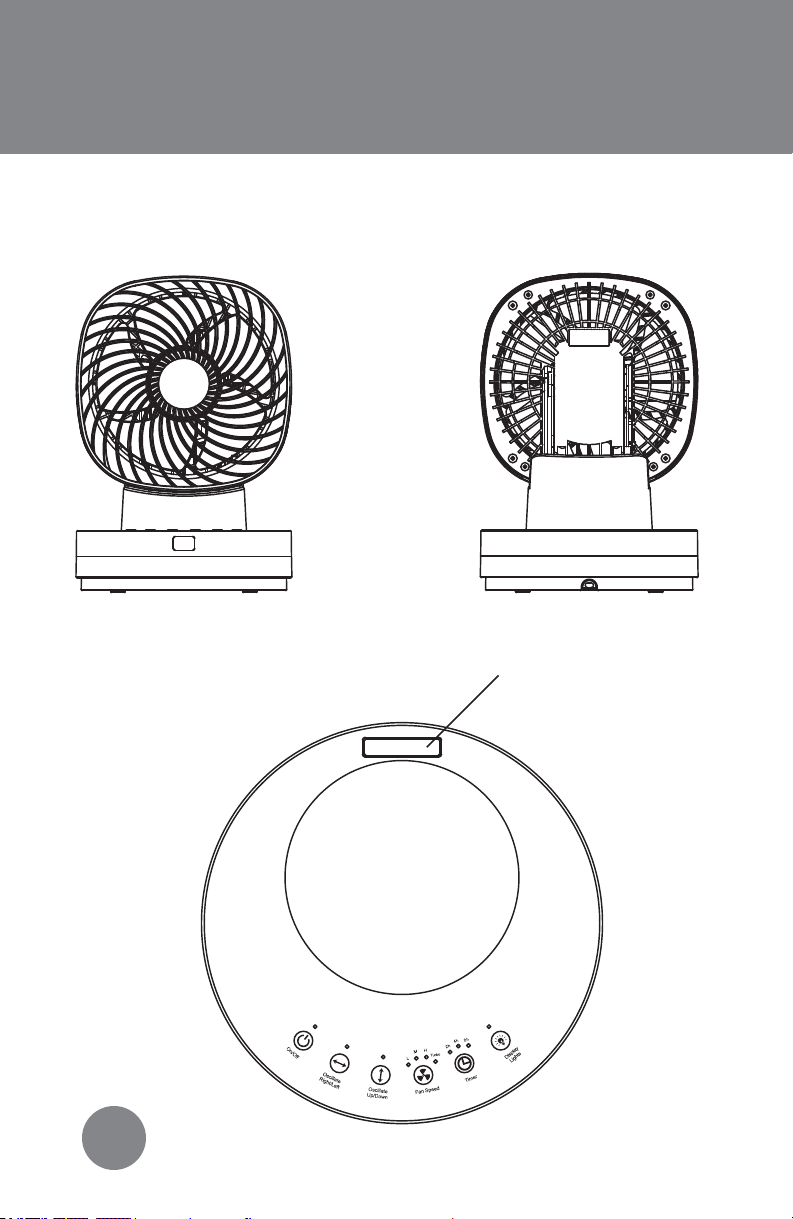
Getting to Know Your Fan
Front View: Back View:
Control Panel:
Remote Control
Holder
5
How to Use Your Fan
Basic Set-Up:
1. Carefully remove fan from box and remove any packaging
material. Your box should contain a remote and a fan.
2. Extend power cord and inspect for any signs of damage. If
damaged, contact LivePure customer service.
3. Plug into wall outlet.
4. Turn on unit by pressing ON/OFF button on fan or remote. The
product should beep when buttons are pressed.
5. Refer to “How to Use Your Fan” for more information on
operating your fan.
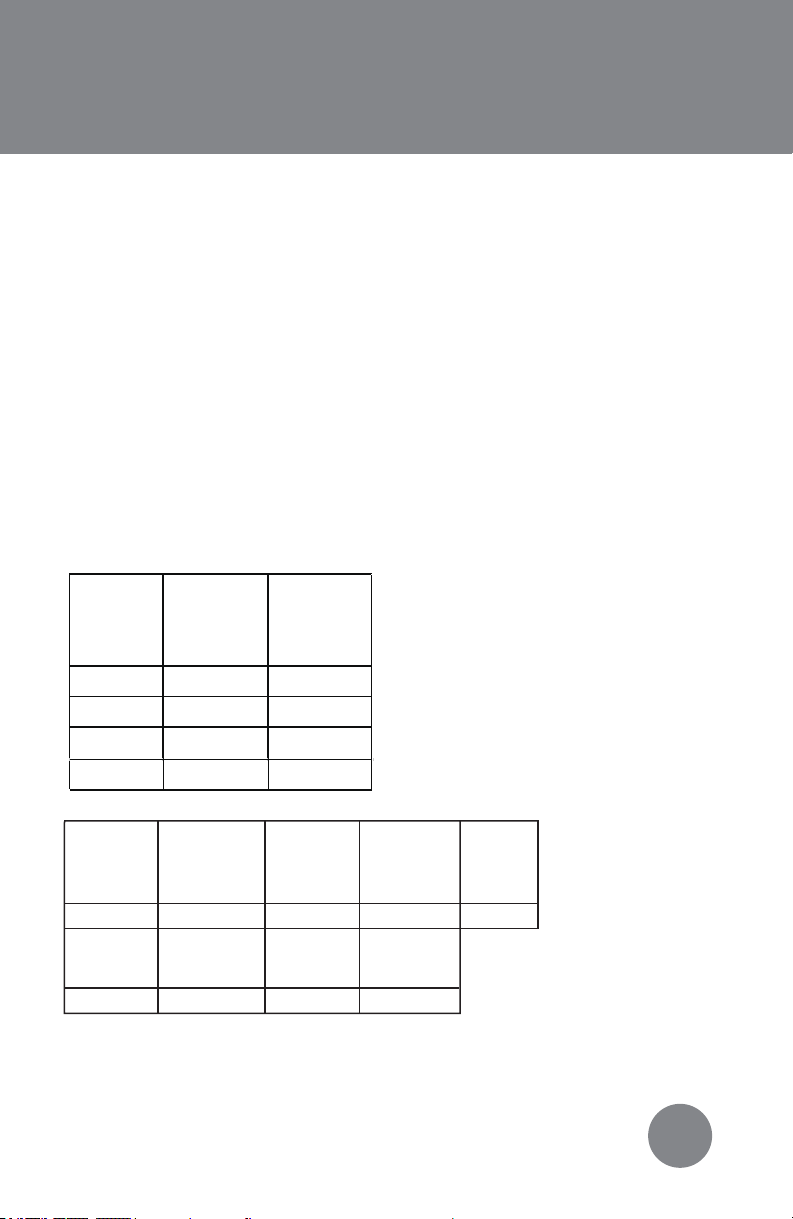
Specifications:
Setting Power
(W)
Noise
(dB)
Low 19.5 37.3
Medium 28.7 43.2
High 37.4 48.1
Turbo 48.5 54.1
Voltage
(V)
Frequency
(Hz)
Rotation
Angle
Rotation
Angle
Horizontal
120 60
83.5° 75°
Weight
(lbs)
Height
(in)
Width
(in)
Depth
(in)
Vertical
Cord
Length
(ft)
7.55
6.06 12.74 8.66 8.86
6
How to Use Your Fan
Oscillation:
You cannot manually change the angle of the product. You must
press the oscillation buttons to change the angle. Trying to
change the angle manually could damage the product.
Horizontal Oscillation:
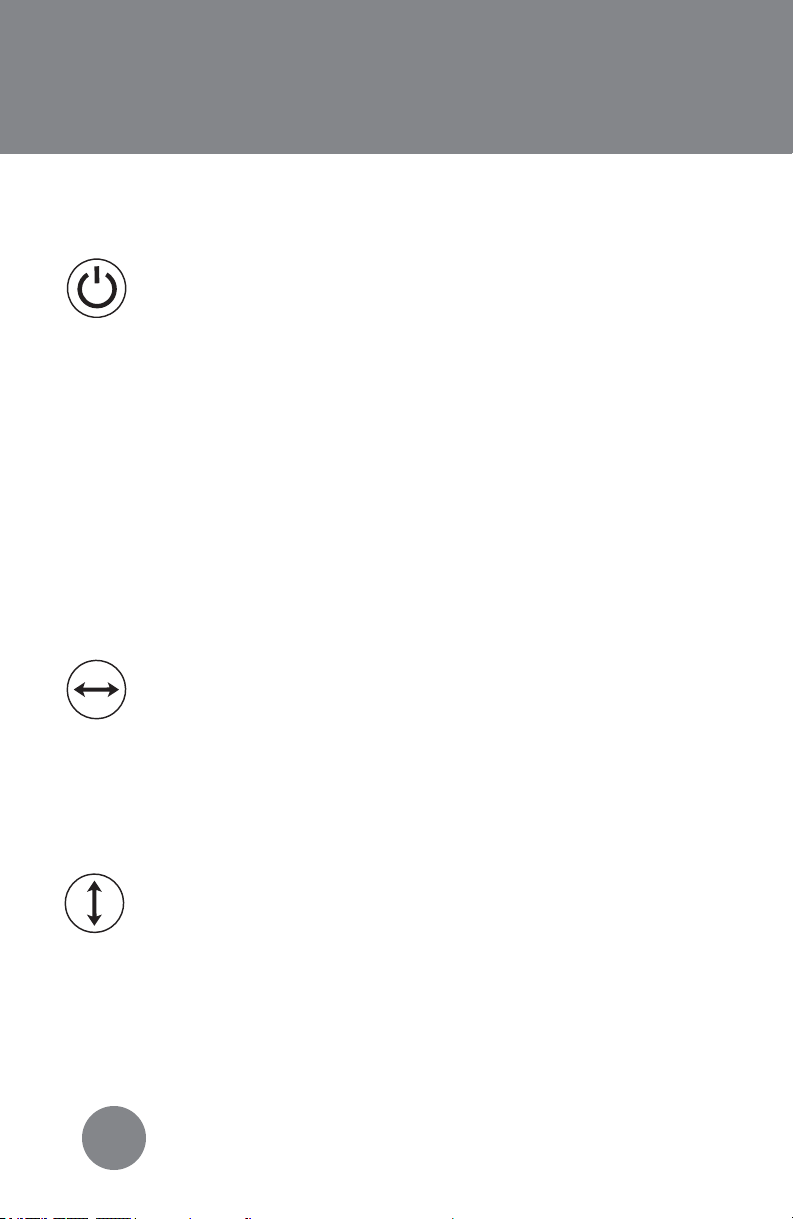
On/Off:
Press the power button “On/Off” on the unit or the
remote to turn on the product. The light above the
button will light up when powered on.
Note: The product will always start running on medium fan speed
when turned on.
Press the “Oscillate Right/Left” button on the unit or the
remote to make the fan rotate horizontally. Press the
button again to make the horizontal oscillation stop. The
light above the button on the unit will be on if the setting is
in use (unless the display lights were turned off).
Vertical Oscillation:
Press the “Oscillate Up/Down” button on the unit or on the
remote to make the fan rotate vertically. Press the button
again to make the vertical oscillation stop. The light above
the button on the unit will be on if the setting is in use (unless
the display lights were turned off).
Note: The product can operate with both horizontal and vertical
oscillation running at the same time for a full oscillation effect.
7
How to Use Your Fan
Press the “Fan Speed” button on the unit or the remote to
control the speed of the fan. The product will
automatically start on the medium “M” speed when
turned on. Press the button again to pick the high “H”
speed setting, once more for the turbo “Turbo” speed
setting, and once more for the low “L” speed setting. The
light above the “Fan Speed” button on the unit will be on
under your chosen setting (unless the display lights were
turned off).
You can progam your fan to turn off after a set time using
the Timer button. You are able to choose between 2 hours,
4 hours and 8 hours. Press the “Timer” button on either the
product or remote once to set the timer to 2 hours, press
again to set the timer to 4 hours, and press one more time
to set the timer to 8 hours. Press the button again to reset
the timer and turn it off. The light will be displayed above
your chosen time. If no light is lit above the “Timer” button
on the product, there is no timer set (unless the display
lights were turned off).
Press the “Display Lights” button on either the product or
the remote to turn off the blue lights on the display panel.
The light above the “Display Lights” button will remain on
but dimmed. The chosen settings, including oscillation, fan
speed and timer, will remain even with the display lights
turned off. Press the button again to turn the lights back on.
Fan Speed:
Timer:
Display Lights:
How to Use Your Fan
8
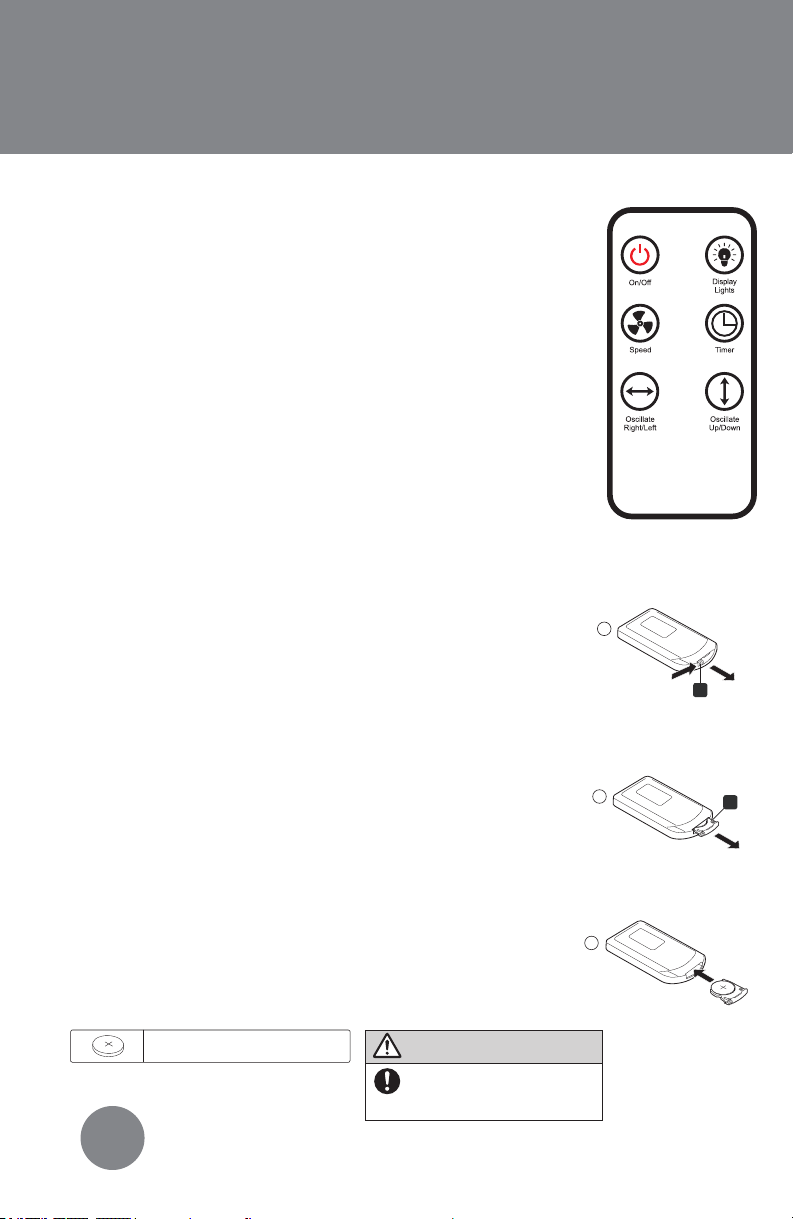
Using the Remote:
Your remote comes with a battery installed and
does not need to be programmed. Before using
your remote for the first time, you must take out the
pull tab. To use remote, make sure to point it at the
front of the unit. The remote will not work when
pointed to the backside of the unit. You should
store your remote on the backside of the unit in the
built-in holder.
It is recommended to replace the battery when
the product takes a long time to respond or stops
responding when the buttons are pressed.
1. Turn over remote control. Press tab A toward
the right and pull.
2. Pull out battery holder B and replace the
battery. Only use the specified battery type
(Lithium Button Cell Battery CR2025). The battery
must be installed with the positive side facing up.
3. Insert battery holder B back into remote.
Note: Do not apply excessive force to battery
holder. Remove battery when not using for an
extended period of time. When disposing of used
battery, please use the correct method of
disposal.
Replacing the Remote Battery:
3
1
A
2
B
Battery : Lithium Button Cell Battery (CR2025)
WARNING
Keep the lithium battery out of
reach of small children.
Small children may accidentally swallow it.
If swallowed, call your doctor immediately.
Ce manuel convient aux modèles suivants
5
Table des matières
Autres manuels LivePure Ventilateur


