Linden Group ST-HB56A1X Manuel utilisateur

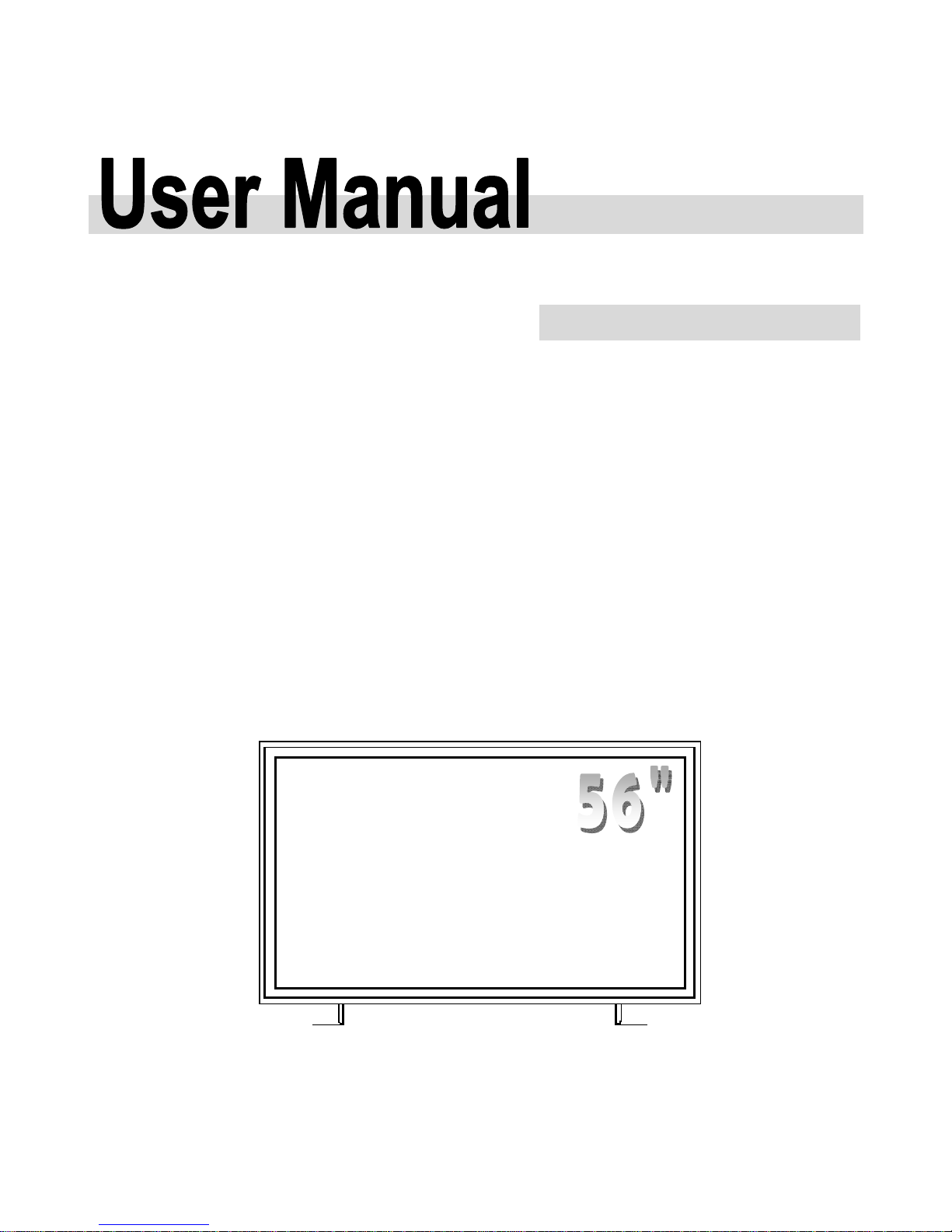
LCD monitor
Model: ST-HB56A1X
4 DVI

1
Contents
Important Safety Instructions ………………………………………………... 2
Safety Precautions …………………………………………………………………...…… 2
Installation Notice………....………………………………………………………….…… 3
Use Notice……………………………….………………………………………………… 4
Clean Notice……………………………….…………………………………….………… 5
Warning for use ……..…………………………………….…………………....... 5
Features………………………………………………………………….……........ 6
Package Contents ……….....…………………….……………………………... 6
Dimension ……………………………………………………………………………….… 8
Installation ……….……….....…………………….……………………………... 9
Power Input …………….…….………………………………………………………….… 9
Connection …………….…..……….……………………..…………………………….… 10
Single Source Input ………….……………………………………………….................. 10
Operating the Monitor …….…………….……………………………............... 11
Power On Process…………………. ……….....……………………..….…………….… 11
Power Off Process………………………… ……………..…………………………….… 11
Display Mode ……………..…………………..………………………….……….……..… 11
Equipment PC- system requirement ………..………………………….……………..… 12
Suggestion software environment ...……..….………………………….……………..… 12
Specification …………..……………….………................................................ 12
Troubleshooting …………………………………….……….…………………... 13
Compliance ……………………………..…………………….…………………... 14
Appendix I………………………………..…………………….…………………... 15

2
※ Please read this user’s manual cautiously and completely before operating this
monitor.
Important Safety Instructions
Before using the monitor, please read this user’s manual thoroughly to help protect against damage your
own and other people’s property from potential damage and ensure your own and other people personal
safety.
Be sure to observe the following instructions with understanding meaning below.
For your safety, be sure to observe the warning in this manual.
The installation or adjustment, please follow this manual instructions or refer all servicing to qualified
service personnel.
Safety Precautions
If smoke or peculiar smell comes from the monitor, remove the power plug from the
outlet immediately .
If the monitor is still used in this condition, it may cause a fire or an electrical shock.
Make sure that the smoke or smell stopped, after that contact your dealer for inspection.
If there isn’t picture, remove the power plug from the outlet immediately .
If the monitor is still used in this condition, it may cause a fire or an electrical shock.
Contact your dealer for inspection.
If water is spilled or objects are dropped inside the monitor, remove the power plug
from the outlet immediately.
If the monitor is still used in this condition, it may cause a fire or an electrical shock.
Contact your dealer for inspection.
If the monitor is dropped or the cabinet is damaged, remove the power plug from the
outlet immediately .
If the monitor is still used in this condition, if may cause a fire or an electrical shock.
Contact your dealer for inspection.
If the power cord or plug is damaged or becomes hot, turn off the main power switch of
the monitor, make sure the power plug has cooled down and remove the power plug
from the outlet .
If the monitor is still used in this condition, it may cause a fire or an electrical shock.
Contact your dealer for replacement.

3
Installation Notice (when install the monitor, please follow the instruction on the manual )
Don't install in the high-temperature environment.
If the monitor used in high-temperature or in direct sunlight, it may cause the case or other parts be distorted,
damaged, overheating or an electric shock.
Don't install in the high-humidity environment such as a bathroom or close to a
humidifier.
This may cause overheating or an electric shock.
Don't install near any heat sources such as radiators, heat registers, stoves, or other
apparatus that produce heat.
This may cause a fire or an electric shock.
Don't overload outlets or cables beyond electricity capacity.
Don't use extension cords, it may cause a fire or an electric shock.
Don't insert the power plug into an outlet other than 100~240V AC.
This may cause a fire or an electric shock.
Don’t use a damaged power plug or worn outlet.
Don’t insert the improper power plug it may cause a fire and an electric shock.
Don't place the monitor on an unstable shelf or desk, such as a shaky table.
The monitor may fall down and cause injury damage. Please install on a horizontal, stable surface.
Don't place objects on the monitor.
If the monitor is covered under the newspaper, tablecloth or curtain, the monitor vent could be clogged,
and it may make the monitor overheating and cause the fire.
If metal or liquid (putting the vase, glass or the cosmetics) get into the monitor, it may cause a fire or an
electrical shock.
If you put the heavy object on the monitor, it may fall down and cause the injury
Please Keep 10cm minimum distance between the monitor and the wall for sufficient ventilation.
Don't move the monitor when it is connecting power cord and cables.
When moving the monitor, make sure to take off the power plug and cables from the outlet or sync
source. If not, a fire and an electric shock may occur. If the power plug is damaged, injury may result
from the monitor is falling down.
When unpacking or carrying the monitor, at least 2 people are needed. Make sure the monitor is
upright.
When moving or putting the monitor, avoiding to face the monitor up or down.
Handle the monitor so as not to jolt the monitor.

4
UseNotice
When getting problem at installation, please contact your distributor to install for you.
Don’t repair or open the monitor by yourself.
It may cause a fire or an electric shock. The monitor repair, please ask your distributor.
Protect and correctly use the power cord/ plug.
Don't heavy press the power cord/ plug, don't step on the power cord/plug.
Connect the power cord and the monitor, before insert the power plug into the wall outlet.
Don't operate the monitor with a damaged power cord, otherwise the monitor will be damaged.
Using the extension line precautions
If use the extension line, the current power of the voltage should be equal to the power consumption of the
monitor at least, if the power of the voltage is smaller than the monitor, it will cause the overheated
phenomenon.
If there is thunder or lightning, don’t touch the monitor or the power plug.
This may cause an electric shock.
When remove the power plug from outlet on wall, don't revolve the power cord.
This may cause the power cord damaged. When take off the power plug, please hold the plug, don’t revolve.
Don’t sprinkle any kind of liquid on the monitor.
If the monitor is sprinkled by any kind of liquid, please be sure to take off the power plug and ask a
qualified service personnel to check the monitor.
If the monitor’s surface is touched by water, please clean it with a dry and soft cloth immediately.
Don’t sprinkle volatile liquid on the monitor such as insecticide.
If the liquid enter the monitor, it may cause the electrical failure.
Don’t insert or take off the power plug with wet hands.
This may cause an electric shock.
If the monitor isn’t in use for a long time, for safety, please take off the power plug.
This may cause breakdown, or it may cause a fire.
If the monitor isn’t in use for a long time, take off the power plug and store it in the proper package. The
original carton and packing should be used, if possible.
Don’t compress on the monitor panel.
This may cause personnel injury or panel damage and break-down.
Don't push or shake the monitor.
This may cause breakdown and the injury.
If the glass of the monitor panel is broken, liquid crystals may transude. Please don't touch the liquid
crystals.
If liquid crystals get into your eyes or touch your skin, wash with the clean water and go to a doctor
immediately.

5
CleanNotice
If dust has collected on the power plug, removed the plug from the outlet and clean off
the dust.
The dust may cause a fire due to reduced insulation of the plug.
Take off the power plug before cleaning.
If not, it may cause an electric shock. Don’t revolve the power cord and the plug from the outlet.
Or, it may cause electric shock.
Cleaning the surface of the monitor.
When the surface of the monitor is polluted, please wipe the surface with the cotton or clean cloth
lightly.
If pollution is not easy to clean out, can use the cloth with 50% of the alcohol .
Please notice carefully that not to let alcohol enter the monitor, it may cause electrical failures.
Warning For Use
Onusing
The monitor may produced overheat phenomenon during operation. Please be careful.
In case of the moving of long distance, please wrap the monitor with blanket to avoid damages.
Please be careful not to bump to the monitor.
Don't expose in the rubber or vinyl for a long time. It will damage the coating.
Avoid keeping a static picture on this monitor, or it may cause a “burn in” image (image retention).
“Burn in” image (image retention) is not covered under warranty.
Make sure change the image on the monitor periodically. Ex. after working for 18 hours, turn off
the monitor for 6 hours pre days.
Exemptions
This product isn’t liable for any damage by natural disaster (such as earthquake, thunder, etc), fire,
acts by third parties, accidents, owner’s intentional misuse and fault, or uses in other improper
conditions.
This product isn’t liable for incidental damages (such as profit loss or interruption in business,
modification or erasure of record data, etc.) caused by use or inability to use of this product.
This product isn’t liable for any damage cause by inappropriate operation, or not follows the
user manual.
This product isn’t liable for any damage cause by misuse or malfunction through simultaneous use
of this product and the connected equipment or software.
This product isn’t liable for any damage cause by neglect of the instructions described about
installation.
This product isn’t liable for any damage cause by improper installation.
This product isn’t liable for any damage cause by disassembled, modified or
maintained by non- authorized service center or people.

6
Features
Ultra High-resolution monitor
This monitor supports 3840 x 2160 Quad Full High Definition (QFHD) format and can display true
16.7M colors, you can enjoy extreme fine pictures and mode-landscape, map.
Shiny finish with a mirror plane
Low reflection coating< 2% reflection
MVA system less-reflection
MVA system and Black TFT LCD panel offer bright and wide images with clear contrast. Even placed
near the windows, the monitor shows bright and clear image with little reflection. The viewing angles of
the monitor are as wide as 176° both horizontally and vertically, enough to enjoy clear images at any
view angle.
Offer a dimmer control wheel.
Control the monitor backlight directly.
Package Contents
Packing list
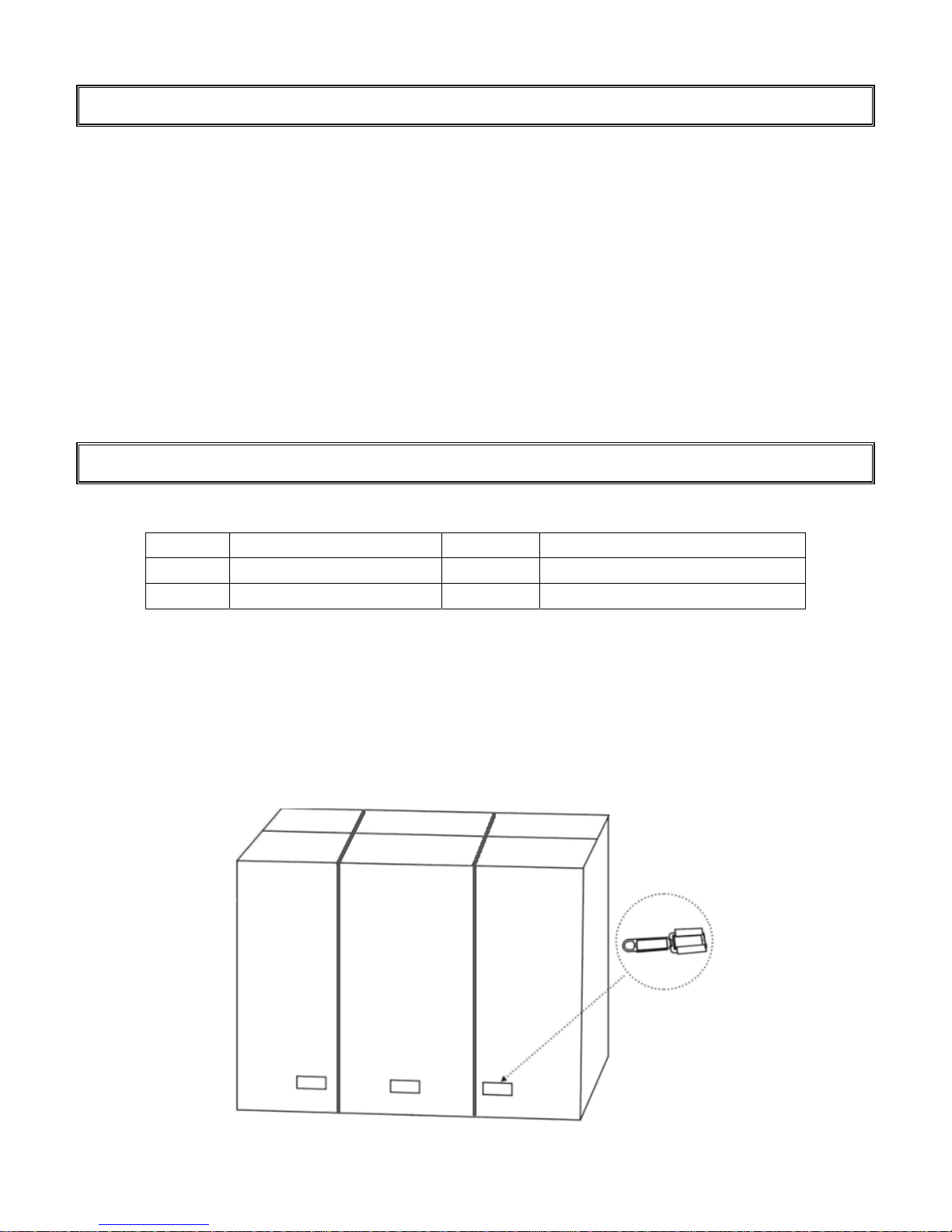
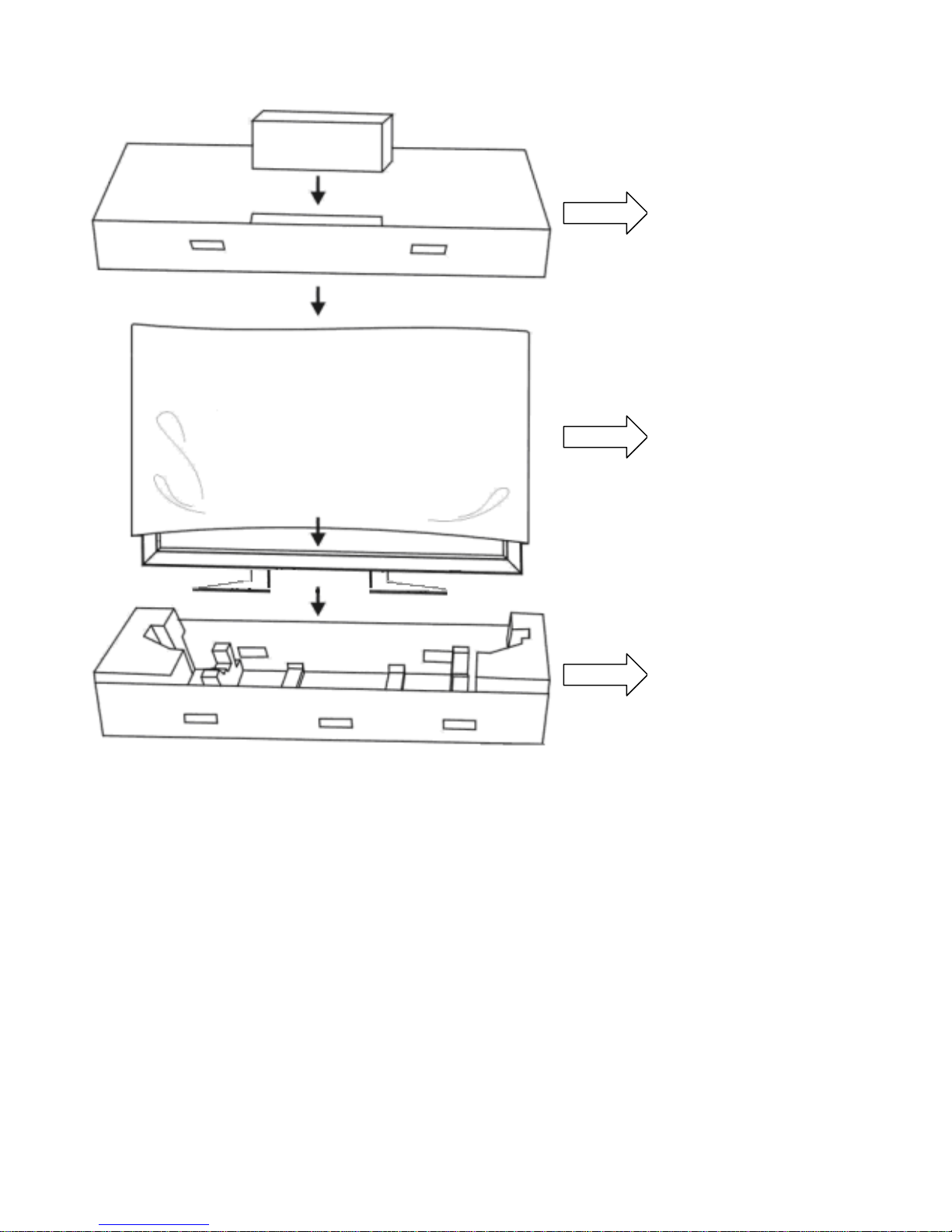
Unpacking
ST-HB56A1X is packed by the carton box. During transportation, in order to protect the monitor,
ST-HB56A1X is packed by cushions to be safe protect and package.
Before unpacking your monitor, prepare a stable, level, and clean surface near a wall outlet for your
monitor first.
Set the LCD Monitor box in an upright position and open from the top of the box before removing the
top cushions.
Step 1: Remove the white handle and cut the bundle
Q’ty Item Q’ty Item
1 set ST-HB56A1X 4 pcs DVI-D(M) dual link cable
1 pcs Power cord

7
Step 2: Remove the top cushion and take the accessories box out.
Top cushion &
Accessories Box
Bottom cushion
The Monitor

8
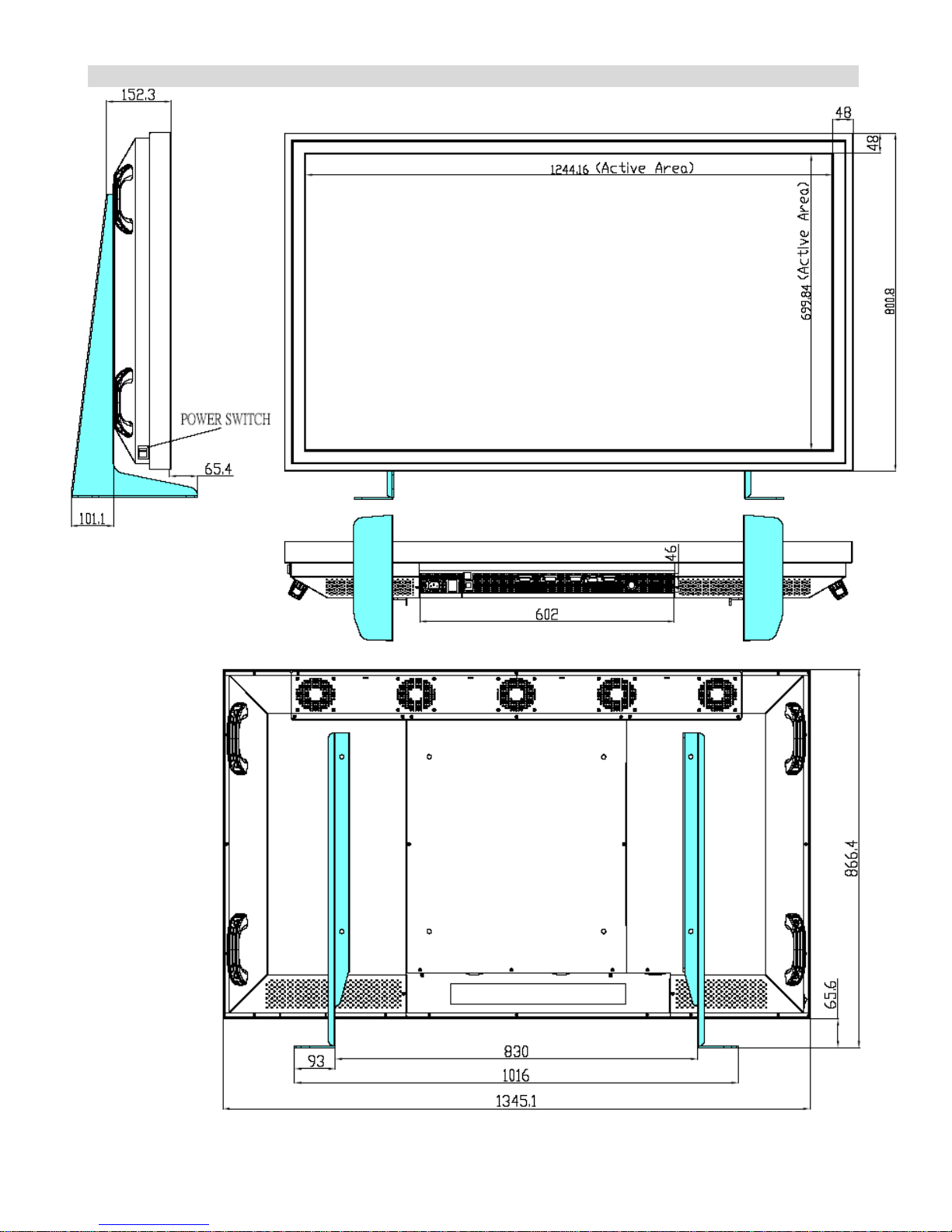
Dimension (Front & Back)

9
Installation
Power Input
Environmental state
Operating temperature︰5℃ ~ 40℃ (Fahrenheit : 41℉ ~ 104℉)
Humidity︰max. 85%
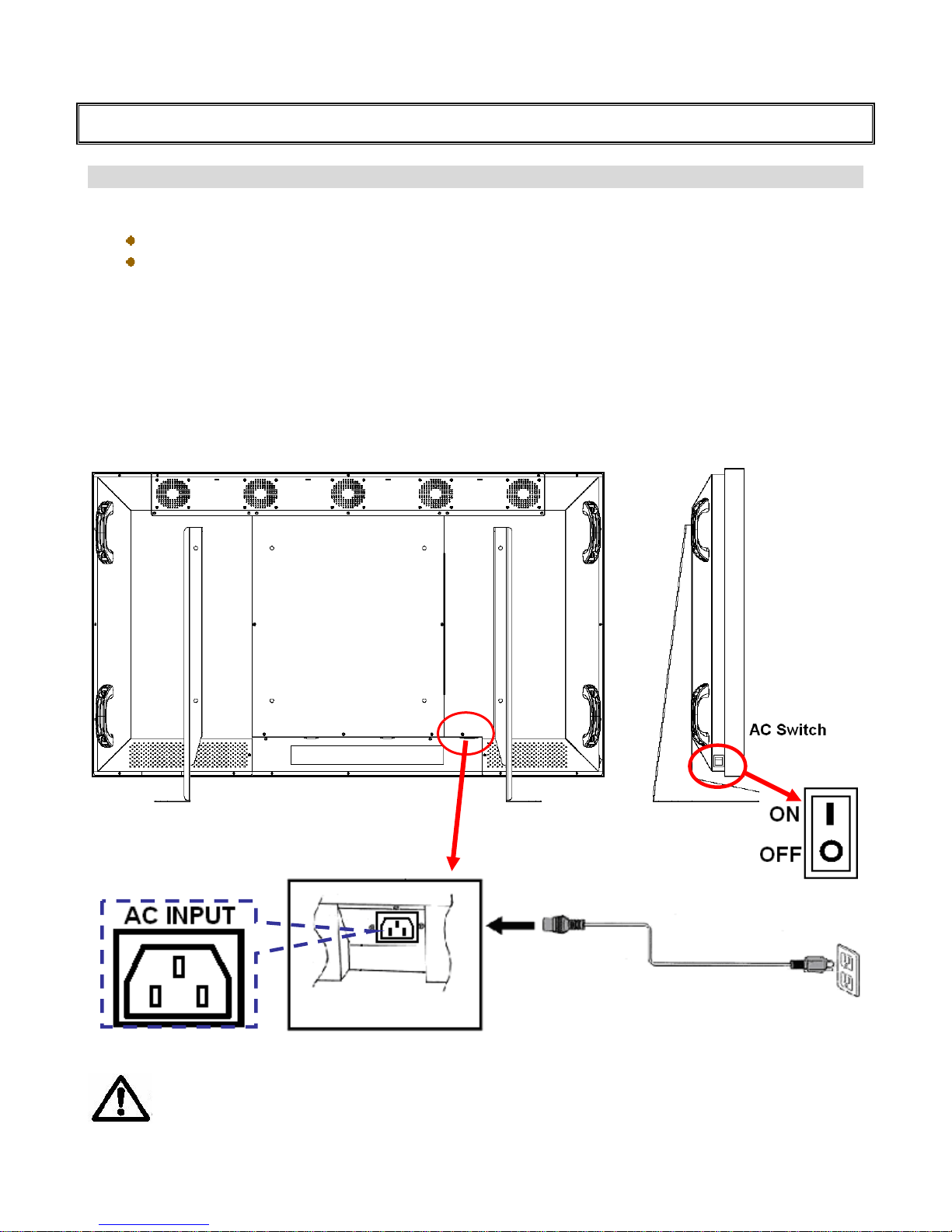
Power Cord
AC Power cord - 15A/ 125V
This power cord is used to connect the back controls of the LCD monitor and the wall outlet.
Connect the power cord into main power of the monitor.
AC switch – Side of monitor, “│” is power on, “○”is power off.
Input : 100-240V~ 10A 50/60Hz
Main power
AC socket
Main powe
r
AC Switch
CAUTION
Don’t connect the power cord with a wet hand.
Table des matières