
LightSpeed Technologies MV-4K-4X4 Manuel utilisateur

LightSpeed Technologies™ MV-4K-4X4
4K 4 x 4 Seamless Multiview Matrix Switcher
Version: V1.0.0
User Manual

1
Table of Contents
Introduction ...................................................................................................... 3
Overview ................................................................................................... 3
Features.................................................................................................... 3
Package Contents .................................................................................... 4
Specifications ............................................................................................ 4
Panel Description ...................................................................................... 6
Installation and Wiring ...................................................................................... 8
Installation................................................................................................. 8
Wiring ....................................................................................................... 9
Button Control ................................................................................................ 10
IR Control ....................................................................................................... 10
Command Control .......................................................................................... 11
Obtain IP Address of the Device ............................................................. 12
Web UI ........................................................................................................... 13
Matrix Control ......................................................................................... 14
Video Matrix Control ........................................................................ 14
HDMI A/V Mute ................................................................................ 15
De-embedded Audio Mute ............................................................... 16
Scaling ............................................................................................. 16
Presets Matrix Control ..................................................................... 17
General Setting ....................................................................................... 17
Source Naming ................................................................................ 17
Zone Naming ................................................................................... 17
Advanced Setting .................................................................................... 18
Lower Power Mode .......................................................................... 18
EDID Presets ................................................................................... 18
EDID Read ...................................................................................... 19
CEC Control .................................................................................... 20
HDCP .............................................................................................. 20

2
Change Login Password .................................................................. 21
Network ........................................................................................... 21
Custom Web UI Logo ...................................................................... 22
System Version ................................................................................ 22
FW Update ...................................................................................... 22
System ............................................................................................. 23
Log................................................................................................... 23
Firmware Upgrade ......................................................................................... 24

3
Introduction
Overview
This product is a full 4K 4 x 4 HDMI seamless matrix switcher
with Multiview available on all four HDMI outputs. It features
compact enclosure, instant switching, and free scaling up to
4K@60Hz SDR and HDR. It allows four sources to be switched
to four HDMI outputs, while providing both analog and digital
S/PDIF audio de-embedding for outputs 1&2. The product can be
easily managed and controlled, for example, through front panel
buttons, IR, RS232, web UI and TCP protocols. The product is
perfect for applications where 4K seamless switching is required.
Features
Seamless switching without seeing a black screen between
four HDMI inputs and outputs.
Each HDMI input and output support video format up to
4K@60Hz SDR and HDR.
HDCP 2.2 compliant and backward compatible.
EDID management includes EDID presets, EDID copy and
custom EDID.
Advanced video processing capabilities:
Supports free scaling between 480p and 4K@60Hz.
Supports conversion between SDR and HDR formats.
Supports conversion on color space, chroma and color
bits.
Supports instant switching between sources so black
screen transition is avoided.
Supports rich scaler processing modes, including auto

4
scaler, manual scaler and video bypass.
Can be easily managed and controlled through front panel
buttons, IR, RS232, web UI and TCP protocols.
Supports firmware upgrade through web UI and Micro USB
port.
Package Contents
1 x Matrix Switcher
1 x DC 12V 3A Power Adapter
1 x IR Remote Controller
1 x IR Receiver Cable
1 x AC Power Cord (with US Pins)
1 x 3.5mm 3-Pin Phoenix Male Connector
2 x 3.5mm 5-Pin Phoenix Male Connector
2 x Mounting Brackets (with Screws)
Specifications
Technical
Input/Output Port
4 x HDMI IN, 4 x HDMI OUT, 1 x RS-232,
1 x LAN (RJ45), 2 x S/PDIF OUT, 2 x Analog AUDIO
OUT, 1 x FW (Micro USB), 1 x DC 12V
Input/Output Signal
Type HDMI with 4K@60Hz 4:4:4
Input/Output
Resolution
Supported
VESA:
800x6008, 1024x7688, 1280x7688, 1280x8008,
1280x9608, 1280x10248,1360x7688, 1366x7688,
1440x9008, 1600x9008, 1600x12008,
1680x10508,1920x12008
SMPTE:
720x576P6, 1280x720P6,7,8, 1920x1080P2,5,6,7,8,
3840x21602,3,5,6,8, 4096x21602,3,5,6,8
2 = at 24 Hz, 3 = at 25 Hz, 5 = at 30 Hz, 6 = at 50 Hz,
7 = at 59.94 Hz, 8 = 60 Hz
Audio Format HDMI IN/OUT: Fully supports audio formats in
HDMI 2.0 specification, including PCM 2.0/5.1/7.1,

5
Technical
Dolby TrueHD, Dolby Atmos, DTSHD Master Audio
and DTS:X
AUDIO OUT: Balance stereo audio
S/PDIF OUT: PCM 2.0/5.1, Dolby digital and DTS
up to 5.1 Channel
Maximum Data Rate 18Gbps
Control Method Front Panel Buttons, RS232, IR, LAN (Telnet &Web
UI)
General
Operating
Temperature 0°C to 45°C (32°F to 113°F)
Storage
Temperature -20°C to 70°C (-4°F to 158°F)
Humidity 10% to 90%, non-condensing
ESD Protection
Human-body Model:
±8kV (Air-gap discharge)/
±4kV (Contact discharge)
Power Supply DC 12V
Power Consumption
(Max) 16W
Device Dimension
(W x H x D)
215mm x 42mm x 140.2mm/8.46” x 1.65” x
5.52”
Product Weight 1.2kg/2.64lbs
Transmission Distance
Cable Type Range Supported Video
HDMI
Input: 15m/50ft
Output: 10m/33ft
1080P@60Hz 24bpp
Input/Output: 10m/33ft 4K@30Hz 4:4:4 24bpp
4K@60Hz 4:2:0 24bpp
Input/Output: 3m/10ft 4K@60Hz 4:4:4 24bpp
6
Panel Description
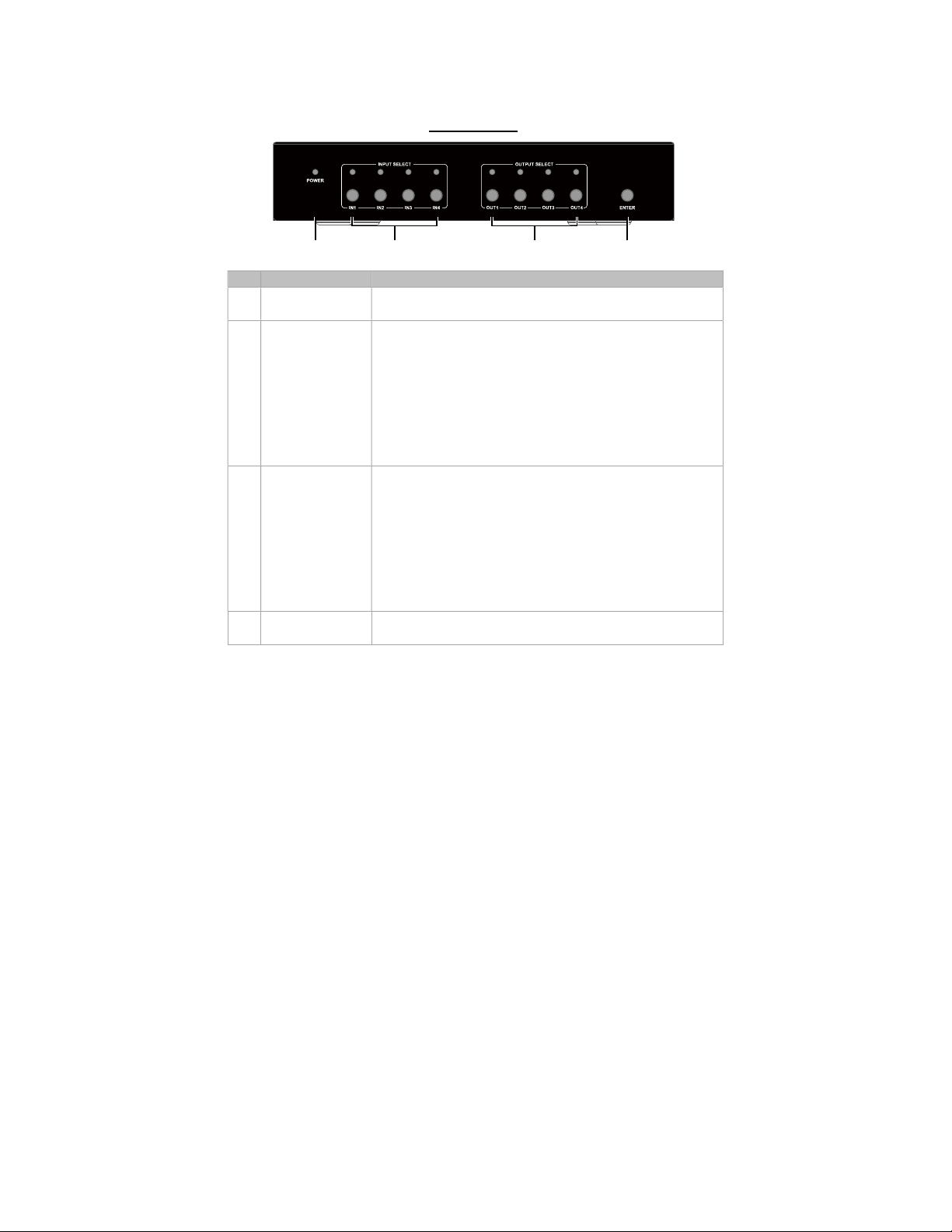
Front Panel
4321
ID
Name
Descript
ion
1 Power LED On: The device is powered on.
Off: The device is powered off.
2 INPUT
SELECT
Input selection LEDs and buttons for input ports (1-4).
LED On: The input port is selected.
LED Blinking: The input port is routed to a specific
output.
LED Off: The input port is not selected.
Input selection buttons (1-4): press to select specific
input port.
3 OUTPUT
SELECT
Output selection LEDs and buttons for output ports
(1-4).
LED On: The output port is selected.
LED Blinking: The output port is routed to a
specific input port.
LED Off: The output port is not selected.
Output selection buttons (1-4): press to select or
deselect specific output port.
4 ENTER Press this button to perform the input and output
selection.

7
Rear Panel
1
1
10
9
8
7
6
5
4
31 2
ID
Name
Description
1 12V Connect to the power adapter and AC power cord
provided for power input.
2 HDMI IN (1-4) Connect to the HDMI source devices.
3 HDMI OUT
(1-4)
Connect to the HDMI display devices.
4 FW Connect to the PC for firmware (ARM module)
upgrade.
5 RS232 Connect to the PC for RS232 control on this device.
6 LAN
Connect to a network device (e.g. network switch,
router, computer, etc.) for LAN control (Web UI &
Telnet).
7 IR EXT. IR extension port. Connect to the IR receiver cable.
8 AUDIO OUT1 Analog audio de-embedded output from HDMI out 1.
Connect to an amplifier or a speaker.
9 SPDIF OUT 1 Digital audio de-embedded output from HDMI out 1.
Connect to an A/V receiver or similar.
10 AUDIO OUT2 Analog audio de-embedded output from HDMI out 2.
Connect to an amplifier or a speaker.
11 SPDIF OUT2 Digital audio de-embedded output from HDMI out 2.
Connect to an A/V receiver or similar.

8
Installation and Wiring
Warnings:
Before installation and wiring, disconnect power from the
device.
During wiring, connect and disconnect the cables gently.
Installation
1. Attach the bracket to one side of the enclosure using the
screws provided. The bracket is attached to the enclosure as
shown.
2. Repeat step 1 for the other side of the enclosure.
3. Attach the brackets to the surface or location desired using
screws (not included in the package).

9
Wiring
Table des matières


