LG MUSICFLOW LAS751M Manuel utilisateur

Model : MUSICFLOW LAS751M
SMART Hi-Fi AUDIO
Wireless Multi-room Sound Bar
Please read this manual carefully before
operating your speaker and retain it for future
reference.
ENGLISH | OWNER’S MANUAL


Getting Started 3
Getting Started
1
Safety Information
CAUTION
RISK OF ELECTRIC SHOCK
DO NOT OPEN
CAUTION: TO REDUCE THE RISK OF ELECTRIC
SHOCK DO NOT REMOVE COVER (OR BACK) NO
USER-SERVICEABLE PARTS INSIDE REFER SERVICING
TO QUALIFIED SERVICE PERSONNEL.
This lightning ash with arrowhead
symbol within an equilateral
triangle is intended to alert the
user to the presence of uninsulated
dangerous voltage within the
product’s enclosure that may be of
sucient magnitude to constitute a risk of electric
shock to persons.
The exclamation point within an
equilateral triangle is intended
to alert the user to the presence
of important operating and
maintenance (servicing)
instructions in the literature
accompanying the product.
WARNING: TO PREVENT FIRE OR ELECTRIC SHOCK
HAZARD, DO NOT EXPOSE THIS PRODUCT TO RAIN
OR MOISTURE.
WARNING: Do not install this equipment in a
conned space such as a book case or similar unit.
CAUTION: The apparatus shall not be exposed to
water (dripping or splashing) and no objects lled
with liquids, such as vases, shall be placed on the
apparatus.
CAUTION: Do not block any ventilation openings.
Install in accordance with the manufacturer’s
instructions.
Slots and openings in the cabinet are provided for
ventilation and to ensure reliable operation of the
product and to protect it from over heating. The
openings shall be never be blocked by placing
the product on a bed, sofa, rug or other similar
surface. This product shall not be placed in a built-
in installation such as a bookcase or rack unless
proper ventilation is provided or the manufacturer’s
instruction has been adhered to.
CAUTION concerning the Power Cord
To disconnect power from the mains, pull out the
mains cord plug. When installing the product,
ensure that the plug is easily accessible.
NOTICE: For safety marking information including
product identication and supply ratings, please
refer to the main label on the bottom or rear of the
apparatus.
CAUTION : Only use the AC adapter supplied
with this device. Do not use a power supply from
another device or manufacturer. Using any other
power cable or power supply may cause damage
to the device and void your warranty.
FCC Compliance Statement
This device complies with part 15 of the FCC
rules. Operation is subject to the following two
conditions:
(1) This device may not cause harmful interference,
and
(2) This device must accept any interference
received, including interference that may cause
undesired operation.
NOTE: This equipment has been tested and found
to comply with the limits for a Class B digital device,
pursuant to Part 15 of the FCC Rules. These limits are
designed to provide reasonable protection against
harmful interference in a residential installation. This
equipment generates, uses, and can radiate radio
frequency energy and, if not installed and used
in accordance with the instructions, may cause
harmful interference to radio communications.
However, there is no guarantee that interference
will not occur in a particular installation.
If this equipment does cause harmful interference
to radio or television reception, which can be
determined by turning the equipment off and
on, the user is encouraged to try to correct the
interference by one or more of the following
measures:
yReorient or relocate the receiving antenna.
yIncrease the separation between the equipment
and receiver.
yConnect the equipment into an outlet on a
circuit dierent from that to which the receiver is
connected.
yConsult the dealer or an experienced radio/TV
technician for help.

Getting Started4
Getting Started
1
CAUTION: Any changes or modications not
expressly approved by the party responsible for
compliance could void the user’s authority to
operate this equipment.
FCC WARNING: This equipment may generate
or use radio frequency energy. Changes or
modications to this equipment may cause harmful
interference unless the modications are expressly
approved in the instruction manual. The user could
lose the authority to operate this equipment if an
unauthorized change or modication is made.
FCC RF Radiation Exposure Statement : This
equipment complies with FCC radiation exposure
limits set forth for an uncontrolled environment.
This equipment should be installed and operated
with minimum distance 20 cm between the
radiator and your body. End users must follow the
specic operating instructions for satisfying RF
exposure compliance. This transmitter must not be
co-located or operating in conjunction with any
other antenna or transmitter.
FCC Radio Frequency Interference
Requirements
This device is restricted to indoor use due to its
operation in the 5.15 to 5.25 GHz frequency range.
FCC requires this product to be used indoors for
the frequency range 5.15 to 5.25 GHz to reduce the
potential for harmful interference to co-channel
Mobile Satellite systems. High power radars are
allocated as primary users of the 5.25 to 5.35 GHz
and 5.65 to 5.85 GHz bands. These radar stations
can cause interference with and/or damage this
device. This device cannot be co-located with any
other transmitter.
CAUTION: Regulations of the FCC and FAA prohibit
airborne operation of radio-frequency wireless
devices because their signals could interfere with
critical aircraft instruments.
Responsible Party :
LG Electronics USA, Inc.1000 Sylvan Avenue
Englewood Clis, NJ 07632
TEL. : +1-800-243-0000

Getting Started 5
Getting Started
1
IMPORTANT SAFETY
INSTRUCTIONS
1. Read these instructions.
2. Keep these instructions.
3. Heed all warnings.
4. Follow all instructions.
5. Do not use this apparatus near water.
6. Clean only with dry cloth.
7. Do not block any ventilation openings.
Install in accordance with the manufacturer’s
instructions.
8. Do not install near any heat sources such
as radiators, heat registers, stoves, or other
apparatus (including amplifiers) that produce
heat.
9. Do not defeat the safety purpose of the
polarized or grounding-type plug. A polarized
plug has two blades with one wider than the
other. A grounding type plug has two blades
and a third grounding prong. The wide blade or
the third prong are provided for your safety. If
the provided plug does not fit into your outlet,
consult an electrician for replacement of the
obsolete outlet.
10. Protect the power cord from being walked on
or pinched particularly at plugs, convenience
receptacles, and the point where they exit from
the apparatus.
11. Only use attachments/accessories specified by
the manufacturer.
12. Use only with the cart, stand,
tripod, bracket, or table specified
by the manufacturer, or sold with
the apparatus. When a cart is
used, use caution when moving
the cart/apparatus combination
to avoid injury from tip-over.
13. Unplug this apparatus during lightning storms
or when unused for long periods of time.
14. Refer all servicing to qualified service personnel.
Servicing is required when the apparatus has
been damaged in any way, such as power-
supply cord or plug is damaged, liquid has been
spilled or objects have fallen into the apparatus,
the apparatus has been exposed to rain or
moisture, does not operate normally, or has
been dropped.

Table of Contents6
Table of Contents
1 Getting Started
3 Safety Information
5 – IMPORTANT SAFETY
INSTRUCTIONS
8 Main Features
8 Introduction
9 Accessories
10 Front panel
10 Rear panel
11 Remote control
12 Installing the sound bar
12 – Installing the cover foot
12 Mounting the main unit on a wall
2 Connecting
14 Connecting the AC Adapter
14 Wireless subwoofer connection
16 Connecting to your TV
16 – Using an OPTICAL cable
16 – LG Sound Sync
17 – Using an HDMI cable
18 – Enjoy rich sound broadcast of the
channel with the sound bar
18 – What is SIMPLINK?
19 – ARC (Audio Return Channel) function
19 – Additional information for HDMI
20 Optional equipment connection
20 – HDMI connection
21 – PORT. (Portable) IN connection
21 – OPTICAL IN connection
22 Understanding Network Connection
22 – Basic Connection
22 – Group playback using Music Flow
Player app
23 Installing “Music Flow Player” App
24 – Starting with Music Flow Player app
25 Connecting the speaker to your Home
Network
25 – Connecting the speaker to your
network with a LAN cable
27 – Connecting the speaker to your
Network via the Wi-Fi Setup Method
(Android)
30 – Connecting the speaker to your
Network via the Wi-Fi Setup Method
(iOS)
34 Connecting the speakers to your Home
Network (Additional)
34 – Adding another speaker
3 Operating
37 Enjoying the Music with Music Flow Player
app
37 – Overview of Home menu
38 – Overview of the side menu
38 – Playing a song
40 – Overview of Playback
41 Different ways of listening to music
42 – Group Playback
43 – Surround playback
44 – Seamless playback
45 Using LG HomeChat
45 – About LG HomeChat
45 – How to start LG HomeChat
47 – Usage Examples
48 Setting the Speaker with Music Flow
Player app
48 – Overview of setting menu
49 – [General] Menu
49 – [Speakers] Menu
50 – [Alarms/Sleep Timer] Menu
50 – [Music Library] Menu
50 – [Account management] Menu
51 – [Advance Settings] Menu
52 – [Version Info.] Menu
52 – [Open source licenses] Menu
53 Using a Bluetooth Wireless Technology
53 – About Bluetooth
53 – Bluetooth profiles
53 – Listening to Music of a Bluetooth
Device
54 Other operations
54 – DRC (Dynamic Range Control)
54 – AV Sync
54 – Turn off the sound temporarily

Table of Contents 7
1
2
3
4
5
55 – Displaying input source information
55 – Sleep timer setting
55 – Using your TV remote control
55 – Adjust the Treble/Bass/Sub-woofer
55 – Night mode
56 – AUTO POWER On/Off
56 Sound adjustment
56 – Adjust volume level automatically
56 Using Media Server for PC
56 – Music Flow PC Software for windows
57 – Nero MediaHome 4 Essentials for
Mac OS
58 Standby mode
58 – Standby mode
58 – Network standby mode
59 Reset the Speaker
59 – Resetting the speaker
4 Troubleshooting
60 Troubleshooting
60 – General
61 – Network
62 – Application and PC Software
5 Appendix
63 File requirement
63 Trademarks and licenses
64 Specifications
66 Handling the Speaker
66 Important Information Relating to
Network Services
67 TERMS OF USE
Some of the content in this manual may dier from Music Flow Player app depending on the
application’s version.

Getting Started8
Getting Started
1
Main Features
Made for iPod/iPhone/iPad or
Android device
Enjoys music from iPod/iPhone/iPad or Android
device with simple connection.
LG Sound Sync
Controls volume level of this unit by the remote
control of your LG TV that is compatible with LG
Sound Sync.
Portable In
Listens to music from your portable device.
Music Flow Player application
Listens to music stored on your smart device.
You can control this speaker with your iPod touch/
iPhone/iPad or Android device via Music Flow
Player app. This speaker and your smart device
must be connected to the same network. Visit
“iTunes store” or “Google Play Store” or use the QR
code shown below to search for“Music Flow Player”
app. For detailed information, refer to page 23.
(Apple iOS)
(Android OS)
yDepending on the application’s version and the
settings of smart device, Music Flow Player app
may not be operated normally.
ySome smart devices may not be compatible with
this speaker.
Introduction
Symbol used in this manual
, Note
Indicates special notes and operating features.
> Caution
Indicates cautions for preventing possible damages
from abuse.

Getting Started 9
Getting Started
1
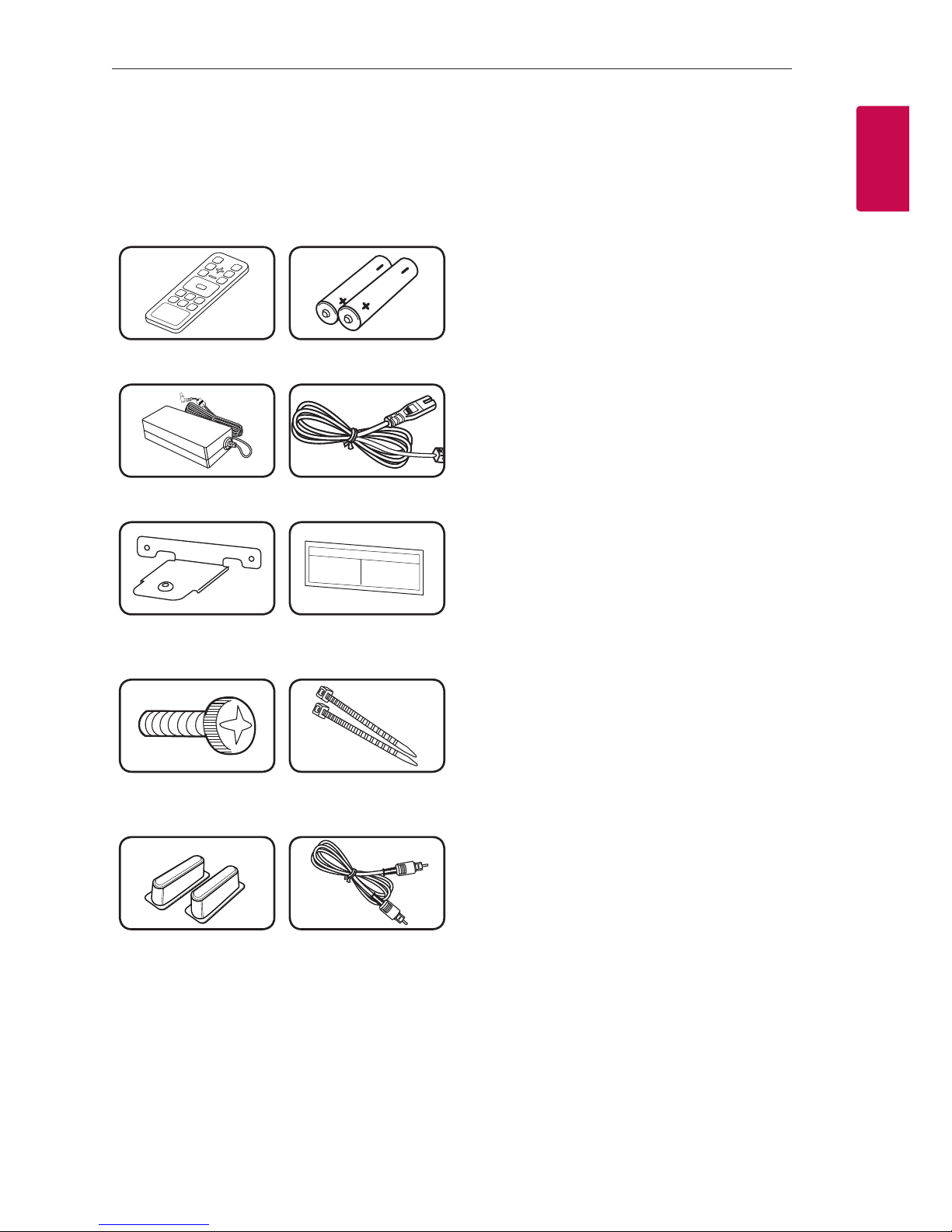
Accessories
Please check and identify the supplied accessories.
Designs and specications of the accessories are
subject to change without prior notice.
Remote control (1) Batteries (2)
AC adapter (1) Power cord (1)
Wall bracket (2) Wall bracket install
guide (1)
Screws (2) Cable ties for arranging
cables (2)
Foot Optical

Getting Started10
Getting Started
1
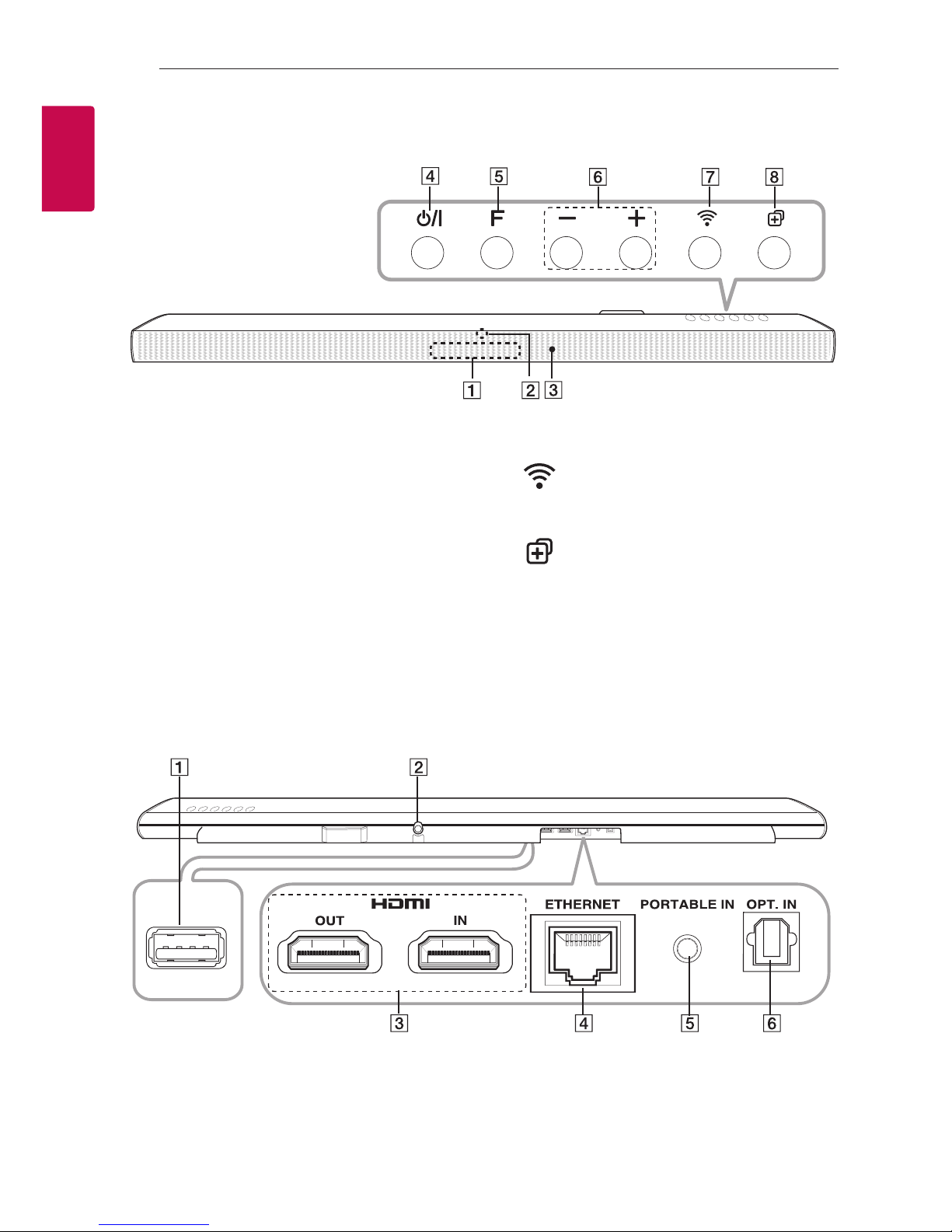
A
Display window
B
LED indicator
Shows connection status.
C
Remote sensor
D1/! (Standby/On)
- Power On
- Switching to the standby mode (page 58)
E
F(Function)
Selects the function and input source.
F p/o(Volume)
Adjusts volume level.
G(Wi-Fi)
Connects your speaker to your network.
(page 27)
H(Add)
Adds the speaker to your network. (page 34)
Front panel
AS/W download connector (For service only)
BDC IN (AC adapter input)
CHDMI IN / OUT : HDMI input / output
DETHERNET : LAN port
EPORTABLE IN : Portable input
FOPT. IN : Optical input
Rear panel
Autres manuels pour MUSICFLOW LAS751M
3
Ce manuel convient aux modèles suivants
1
Table des matières
Autres manuels LG Intervenants
Manuels Intervenants populaires d'autres marques

Bowers & Wilkins
Bowers & Wilkins 4 Manuel utilisateur

Sonance
Sonance SONOS OUTDOOR Series Manuel utilisateur

Electro-Voice
Electro-Voice EVID FM4.2 Manuel utilisateur

Pioneer
Pioneer XW-HTD630 Manuel utilisateur

Onn
Onn BWA16AA002 Manuel utilisateur

HP
HP GL313AA - USB Speakers PC Multimedia Manuel utilisateur