LG Hi-Fi Plus Manuel utilisateur

REV 1.2 AUS
All rights reserved. LG Electronics Inc., 2016
Note: Please read all information carefully prior to
using the LG Hi-Fi Plus in order to enjoy the best
performance and prevent damage to the product.
ENGLISH
User Guide
with B&O PLAY
Hi-Fi Plus
AFD-1200
Compatible with G5 worldwide except Korea

2
The LG Hi-Fi Plus is a 32-bit hi- digital-to-analogue converter (DAC) module that can be
attached to the bottom of your LG G5.
• You can enjoy a rich hi- sound by connecting your audio devices, such as headsets or
sound systems, to this 32-bit DAC.
• 32-bit high-quality audio content can be played in its original sound quality.
• The LG Hi-Fi Plus can upbit and upsample your existing audio content with less than
32-bit quality so that it plays closer to the originally intended sound.
Product Overview

3
• Always use genuine products. Do not use this product for any unintended purpose.
• Using or connecting products that are not genuine may shorten the product’s longevity or
cause an explosion. Doing so may also damage the product and thereby void the service
warranty.
• If you insert a module that is not compatible with your service provider (for example, a
module bought from another service provider or in an area that is not covered by your
service provider), your device may not operate normally.
• Do not disassemble the product or allow anything to impact it. Doing so may cause an
electric shock, short circuit, or re.
• Applying heavy pressure to the product may damage it.
• Some functions of this product may be damaged, or its appearance may become altered
or impaired if it is bent or crushed and not repaired.
• In order to prevent any damage, be careful to not drop the product on a hard surface or
subject it to a severe shock.
• Keep the product away from water, alcohol, benzene, etc.
• Do not use or store the product in environments with extreme temperatures. Do not
leave the product in direct sunlight for long periods of time. Doing so may cause damage
or an explosion.
• Do not use alcohol, benzene, thinners, or detergents to clean the product. Doing so may
cause a re.
• Use a soft cloth to wipe the product.
Important Safety Information

4
• Keep the product out of the reach of small children and pets. Do not put the product in
your mouth or subject it to a severe shock. There is a risk of electric shock, explosion, or
suffocation.
• Do not connect or insert conductive materials (metal pieces, pencil leads, etc.) into the
connectors. (other than those described herein)
• Do not cover or wrap the product with a blanket while in use.
• The product may become hot after long periods of use. Avoid touching the product when
it becomes hot as it may cause a low-temperature burn.
• Do not dispose of the product as household waste. Doing so may cause a re or damage
the environment.

5
Product Components
• Earphones not included. Sold seperatly.
• The cap of the LG Hi-Fi Plus is attached to the main unit of the LG Hi-Fi Plus when
packaged.
• If there are any missing components, contact the retailer where you purchased the
product.
• Some items are subject to change without prior notice depending on the circumstances.
• The appearance and specications of the product are subject to change without prior
notice to improve performance.
Cap
LG Hi-Fi Plus
User GuidePouch
OTG Cable
(USB Type-C to Type-B)

6
Product Description
Some functions may not be available depending on the product specications.
Speaker MIC
Hi-Fi Headset Port
USB
Port
DAC Input USB Port

7
Connections
Inserting the Battery
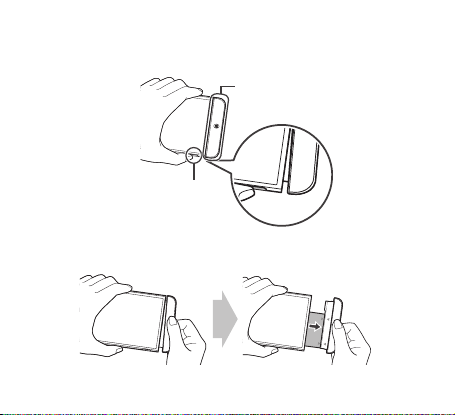
1 Align the arrows on both the battery and the module and rmly connect the battery
terminals to the module.
2 Align the battery with the lower edge and carefully slide the module back into the device.
• Never press the Module Eject Key when inserting the module into the device.
• When inserting the battery into the device, make sure the battery is securely attached
to the module.
8
Removing the Battery
1 Press the Module Eject Key to partly eject the module from the device.
Module
Module Eject Key
2 Grip the middle of the ejected module and pull it out.

9
3 Hold the battery and the module with both hands and separate them from one another in
an outward arc (as indicated below) to disconnect the battery terminals.
• Do not detach the module while it is in use.
• Immediately attach the module to the main unit if it becomes loose or detached during
use.
• Be careful to not hurt your hands or ngers when attaching or detaching the module.
• Be careful to not be injured by the edges of the product or the module.
• Make sure the battery and the module are properly inserted. Otherwise, the product
may be damaged or fail to turn on.
• Failing to follow the instructions in this user guide may result in damage to the product.

10
Instructions
• This product will not operate normally if your G5 and LG Hi-Fi Plus are produced for
different countries or operators.
• While your earphones are connected to the LG Hi-Fi Plus, USB data communication and
high-speed charging are not available. (Hi-Fi features and charging are available.)
• While your earphones are connected to the LG Hi-Fi Plus, the audio cannot be adjusted in
Settings > General > Accessibility > Hearing.
• While the LG Hi-Fi Plus is attached to your LG G5, unplugging your earphones from the
LG Hi-Fi Plus while it is not in use will help reduce power consumption.
• 384 kbps hi- audio is supported. Power consumption will increase slightly when this
feature is in use.
• All sounds except for the ringtone and alarm will be blocked while playing DSD les
(.dff, .dsf). Your device will vibrate if you receive any notications.
• If a Bluetooth® headset is connected during a call, the Bluetooth® device will be used
for the audio output. If there is not a Bluetooth® device connected, then any earphones
connected to your phone will be used for the audio output. If your earphones are
connected to only the Hi-Fi Plus, then those earphones will be used for the audio output.
• To play FM radio, connect your earphones to the earphone jack on the upper part of the
LG G5 to serve as an antenna.
• When your LG Hi-Fi Plus is attached to your G5 while your earphones are connected, any
voice or external audio will be recorded via the microphone on your LG Hi-Fi Plus when
recording voice or videos.
• The earphone lead call controls are not supported when you are connected through the
LG Hi-Fi Plus.
Autres manuels pour Hi-Fi Plus
1
Ce manuel convient aux modèles suivants
1
Table des matières
Autres manuels LG Convertisseur de média