
LG AR805TS Manuel utilisateur
OWNER’S MANUAL
DIGITAL A/V RECEIVER
SYSTEM
MODEL
AR805TS (AR805TS, SR85TS-F/S/C/W)
P/NO : MFL63267063
Please read this manual carefully before operating
your set and retain it for future reference.
2Safety Information
Safety Information
1
1
Safety Information
CAUTION
RISK OF ELECTRIC SHOCK
DO NOT OPEN
CAUTION: TO REDUCE THE RISK OF ELECTRIC SHOCK
DO NOT REMOVE COVER (OR BACK) NO USER-
SERVICEABLE PARTS INSIDE REFER SERVICING TO
QUALIFIED SERVICE PERSONNEL.
This lightning ash with arrowhead
symbol within an equilateral triangle is
intended to alert the user to the presence
of uninsulated dangerous voltage within
the product’s enclosure that may be of
sucient magnitude to constitute a risk
of electric shock to persons.
The exclamation point within an
equilateral triangle is intended to
alert the user to the presence of
important operating and maintenance
(servicing) instructions in the literature
accompanying the product.
Cautions and Warnings
WARNING: TO PREVENT FIRE OR ELECTRIC SHOCK
HAZARD, DO NOT EXPOSE THIS PRODUCT TO RAIN
OR MOISTURE.
WARNING: Do not install this equipment in a
conned space such as a book case or similar unit.
CAUTION: The apparatus shall not be exposed to
water (dripping or splashing) and no objects lled
with liquids, such as vases, shall be placed on the
apparatus.
CAUTION: Do not block any ventilation openings.
Install in accordance with the manufacturer’s
instructions.
Slots and openings in the cabinet are provided for
ventilation and to ensure reliable operation of the
product and to protect it from over heating. The
openings shall be never be blocked by placing
the product on a bed, sofa, rug or other similar
surface. This product shall not be placed in a built-
in installation such as a bookcase or rack unless
proper ventilation is provided or the manufacturer’s
instruction has been adhered to.
CAUTION concerning the Power Cord
Most appliances recommend they be placed upon a
dedicated circuit;
That is, a single outlet circuit which powers only
that appliance and has no additional outlets or
branch circuits. Check the specication page of this
owner’s manual to be certain. Do not overload wall
outlets. Overloaded wall outlets, loose or damaged
wall outlets, extension cords, frayed power cords, or
damaged or cracked wire insulation are dangerous.
Any of these conditions could result in electric
shock or re. Periodically examine the cord of your
appliance, and if its appearance indicates damage
or deterioration, unplug it, discontinue use of the
appliance, and have the cord replaced with an exact
replacement part by an authorized service centre.
Protect the power cord from physical or mechanical
abuse, such as being twisted, kinked, pinched, closed
in a door, or walked upon. Pay particular attention
to plugs, wall outlets, and the point where the cord
exits the appliance. To disconnect power from the
mains, pull out the mains cord plug. When installing
the product, ensure that the plug is easily accessible.

3
Safety Information
Safety Information
1
This device is equipped with a portable battery or
accumulator.
Safety way to remove the battery or the battery
from the equipment:
Remove the old battery or battery pack, follow the
steps in reverse order than the assembly. To prevent
contamination of the environment and bring on
possible threat to human and animal health, the
old battery or the battery put it in the appropriate
container at designated collection points. Do not
dispose of batteries or battery together with other
waste. It is recommended that you use local, free
reimbursement systems batteries and accumulators.
The battery shall not be exposed to excessive heat
such as sunshine, re or the like.
Copyrights
It is forbidden by law to copy, broadcast, show,
broadcast via cable, play in public, or rent
copyrighted material without permission. This
product features the copy protection function
developed by Macrovision. Copy protection signals
are recorded on some discs. When recording and
playing the pictures of these discs picture noise
will appear. This product incorporates copyright
protection technology that is protected by U.S.
patents and other intellectual property rights. Use
of this copyright protection technology must be
authorized by Macrovision, and is intended for home
and other limited viewing uses only unless otherwise
authorized by Macrovision. Reverse engineering or
disassembly is prohibited.
CONSUMERS SHOULD NOTE THAT NOT ALL HIGH
DEFINITION TELEVISION SETS ARE FULLY COMPATIBLE
WITH THIS PRODUCT AND MAY CAUSE ARTIFACTS
TO BE DISPLAYED IN THE PICTURE. IN CASE OF 525
OR 625 PROGRESSIVE SCAN PICTURE PROBLEMS,
IT IS RECOMMENDED THAT THE USER SWITCH THE
CONNECTION TO THE ‘STANDARD DEFINITION’
OUTPUT. IF THERE ARE QUESTIONS REGARDING
OUR TV SET COMPATIBILITY WITH THIS MODEL 525p
AND 625p UNIT, PLEASE CONTACT OUR CUSTOMER
SERVICE CENTER.
You have to set the disc format option to [Mastered]
in order to make the discs compatible with the LG
players when formatting rewritable discs. When
setting the option to Live File System, you cannot
use it on LG players.
(Mastered/ Live File System : Disc format system for
Windows Vista)
4Contents
Contents
1
Safety Information
2 Cautions and Warnings
3 Copyrights
2
Preparation
6 Introduction
6 About the “ ” Symbol
Display
6 Symbols Used in this
Manual
6 Accessories
7 Required cables
8 Remote control
10 Front panel
11 Rear panel
3
Installation
12 Installing speakers
13 Connecting speakers
14 Connecting to Your TV
14 Video/Audio (Left/Right)
connection
15 HDMI connection
16 Resolution Setting
16 Connecting TV or components
with HDMI jack
17 Connecting components with
analog video and audio jacks
17 AV IN 1 connection
17 AV IN 2 connection
18 Connecting components with
Digital Audio jacks
18 Optical digital audio
connection
18 Coaxial digital audio
connection
19 Connecting the portable device
19 Connecting the antennas
20 Connecting the headphones
21 Settings
21 Adjusting the Setup
Settings
21 [Language] Menu
21 [Display] Menu
22 [Audio] Menu
23 [Others] Menu
5
1
2
3
4
5
6
7
Contents
4
Operation
24 Turning On the unit
24 Selecting the input source
25 Adjusting the speaker levels
26 Enjoying various sound mode
26 Sound Effect
27 Bass Blast
27 Setting the USER EQ
27 Listening to FM/AM radio
27 Automatic tuning
27 Manual tuning
28 Presetting radio stations
28 Tuning to preset stations
28 Deleting the preset stations
28 Deleting all the preset
stations
29 Playing the USB device
29 Basic operations
31 Listening to music
32 Playing a movie file
34 Viewing a photo
35 Dimmer
35 Screen Saver
36 Using the Sleep Timer
36 Using microphone
5
Maintenance
37 Handling the Unit
6
Troubleshooting
38 Troubleshooting
7
Appendix
40 Trademarks and Licenses
41 Specifications
6Preparation
Preparation
2
2
Preparation
Introduction
About the “ ” Symbol Display
“ ” may appear on your TV display during
operation and indicates that the function
explained in this owner’s manual is not
available on that specic media.
Symbols Used in this Manual
NOTE
Indicates special notes and operating features.
CAUTION
Indicates cautions for preventing possible
damages from abuse.
A section whose title has one of the following
symbols are applicable only to the disc
represented by the symbol.
MOVIE
Movie les contained in
the USB
MUSIC
Music les contained in
the USB
PHOTO
Photo les contained in
the USB
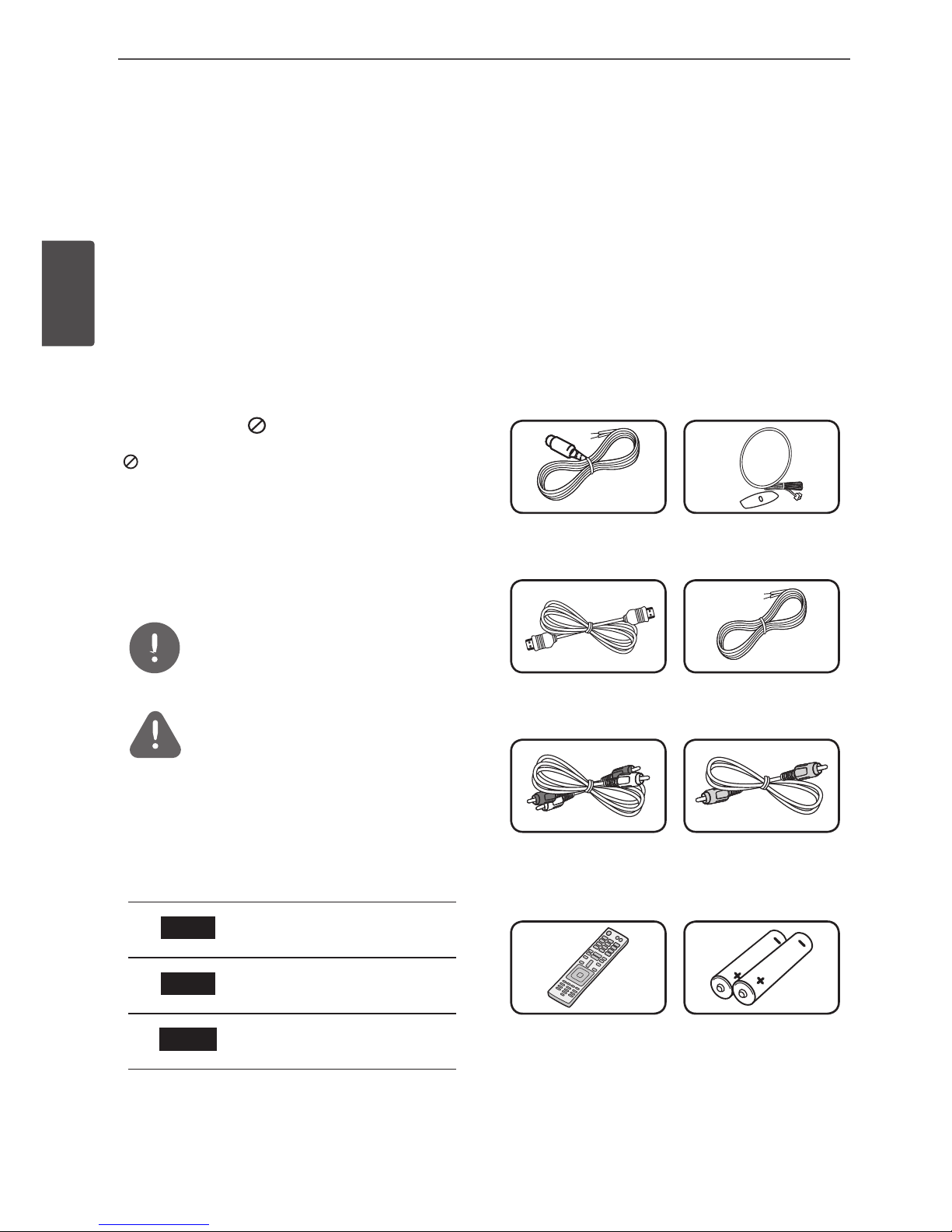
Accessories
Please check and identify the supplied
accessories.
FM antenna (1) AM antenna (1)
HDMI cable (1) Speaker cables (5)
Analog audio cable
(1)
Composite video
cable (1)
Remote control (1) Batteries (2)
7Preparation
Preparation
2
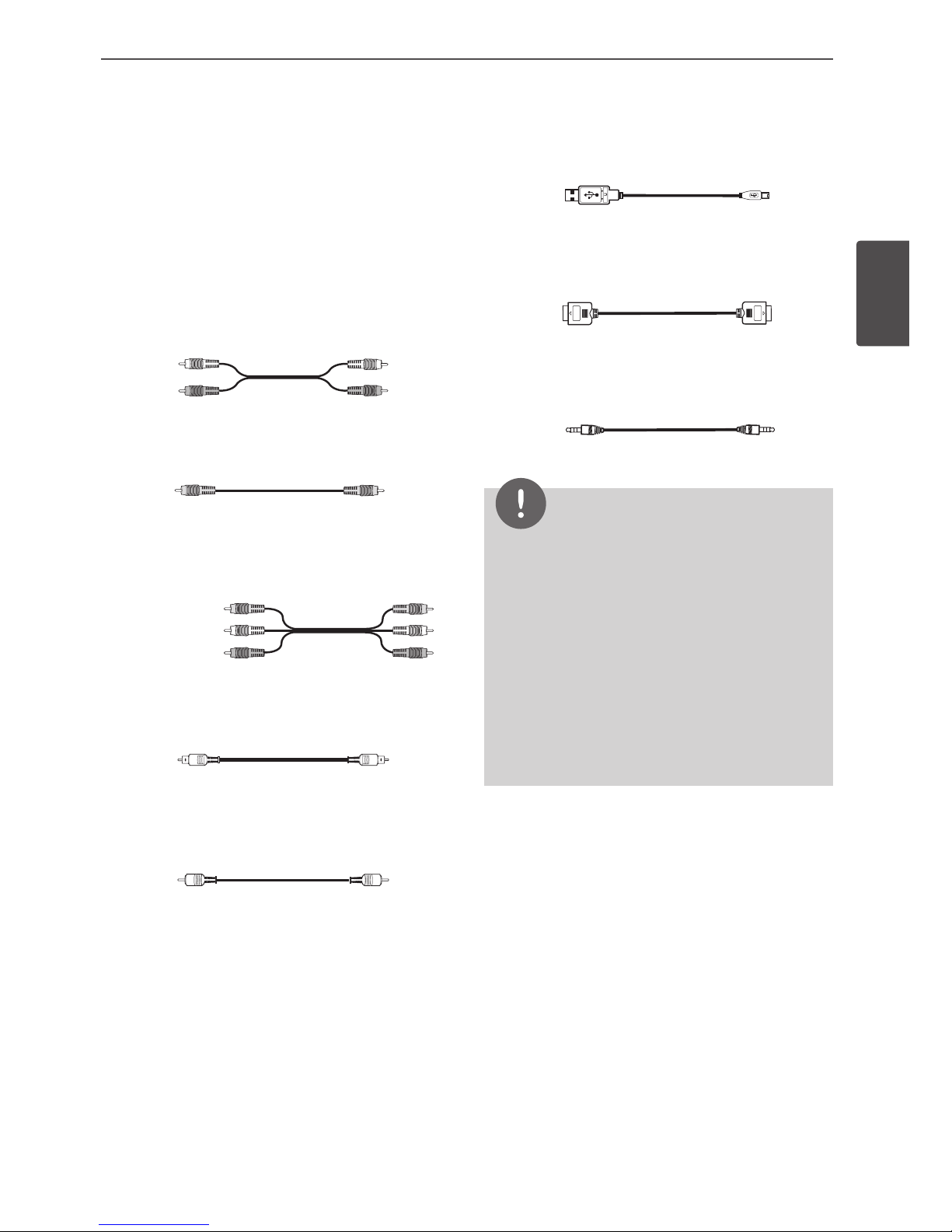
Required cables
The hookup diagrams on the subsequent
pages assume the use of the following
connection cables.
You must purchase the connection cables
separately if necessary.
• Analog audio cable
White (L)
Red (R)
• Composite video cable
Yellow
• Analog audio/Composite video cable
Yellow (Video)
White (L/audio)
Red (R/audio)
• Optical digital audio cable
• Coaxial digital audio cable
• USB cable
• HDMI cable
• Portable cable
NOTE
• Turn o the power to all components before
making any connections.
• When connecting an audio/video cable, be
sure to match the colour-coded pins to the
appropriate jacks on the components: yellow
(video) to yellow; white (left, audio) to white;
and red (right, audio) to red.
• When connecting optical digital cables, insert
the cable plugs straight in until they click into
place.
• Do not bend or tie optical digital cables.
8Preparation
Preparation
2
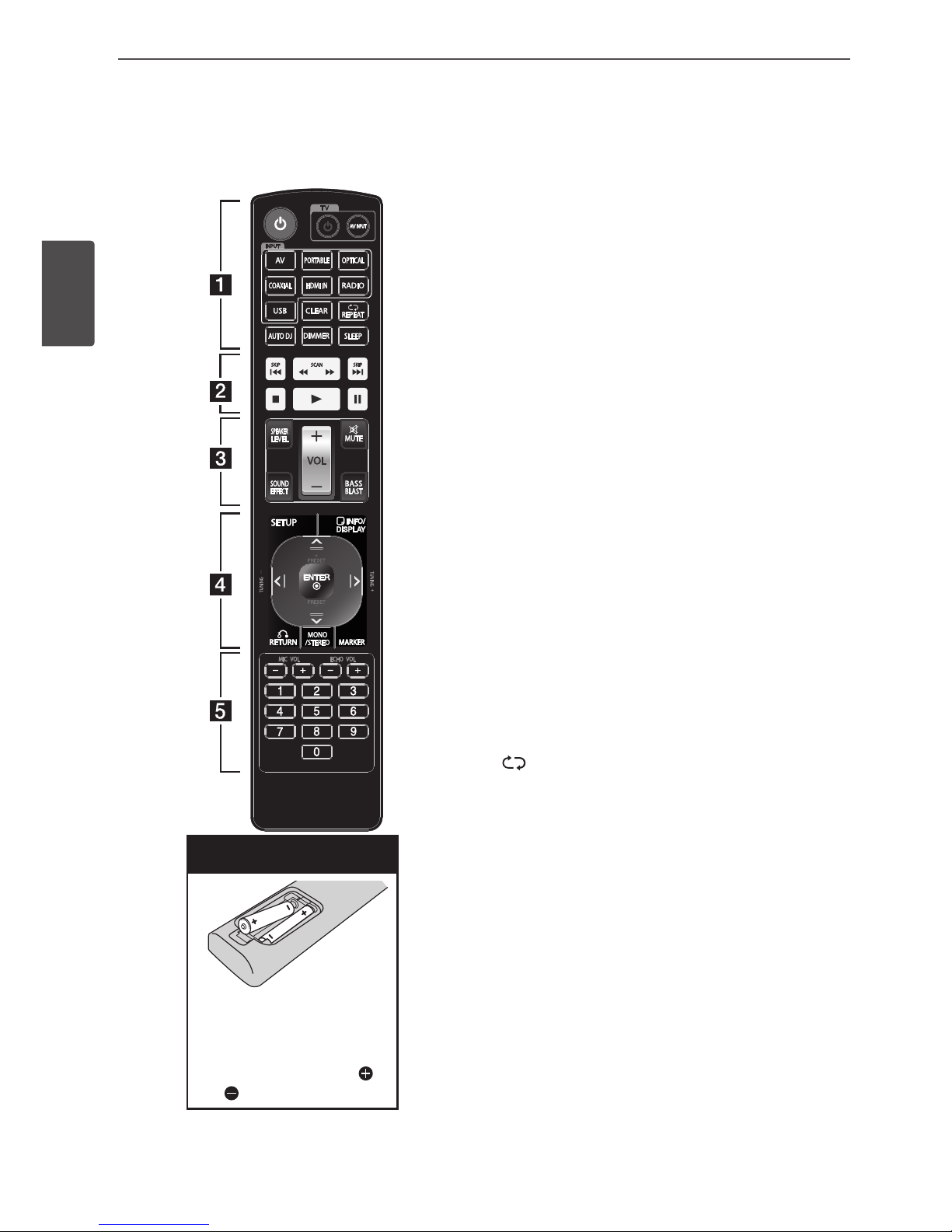
Remote control
Battery Installation
Remove the battery cover
on the rear of the Remote
Control, and insert two R03
(size AAA) batteries with
and matched correctly.
• • • • • • • • • a • • • • • • • •
POWER (1): Switches the unit ON or OFF.
TV control buttons: Controls the TV. (LG TV
only)
-
-1-: Turns the TV on or o.
-AV/INPUT : Switches the TV’s input source
between the TV and other input sources.
INPUT buttons: Selects the input source you
want to use. (Page 25)
-AV: Selects the input source connected to
AV IN 1/2 jack.
-PORTABLE: Selects the input source
connected to PORT. IN jack.
-OPTICAL: Selects the input source
connected to OPTICAL IN 1/2 jack.
-COAXIAL: Selects the input source
connected to COAXIAL IN 1/2 jack.
-HDMI IN: Selects the input source
connected to HDMI IN jack.
-RADIO: Selects the FM/AM.
-USB: Selects the input source connected to
USB port.
CLEAR: Deletes a preset stations. (Page 28)
-REPEAT: Selects a play mode. (Repeat
playback/ Random playback) (Page 32)
AUTO DJ: Selects the AUTO DJ mode.
(Page 32)
DIMMER: The display window is darken by
half. (Page 35)
SLEEP: Sets the system to turn o
automatically at a specied time. (Page 36)

9Preparation
Preparation
2
• • • • • • • • • b • • • • • • • •
./> (SKIP): Goes to the next or previous
chapter / track / le.
m/M (SCAN): Searches backward or
forward.
x (STOP): Stops playback.
N(PLAY): Starts playback.
X (PAUSE): Pauses playback.
• • • • • • • • • c • • • • • • • •
SPEAKER LEVEL: Sets the sound level of
desired speaker. (Page 25)
SOUND EFFECT: Selects a sound eect mode.
(Page 26)
VOL (-/+) : Adjusts speaker volume.
MUTE ( ): Turns o the sound temporarily.
Press the button again to restore the sound.
BASS BLAST: Selects the BASS BLAST sound
mode directly. (Page 27)
• • • • • • • • • d • • • • • • • •
SETUP: Displays or exits the [SETUP] menu.
RETURN (O): Moves backwards in the menu
or exits the setup menu.
INFO/DISPLAY ( ): Displays or exits On-
screen Display. (Page 33, 35)
ENTER ( ): Acknowledges menu selection.
MARKER: Marks music les on the [MUSIC]
menu. (Page 31)
PRESET (-/+): Selects a preset stations.
TUNING (-/+): Tunes in the desired radio
station.
U/u/I/i (up/ down/ left/ right): Selects an
option in the menu.
MONO/STEREO: Selects mono/stereo in FM
mode. (Page 27)
• • • • • • • • • e • • • • • • • •
MIC VOL (-/+): Adjusts the microphone
volume. (Page 36)
ECHO VOL (-/+): Adjusts the echo volume.
(Page 36)
0 to 9 numerical buttons: Selects numbered
options in a menu.
10 Preparation
Preparation
2
kl
jn o p
m
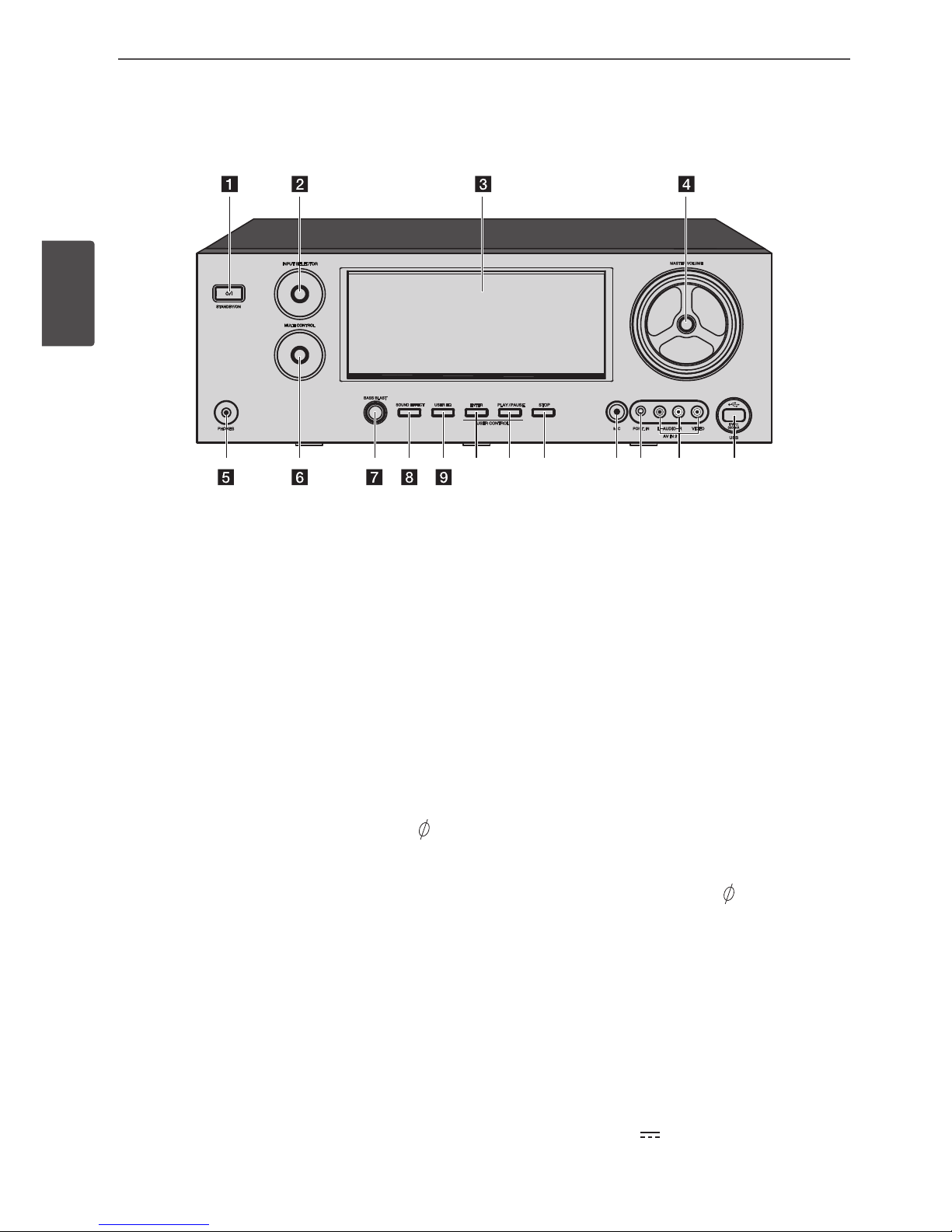
a STANDBY/ON (1/[)
Switches the unit ON or OFF.
b INPUT SELECTOR
Selects the input source. Rotate this knob
until the input source you want appears in
the display window.
c Display window
Shows the current status of the unit.
d MASTER VOLUME
Adjusts the speaker volume.
e PHONES connector
Connects a stereo headphone plug (
3.5 mm) to PHONES connector for private
listening. (Page 20)
f MULTI CONTROL
Adjusts the various options.
g BASS BLAST
Selects the BASS BLAST sound mode
directly. (Page 27)
h SOUND EFFECT
Selects a sound eect mode. (Page 26)
i USER EQ
Sets the USER EQ mode (BASS, MIDDLE
and TREBLE). (Page 27)
j ENTER
Acknowledges menu selection.
k PLAY/PAUSE
Starts playback.
Pauses playback, press it again to exit
pause status.
Moves to the BASS mode if you press PLAY/
PAUSE on the front panel while the “USER
EQ” is displayed in the display window.
l STOP
Stops playback.
m MIC
Connects a microphone ( 6.3 mm) to
MIC jack.
n PORT. IN
Connects a portable device (MP3 player,
etc) to PORT. IN jack.
o AV IN 2 (L-AUDIO-R, VIDEO)
Connects the components with analog
audio/video output jacks (camcorder,
video game, etc).
p USB port (5 V 500 mA)
Connects an USB device to USB port.
Front panel
Ce manuel convient aux modèles suivants
4
Table des matières
Autres manuels LG Système de cinéma maison

LG
LG DV-4500H Manuel utilisateur

LG
LG MD-9500DV Manuel utilisateur

LG
LG HT303SU Manuel utilisateur

LG
LG LHD657M Fiche technique

LG
LG XB12 Manuel utilisateur

LG
LG HT1200TA Manuel utilisateur

LG
LG MDD72 Manuel utilisateur

LG
LG FA-3000AWE Manuel utilisateur

LG
LG HT806TH Manuel utilisateur

LG
LG LX-D2640 Manuel utilisateur

LG
LG HX806TG Fiche technique

LG
LG Cinema 3D Sound Blu-ray S93T2-FL Manuel utilisateur

LG
LG LHB996 Manuel utilisateur

LG
LG DV4S2H-N Manuel utilisateur

LG
LG S62T1-C Manuel utilisateur

LG
LG BH7230C Mode d’emploi

LG
LG BH6730T Manuel utilisateur

LG
LG LX-D6960 Manuel utilisateur

LG
LG HT306SF Manuel utilisateur

LG
LG HX-506-DI Manuel utilisateur


