LG MD18GQBE0 Manuel utilisateur

www.lg.com
Copyright © 2022 LG Electronics Inc. All Rights Reserved.
Please read this manual carefully before operating your set and retain it for future
reference.
MD18GQBE0 / MD17GQSE0
MFL68026049
Rev.00_121222
OWNER’S MANUAL
DEHUMIDIFIER
ENGLISH

2SAFETY PRECAUTIONS
ENGLISH
SAFETY PRECAUTIONS
The following safety precautions are intended to prevent accidental property damage and per-
sonal injury through safe and correct use of the product.
WARNING
Failure to follow the instructions could result in death or serious injury of the user.
CAUTION
Failure to follow the instructions could result in personal injury or property damage.
WARNING
When installing the dehumidifier
• Do not damage, alter, excessively bend, twist, pull, pinch or heat the power cord.
If the power cord is damaged, request for repair to the service technician to prevent any risk.
If not, it can cause fire, electric chock or product failure.
• Do not use multiple-outlet adaptors with this dehumidifier.
Excessive use of power could result in electric shock or fire.
• Do not use the product if the outlet is damaged or loose.
Doing so could result in electric shock or fire.
• If there is a gas leak, open the window for ventilation before using the dehumidifier.
Failure to do this could result in explosion, fire or burns.
• Do not disassemble, repair or modify the product.
Doing so could result in fire or electric shock.
• Do not store or use flammable gases or materials near the dehumidifier.
Doing so could result in fire or product malfunction.
• This appliance is not intended for use by persons (including children) with reduced
physical, sensory or mental capabilities, or lack of experience and knowledge, unless
they have been given supervision or instruction concerning use of the appliance by a
person responsible for their safety.
Children should be supervised to ensure that they do not play with the appliance.
When using the dehumidifier
• Push the power plug all the way into the wall outlet so that it is not loose.
A loose connection could result in fire.
• Do not touch the power plug with wet hands.
Doing so could result in electric shock or injury.
• Do not modify or extend the power cord.
Doing so could result in fire or electric shock.
• If the product makes a strange noise or emits a smell or smoke, pull the power plug out
and contact the service center.
Failure to do this could result in explosion, fire or burns.
• Avoid placing the dehumidifier or other heavy objects on top of the power cord.
Doing so could result in fire or electric shock.
• Do not use water to clean the dehumidifier.
Doing so could result in electric shock or malfunction.
!
!
!

SAFETY PRECAUTIONS 3
ENGLISH
• Keep the air inlet and outlet free from obstructions.
Failure to do this could result in poor performance or malfunction.
• Do not cover the power cord with a mat etc.
If heavy objects are placed on the mat, the power cord underneath could be damaged, causing
fire or electric shock.
dangerous UV-C radiation. UV-C radiation may, even in little doses, cause harm to the
• Do not place combustion appliances directly in the path of the dehumidifier’s airway.
Doing so could result in incomplete combustion or deformation by heat.
• Keep the product away from fire.
Failure to do this could result in fire.
• Do not use the product in places where it could be splashed by water.
Doing so could result in fire or electric shock.
• Do not insert fingers, sticks etc. into the air inlet or outlet.
You could be injured by the high-speed fan.
• Only qualified personnel may clean the internal parts. Do not use corrosive detergents.
• Unintended use of the appliance or damage to the housing may result in the escape of
eyes and skin.
Doing so could result in product malfunction, fire or electric shock.
and contact the service center.
• When the appliances are damaged or need to replaced, disconnect the power supply
• This appliance contains a UV-C lamp.
service center.
• Do not replace the product UV-C lamp directly. If you need a replacement, please contact
• Appliances that are obviously damaged must not be operated.
• Read the maintenance instructions before opening the appliance.
• Do not operate UV-C lamp outside of the appliance.
CAUTION
When installing the dehumidifier
• Do not use the product for purposes other than its intended use.
This product is not designed for preserving precision instruments, tableware or art works. The
quality of the items you are trying to preserve could deteriorate.
• Ventilate frequently.
Keep the area well ventilated, especially if you are using a combustion appliance as well. Inad-
equate ventilation reduces the oxygen level in the air.
• Always hold the plug head when pulling the power plug.
Failure to do so could result in electric shock or injury.
• Do not use excessive force when pulling the extension hose.
Doing so could result in damage to or deformation of the hose.
• Do not use the product in places where chemicals are used.
Chemicals and solvents dissolved in the air in places such as hospitals, factories, laboratories
and hair salons could cause the product to become deformed, causing the dehumidified water
to leak and wet nearby household items, equipment etc.
• Turn off the dehumidifier and pull out the power plug before cleaning.
If you do not do this, you could be injured by the high-speed fan.
• DO NOT operate the dehumidifier without a filter.
Using the product without a filter could result in a reduced product lifespan, electric shock or in-
jury.
!

• Turn off the dehumidifier and empty the water tank before moving the dehumidifier.
The water could overflow from the tank, wetting household items or causing fire or electric
shock.
• Pull out the power plug if you will not be using the product for an extended period.
Failure to do this could result in product malfunction or fire.
• Do not use the product in a very small space such as a closet.
Poor ventilation could result in overheating or fire.
• Do not use wax, thinner or a strong detergent when cleaning. Wipe the product using a
soft cloth.
Using inappropriate cleaning products could cause the product to become discolored or de-
velop surface flaws.
• Do not use the product in direct sunlight or rain.
The product could overheat, causing fire or electric shock.
• Do not touch the product with wet hands.
Doing so could result in electric shock. Position the product on a firm, stable surface.
• If the product is on an unstable surface, it may vibrate and make noise.
If the product is tilted or laid down, the dehumidified water could overflow and the product
could malfunction.
• Do not keep the power cord tied up when using the product.
The power cord could overheat, resulting in fire.
• Do not spray foreign substances or water into the sensor hole.
This could result in electric shock or malfunction.
• Do not use the product at unstable voltage for a long period of time.
The product may stop automatically to protect itself. This could result in electric shock or mal-
function.
• Do not allow child to mount on the product.
It may cause serious injury and also product defect.
4SAFETY PRECAUTIONS
ENGLISH
When using the dehumidifier
• Do not use the product for preserving animals/plants, precision instruments, art works
etc.
It may cause property damage.
• Do not place vases or water jars on the dehumidifier.
If the water flows into the dehumidifier, it could result in fire or electric shock.
• Product must be placed on safe and hard surface floor.
On weak surface floor, product is prone to vibration and noise.
Product must stand upright, otherwise it causes defect and water leakage.

TABLE OF CONTENTS 5
ENGLISH
TABLE OF CONTENTS
2SAFETY PRECAUTIONS
6QUICK START
7NAME OF EACH PART
7 Front side
7 Back side
8 Display Panel
9CHECKLIST BEFORE
USAGE
10 HOW TO USE
11 Smart Dehumidification
12 Jet Dehumidification
12 Silent Dehumidification
13 Spot Drying
14 Laundry Drying
15 Ionizer
15 Defrost Operation
15 Auto Clean
16 Bucket full
17 OFF Timer
17 Timer function
18 Lock Function
18 Using UVnano Function
18 Water tank light button method
19 How to empty water tank
20 How to Continuous Drainage Setup
21 Product registration through Wi-Fi func-
tion
22 SMART FUNCTIONS
22 LG ThinQ Application
25 HOW TO CLEAN
25 How to clean the exterior and inlet of
28 Normal operating sounds of the product
the dehumidifier
25 How to clean water tank
26 How to clean Pre-Filter
24 Smart Diagnosis
27 HOW TO STORE
28 TROUBLESHOOTING
TIPS
30 PRODUCT SPECIFICA-
TIONS

6QUICK START
ENGLISH
Dehumidifier efficiency varies depending on room tempera-
ture and relative humidity.
• A lower temperature and lower relative humidity will reduce the moisture removal rate.
• The compressor operates in dehumidification mode only when the set humidity is lower than the
room humidity.
The operating temperature is 5°C to 32°C.
• The dehumidifier cannot be used at 0°C or below because the dehumidified water could freeze.
• At 32°C or higher, the dehumidifier may stop running automatically to protect itself from over-
heating.
The room temperature increases while the dehumidifier is
running.
• This dehumidifier does not have temperature control functions.
• The dehumidifier generates heat while operating, raising the room temperature by about 2°C or
3°C depending on the usage conditions (room air pressure and room size).
The dehumidification can be restarted after three minutes.
• If you attempt to restart the dehumidifier immediately after stopping it, the compressor will start
running again after about three minutes for product safety reasons.
QUICK START

NAME OF EACH PART 7
ENGLISH
Start/stop button
Outlet
Louver
Display
Water tank lid
Water tank
It stores dehumidified water.
It adjusts
the direction
of the wind.
Pre-Filter
Wheels for moving
Power plug hanging part
Inlet
Hose cover
Power plug
Rubber Cap
It absorbs the air and
moisture in the room.
The components are at the top part of the product packaging box.
The form of water container may differ in each product.
Extension hose Shoes drying kit Laundry drying kit
Back side
Components
NAME OF EACH PART
Front side

8NAME OF EACH PART
ENGLISH
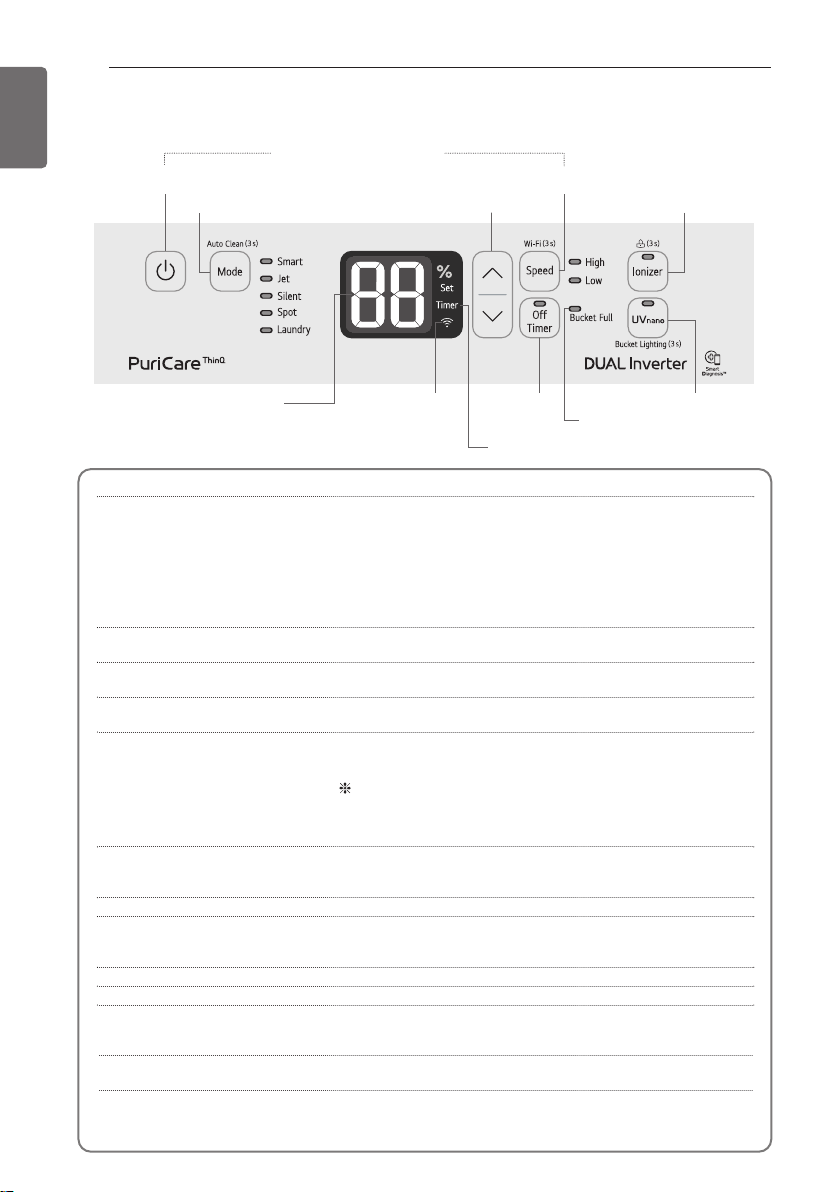
Display Panel
Start/Stop button It is used to start and stop the product operation.
Operation mode button It is used to switch to Smart dehumidification mode,
Jet dehumidification mode, Silent dehumidification mode,
Spot drying mode, and Laundry drying mode.
Smart dehumidification → Jet dehumidification → Silent
dehumidification → Spot drying → Laundry drying →
Smart dehumidification
The Auto Clean function will turn on/off after depressing
the button for 3 seconds or more.
Ionizer button It is used to remove harmful bacteria in the air. When you
press the button for 3 seconds, lock function is operated.
Humidity control button It controls the desired humidity. (30%~70%)
Humidity control can be set in the units of 5%.
Wind strength control button It controls the wind strength. When you press the button
for 3 seconds, Wi-Fi pairing is operated.
UVnano button Keep the fan clean. (Related features apply only to products
with UVnano features.)
Buttons to turn off Wi-Fi Register to the app, pressing and holding the Start/Stop
button and the Wind strength control button at the same
time for more than 3 seconds turns off Wi-Fi.
After finishing product registration and while Wi-Fi is off,
pressing and holding the button for more than 3 seconds
turns on Wi-Fi and you can control the product from your
smart-phone that has been previously registered.
Off Timer button The product will be turned off after the set time.
When the button is pressed, it is increased by 1 hour each
time, and you can set up to 8 hours.
Operation mode lamp It displays the currently set operation mode.
Humidity & Off timer display
It displays the current humidity and set humidity. When Off
timer is set, it displays the Off timer time, and it automatically
displays the current humidity after completing the setting.
Wi-Fi indicator lamp It is displayed when Wi-Fi function is set.
Timer indicator lamp It is displayed when timer is set in Wi-Fi app.
Set indicator lamp It is displayed when humidity is set.
Desired humidity is displayed with "Set" light, and the light
is turned off when showing current humidity.
Water tank light button Turn on the LED light in the bucket. (For some products with
UVnano function, pressing and holding this button for 3
seconds or longer will turn on the LED light of the bucket.)
Start/stop
Off Timer
Bucket full indicator lamp
Lighting
Operation mode Humidity control Ionizer
Wind strength control
Timer indicator lamp
Humidity &Off timer
display
Wi-Fi
indicator lamp
Buttons to turn off Wi-Fi

CHECKLIST BEFORE USAGE 9
ENGLISH
Dehumidification amount changes according to indoor temperature and
relative humidity.
- If the temperature or relative humidity is low, dehumidification amount is decreased.
- Dehumidification is performed with compressor operation only when the desired humidity is
lower than the current humidity.
The product can operate in the temperature boundary of 5°C~32°C.
- At 0°C or less, dehumidified water will freeze, and dehumidification cannot be performed.
- If it is over 32°C, the temperature inside the dehumidifier will rise, and there will be cases of
stopping the operation by protective device activation to avoid excessive usage.
When the dehumidifier is under operation, the indoor temperature will rise.
- Dehumidifier does not have a cooling/heating function.
- Heat is generated during the operation, so the temperature may be increased by about 2°C~3°C
according to the usage conditions (indoor temperature, size of the room).
Operation will restart after 3 minutes.
- If it is restarted right after the stop, the compressor will start about 3 minutes after to protect the
product.
It automatically protects the product during the continuous operation.
If it is operated for 24 hours or more continuously, the compressor will stop automatically to pro-
tect the product, and it will restart after 1 hour.
Please have gap of 30cm or more from the wall.
If it is not ventilated well, the air suction performance will be degraded.
There may be water remaining in the drain water tank at the first time
usage.
There may be water remaining in the drain water tank by the product outgoing inspection to check
the normal operation of the product. It is not a failure.
CHECKLIST BEFORE USAGE

10 HOW TO USE
ENGLISH
Push start/stop button.
- The louver opens and smart dehumidification starts.
But, if no other button is pressed (Mode, Speed etc.), the desired humidity will change to 50%
after 30 minutes of continuous operation.
- The current humidity is displayed on The humidity & Off timer display.
Press operation mode button to select desired operation mode among
smart dehumidification, jet dehumidification, silent dehumidification,
spot drying, and laundry drying mode.
- The selected operation indicator lamp is lighted.
- The selected operation mode starts after 3 seconds.
Press Humidity Control ∧/∨button to change humidity.
- Desired humidity can be set to 30 ↔ 35 ↔ 40 ↔ 45 ↔ 50 ↔ 55 ↔ 60 ↔ 65 ↔ 70.
Humidity can be set with the units of 5%.
- During the humidity setting, desired humidity is displayed on the humidity display part, and the
current humidity is displayed after about 5 seconds.
- Current humidity is displayed in the units of 5% from 25~90%.
If it is less than 25%, it is displayed as 25%, and if it is 90% or more, it is displayed as 90%.
Press Wind Strength Control button to change wind amount.
You can set the wind amount to low or high wind.
HOW TO USE
Ce manuel convient aux modèles suivants
1
Table des matières
Autres manuels LG Déshumidificateur

LG
LG UD501KOJ5 Manuel utilisateur

LG
LG LD301EL Manuel utilisateur

LG
LG LHD45EL Manuel utilisateur

LG
LG D451WH Manuel utilisateur

LG
LG MD19GQGE0 Manuel utilisateur

LG
LG UD701KOG3 Manuel utilisateur

LG
LG LHD45EL Manuel utilisateur

LG
LG LD651EBL Manuel utilisateur

LG
LG LHD65EBL Manuel utilisateur

LG
LG MD16GQSE0 Manuel utilisateur

LG
LG LD40E Manuel utilisateur

LG
LG LD40E Manuel utilisateur

LG
LG LD156QSD1 Manuel utilisateur

LG
LG LD40EY5 Manuel utilisateur

LG
LG LD156QSD0 Manuel utilisateur

LG
LG LD25EL Manuel utilisateur

LG
LG GHD30 Manuel utilisateur

LG
LG LD450ST8 Manuel utilisateur

LG
LG MD19GQGA1 Manuel utilisateur

LG
LG UD551GKG3 Manuel utilisateur