
LevelOne VOI-9200 Manuel utilisateur

VOI-9200
SIP IP PBX
User Manual
Ver. 1.02 - 0809

Table of Contents
1. INTRODUCTION.......................................................................................................................................3
1.1. OVERVIEW ...........................................................................................................................................3
1.2. FEATURE ..............................................................................................................................................4
1.3. PACKAGE CONTENT .............................................................................................................................5
1.4. PHYSICAL.............................................................................................................................................5
1.5. DEFAULT SETTINGS..............................................................................................................................7
1.6. CONNECTION DIAGRAM .......................................................................................................................7
2. WEB BASED MANAGEMENT................................................................................................................8
2.1. SYSTEM................................................................................................................................................9
2.2. SERVICE .............................................................................................................................................22
2.3. USER MANAGEMENT..........................................................................................................................29
2.4. DEVICE...............................................................................................................................................34
2.5. ROUTE MANAGEMENT .......................................................................................................................42
2.6. TRUNK ...............................................................................................................................................46
2.7. FEATURE ............................................................................................................................................56
3. APPLICATION EXAMPLES..................................................................................................................67
3.1. CASE I: SINGLE-SITE IP PBX.............................................................................................................68
3.2. CASE II: TWO-SITE IP PBX................................................................................................................69
4. APPENDIX - SPECIFICATION.............................................................................................................72
5. GENERAL PUBLIC LICENSE ..............................................................................................................73

1. Introduction
1.1. Overview
The VOI-9200 IP PBX is an embedded Voice over IP (VoIP) Server with Session
Initiation Protocol (SIP) to provide global virtual office IP extension phone connection
for small-to-medium business (SMB) companys. Equipped with two FXS ports,
two FXO ports, Ethernet LAN and WAN ports, VOI-9200 combines the telephony
network and the data network into a manageable converged network.
VOI-9200 IP PBX works with various IP phones (Desktop, WiFi, Bluetooth, and
DECT), VoIP gateways, and analog telephone adapters (ATA) to route calls among
client phones, analog phones, and PSTN network. Call features such as
conferencing, auto attendant, and voicemail can be seamlessly enabled to all phone
devices. In addition, it also provides Internet access to all LAN devices through NAT
router.
VOI-9200 IP PBX provides call control and media relay services to SIP clients, and it
performs the following primary functions:
SIP Registrar
SIP Outbound Proxy with media relay
SIP Gateways (FXO)
SIP PBX for extension calls
Auto attendant Interactive Voice Response (IVR)
Voice Mail IVR
Meet-Me Conferencing
VOI-9200 IP PBX has a built-in suite of voice applications for supplementary services.
This lowers down the total cost of a converged network enabled by VOI-9200 IP PBX
than building separated infrastructures for legacy telephony network and data
network. In addition, with a web-browsable interface to the data network configuration
and voice service provisioning, VOI-9200 brings the manageability of both networks
together to facilitate administration locally or remotely.

1.2. Feature
Supported Standards
RFC 3261, RFC 3311, RFC 3515
RFC 3265, RFC 3892, RFC 3361
RFC 3842, RFC 3389, RFC 3489
RFC 3428, RFC 2327, RFC 2833
RFC 2976, RFC 3263, RFC 3264
SIP Registrar
‧Static/Dynamic registration
‧Configurable expiry time
‧MD5 authentication
‧Registration proxy to external registrars
‧Configurable PBX Caller ID
‧User profile
‧Handle loose RFC-compliant phones
‧Resilient message retry mechanism
‧Seeding historical registrations
SIP Proxy
‧Proxy server
‧Call-based MD5 authentication
‧NAT traversal for clients
‧Outbound proxy with or without WAN
‧Inter-proxy call hand-off
PBX Features
‧Support call hold, call waiting, 3-way call conference
with feature phones
‧Built-in in-line call transfer
‧Unconditional, unavailable, busy call forward
‧Per-calling-number forward and rejection
‧Group-based call pick-up
‧Call-parking
‧Multi-room meet-me conference
‧Auto-attendant
‧Voice mail system
‧Call privilege grouping
‧FXO interface for PSTN Inbound/outbound
‧FXO disconnection tone detection
‧FXO hunt group
‧Caller ID detection
‧Echo cancellation
‧In-band/RFC2833/SIP-INFO DTMF translation
‧Support 5 SIP trunk
‧Intra-PBX stackable trunking over Ethernet
‧FWD/Vonage account sharing for extensions
‧Interoperable with Cisco
CallManager, CCME, IOS SIP gateway, Unity
CUE, 79XX, ATA
‧Call admission control for wired/wireless phones
‧Music on hold
‧Direct line
‧Outbound 900/0204 blocking
Auto Attendant
‧Configurable Greeting
‧Key to reach operator
‧Timeout interval and timeout action
‧Music on ringing extensions
‧Forward to voice mail on no-answer
Voice Mail
‧User PIN
‧Multilingual
‧Multi-folder archive
‧Fast-forward/Rewind/Undelete
‧MWI notification
‧E-mail notification and attachment(Unified messaging)
‧Personal reception on unavailability and busy
‧Voicemail forwarding
‧Reply call or new call in voicemail menu
Storage
‧Support USB 2.0 storage media
Meet-me Conference
‧Multiple rooms with configurable number and PIN
‧Music on first dial-in party
‧Hot key to leave conference
NAT
‧Auto NAT discovery and traversal
‧Built-in STUN client
‧RTP proxy
‧RTP port range designation
Relational Provision
‧Logical partition/relation on users and trunks
‧Logical provision on outgoing and incoming
calling search scopes
‧Rich dial-plan expressiveness through route patterns
‧Object-oriented provisioning paradigm
Administration
‧Web-based configuration
‧Flat system event syslog
‧Flat Call Detail Record (CDR)
‧Extension status display
‧TFTP server and TFTP repository maintenance
‧Network Time Protocol time synchronization
‧Real Time Clock setting
‧DHCP server with multiple partitions,
per-MAC IP binding, list of options
‧Configurable time zone
‧Firmware upgrade through Web interface
Network Management
‧DHCP/PPPoE/Static IP on WAN
‧LAN IP and netmask specification
‧Firewalling on predefined services
‧NAT for outbound traffic from LAN
‧DNS and dynamic DNS
‧QoS queuing mechanism for VoIP and data traffic
Maximum Capacity
‧30 extension registrations
‧30 voicemail accounts
‧10 concurrent calls with RTP
‧4 analog calls
Voice
‧Caller ID : Bellcore and ESTI
‧Fax support: T.38 compliant
‧Echo canceller: G.168-2002 compliant
‧Seamless integrated with VOI-7000 / VOI-7100,
VOI-800x

1.3. Package Content
- VOI-9200
- Power Adapter 12V, 1.66A
- Cat.5 Cable
- CD Manual
1.4. Physical
1.4.1. Front Panel
LED
1. Line 2-Port FXO
2. Phone 2-Port FXS
3. LAN ON indicates LAN connection
BLINK indicates LAN activity
4. WAN ON indicates WAN connection
BLINK indicates WAN activity
5. WLAN Reserved *
6. Active On Indicates the system is ready
7. PWR ON indicates the unit is powered up
* WLAN is not applicable for the VOI-9200
1234567

1.4.2. Rear Panel
1. Power 12V DC, 1.66A
2. Reset Hold the Reset button and release to reboot system
Hold the Reset button for 10 seconds before release to
restore whole system back to the factory default
3. FXO ports 2 FXO ports are for connection to PSTN lines, and
numbered 1 and 2 from left to right.
4. FXS ports 2 FXS ports are for connection to the analog phone,
and numbered 3 and 4 from left to right.
5. USB port Connect to an external USB drive for backup internal
system storage. Click the Backup icon in Web
configurations and follow instructions to insert the USB
connector of an external USB drive.
6. WAN port Connect to a broadband ADSL/Cable modem or a
WAN router.
7. LAN ports 4 LAN ports are for connection to PC or Laptop,
extended IP Phones, or VoIP Gateways/ATA, etc.
8. Console port RS-232 Serial connection for configuration by CLI
1
2
345678
1.5. Default Settings
WAN IP 192.168.0.1
LAN IP 192.168.1.1
Username admin
Password admin
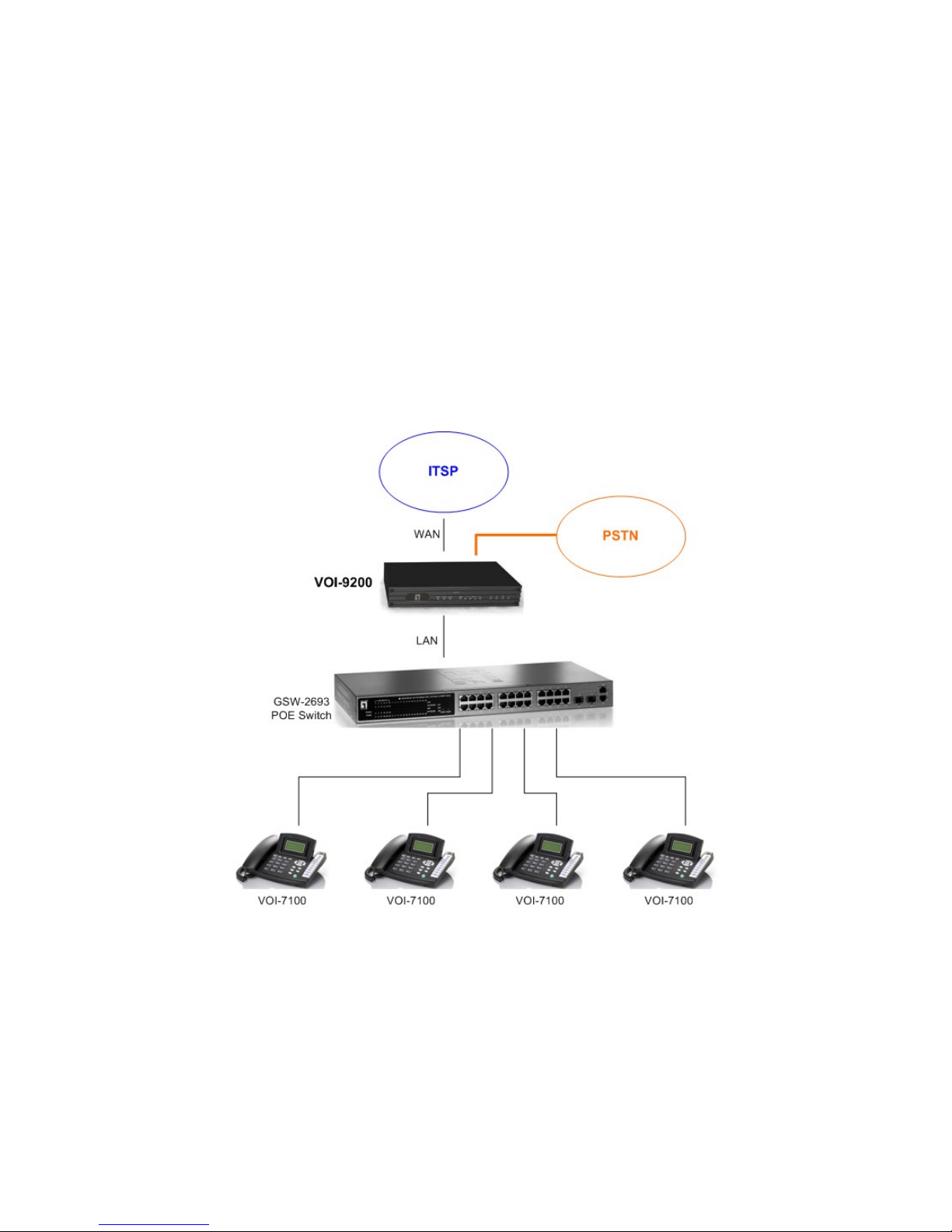
1.6. Connection Diagram
2. Web Based Management
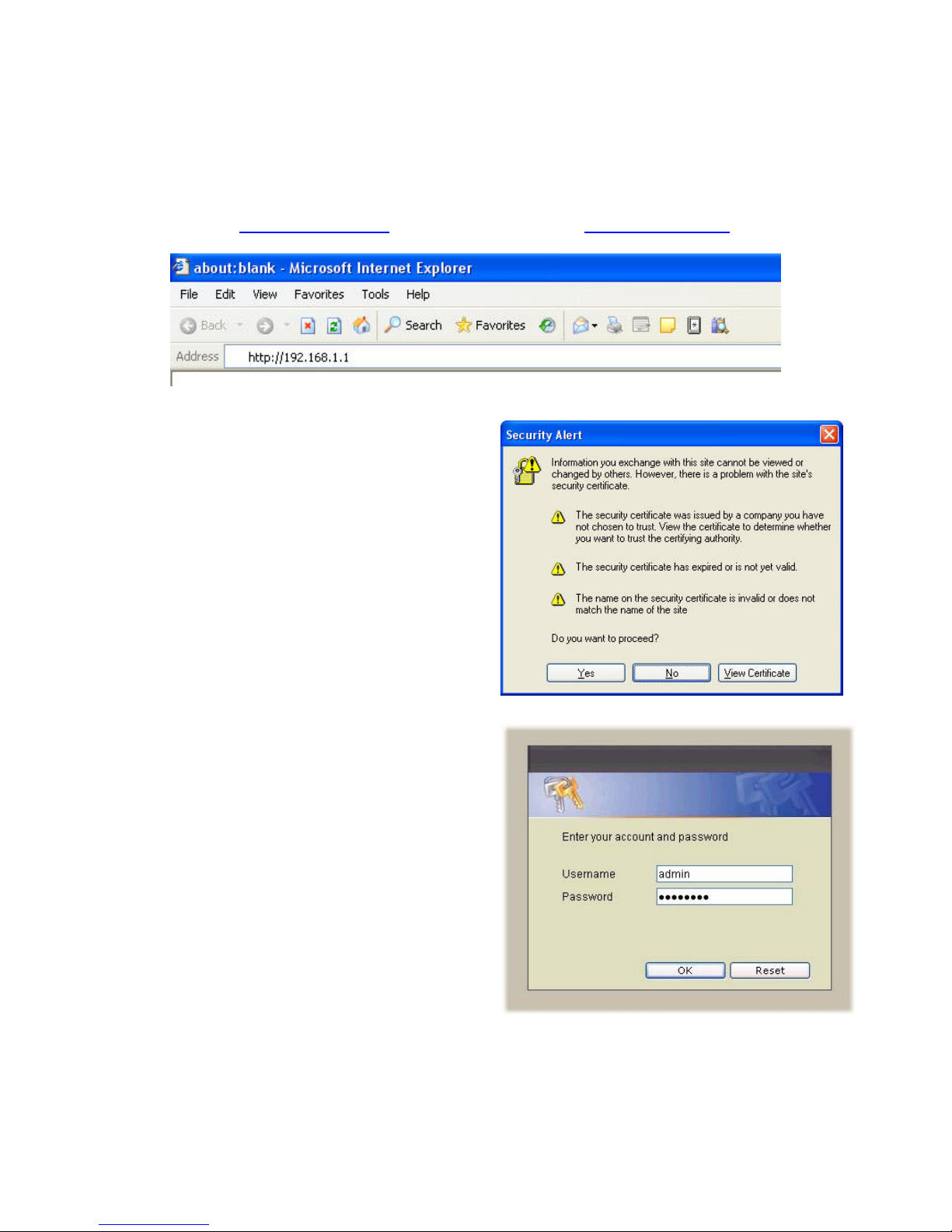
This chapter illustrates how to login and configure system parameters with VOI-9200.
The factory default of LAN IP address is 192.168.1.1 and WAN IP address is
192.168.0.1. You can connect your PC or laptop to access the web GUI through
LAN port at https://192.168.1.1/, or through WAN port at https://192.168.0.1.
Once connected, the browser may warn
about accepting a certificate, please accept
it.
Then, enter the username and password
(default is admin/admin) to login for PBX
configuration. The PBX System with PBX
status will be shown.
Note the password could be changed in the
User Management page under user ID
“admin”.

2.1. System
The System setup includes the following configurations
2.1.1. Time Setup
Select System→Time Setup, and you can see the current setting of time zone and
real time clock. The Time Setup page allows to configure time zone and date for IP
PBX.
System time zone setup
Choose the time zone for the IP PBX0, then click APPLY button to save the setting.
Real time clock (RTC) setup
Choose values of year, month, day, hour, minute, and second respectively, then click
APPLY button to save the settings.

2.1.2. On-board WAN Setup
The WAN setup page allows administrator to configure WAN interface of VOI-9200.
Select System→On-board WAN Setup, to display current setting of WAN interface.
You can select one of three interface types among static IP, DHCP, and PPPoE. The
default type of WAN interface is static IP and the default WAN IP is 192.168.0.1. If
LAN only checkbox is checked, the WAN interface will be disabled.
Static IP
You can choose Static IP in Type list and configure the following information:
IP address
Network mask
Default gateway IP address
Primary and secondary DNS servers
Then click APPLY button to submit.
Autres manuels pour VOI-9200
1
Table des matières
Autres manuels LevelOne PBX


Manuels PBX populaires d'autres marques

Allo.com
Allo.com Nano 2 Manuel utilisateur

ZYCOD
ZYCOD ZX50 Manuel utilisateur

Panasonic
Panasonic KX-TDA100BX Manuel utilisateur

LV switch
LV switch IPPBX800 Manuel d'instructions

Edge-Core
Edge-Core VST3305 Manuel utilisateur

Panasonic
Panasonic KX-T7625 - Digital Proprietary Speakerphone 24... Manuel utilisateur

Rauland-Borg
Rauland-Borg Telecenter IV Manuel utilisateur

Grandstream Networks
Grandstream Networks UCM6208 Manuel utilisateur

ATCOM
ATCOM IPPBX IP02 Manuel utilisateur

Panasonic
Panasonic KX-TVS50 - 2 Port Voicemail System Manuel utilisateur

bintec elmeg
bintec elmeg elmeg hybird 600 Manuel utilisateur

Panasonic
Panasonic KX-NS300 Manuel utilisateur


