
Lenovo Speaker C1530 Manuel utilisateur
王兆东
汪 赟
刘明忠 2011-06-12
说明书 联想 C1530/出国外
105*145mm
R440-C1530-002
80g书写纸
1
Safety and Maintenance Instructions
Security Warning
• Ifthemachinegivesoutsmokeorshowsanyotherabnormalsigns,pleaseunplugthe
USBdeviceimmediatelytoavoidaccidents.Meanwhile,pleasecontactthelocaldealer
orcallLenovoGroup’sServiceCenterforrepair.
• Iftheinteriorofthemachineisexposedtotherainorisdamped,pleaseplaceitata
ventilativeplacefordrying.YoumustnotplugitintotheUSBpowersourceordryitby
heat;otherwisethemachineoritscomponentsmaybeburnedorfail.
• Ifanyforeignobjectfallsintothemachine,pleasedisconnecttheUSBpowersource
andoverturnorshakethemachineforseveraltimes.Iftheforeignobjectremains
inside,pleasecontactthelocaldealerforrepair.
• Thepowerlinesandaudiosignallinesmaynotbesubjectedtosqueezing,stretching,
hangingweightorstampingtopreventtheirinsulationlayerbeingdamagedandthe
ensuingshortcutorpoorcontact.
• Intrusionofanyforeignobjectorliquidintothemachineshallbeprevented.Youmust
notplacechemicals(includingcosmetics,liquidmedicine,andpesticideetc.)onthe
machinebecausetheymaybeaffectedbytheheatproducedbythemachinewhenitis
working.Pleaseplacethemachinefarawayfrominammableorexplosivehazardous
articlestoavoidaccidents.Youmustnotblocktheheatdissipationholesbecause
insufcientheatdissipationmayshortentheservicelifeofthemachine.
• Ifthemachineisnotinuseforalongtime,pleasetakeofftheUSBpowerplugto
preventlightningdamagetothemachine.
MaintenanceTips
• WorkingEnvironment
Themachinewhenworkingshouldhavegoodventilation,withitsbackbeingmorethanten
centimetersfromanybarricade.Don’tplaceanyobjectonitwhenitisworking.
• Cleaning
Whendoingcleaning,pleaseremembertotakeofftheUSBpowerplug.Itwilldotowipeit
withcloth.Don’tuseanycleansinguidorspray.
• Repair
Intheeventofmalfunction,signicantchangeinperformanceordamagetoanycomponent,
pleaserstdisconnectthepowerbytakingofftheUSBpowerplugandthencontactthe
designatedrepairservicecenterappointedbyLenovo(Beijing)Limitedorcontactthedealer.
Youmustnotattempttoopentheenclosureofthemachineandrepairityourself.
English
20110524_LX-8451_C1530_manual.indb 1 2011-6-13 15:43:49
2
• HelpfulTips
Toprolongtheservicelifeofthemachineaswellasbenetyourphysicalandmentalhealth,
pleasedon’tlistenathighvolumeoverlongperiodsbecausethiswillimpairyourhearing.
ControlPanelandOperationInstructions
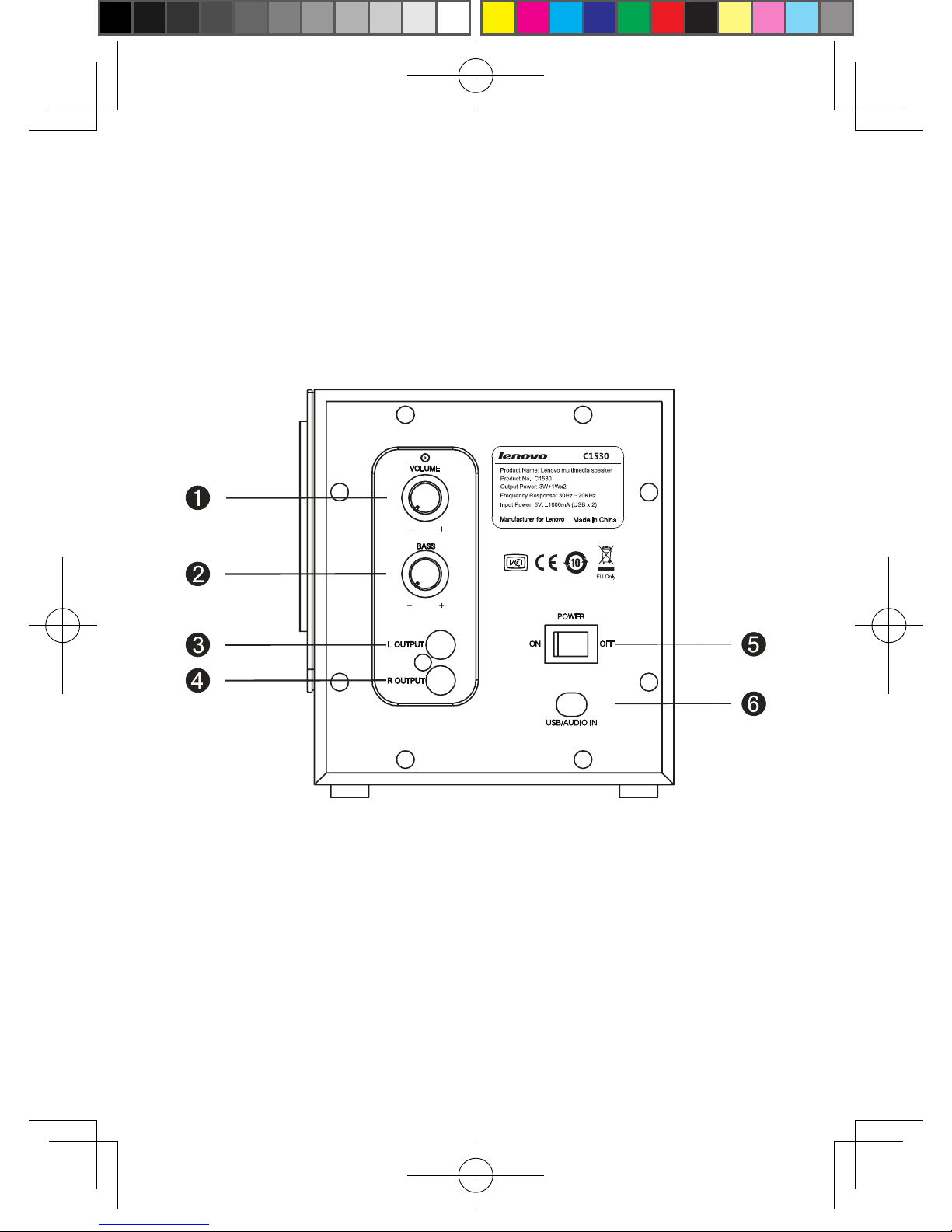
ThismachineisaUSB-powered2.1CHmultimediaspeakerfeaturingacomputer-aided
acousticdesignandanoptimalsynergybetweenthespeakerandthepoweramplier.
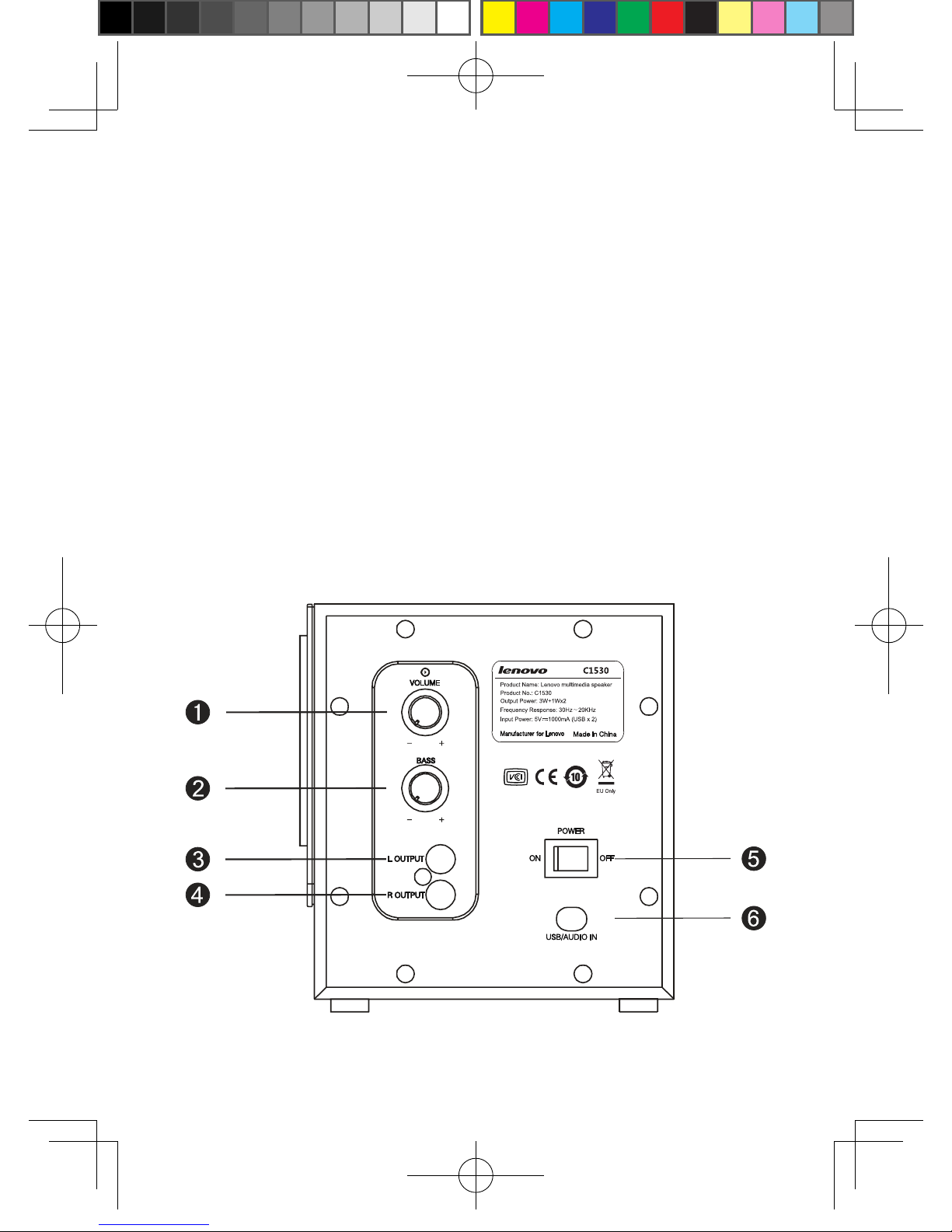
1. VOLUME:Rotatethiscontrolclockwisetoincreasemastervolumelevelsand
counterclockwisetodecreasemastervolumelevels.
2. BASS:Rotatethiscontrolclockwisetoincreasethelowfrequencyresponseand
counterclockwisetodecreasethelowfrequencyresponse.
3. LEFTOUT:Sendmusicsignalstotheleftsatellitespeaker.
4. RIGHTOUT:Sendmusicsignalstotherightsatellitespeaker.
5. POWERSWITCH
6. AUDIOSIGNALINPUTLINES:Sendstereomusicsignalstothemachine.
USBPOWERSUPPLY:5V=500mAX2
20110524_LX-8451_C1530_manual.indb 2 2011-6-13 15:43:49
3
Features
1. Built-inactivepowermagniergivesapureandbeautifulacousticdelity.
2. Integrationof2.1megabassandstereosurroundeffectsprovidesanactivemotion
system.
3. USB-basedpowersupplyisenergyefcient.
4. Combinationofwoodencabinetandhighlightcontrolpanellooksdigniedandgraceful.
SpeakerOutputConnection
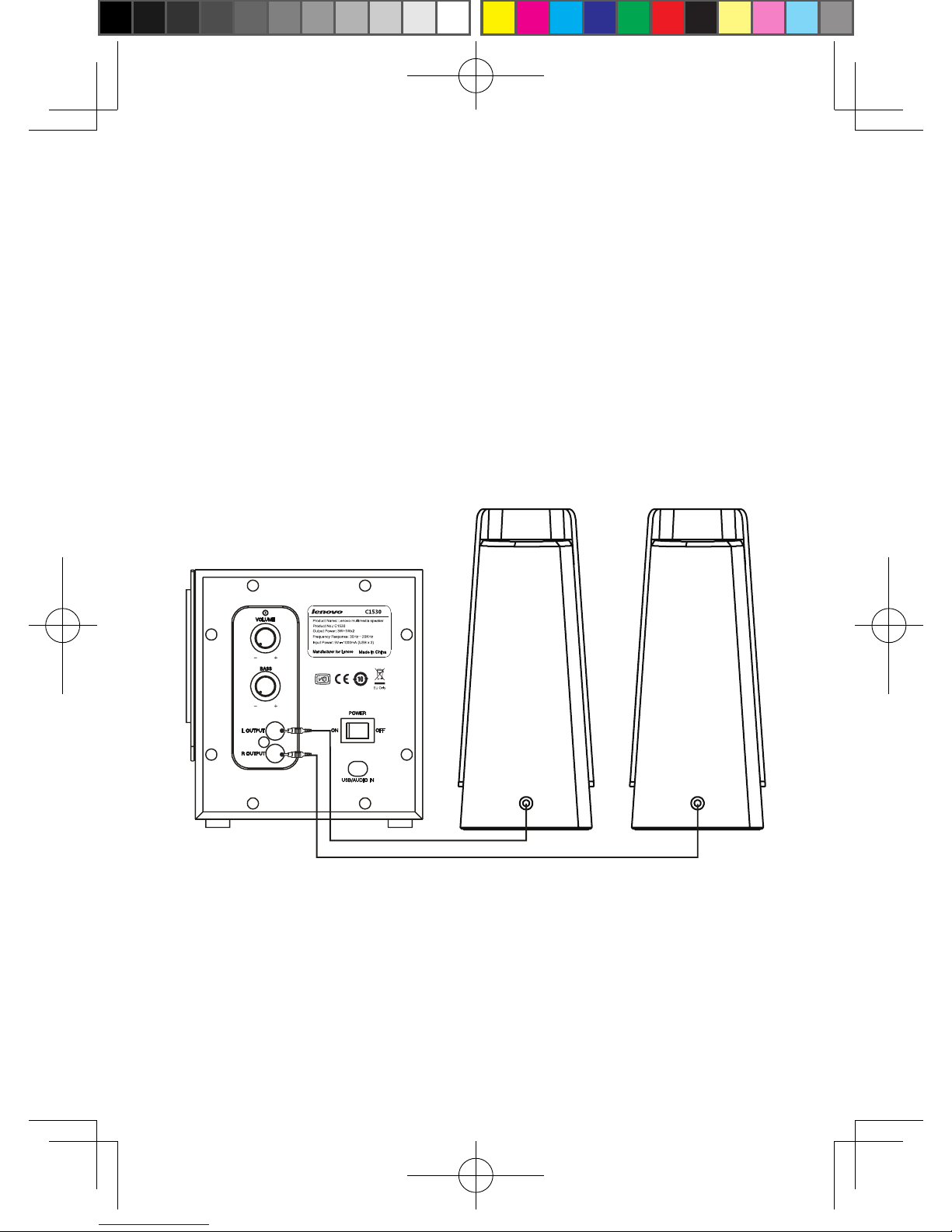
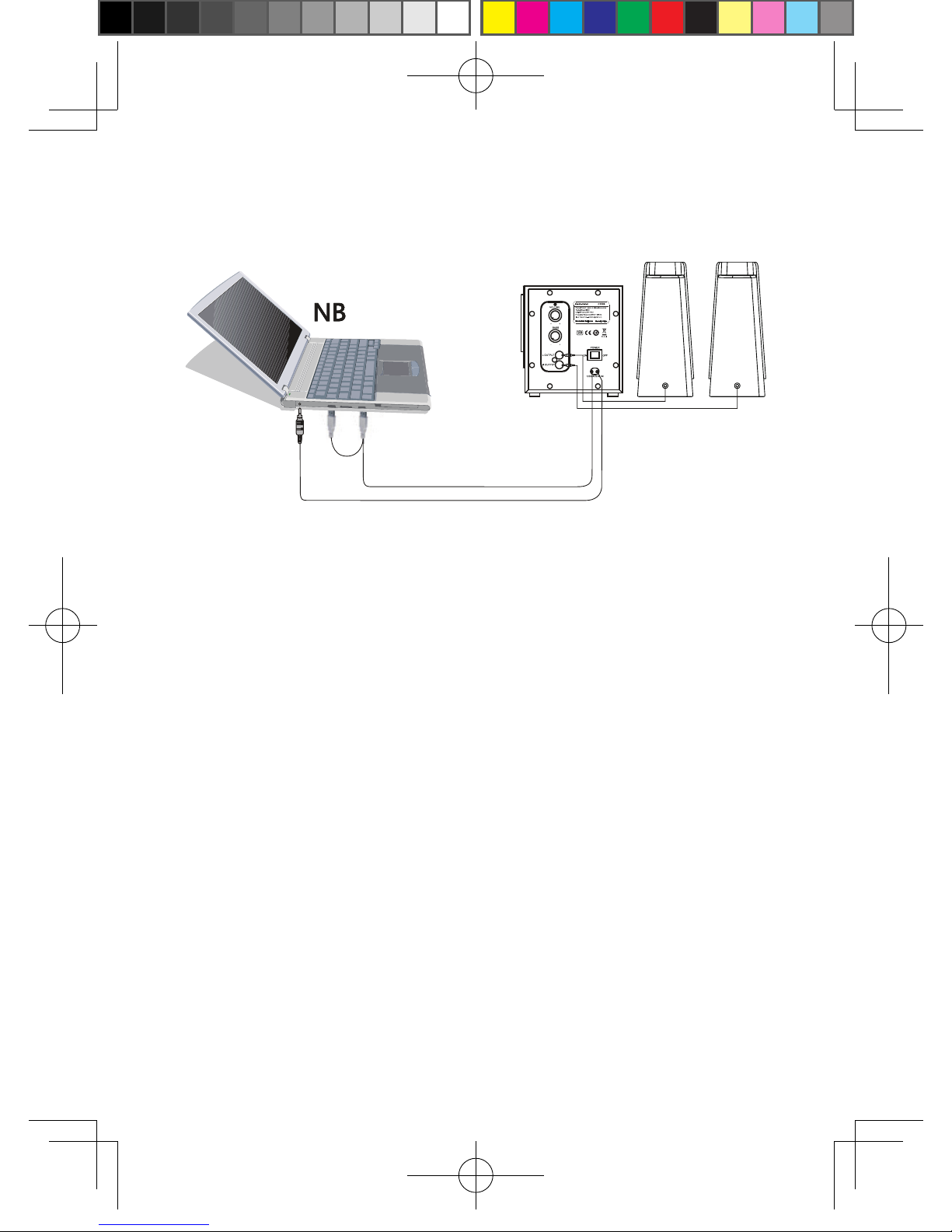
Connectionbetweenspeakers
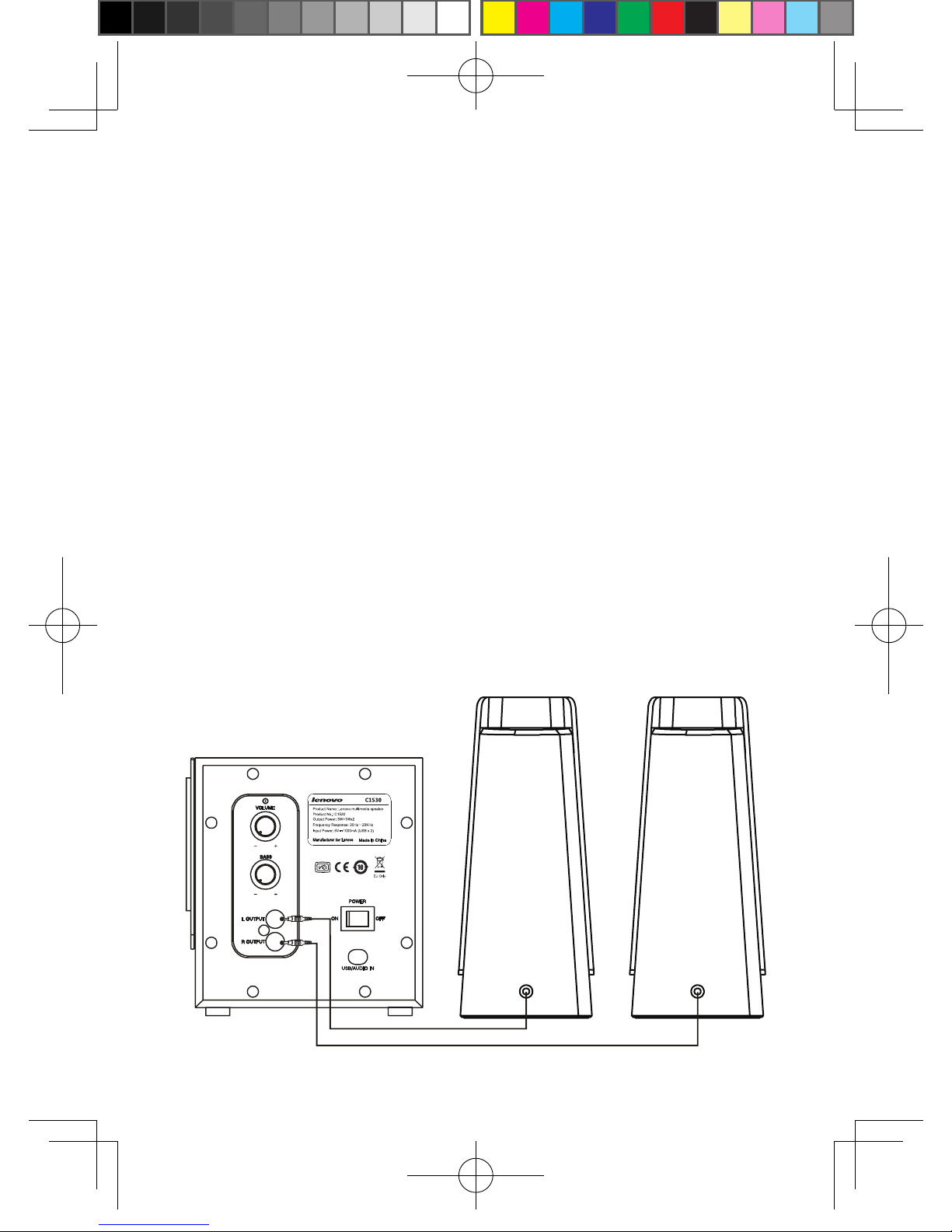
Plugtheconnectionsofthesatellitespeakersintothe“LEFTOUT”and“RIGHTOUT”jacksat
thebackofthewoofer.
TheredplugfromtherightsatellitespeakerispluggedintotheredRCAplugseatofthe
wooferandthewhiteplugfromtheleftsatellitespeakerispluggedintothewhiteRCAplug
seatofthewoofer.
20110524_LX-8451_C1530_manual.indb 3 2011-6-13 15:43:50
4
AudioDeviceInputConnection
Howtoconnect
1. UnplugtheUSBpowersourcebeforeconnectingordisconnecting,otherwise
malfunctionordamagemaybecaused.
2. Ensurethattheaudioinputsignallinesofthemachinearecorrectlyconnected.
3. Alllinesshouldbermlyconnectedbecauselooseconnectionsmaycausemalfunctions
suchassoundlessnessornoise.
**ToguaranteethesoundeffectsofthisproductandprotecttheUSBinterfaces
ofyourcomputer,pleaseconnectbothUSBplugswhenusingthisproduct.
Troubleshooting
Ifyoumeetanyofthefollowingproblemswhenusingthemachine,youmaysolvethem
byfollowingthetroubleshootingtipsbelow.Ifaproblemremainsunsolvedafterfollowing
thesetips,pleasecontactLenovo’sservicesupportaccordingtothecontactinformation
inthewarrantycerticateandyoumustnotattempttorepairthemachineyourselftoavoid
accidentsoraggravatingthemalfunction.
20110524_LX-8451_C1530_manual.indb 4 2011-6-13 15:43:50
5
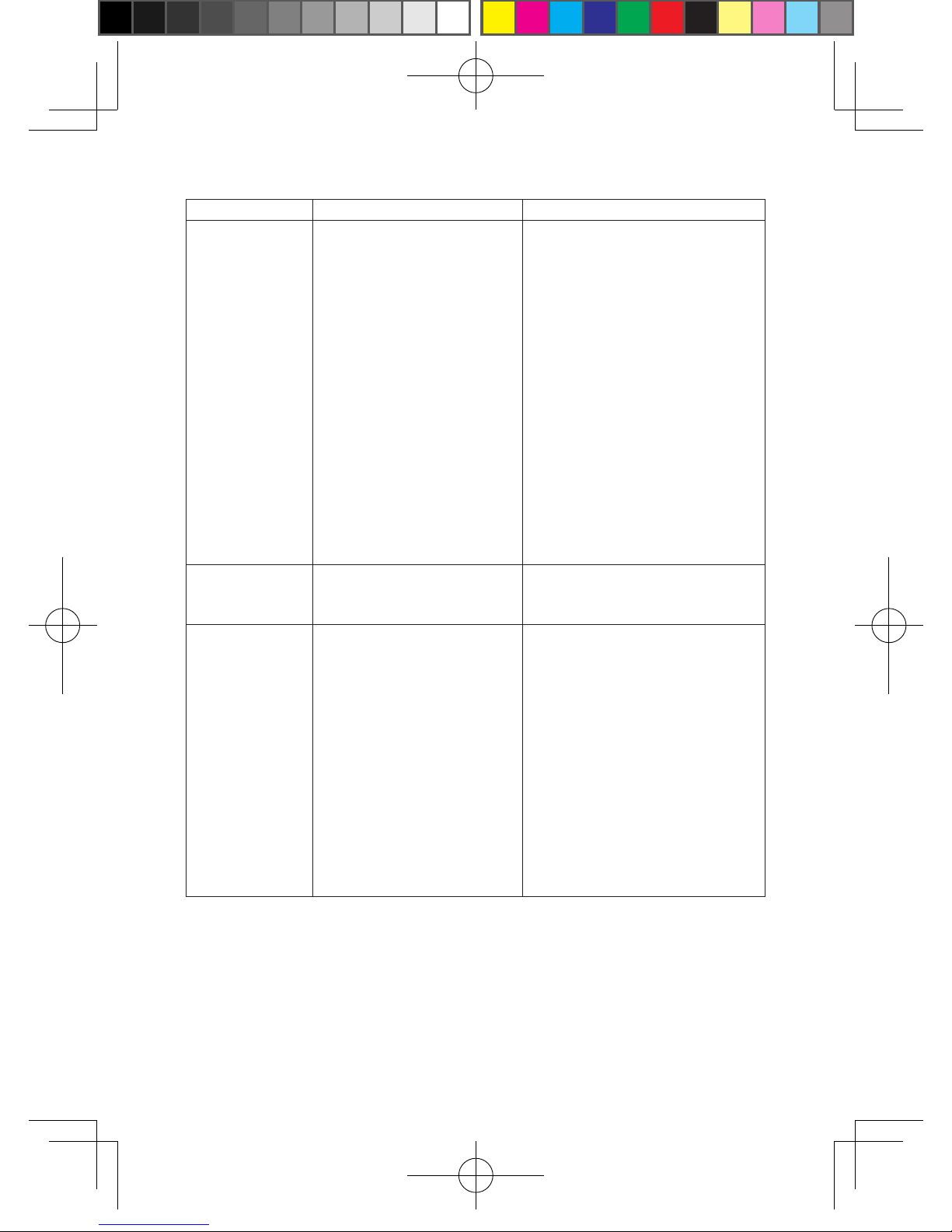
Problems PossibleCauses Solutions
Soundless • USBpowersourceisnot
properlyplugged.
• Thespeakerisnotproperly
connected.
• Input/outputlinesarenot
properlyconnected.
• Inputmodeiswronglychosen.
• Thespeaker’sterminalis
short-circuited.
• USBpowerisinsufcient.
• PlugtheUSBpowersource
correctly.
• Checktheconnectionofthe
speaker.
• Connectinput/outputlinescorrectly.
• Choosetherightinputmode.
• Connectthespeakerbeforeturning
onthemachineagain.
• Withsomecomputers,thespeaker
connectedwithoneUSBinterface
occasionallydoesn’tproduce
sound.Thisisgenerallyattributed
toinsufcientpowersupplyofthe
USBterminal.Theproblemmay
besolvedbypluggingintoanother
USBinterface.
Onesideof
thespeakeris
soundless.
• Thespeakerisnotproperly
connected.
• Checktheconnectionofthe
speaker.
Buzzorlow-
frequencynoise
• Inputisnotgroundedornot
properlygrounded.
• Reconnectorexaminethesignal
lines.Iftheproblempersistsafter
itisconrmedthattheconnection
andsignallinesarenormal,then
generallytheproblemiscausedby
crosstalkbetweentheaudioand
USBterminalofthecomputer,and
youareadvisedtoreducenoiseby
moderatelydecreasingthevolume
ofthewoofer.Inaddition,youare
advisedtokeepthespeakermore
than30cmawayfromyourhead
toensurethatyoucanenjoythe
optimalsoundeffects.
20110524_LX-8451_C1530_manual.indb 5 2011-6-13 15:43:50
6
Technicalspecications
Model:C1530
OutputPower:3W+1W*2
Speakerspecications:Woofer:5W;SatelliteSpeaker:3W
FrequencyResponse:30Hz~20KHz
SNR:Equaltoorgreaterthan70dB
Sensitivity:Woofer:300mV;SatelliteSpeaker:600mV
Distortion:Equaltoorlessthan1%
SpeakerSize:Woofer:W228XH156XD142mm;SatelliteSpeaker:W85XH200XD69mm
PowerSupplyVoltage:USB/DC5V
Note:Theabovedataareforreferenceonly.Thisproductisincompliancewith
SJ/T11217-2000SJ/T11218-2000.
Checklist
C1530Woofer:1
C1530LeftSatelliteSpeaker(whiteconnection):1
C1530RightSatelliteSpeaker(redconnection):1
UserManual:1
Warrantycard:1
Note:
1. Thepicturesareforreferenceonly,andtheactualitemisthestandard.
2. Lenovo(Beijing)Limitediscommittedtocontinuouslyimprovingthequalityand
performanceofitsproducts.Thetechnicalspecicationsanddesignofitsproducts
maychangewithoutnotice.(Lenovo(Beijing)Limitedreservestherightfornal
interpretationofthisManual.)
20110524_LX-8451_C1530_manual.indb 6 2011-6-13 15:43:50
7
Instruçõesdesegurançaemanutenção
Advertênciadesegurança
• Seoequipamentoproduzirfumaçaouexibiroutrossinaisanormais,desconecteo
dispositivoUSBimediatamenteparaevitaracidentes.Aseguir,entreemcontatocom
orevendedorlocalouligueparaoCentrodeManutençãodoGrupoLenovoparaobter
reparo.
• Seaparteinternadoequipamentoforexpostaàchuvaoumolhar,coloque-oemum
localventiladoparasecar.NãooliguenafontedealimentaçãoUSBnemseque-o
comcalor;casocontrário,oequipamentoouseuscomponentespoderãoqueimarou
apresentarfalha.
• Sequalquerobjetoestranhocairdentrodoequipamento,desconecteafontede
alimentaçãoUSBevireousacudaoequipamentováriasvezes.Seoobjetoestranho
permanecerdentrodoequipamento,entreemcontatocomorevendedorlocalpara
obterreparo.
• Aslinhasdeenergiaeaslinhasdesinaldeáudionãodevemseramassadas,
esticadas,pendurarpesosouserempisadasparaevitarqueacamadadeisolamento
sejadanicadaecausecurto-circuitooumalcontato.
• Eviteainserçãodeobjetosestranhoselíquidosnoequipamento.Nãocoloque
produtosquímicos(incluindocosméticos,remédioslíquidos,pesticidasetc.)no
equipamento,poispoderãoserafetadospelocalorproduzidopeloequipamento
duranteseufuncionamento.Coloqueoequipamentolongedeartigosinamáveisou
explosivosparaevitaracidentes.Nãobloqueieosorifíciosdedissipaçãodecalor,pois
adissipaçãoinsucientedocalorpoderádiminuiravidaútildoequipamento.
• Seoequipamentonãoforusadoporumlongoperíodo,desconecteopluguede
energiaUSBparaevitardanoscausadosporraios.
Dicasdemanutenção
• Ambientedetrabalho
Duranteseufuncionamento,oequipamentodeveráterboaventilação,comsuapartetraseira
apelomenosdezcentímetrosdequaisquerobstruções.Nãocoloquequalquerobjetosobre
oequipamentoduranteseufuncionamento.
Português do
Brasil
20110524_LX-8451_C1530_manual.indb 7 2011-6-13 15:43:50
8
• Limpeza
Aorealizaralimpeza,lembre-sededesconectaropluguedeenergiaUSB.Serásuciente
limpá-locomumpano.Nãouseuidoouspraydelimpeza.
• Reparo
Emcasodedefeitos,mudançasignicativanodesempenhooudanosacomponentes,
primeirodesconecteaenergiaremovendoopluguedealimentaçãoUSBe,aseguir,entre
emcontatocomocentrodemanutençãodesignadopelaLenovo(Beijing)Limitedoucomo
revendedor.Nãotenteabrirocompartimentodoequipamentoerepará-lovocêmesmo.
• Dicasúteis
Paraprolongaravidaútildoequipamentoepreservarsuasaúdefísicaemental,nãoouça
emvolumealtoporlongosperíodos,poisissoprejudicarásuaaudição.
Paineldecontroleeinstruçõesdeoperação
Esteequipamentoéumalto-falantemultimídia2.1,comalimentaçãoviaUSB,apresentando
umdesignacústicoauxiliadoporcomputadoreumasinergiaidealentreoalto-falanteeo
amplicadordepotência.
20110524_LX-8451_C1530_manual.indb 8 2011-6-13 15:43:50
9
1. VOLUME:Gireestecontrolenosentidohorárioparaaumentarosníveisdevolume
masterenosentidoanti-horárioparadiminuí-los.
2. BAIXO:Gireestecontrolenosentidohorárioparaaumentararespostadefrequência
baixaenosentidoanti-horárioparadiminuí-la.
3. SAÍDAESQUERDA:Enviasinaisdemúsicaparaoalto-falantesatéliteesquerdo.
4. SAÍDADIREITA:Enviasinaisdemúsicaparaoalto-falantesatélitedireito.
5. INTERRUPTORDEENERGIA
6. LINHASDEENTRADADESINALDEÁUDIOEnviasinaisdemúsicaestéreoparao
equipamento.
ALIMENTAÇÃODEENERGIAUSB:5V=500mAX2
Características
1. Oamplicadordepotênciaativointegradoofereceumadelidadeacústicapuraebela.
2. Aintegraçãodeefeitossurroundestéreoemegabass2.1forneceumsistemade
movimentoativo.
3. AfontedealimentaçãocombaseemUSBéecienteemtermosdeenergia.
4. Acombinaçãodogabinetedemadeiraeopaineldecontroleemdestaquetem
aparênciadignaegraciosa.
Conexãodesaídadoalto-falante
Conexãoentreosalto-falantes
Ligueasconexõesdosalto-falantessatélitesnastomadas“SAÍDAESQUERDA”e“SAÍDA
DIREITA”,napartetraseiradowoofer.
20110524_LX-8451_C1530_manual.indb 9 2011-6-13 15:43:51
Table des matières
Langues :
Autres manuels Lenovo Intervenants


Manuels Intervenants populaires d'autres marques


Bowers & Wilkins
Bowers & Wilkins 4 Manuel utilisateur

Sonance
Sonance SONOS OUTDOOR Series Manuel utilisateur

Electro-Voice
Electro-Voice EVID FM4.2 Manuel utilisateur

Pioneer
Pioneer XW-HTD630 Manuel utilisateur

Onn
Onn BWA16AA002 Manuel utilisateur

HP
HP GL313AA - USB Speakers PC Multimedia Manuel utilisateur