
Leding XPRESSION 250RGBLA Manuel utilisateur

USER MANUAL
1
1 PRODUCT
1.1 TECHNICAL SPECIFICATIONS
LED colors RGBAL 200W LED
Power 240W
Voltage Range AC100~240V,50/60Hz
Protection IP20
Operation
Temperature 0℃~45℃
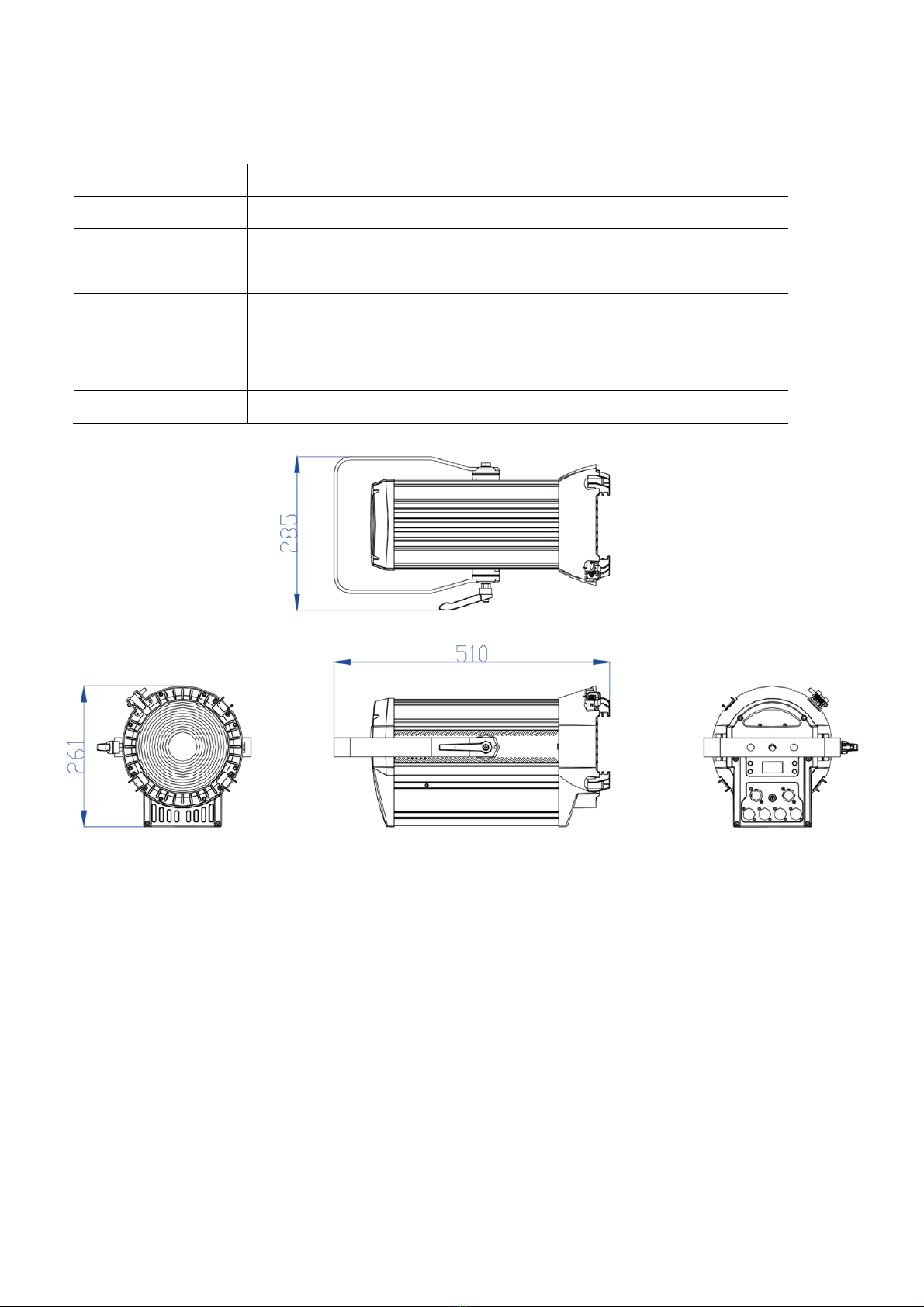
Dimensions 510X285X261mm
Weight 7.6kg

2
1.2 Safety Notes
IMPORTANT
.........
This product must be installed by a qualified professional.
In order to maintain this condition and to ensure a safe operation, it is absolutely necessary
for the user to follow the safety instructions and warning notes
The manufacturer will not accept liability for any resulting damages caused by the
non-observance of this manual or any unauthorized modification to the device.
CAUT
....
ION!
....
Make sure that the available voltage is not higher than stated on the rear panel.
Do not touch the power cables if your hands are wet.
The earth wire must always be connected to the ground. Therefore it is essential to connect
the yellow/green conductor to earth.
Make sure that the power-cord is never crimped or damaged by sharp edges. Check the
device and the power-cord from time to time. The electric connection, repairs and servicing
must be carried out by a qualified employee.
Always disconnect power input cable to completely remove power from unit when not in use
or before cleaning or servicing the fixture.
Do not switch the fixture on and off in short intervals as this would reduce the lamp’s life.
Do not touch the device’s housing bare hands during its operation (housing becomes hot)!
The surface of the product’s casing can reach up to 70° C (158° F) during operation. Avoid
contact by persons and materials. Do not install the product in a location where there is a risk
of accidental contact. Allow the product to cool for at least 10 minutes before handling.
For replacement use lamps and fuses of same type and rating only.
Please protect the fixture and avoid destroy during transport and installation. If there is any
damage to the coating, the shell may be corroded.
When hanging lamps and lanterns, it is necessary to verify that facilities and hooks can bear
at least 10 times the weight of lamps and lanterns.
Fix the safety rope at the correct holes only. Only operate the fixture after having checked
that the housing is firmly closed and all screws are tightly fastened.
The maximum ambient temperature 45°C must never be exceeded. Do not operate the
product if the ambient temperature (Ta) exceeds 45° C (115° F).
E
.
lectrical
.........
W
.
arning
......
The light source contained in this luminaire shall only be replaced by the manufacturer or his
service agent or a similar qualified person

3
2 INSTALLATION
2.1MOUNTING
UPRIGHT
.......
For overhead use, always install a safety cable that can hold at least 10 times the weight of
the fixture.
For overhead installation, the fixture must be always secured with a safety wire that can bear
at least 10 times the weight of the fixture;Secure the fixture with a safety cable through the
rear safety eye as shown.
Ensure that the structure (truss) to which you are attaching the fixture is secure
Hanging layout
2.2 POWER CONNECTIONS
POWER Linking: 3 units@110V;6 units@220V.
This product has an auto-ranging power supply that can work with an input voltage range of
100–240 VAC, 50/60 Hz.
AC Plug
Connection Wire (U.S. Wire(Europe) Screw Color
AC Live Black Brown Yellow/Brass
AC Neutral White Blue Silver
AC Ground Green/Yellow Green/Yellow Green

4
2.3 Data network requirements
Connect the DMX512 controller to the units in series. A DMX 512 data link is required in
order to control the fixture via DMX. The fixture has 3/5-pin XLR connectors for DMX data
input and output.
Each unit has 13 DMX channels so the DMX Addresses should increase by increments of 1,
(Nx1)+1,(Nx2)+1,(Nx3)+1...
Any DMX address in the range from 001 to 512 may be used.

5
3 FUNCTIONS AND SETTINGS
3.1 DISPLAY OPERATION
MENU:Used to access the menu or to return a previous menu option;
ENTER:Used to select and store the current menu or confirm the current function value or
option within a menu;
UP:Navigates downwards through the menu list and increases the numeric value when in a
function;
DOWN:Navigates upwards through the menu list and decreases the numeric value when in
a function;
3.2 Menu Map
KNOB MODE Mode 1 1.Dimmer、2.Zoom、3.CCT Knob mode select
Mode 2 1.Dimmer、2.Zoom、3.COLOR
Mode 3 1.H、2.S、3.I
Mode 4 1.Dimmer、2.CCT、3.Green
STATIC RED 0-255 Combine
[RED],[GREEN],[BLUE],[LIME],[AMBER]to
create an infinite range of colors(0-255).
Set the value of the [STROBE](0-25Hz).
GREEN 0-255
BLUE 0-255
AMBER 0-255
LIME 0-255
ZOOM 0-255
STROBE 0-25
ADDRESS 001-512(default001) Set the DMX ADDRESS
RUN MODE DMX(default) [DMX] Using the DMX 512 controller to
control;[SLAVE] Master--Slave operation.
SLAVE
PERSONALITY HSIC Use the menu to select desired channel
mode
SSP
TOUR(default)
TR16
AUTO
PROGRAM
AUTO 1 0-255 Selects automatic AUTO program and
AUTO program speed.
Programs [CUSTOM 1] to [CUSTOM 2] are
fully pre-programmed and can be edited in
[EDIT] mode.
AUOT 2 0-255
... 0-255
AUTO 10 0-255
PR 1
PR 2
EDIT PROGRAM
1-2
SCENE
01-10
RED 0-255 Enter the [EDIT] mode to edit the custom
programs [PROGRAM01] to [PROGRAM2].
Each custom program has 30 scenes that
can be edited.
Fade transition time, time 0-255 unit is
second, fade time setting should be less
than time setting.
After editing the program, Play in AUTO.
GREEN 0-255
BLUE 0-255
AMBER 0-255
LIME 0-255
ZOOM 0-255
STROBE 0-25
TIME 0-255

6
FADE 0-255
UPLOAD **** SEND Select [UPLOAD] to upload the custom programs
SETTING **** RESET **** RESET Restore factory settings
DIMMER DIM4(default) Dimming curves DIM1 (fast) to DIM4 (slow);
OFF
DMX
ERROR
SAVE(default) Hold after loss of DMX signal
BLACK Blackout after loss of DMX signal
LED PWM 1200HZ(default) Sets the PWM frequency
2400HZ
4000HZ
6000HZ
25000HZ
PERFORM LIVE(default) Fan mode low speed
POWER Fast rotation of fan,all power
STUDIO Automatic rotation of fan
DISP KEY ON(default) Locks display (passcode is <UP>,
<DOWN>,<UP>, <DOWN>, <ENTER>)
OFF
DISP TIME ON Display backlight always on
10s Turns off display backlight after 10s/30s
/2min of inactivity
30s(default)
2min
INFO FIXTURE HOURS Hours of fixture use
VERSION Software versions
RDM UID 0x388Axxxxxxxx Check fixture's ID
CCT 1800K Preset color temperatures
2200K
2700K
3000K
3200K
4000K
4500K
5000K
5600K
6000K
6500K
7000K
8000K
10000K
PRESET
COLOR
COLOR 1 Preset colour (See Annex I for details)
COLOR 2
...
COLOR 48
All passwords of this product are <UP>, <DOWN>,<UP>, <DOWN>, <ENTER>)

7
4 USING A DMX512 CONTROLLER
4.1 DMX CONTROL
HSIC
(8CH) Value Function
CH.1 0-255 INTENSIYT
CH.2 0-255 HUE
CH.3 0-255 HUE FINE
CH.4 0-255 SATURATION
CH.5
CCT
0-9 NO FUNCTION
10 1800K
25 2200K
40 2700K
55 3000K
70 3200K
85 4000K
100 4500K
115 5000K
130 5600K
145 6000K
160 6500K
175 7000K
190 8000K
205 10000K
255 10000K
CH.6
STROBE
0-9 NO FUNCTION
10-99 STROBE FROM SLOD TO FAST (0-25Hz)
100-109 NO FUNCTION
110-179 THUNDER STROBE
180-189 NO FUNCTION
190-255 RANDOM SROBE
CH.7 0-255 ZOOM
CH.8
CONTROL(EXECUTE AFTER 3 SECONDS)
000-010 NO FUNCTION
011-020 RESERVED
021-030 RESERVED
031-040 RESERVED

8
041-050 RESERVED
051-060 RESERVED
061-070 LIVE
071-080 STUDIO
081-090 POWER
091-100 RESERVED
101-110 DIMMER OFF
111-120 DIMMER DIM4
121-130 RESERVED
131-140 RESERVED
141-150 RESERVED
151-160 1200Hz
161-170 2400Hz
171-180 4000Hz
181-190 6000Hz
191-200 25000Hz
201-210 ALL RESET
211-220 ZOOM RESET
221-230 RESERVED
231-240 RESERVED
241-255 RESERVED
SSP
(9CH)
TOUR
(13CH)
TR16
(19CH) Value Function
CH.1 CH.1 CH.1 0-255 MASTER DIMMER
-- -- CH.2 0-255 MASTER DIMMER FINE
CH.2 CH.2 CH.3 0-255 RED
-- -- CH.4 0-255 RED FINE
CH.3 CH.3 CH.5 0-255 GREEN
-- -- CH.6 0-255 GREEN FINE
CH.4 CH.4 CH.7 0-255 BLUE
-- -- CH.8 0-255 BLUE FINE
CH.5 CH.5 CH.9 0-255 AMBER
-- -- CH.10 0-255 AMBER FINE
CH.6 CH.6 CH.11 0-255 LIME
-- -- CH.12 0-255 LIME FINE
-- CH.7 CH.13
PRESET COLOR
0-10 NO FUNCTION
11-255 PRESET COLOR(See Annex I for details)

9
-- CH.8 CH.14
CCT
0-9 NO FUNCTION
10 1800K
25 2200K
40 2700K
55 3000K
70 3200K
85 4000K
100 4500K
115 5000K
130 5600K
145 6000K
160 6500K
175 7000K
190 8000K
205 10000K
255 10000K
CH.7 CH.9 CH.15
STROBE
0-9 NO FUNCTION
10-99 STROBE FROM SLOD TO FAST (0-25Hz)
100-109 NO FUNCTION
110-179 THUNDER STROBE
180-189 NO FUNCTION
190-255 RANDOM SROBE
CH.8 CH.10 CH.16 0-255 ZOOM
-- CH.11 CH.17
AUTO
0-40 NO FUNCTION
41-50 AUTO 1
51-60 AUTO 2
61-70 AUTO 3
71-80 AUTO 4
81-90 AUTO 5
91-100 AUTO 6
101-110 AUTO 7
111-120 AUTO 8
121-130 AUTO 9
131-140 AUTO 10
141-150 PROGRAM 1
151-160 PROGRAM 2
Table des matières
Autres manuels Leding Équipement d'éclairage


Manuels Équipement d'éclairage populaires d'autres marques


Qazqa
Qazqa Suplux SL 3 Black 103062 Manuel utilisateur

Commercial Electric
Commercial Electric 54568141 Manuel utilisateur

CREE LIGHTING
CREE LIGHTING 304 Series Manuel utilisateur

Goobay
Goobay 49867 Manuel utilisateur

ECOMAN ITALIA
ECOMAN ITALIA LED T8 Manuel utilisateur

Alkalite
Alkalite Krypton KT-81 Manuel utilisateur


